Huntress Managed SIEM is priced by the number of active data sources, with each source allocated 10GB/month. Usage is pooled across the subscription to provide predictable billing.

Look no further than Log360 Cloud. Get threat detection, investigation, UEBA, SOAR, and compliance in one security platform, with the flexibility to deploy in the cloud or on-premises as your needs evolve.
Recognized by independent review platforms and analyst firms
A managed security model can take a lot of work off your team. But it can also mean giving the provider more say in what gets collected, how detections are tuned, and how security events are handled.
That's a real advantage if your priority is reducing the operational burden on your security team.
The more of the operation your provider runs, the less of the underlying detection and response process your own team gets to shape.
Log360 Cloud keeps those decisions with your security team, while still giving you the prebuilt detection content, automation, and AI assistance to act on them.
Grouped by decision category so you can jump to what matters for your evaluation.
| Feature | ManageEngine Log360 Cloud SIEM, UEBA, SOAR, and compliance in one platform | Huntress Managed SIEM Managed SIEM operated by the Huntress SOC |
|---|---|---|
| Detection content | More than 2,000 out-of-the-box detection rules covering MITRE ATT&CK® techniques, behavioral anomalies, cross-domain correlation, and threat intelligence, giving a broader detection baseline from day one. | A growing library of detections and correlation rules maintained by Huntress, covering activity across supported log sources and designed to connect related signals across time, systems, and sources. |
| Dark web monitoring | Scan deep and dark web to identify leaked PII and get notified of threats such as social engineering, account compromise, and third-party data exposures. | Incorporates dark web intelligence into its threat detection and investigation workflows, but does not provide dedicated dark web monitoring as a module. |
| Out-of-the-box compliance reports | More than 1,000 out of the box reports covering security, operational, and compliance use cases, including HIPAA, SOX, FISMA, the PCI DSS, and the GDPR with options to customize reports for specific requirements. | Takes a flexible, evidence-based approach to compliance, providing searchable retained logs, dashboards, reporting, saved and scheduled queries, and audit focused summaries that organizations can use to compile evidence for specific frameworks. |
| Storage allocation model | Component-based licensing with separate Search and Archival Storage. Storage can be purchased and allocated based on the required retention period, with Storage Tiers allowing different retention policies for different log sources. | Data source-based with a pooled annual Data Pool. Each data source contributes a 10GB/month ingestion allocation, with the total allocation pooled across the subscription and usable flexibly across sources and months. |
| Feature | ManageEngine Log360 Cloud SIEM, UEBA, SOAR, and compliance in one platform | Huntress Managed SIEM Managed SIEM operated by the Huntress SOC |
|---|---|---|
| Operating model and autonomy | ||
| Who operates your SIEM | Your security team operates the platform, with support available when needed. You control detection rules, alerts, investigations, dashboards, and response workflows. | Huntress operates the security service through its 24/7 SOC, handling monitoring, investigation, threat hunting, and triage. |
| Who authors detection logic | Your team can create and modify detection rules, with more than 2,000 prebuilt detection rules available for known threats and use cases. | Huntress delivers and manages the detection content as part of the service, with its security team responsible for keeping the detection rules updated as the threat landscape evolves. |
| Rule authoring interface | Provides a visual builder to create and modify detection logic without requiring extensive knowledge of SPL, KQL, or custom scripting. | As part of its managed service, Huntress completely takes care of the scripting part itself. |
| Who tunes and suppresses alerts | Your analysts can tune detection rules, add exceptions, and suppress alert noise to focus on the detections that truly matter. | Huntress handles detection tuning and alert triage as part of the managed service, reducing the amount of day-to-day alert maintenance required from your team. |
| Log collection and data fidelity | ||
| Collection methods | Supports both agent-based and agentless collection methods, along with syslog, API, and native cloud integrations across several log sources. | Collects Windows and Linux OS logs through the Huntress Agent, while syslog can be collected through an agent-based collector. HTTP Event Collector (HEC) and API sources can also send data directly to the Huntress cloud without a dedicated agent collector. |
| Agent dependency | Agentless collection is available for many sources, while agents can be used where direct collection is impractical or where sources sit behind restricted networks. | Agent required for Windows and Linux log collection and syslog, while HEC and API integrations support agentless collection. |
| Custom applications | Supports REST API-based collection for custom applications, giving you a way to bring in application logs even when a dedicated integration is not available. | Custom structured logs can be sent through HEC or syslog, including JSON data. API-based integrations are available for supported sources, with the integrations built and maintained by Huntress. |
| What gets stored | The data you choose to send is collected and stored according to your configured collection and retention settings. | Huntress applies Smart Filtering to the logs it collects, removing event types it considers of low value to security and compliance. |
| Threat detection | ||
| Detection content | More than 2,000 out-of-the-box detection rules covering MITRE ATT&CK® techniques, behavioral anomalies, cross-domain correlation, and threat intelligence, giving a broader detection baseline from day one. | A growing library of detections and correlation rules maintained by Huntress, covering activity across supported log sources and designed to connect related signals across time, systems, and sources. |
| Rule authoring and tuning | Gives security teams direct control over detection logic. They can create standard, anomaly, and advanced rules, define thresholds and conditions, add exceptions, map rules to MITRE ATT&CK®, and tune existing detections based on their environment. | Huntress' SOC and Detection Engineering and Threat Research teams maintain detections, tune them to reduce false positives, and incorporate new threat intelligence, reducing the day-to-day rule maintenance required from the customer. |
| Explore more | ||
| Threat intelligence | ||
| Built-in feeds | Built-in global threat intelligence with more than 600 million malicious IPs, domains, and URLs, supported by feeds and intelligence from Webroot, BrightCloud, VirusTotal, AlienVault OTX, and Constella. | Threat intelligence is built into the managed detection service, drawing on Huntress research, real-world incidents, global telemetry, and intelligence from its security teams to add context to detections. |
| Dark web monitoring | Scan the deep and dark web to identify leaked PII and get notified of threats such as social engineering, account compromise, and third-party data exposures. | Incorporates dark web intelligence into its threat detection and investigation workflows, but does not provide dedicated dark web monitoring as a module. |
| Explore more | ||
| UEBA and behavioral analytics | ||
| UEBA | Provides dedicated ML-based UEBA that establishes behavioral baselines and identifies time, count, and pattern anomalies across users and entities. | Uses behavioral analytics and cross-source correlation to identify activity that deviates from expected patterns. |
| Risk scoring | Assigns risk scores to users and entities based on anomalous activity, with dashboards showing risk levels, trends, and the activities contributing to the score. | Prioritizes suspicious activity through automated detection, correlation, and 24/7 SOC analysis rather than exposing a dedicated user and entity risk scoring layer comparable to Log360 UEBA. |
| Insider threat use cases | Detects insider threat indicators such as unusual logons, abnormal file activity, privilege misuse, compromised accounts, and data exfiltration. | Addresses insider threat scenarios through Managed SIEM correlation and its broader Managed ITDR and EDR capabilities, with the SOC investigating suspicious identity, endpoint, and log activity. |
| Explore more | ||
| Investigation and AI | ||
| Investigation workspace | Incident Workbench brings incident evidence into a single investigation view, with chronological event timelines, threat intelligence context, UEBA signals, and process lineage to help analysts reconstruct what happened. | The Huntress Investigations dashboard provides a centralized view of SIEM and other Huntress investigations, including the signals reviewed, investigation timeline, actions taken, remediation, and final outcome. Investigations can also be exported for reporting. |
| AI assistance | Zia Insights summarizes events and maps them to MITRE techniques; the Alert Investigation Agent runs autonomous multi-stage investigations and reconstructs attack timelines; Ask Zia and Zia Agents provide plain-language search and no-code agents. | AI is built into the Huntress SOC workflow, while AI Search is now generally available in Managed SIEM for natural language log queries. Analysts can search in plain English without writing complex queries. |
| AI billing | AI capabilities are included in the applicable Log360 Cloud editions with no separate Log360 AI SKU. AI features use a BYOK model, so customers configure their own OpenAI or Azure OpenAI service and credentials. | AI-assisted SOC capabilities and AI Search are part of the Managed SIEM service rather than a separately metered AI feature. |
| MCP integration | Log360 Cloud supports MCP through the Zoho MCP Server, allowing compatible AI clients such as Claude, Copilot, Cursor, and others to query Log360 data, investigate alerts, and perform authorized actions. | Huntress provides APIs and integrations for connecting its platform with other tools, but does not offer a published MCP server for Managed SIEM. |
| SOAR and automation | ||
| Security automation | Teams can build multistep workflows for investigation, enrichment, decision making, containment, and notification using a drag-and-drop editor with branching and parallel actions. | Provides managed response and SOAR integrations, with Huntress handling response actions through its SOC and platform. |
| Response workflows | Provides a library of ready-to-use playbooks covering integrations such as CrowdStrike Falcon, Bitdefender, Sophos Central, Cisco Duo, Okta, VirusTotal, Windows, and Linux, which can also be adapted and combined into larger workflows. | Response workflows are maintained and executed as part of the Huntress managed service with an emphasis on SOC-driven response. |
| Extensible automation | Lets teams extend playbooks with custom functions. These functions can call third-party APIs, create tickets, send notifications, and perform other custom actions when an alert triggers a workflow. | Response actions are defined and managed through Huntress's service and integrations. |
| Response execution | Playbooks can execute automatically when defined conditions are met or be launched manually by analysts. Actions can include enrichment, investigation, notifications, account operations, and endpoint remediation. | Huntress SOC analysts can investigate and respond to threats, while supported automated remediation can isolate hosts, terminate malicious processes, and remove attacker footholds. |
| Explore more | ||
| Compliance monitoring | ||
| Out-of-the-box compliance reports | More than 1,000 out-of-the-box reports covering security, operational, and compliance use cases, including HIPAA, SOX, FISMA, the PCI DSS, and the GDPR, with options to customize reports for specific requirements. | Takes a flexible, evidence-based approach to compliance, providing searchable retained logs, dashboards, reporting, saved and scheduled queries, and audit-focused summaries that organizations can use to compile evidence for specific frameworks. |
| Continuous compliance monitoring | Dedicated compliance dashboards track activity against regulatory requirements and help identify violations. | Provides compliance dashboards, centralized log monitoring, and 24/7 SOC oversight to help identify security and compliance-relevant activity. |
| Log immutability | Archived logs can be retained for compliance using configurable archival retention and storage tiers, giving organizations control over how long historical data is preserved. | Received SIEM logs are stored as immutable data, with retention available for up to seven years. |
| Explore more | ||
| Retention, storage, and data access | ||
| Storage allocation model | Component-based licensing with separate Search and Archival Storage. Storage can be purchased and allocated based on the required retention period, with Storage Tiers allowing different retention policies for different log sources. | Data source-based with a pooled annual Data Pool. Each data source contributes a 10GB/month ingestion allocation, with the total allocation pooled across the subscription and usable flexibly across sources and months. |
| Searchable retention | 30 to 90 days. Search Storage can be configured for up to 90 days, with additional Search Storage available when the bundled allocation is insufficient. | 1 month by default; up to 90 days with Extended Retention. The first month is held in active storage and remains searchable through the SIEM console. |
| Archival retention | Up to 10 years. Logs move from Search Storage to compressed Archival Storage based on the configured retention policy and can be reloaded into Search Storage when they need to be searched. | 12 months by default; up to 7 years with Extended Retention. Cold data beyond the active period can be rehydrated into active storage for search and compliance use. |
| Deployment and data residency | ||
| Deployment options | Available in both on-premises and cloud deployments. | SaaS-based SIEM managed through the Huntress cloud platform. |
| Data residency | Log360 Cloud stores collected data in the regional data center associated with the selected location, helping organizations meet geographic and data residency requirements. | Customer-selectable regional data residency options are not supported. |
We have received your request for a personalized demo and will contact you shortly.
Huntress uses Smart Filtering to determine which events from the logs you send are security-relevant enough to retain, and its SOC then works from that filtered dataset. That's part of what makes the model simple, but it also means the provider is making a decision about your telemetry before your analysts investigate it. Log360 Cloud lets you define collection filters and decide which events enter the platform, so analysts can search and work with the underlying log data.
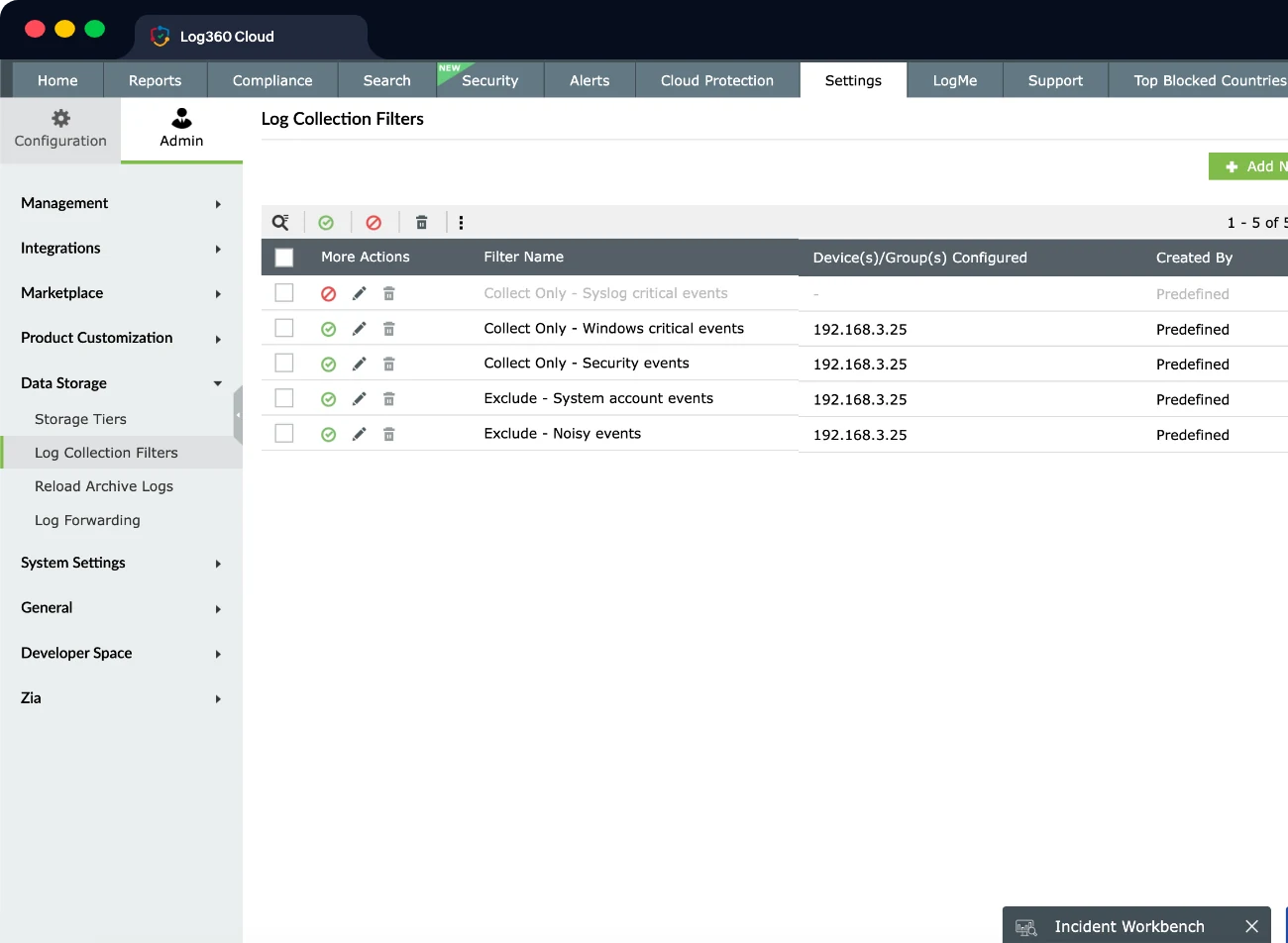
Every environment has its own users, devices, applications, administrative processes, and legitimate exceptions. Detection logic that works well across thousands of environments won't always fit yours. Log360 Cloud lets your team build correlation rules through a visual editor without SPL, KQL, or scripting. You can modify detection logic, apply exclusions, and scope conditions to the entities that matter to your environment.
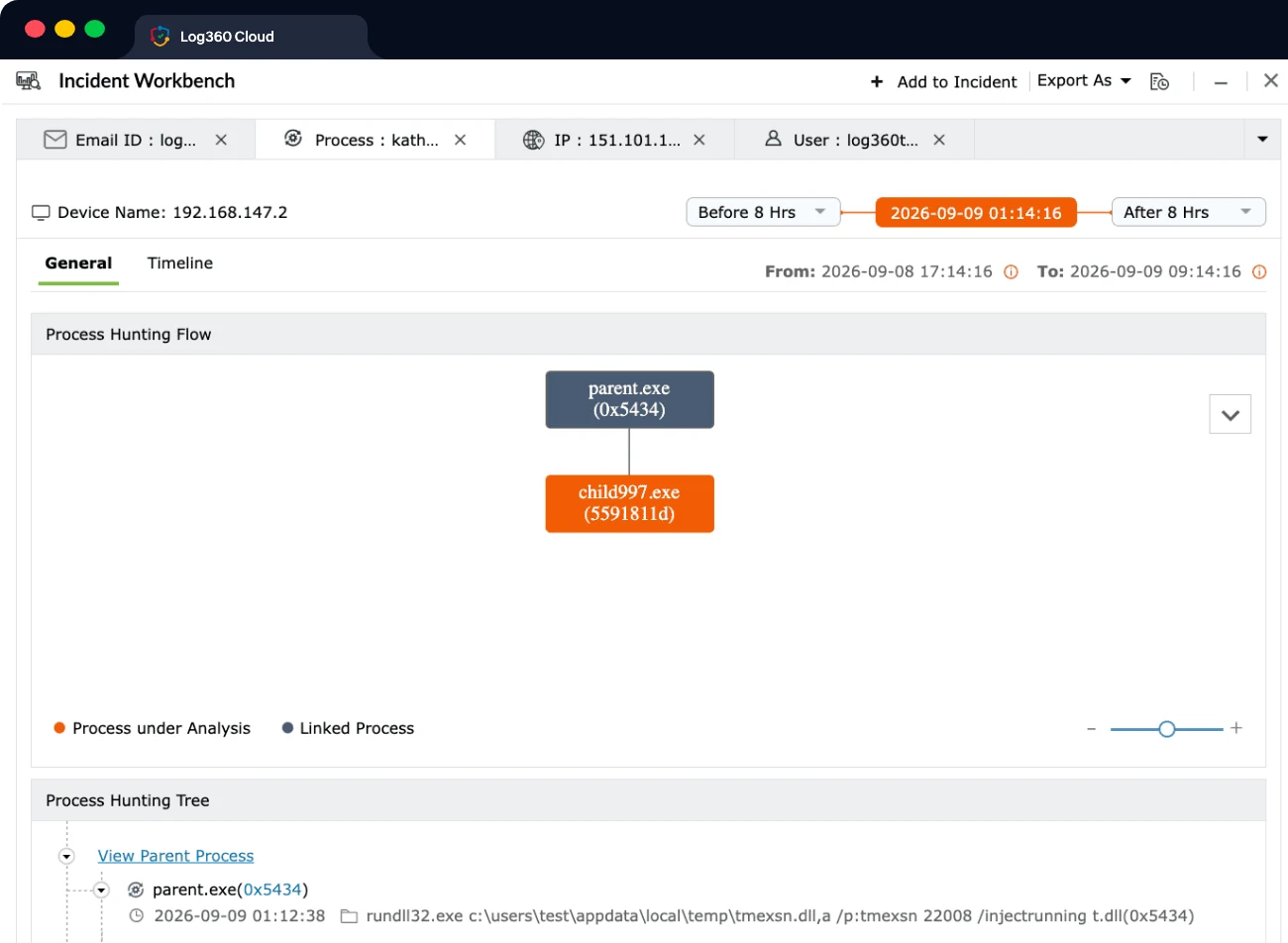
A managed SOC can tell you that something is suspicious. Your own analysts may still want to determine what happened, how far it spread, and whether the activity belongs to the same incident. Log360 Cloud gives analysts the underlying events, timelines, entity context, risk information, and investigation capabilities needed to work through that question themselves.
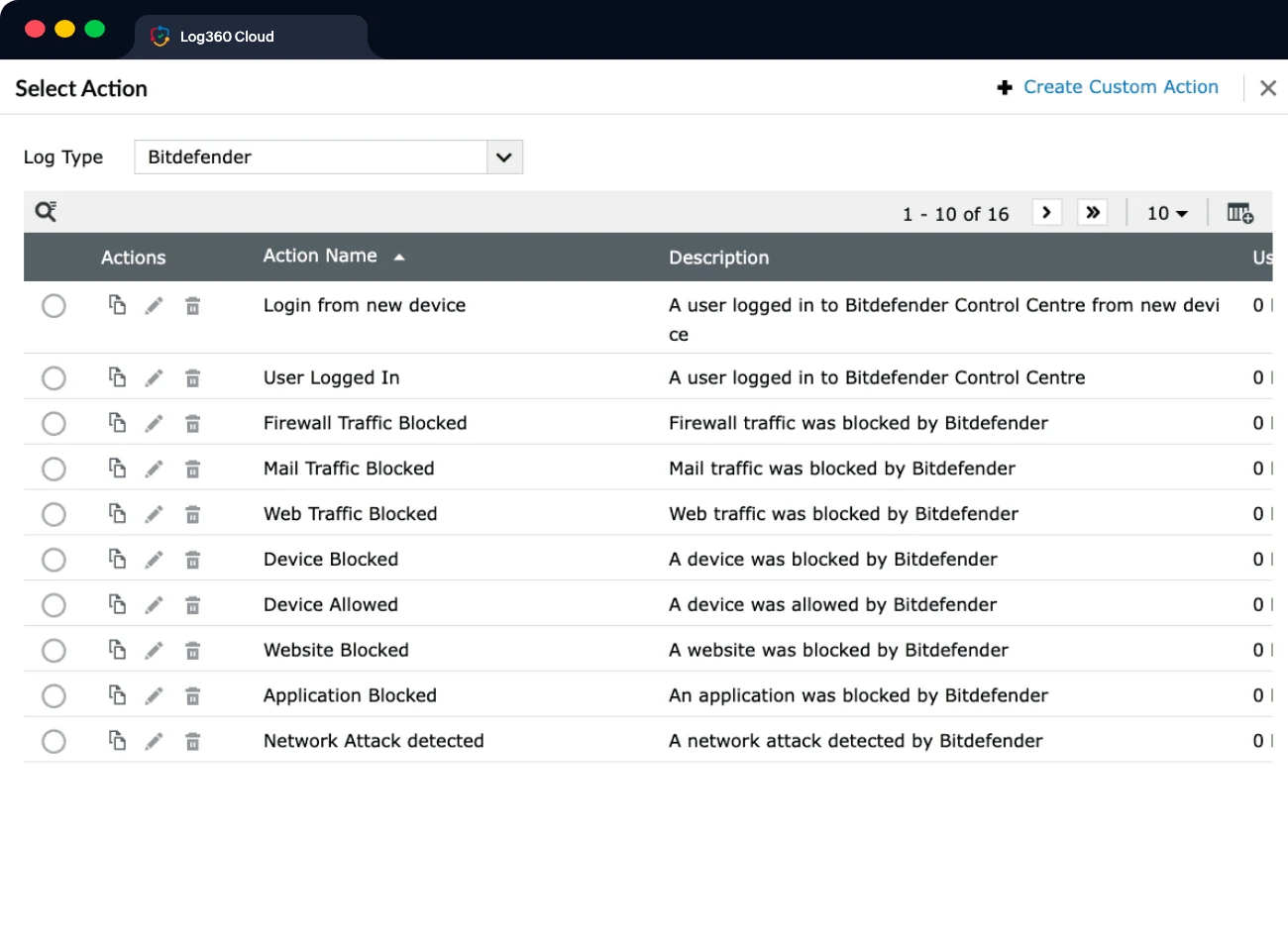
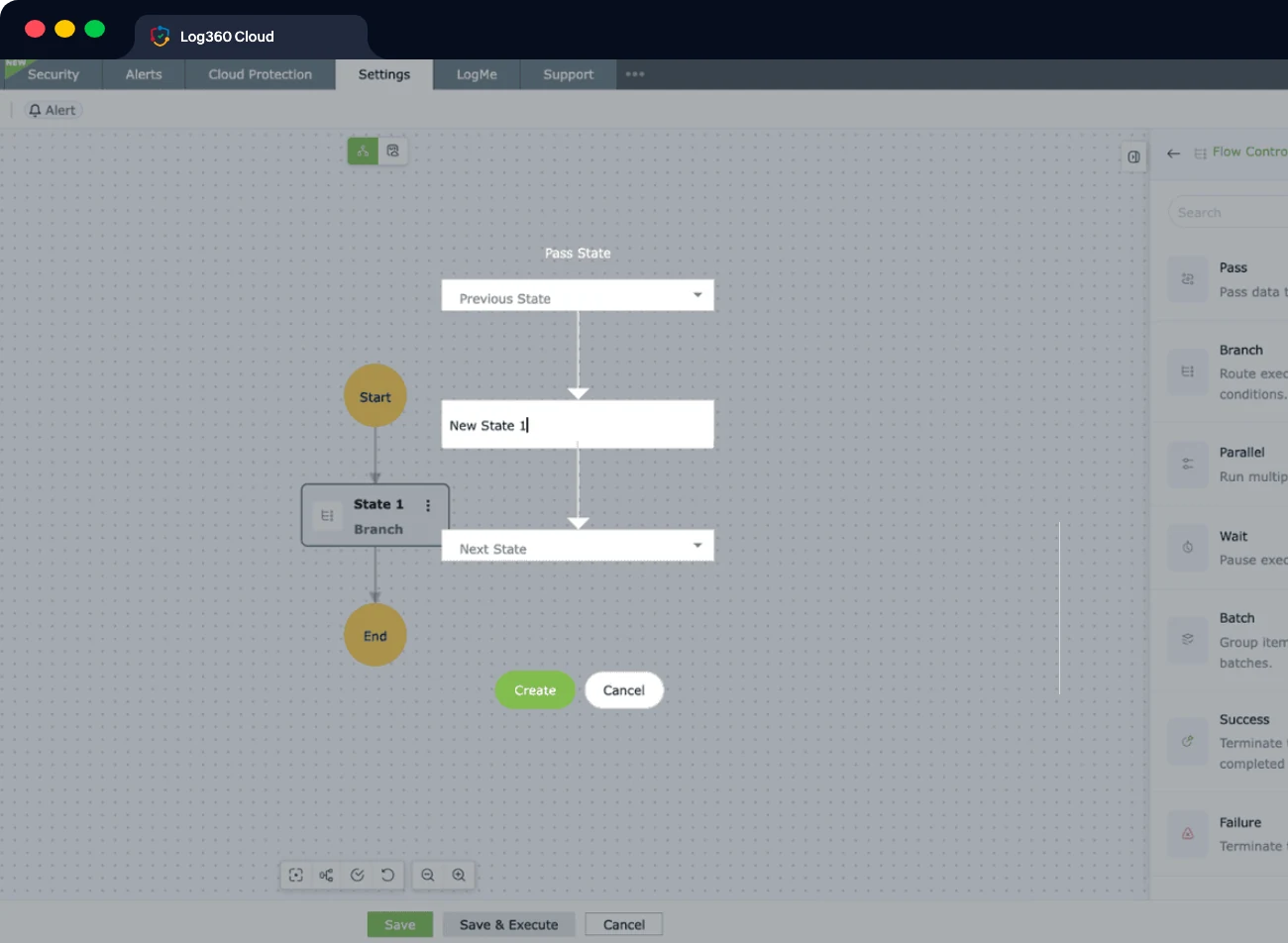
Not every incident calls for the same response. Sometimes you want your analyst to investigate before taking action, and sometimes there's no reason to wait for a human to block a known threat. Log360 Cloud includes native SOAR with visual playbooks, so teams can turn their own response procedures into automated workflows. Start with analyst-assisted workflows and add more automation as your processes mature.
Establishes behavioral baselines and identifies time, count, and pattern anomalies across users and entities, with dashboards showing risk levels, trends, and the activities contributing to the score.
Scan the deep and dark web to identify leaked PII and get notified of threats such as social engineering, account compromise, and third-party data exposures.
A library of ready-to-use playbooks covering integrations such as CrowdStrike Falcon, Bitdefender, Sophos Central, Cisco Duo, Okta, VirusTotal, Windows, and Linux, which can also be adapted and combined into larger workflows.
Zia Insights summarizes events and maps them to MITRE techniques, the Alert Investigation Agent runs autonomous multi-stage investigations, and the Zoho MCP Server lets AI clients such as Claude, Copilot, and Cursor query Log360 data.
More than 1,000 out-of-the-box reports covering security, operational, and compliance use cases, including HIPAA, SOX, FISMA, the PCI DSS, and the GDPR, with options to customize for specific requirements.
Available in both on-premises and cloud deployments. Log360 Cloud stores collected data in the regional data center associated with the selected location, helping you meet geographic and data residency requirements.

Discover how a SIEM solution helps your organization get on top of emerging threats and enhance operational resilience.
Huntress uses a pooled data allocation based on your committed data sources. Each source adds 10GB of monthly ingestion to an annual Data Pool. When the pool is exhausted, Huntress keeps collecting but starts truncating the oldest stored data, shortening your continuous lookback.
Log360 Cloud separates the cost of monitoring your infrastructure from the storage needed to retain its data. You license the components you want to monitor, then allocate Search and Archival Storage according to how long you need different logs available.
Storage Tiers lets you keep your organization's high-value sources searchable longer, while moving lower-priority logs to archival storage sooner.
Reload archived logs into Search Storage for incident investigations, audits, or legal requests, without keeping everything searchable all the time.
Note: Up to 90 days of Search retention for active investigations, and up to 10 years of compressed Archival retention for compliance.
License the components you want to monitor, then allocate Search and Archival Storage according to the retention each set of logs actually needs.
Both editions share the same detection engine and compliance content. Pick the deployment model that fits your infrastructure and your obligations.
Both editions include: a free 30-day trial · no user limits · free 24×5 technical support

“We gained complete visibility into our server and security logs. The solution’s threat detection, event monitoring, and log analysis features have significantly improved how the organization tracks and responds to security events.”
Dhanaraj K, chief information security officer, Vibrant Screen
Start with the security outcomes you need to preserve, then decide how each one should be delivered once your team is operating the platform.
The detection coverage, investigation depth, compliance evidence, and response actions your current service delivers today.
Work back from each outcome to the log sources and historical events that support it, including anything your auditors ask for.
Start from more than 2,000 prebuilt detection rules and more than 1,000 out-of-the-box reports, then tune them to your environment in the visual rule builder.
Then decide which of those capabilities should be handled by Log360 Cloud, automated through its workflows, or owned directly by your security team.
Huntress uses Smart Filtering to retain security-relevant events rather than ingesting and retaining every event generated by connected sources. This means the historical data available in Huntress may not represent the complete raw log stream from those sources. Before moving to Log360 Cloud, identify the source data and historical events you need for investigation, compliance, and audit purposes. Where full log visibility is required, configure those sources to collect and retain the required data in Log360 Cloud from the point of migration.
Get SIEM, UEBA, and SOAR in a single cloud solution built to eliminate complexity, accelerate response times, and secure your enterprise without hidden costs.
Huntress Managed SIEM is priced by the number of active data sources, with each source allocated 10GB/month. Usage is pooled across the subscription to provide predictable billing.
Log360 Cloud uses an infrastructure-based model, pricing log sources, domain controllers, file servers, cloud accounts, and endpoints separately, with search and archival storage available as add-ons.
Smart Filtering analyzes incoming log data and filters out low-value events that are not considered security-relevant. The filtered events are not retained in Huntress Managed SIEM; only the security-relevant data is stored and available for search and investigation.
Log360 is available in both cloud and on-premises editions, while Huntress Managed SIEM is SaaS only.
ManageEngine is a division of Zoho Corp.