Secondary Server Model with Read-Only Server Continuity using PostgreSQL
Caution
- This PostgreSQL High Availability model is supported for builds 8400 and above and uses PostgreSQL’s native streaming replication. The earlier Rubyrep-based replication model has reached its end-of-life and is no longer supported.
- If you have upgraded to PAM360 build 8400 or above and are using a PostgreSQL High Availability setup with Rubyrep replication, you should take a complete backup of the PAM360 application and database before proceeding. After the backup, follow the steps outlined below to configure the new High Availability secondary server model with Read-Only continuity.
- Procedure applies to builds 8400 and above. For build 8310 and below, refer to this help document.
In mission-critical environments, uninterrupted access to passwords is essential. The PostgreSQL secondary server model with Read-Only continuity in PAM360 ensures continuous availability, fault tolerance, and optimal performance by using primary and secondary servers with a shared database, along with a read-only server that maintains a real-time replica. This architecture enables seamless operations even if the primary and secondary servers become unavailable. This document outlines the steps to configure and maintain the PostgreSQL secondary server model with Read-Only server continuity setup in your environment.
The following topics are covered in this help document:
- Prerequisites
- Secondary Server Model with Read-Only Server Continuity
- Configuring the Application Servers for Availability
- High Availability Monitoring
- High Availability Audit Trails
- Removing High Availability Configuration
- Frequently Asked Questions
- Troubleshooting Tips
1. Prerequisites
- If you are using the existing Secondary Server Model using PostgreSQL Database in your environment, you should remove the existing configuration before setting up this new high availability configuration. Explore this link for the detailed steps to remove the existing configuration in your environment.
- Ensure the web server port (8282) is open in all the servers and the database server port (3456) is open in the primary and read-only servers. If you have configured a custom port for web and database servers in your environment, ensure those ports are open.
- Ensure that Microsoft Visual C++ Redistributable for Visual Studio 2015 or later is installed on the server you are planning to deploy as a secondary or read-only server, if Application Gateways are deployed in your environment.
2. Secondary Server Model with Read-Only Server Continuity
The PostgreSQL secondary server model with Read-Only continuity in PAM360 is designed to deliver robust performance, fault tolerance, and service continuity. This architecture comprises a Primary and a Secondary server, both fully functional and capable of handling read and write operations, connected to a shared PostgreSQL database running as an independent service on the primary server. In addition, it includes a Read-Only server with its dedicated PostgreSQL database that maintains a real-time replica of the primary database through PostgreSQL’s native streaming replication, supporting read operations only.
This full secondary server model with Read-Only continuity is our recommended deployment for organizations seeking maximum availability and disaster recovery readiness. It ensures uninterrupted operations even during server or database failures. In the event of a PAM360 service failure on the Primary server, the PAM360 service on the Secondary server seamlessly takes over without service interruption. If both Primary and Secondary servers are completely down, access to privileged passwords continues via the Read-Only server. Administrators can also temporarily promote the Read-Only server to restore full read-write functionality, ensuring minimal disruption and data consistency across all nodes.
However, if your infrastructure or operational requirements do not call for the complete setup or if provisioning multiple servers is a constraint, you can opt for one of the supported alternative deployment types:
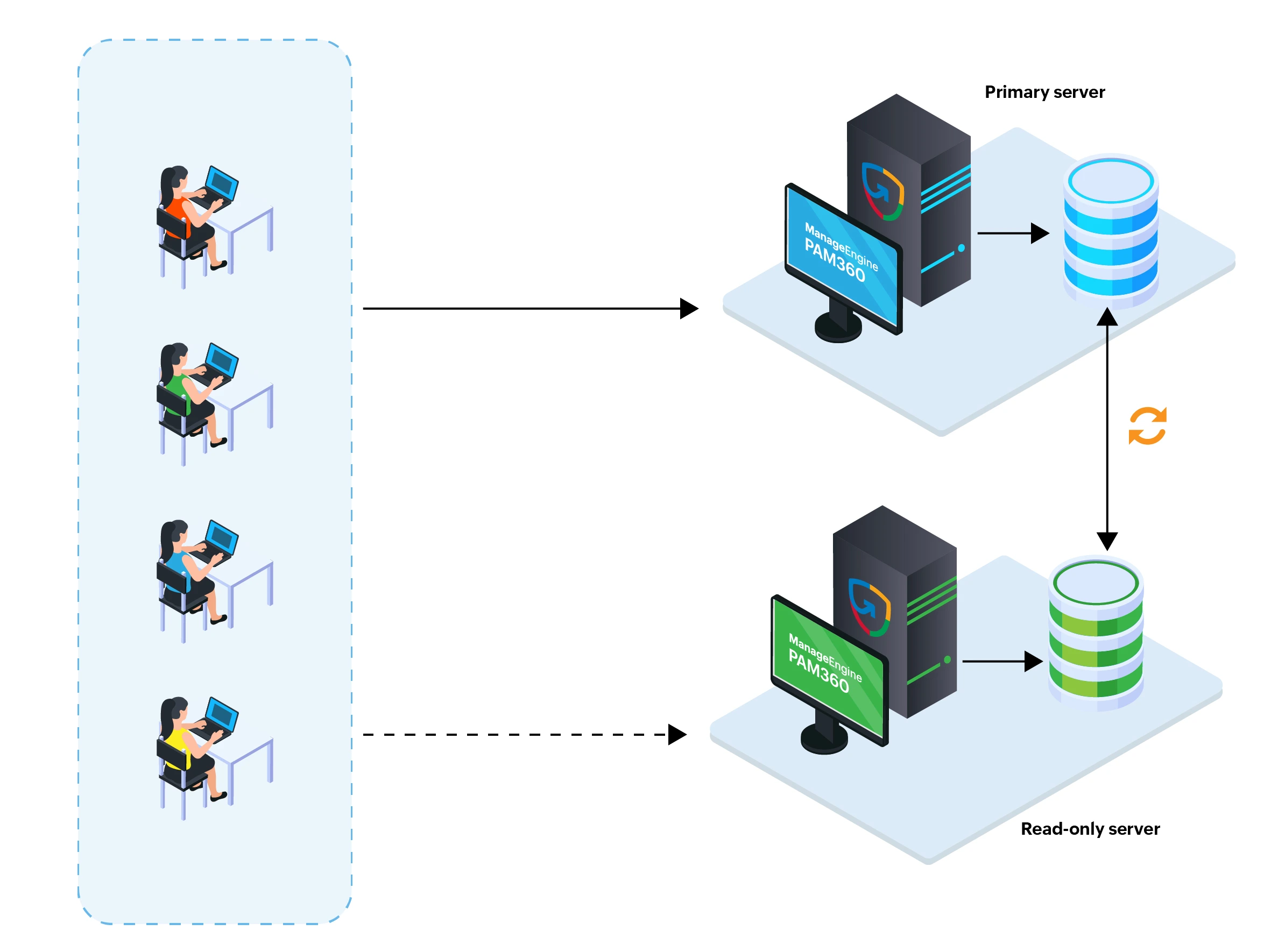
- Primary Server with a Read-Only Server - This model comprises a primary server with full read and write functionality and a read-only server that supports read-only operations. The read-only server acts as a fallback option during primary server failures, ensuring continued access to stored passwords. In this setup, both the primary and read-only servers maintain their own dedicated databases.
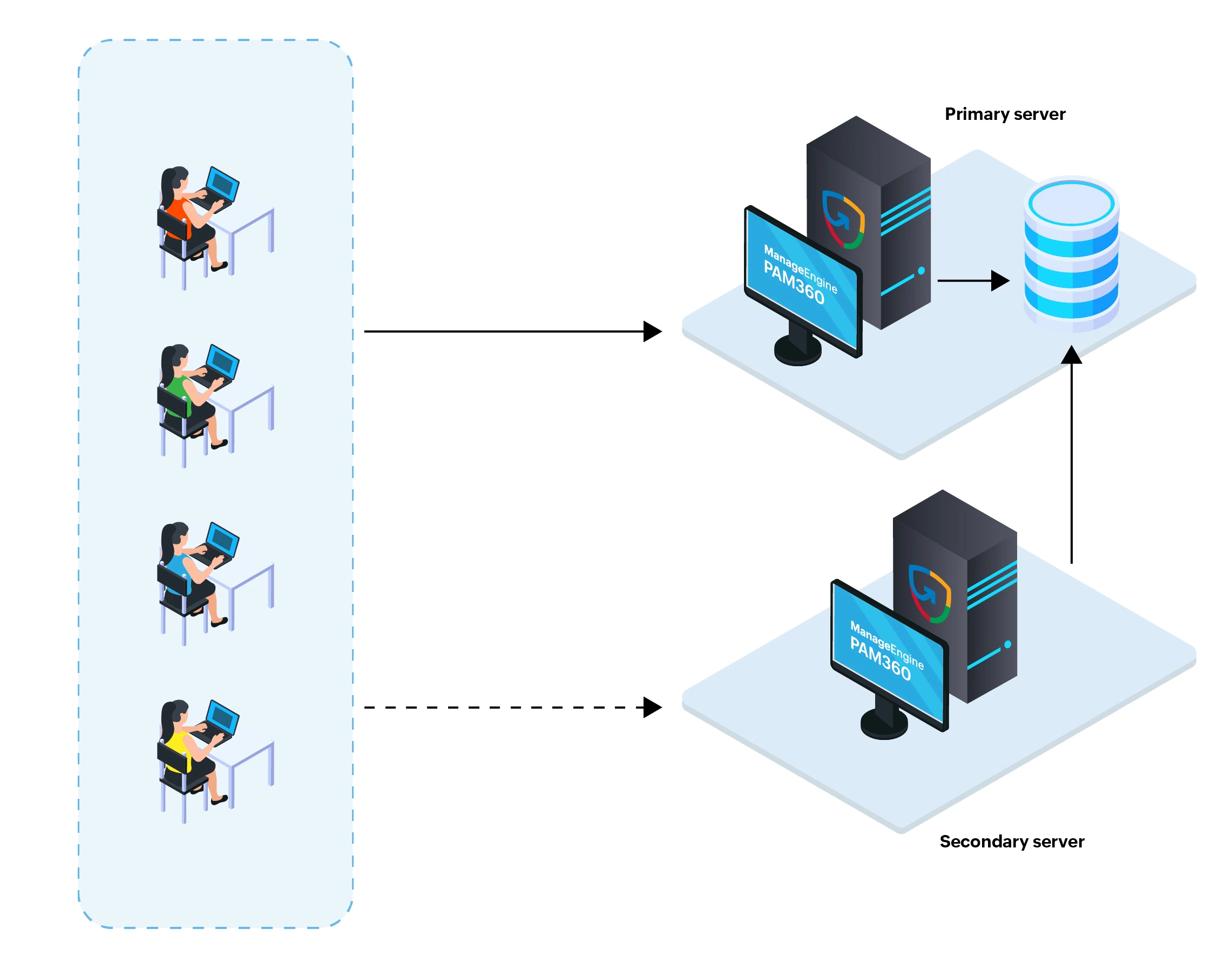
- Primary and Secondary Server with a Shared Database - This model comprises a primary and a secondary server, offering full read and write functionality. The secondary server acts as a fallback when the PAM360 service on the primary server is unavailable. In this setup, both servers rely on a single PostgreSQL database, running as an independent service on the primary server.
Each of these models offers varying degrees of availability and scalability to suit different organizational needs.
| Scenario | Access to Privileged Passwords via | Supported Functionality |
|---|---|---|
PAM360 and database services are active on the primary server. | Primary server | Full access with read and write operations |
PAM360 service is down on the primary server but the database service is active. | Secondary server | Full access with read and write operations |
Complete outage of the primary server | Read-only Server | Limited access with only read operations |
Complete outage of primary and secondary servers | Read-only Server | Limited access with only read operations |
Caution
- The read-only server in the Secondary Server Model with Read-Only Server Continuity is provided as a fallback server and not for permanent access.
- The schedules will run only on the primary server.
- The read-only server cannot be accessed directly when the primary or secondary servers are active, and the PAM360 service is running. The following redirection logic applies when users access the PAM360 application using the read-only server URL:
- When both the PAM360 and PostgreSQL database services are running on the primary server, users are automatically redirected to the primary server.
- When the PAM360 service is down on the primary server, but the PostgreSQL database service is running, users are redirected to the secondary server if the PAM360 service is running on the secondary server.
- When both the primary and secondary servers are completely down, users can maintain uninterrupted access to privileged passwords via the read-only server.
- If the application servers are deployed across different networks in your environment, redirection from the read-only server to the primary or secondary server may fail due to network limitations. In such scenarios, it is recommended that users access PAM360 directly using the primary server URL, rather than the read-only server URL.
- In the event of a complete outage of the primary server in the Primary and Secondary Server with Shared Database model, access to stored passwords and other privileged data is unavailable, as the PostgreSQL database runs as an independent service on the primary server and becomes inaccessible during during the primary server outage.
Refer to the upcoming section to follow the appropriate deployment steps for the model you choose.
3. Configuring the Application Servers for Availability
The following are the three types of deployment models are to suit varied operational needs. Refer to one of the desired models for the configuration procedure:
- Primary and Secondary Server with a Shared Database and an Additional Read-Only Server (Recommended)
- Primary Server with a Read-Only Server
- Primary and Secondary Server with a Shared Database
4. High Availability Monitoring
Additional Details
- Currently, PAM360 offers secondary server monitoring exclusively for the bundled PostgreSQL database. However, support for MS SQL databases will be added in future updates.
- The High Availability monitoring described here is for a Primary and Secondary Server with a shared database and an additional Read-Only Server. This may vary depending on your chosen High Availability deployment model.
- If you have configured the Primary Server with a Read-Only Server model, navigate to Admin >> Business Continuity >> Read-Only Server to access the High Availability Monitoring dashboard.
Continuous monitoring of the application servers and associated databases is essential to ensure business continuity and minimize the risk of downtime due to unexpected server failures. PAM360 offers a centralized High Availability Monitoring dashboard that provides real-time visibility into all configured components such as the primary, secondary, and read-only servers, as well as the primary and read-only databases. It provides real-time insights into server availability, connectivity status, database replication health, and server roles. To access the High Availability Monitoring dashboard, navigate to Admin >> Business Continuity >> High Availability.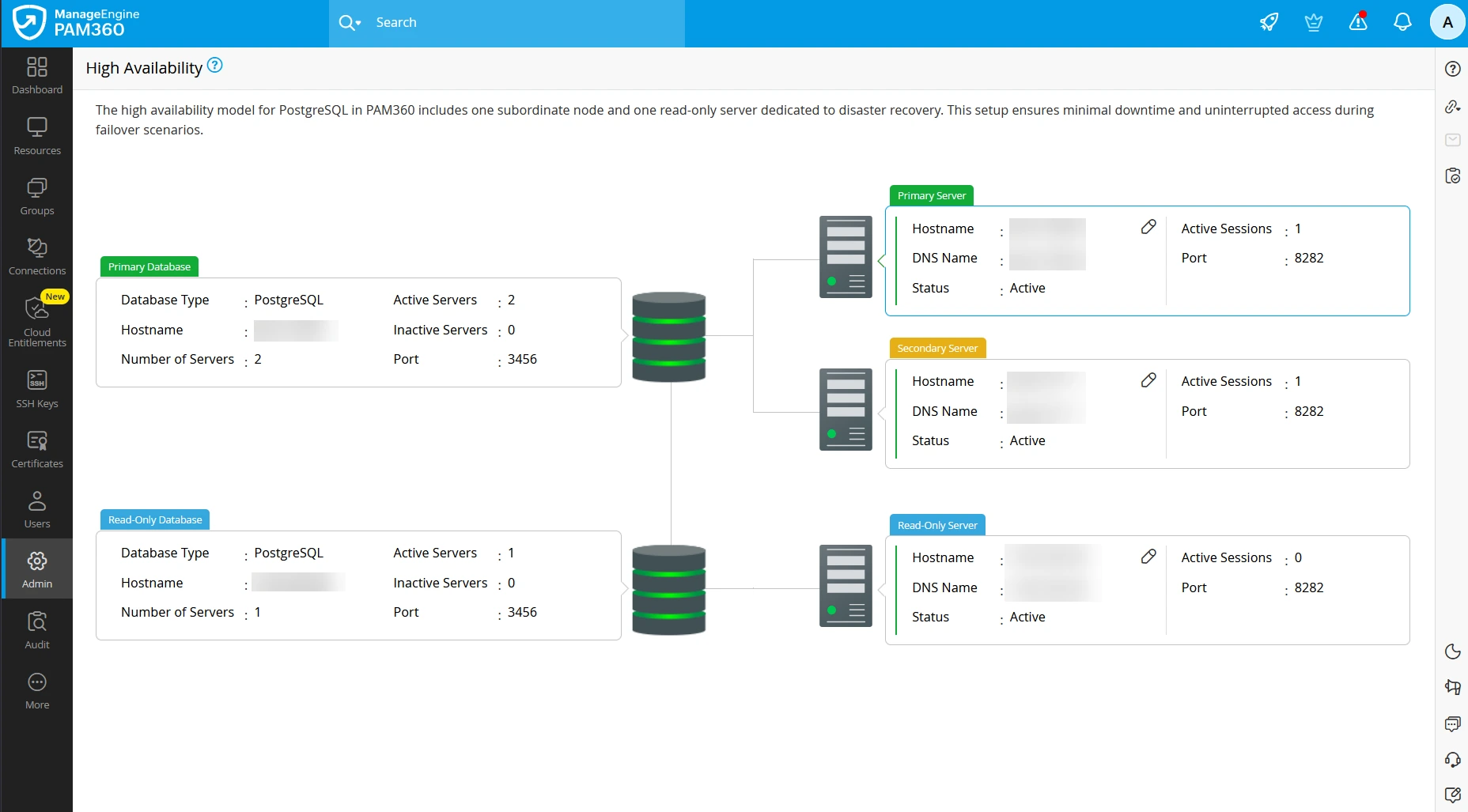
The dashboard displays the secondary server model with Read-Only continuity deployed in your environment with the following details:
- Servers - Hostname, DNS name, status, server type, port in use, and the number of active user sessions
- Databases - Hostname, database type, port in use, total number of configured servers, and the number of active servers
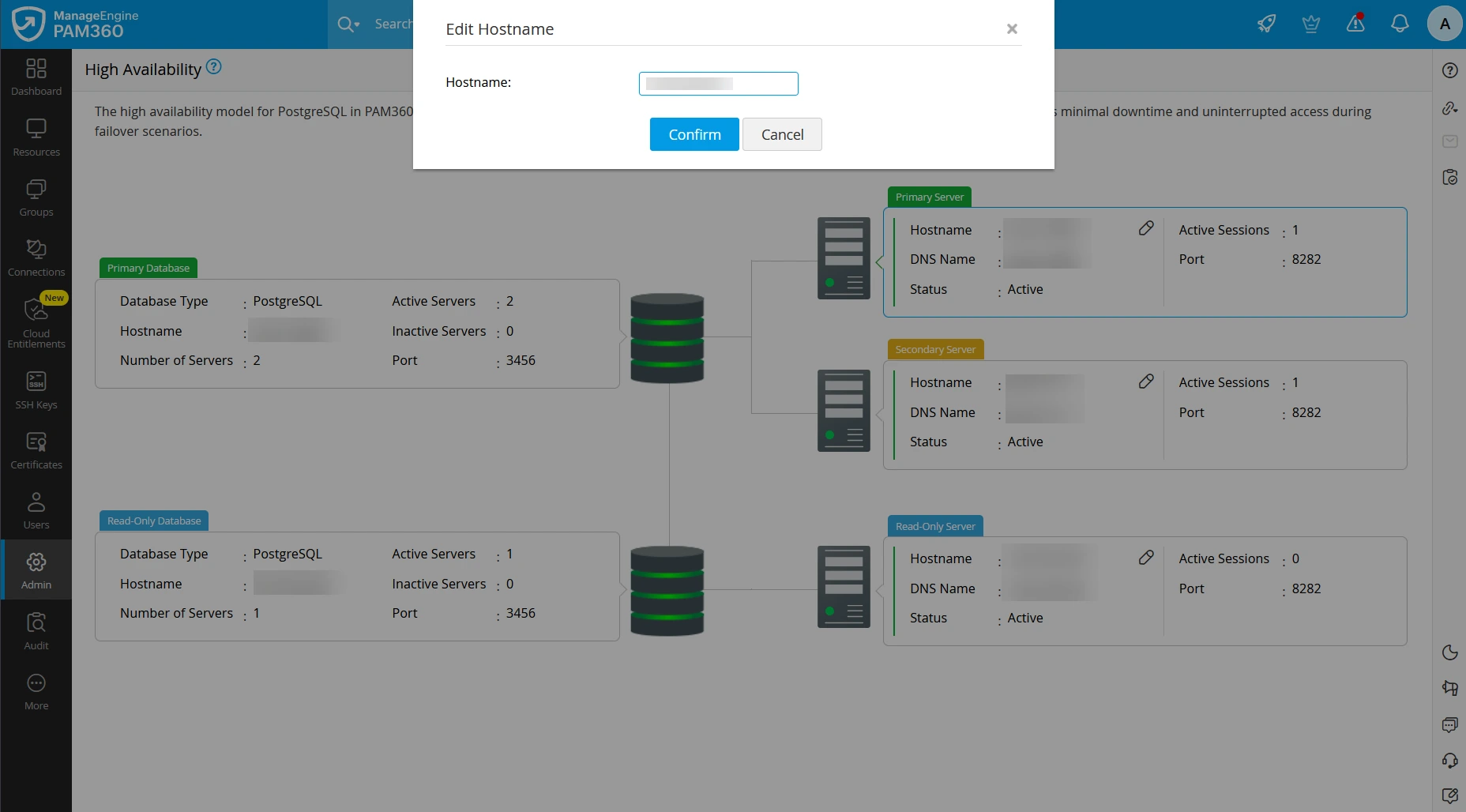
Additionally, you can modify the name of the servers available in your environment for easier identification. Follow these steps to rename a server:
- On the High Availability dashboard, click the edit icon beside the hostname of the desired server.
- On the Edit Hostname window that appears, enter the name that you wish to use for the selected server in the Hostname field.
- Click Confirm to save the configured changes.
This monitoring feature enables administrators to track the health and connectivity of all servers and databases in real-time, helping them proactively respond to disruptions and maintain uninterrupted privileged access across the environment.
5. High Availability Audit Trails
By default, PAM360 offers comprehensive audit trails covering Resource, User, Key, Certificate, and Task activities. When the secondary server model with Read-Only continuity is enabled, auditing capabilities are further enhanced with server-specific tracking for Resource, User, and Task audits. Each of these audit categories will feature dedicated tabs for the Primary, Secondary, and Read-Only servers, enabling administrators to trace actions based on their originating servers. This enhancement offers a comprehensive view of all activities across the clustered environment. Click here to learn more about audit trails in PAM360.
6. Removing High Availability Configuration
If you are migrating from the Secondary Server Model with Read-Only Continuity to one of the other supported deployment models within the secondary server setup or to another supported PostgreSQL High Availability configuration, you should decommission the existing Read-Only server, secondary server, or both, as applicable, based on the selected deployment model. Follow the procedure detailed in this help documentation carefully to decommission the secondary or read-only servers from the configured high availability setup before reconfiguring the required deployment model.
7. Frequently Asked Questions
1. Can I enable secondary server model with Read-Only continuity without disrupting the current setup?
No, if you have an existing secondary server model using PostgreSQL, you should remove this configuration before setting up the new one. Follow the steps provided in this link to safely remove the existing setup.
2. What happens if both the primary and secondary servers go down?
In such cases, users can maintain continuous access to privileged passwords via the read-only server. If required, users with the administrator privileges can temporarily reconfigure the read-only server to act as the primary server to maintain full functional capabilities. Refer to this link for the detailed steps to configure the read-only server into the primary server.
3. How can I verify the status of all nodes?
You can view the status of all the servers under Admin >> Business Continuity >> High Availability, where the status of all the servers will be displayed.
8. Troubleshooting Tips
1. What should I do when one of the servers appears inactive on the High Availability dashboard?
If one of the servers' status appears as inactive under Admin >> Business Continuity >> High Availability, it could be due to the PAM360 service not running, a potential issue with the PostgreSQL replication setup, or an issue with the network communication between the primary, secondary, and read-only servers. Follow these steps to resolve this issue:
- If the primary or secondary server is displayed as inactive, ensure that the respective servers are alive and the PAM360 service is running properly.
- If the read-only server is displayed as inactive, ensure that the read-only server is alive and the PAM360 service is running properly.
- If the service is running but the status is displayed as inactive, it could be due to an issue with the database replication. Follow these steps to check the replication configuration on the primary server:
- Navigate to the <PAM360-Installation-Directory>/pgsql/data folder.
- Open the pg_hba.conf file and ensure the following entries are present and correctly configured:
2. How do I ensure business continuity with full functional capabilities when both the primary and secondary servers are unrecoverable?
When both the primary and secondary servers are unrecoverable, you can configure the read-only server to act as the primary server temporarily to support both the read and write operations.
Follow these steps to configure the read-only server into the primary server:
- Stop the PAM360 service running on the read-only server.
- Remove the standby.signal file from the <PAM360-Installation-Directory>/pgsql/data folder.
- Open the postgres_ext.conf file located in the <PAM360-Installation-Directory>/pgsql/ext_conf folder and delete all entries listed under the section recovery props.
- Delete the entry readonly.mode=true in the <PAM360-Installation-Directory>/conf/configurations.properties file.
- Open the serverstate.conf file from the <PAM360-Installation-Directory>/conf folder, locate the entry ro, and replace it with master.
- Start the PAM360 service on this server. It will now function as the primary server supporting full functionality.
- Now, execute the following commands to clean up database references to the old read-only configuration:
- Windows
- <PAM360-Installation-Directory>\bin\DeleteROServerIP.bat <IP_Address_of_RO_that_was_converted_to_Primary>
- <PAM360-Installation-Directory>\bin\DeleteSlot.bat <slotName_of_RO_that_was_converted_to_Primary>
- Linux
- <PAM360-Installation-Directory>/bin/DeleteROServerIP.sh <IP_Address_of_RO_that_was_converted_to_Primary>
- <PAM360-Installation-Directory>/bin/DeleteSlot.sh <slotName_of_RO_that_was_converted_to_Primary>
You have now successfully reconfigured the read-only server as the primary server in your High Availability setup. Once the primary and secondary servers are recovered in your environment, you can revert the acting primary server to its fallback role. After restoring the primary and secondary servers, ensure that you do not start the PAM360 service on these servers without restoring the database backup from the acting primary server (previously read-only server) to the primary database as this might lead to data loss.
Caution
Please note that restarting the primary server without restoring the database backup will result in data loss.
Follow these steps to restore the database backup from the read-only database to the primary database:
- On the acting primary server, navigate to Admin >> Configuration >> Database Backup, and click the Backup Now button on the Database Backup window. The backup file will be generated in the destination directory.
- Stop the PAM360 service on the acting primary server.
- Use the generated backup file to restore the data from the acting primary server to the restored primary server. Explore this link for the detailed steps to restore the backup data.
- After restoring the database backup, start the PAM360 service on the restored primary server to initialize the server and the database.
Caution
When the database backup is being restored on the primary server, no servers will be available to handle user requests in the environment.
The acting primary server, previously the read-only server, cannot be reconfigured to its previous fallback role. Decommission this server and build a new read-only server from scratch by following the steps detailed below:
- Stop the PAM360 service running on the restored primary server.
- Generate the read-only server setup pack on the restored primary server.
- Configure the read-only server using the newly generated setup pack.
As detailed above, when primary and secondary servers are beyond recovery or cannot be brought back online quickly, you can promote the read-only server to act as a fully functional primary server to ensure business continuity. Once the primary and secondary servers are recovered, generate the database backup from the acting primary server and restore it on the recovered primary server to ensure data consistency with the most recent changes made while the primary was down. Decommission the acting primary server (previously read-only server) and reconfigure a new read-only server to act as a fallback server.
If the issue persists and a server still appears as inactive after verifying the above configurations, collect logs from the following locations and send them to pam360-support@manageengine.com for further assistance:
- <PAM360-Installation-Directory>/logs
- <PAM360-Installation-Directory>/pgsql/data/pg_log