Wireless LAN controller monitoring software
OpManager helps you optimize wireless networks and SD-WAN environments with real-time WLC monitoring and fault-detection!
What is wireless LAN controller monitoring?
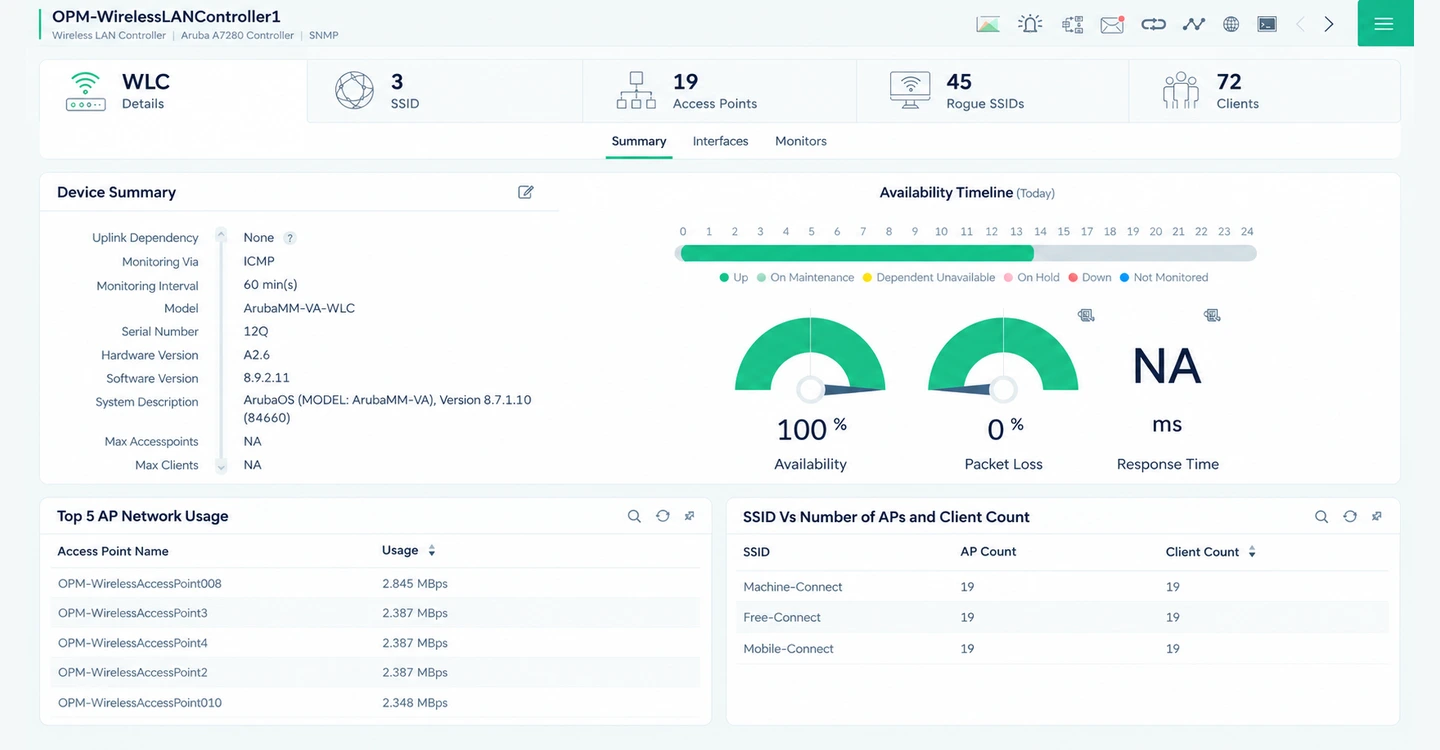
Wireless LAN controller (WLC) monitoring is the process of tracking the uptime, health, and performance of WLCs, wireless access points, and the SSIDs managed by them. Sysadmins, NOC teams, and IT professionals use WLC monitoring software to ensure continuous, high speed connectivity for wireless networks. ManageEngine OpManager is a network monitoring software with powerful WLC monitoring capabilities.
OpManager's WLC monitoring capabilities
Gain visibility into WLCs and wireless networks
ManageEngine OpManager monitors wireless networks from the controller level. It uses agentless protocols like SNMP or WLC vendor APIs to discover the primary controllers, the failover controllers in high availability configurations, and the wireless devices associated with them.
- Drill down into each device, set up performance monitors, and review performance.
- When you add your WLC, all access points managed by it are also discovered. You can also see the SSIDs (service set identifier) and clients connected to each WLC overall.
- For software defined networks like Cisco Meraki, you can discover and monitor wireless devices spread across different sites at the controller level itself.
Keep tabs on device health, client count, and signal strength
OpManager ships with out-of-the box support for top WLC vendors, including Aruba (HPE), Cisco, Huawei, and Ruckus. For each vendor and model, you get auto-curated performance indicators. OpManager supports protocols like SNMP, vendor APIs, and streaming telemetry standards like gNMI.
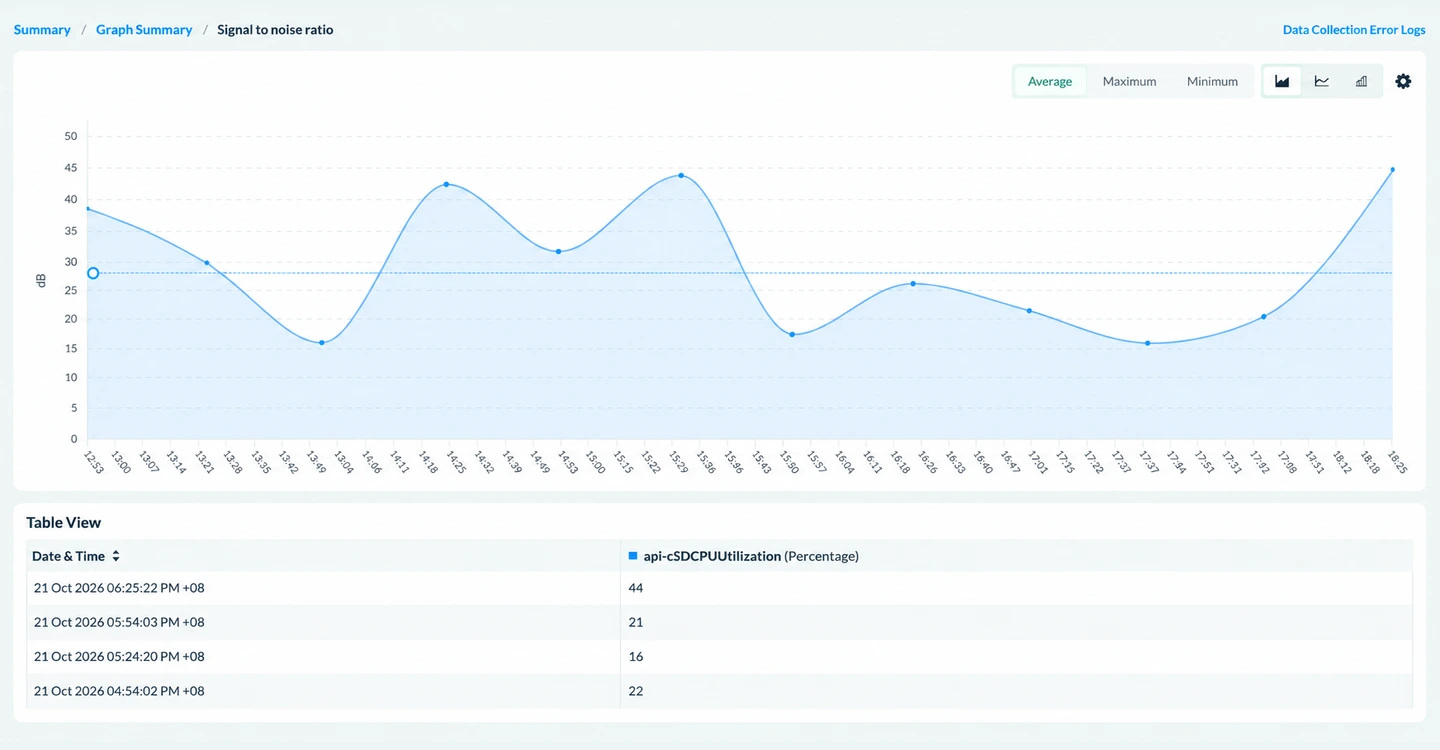
- You can track the health of WLCs and access points by monitoring the CPU utilization, temperature, bandwidth utilization per access point, and latency.
- OpManager gives you the client count connected overall at the WLC level, at the SSID level, and at the access point level.
- You can also optimize signal strength and reduce noise by tracking metrics like Received Signal Strength Indication (RSSI) and SNR (signal to noise ratio).
Resolve WiFi issues proactively with alerts and notifications
When WiFi issues occur, network engineers have to resolve them within SLA-specified timelines. However, this can be delayed due to alarm noise, missed alarms, and slower incident response workflows. With OpManager, network engineers can avoid this.
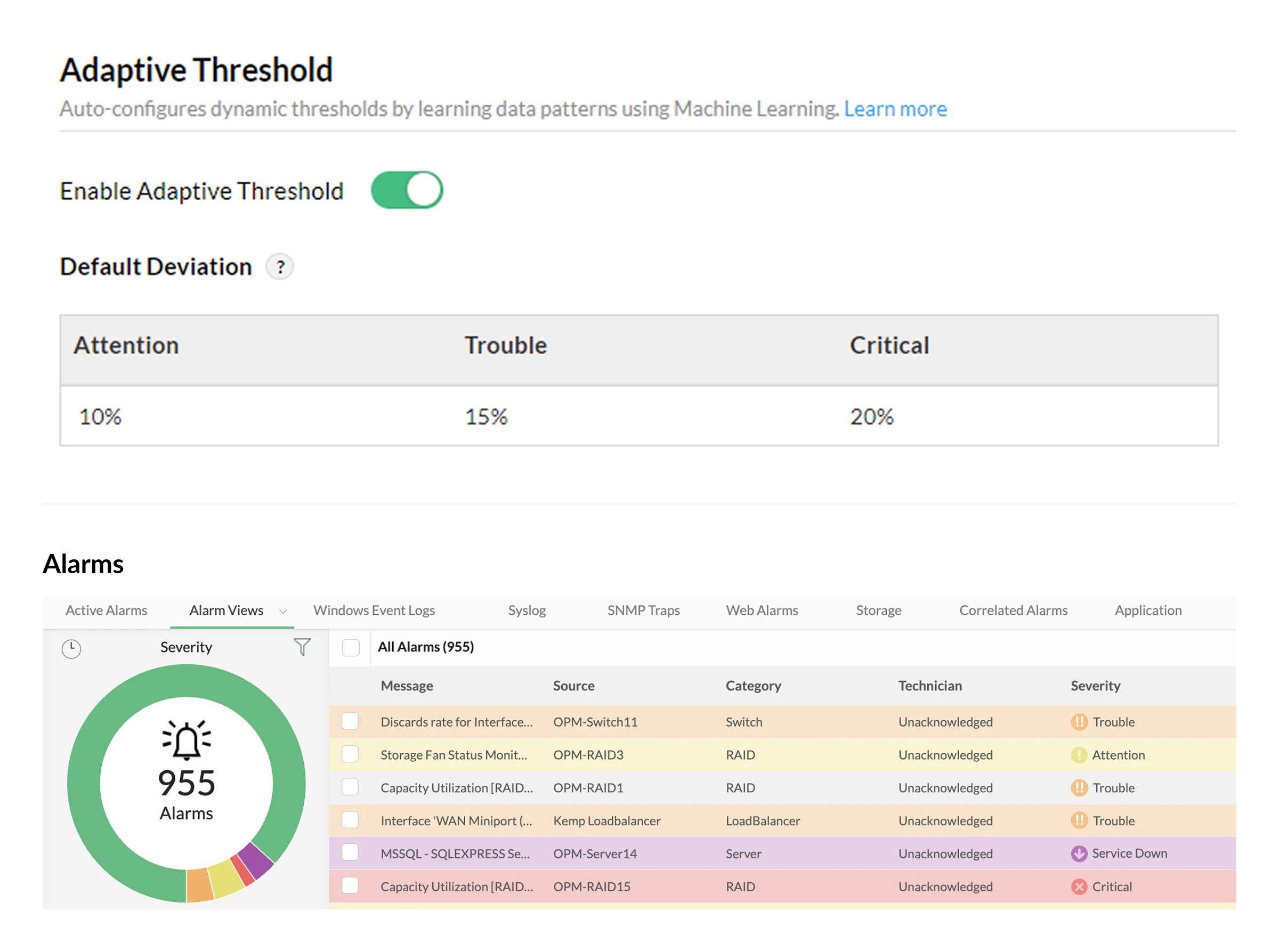
- OpManager studies network behavior at peak hours, seasonal network bursts, and dynamic patterns with its built-in Zia AI. Alarm thresholds are then calculated, set, and updated every hour automatically.
- Each alarm is color-coded, and can be raised as notifications through email, SMS, push notifications or through third party tools like Slack or Teams.
- You can set up automated workflows to execute troubleshooting actions when issues occur. You can also automatically log tickets in help desk tools like ServiceDesk Plus, ServiceNow, or Freshdesk.
Visualize wireless networks with maps and graphs
OpManager's intuitive GUI helps you visualize your wireless network, from edge devices to the access points and the performance stats within those access points. This helps you identify performance issues, link failures, and device relationships with a glance.
- Monitored metrics are displayed as graphs. You can set up monitoring intervals like 30 seconds, 1 minute, or 10 minutes, forecast predicted values with ML, or export them as reports.
- Layer 2 maps in OpManager helps you visualize network connections from the edge to the access point. These maps are updated automatically on a regular basis to maintain accuracy.
- OpManager also helps you create custom maps where you can add devices from different networks into custom backgrounds or interactive world maps.
Analyze WLC performance with reports and dashboards
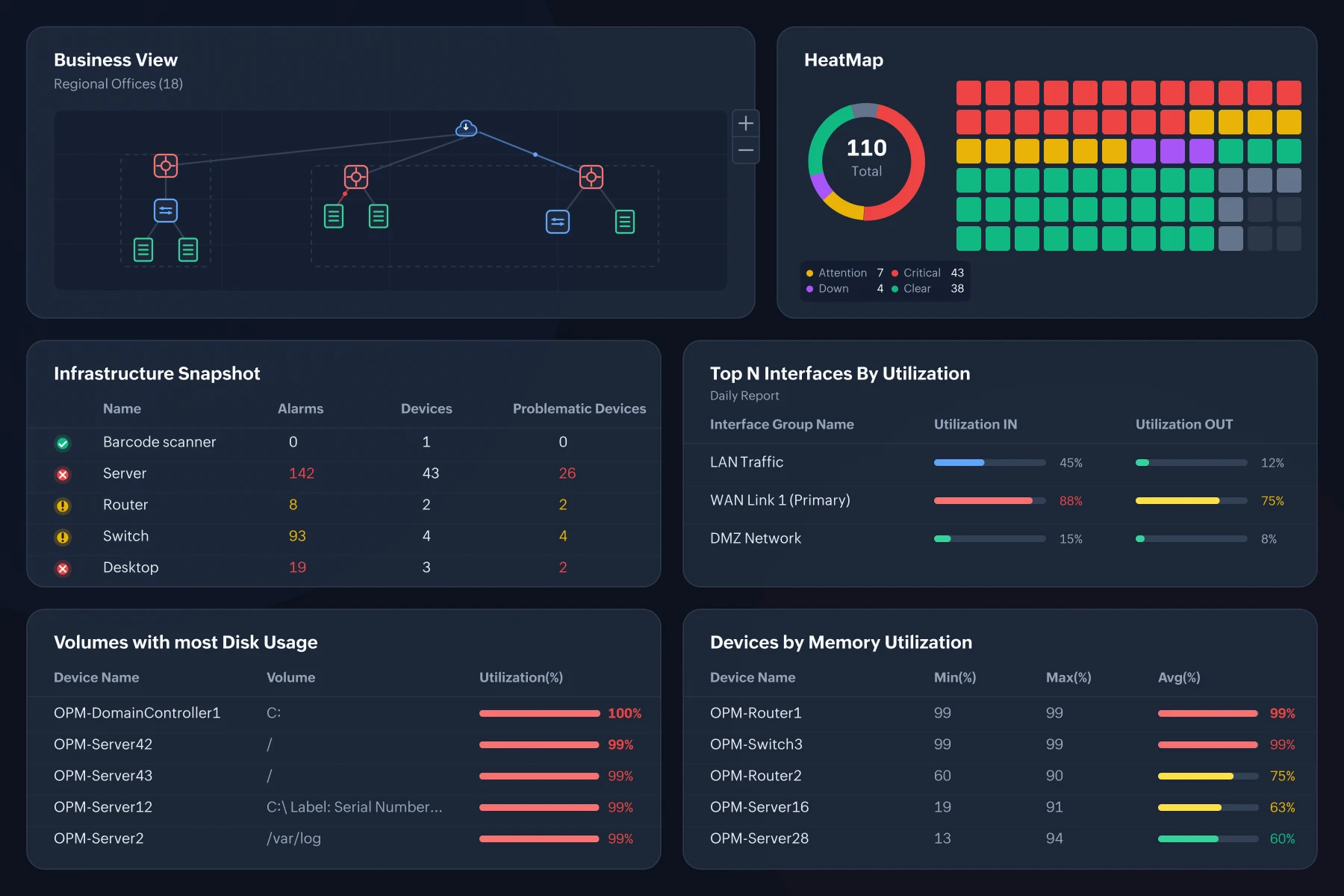
OpManager also helps you make sense of the raw telemetry it collects. You can create reports, connect to AI clients through MCP servers, or create dedicated dashboards.
- OpManager ships with 100+ pre-built reports focusing on devices, interfaces, and metrics. You can create reports to analyze the access points managed within your WLC, or compare the traffic flowing across your interfaces. You can also build your own reports with the custom report builder.
- You can add reports, graphs, and maps to dedicated dashboards to keep an eye on critical network elements and wireless estates.
- With the native MCP server, you can use clients like Visual Studio Code and Claude Desktop to create reports and dashboards with simple, natural language queries.
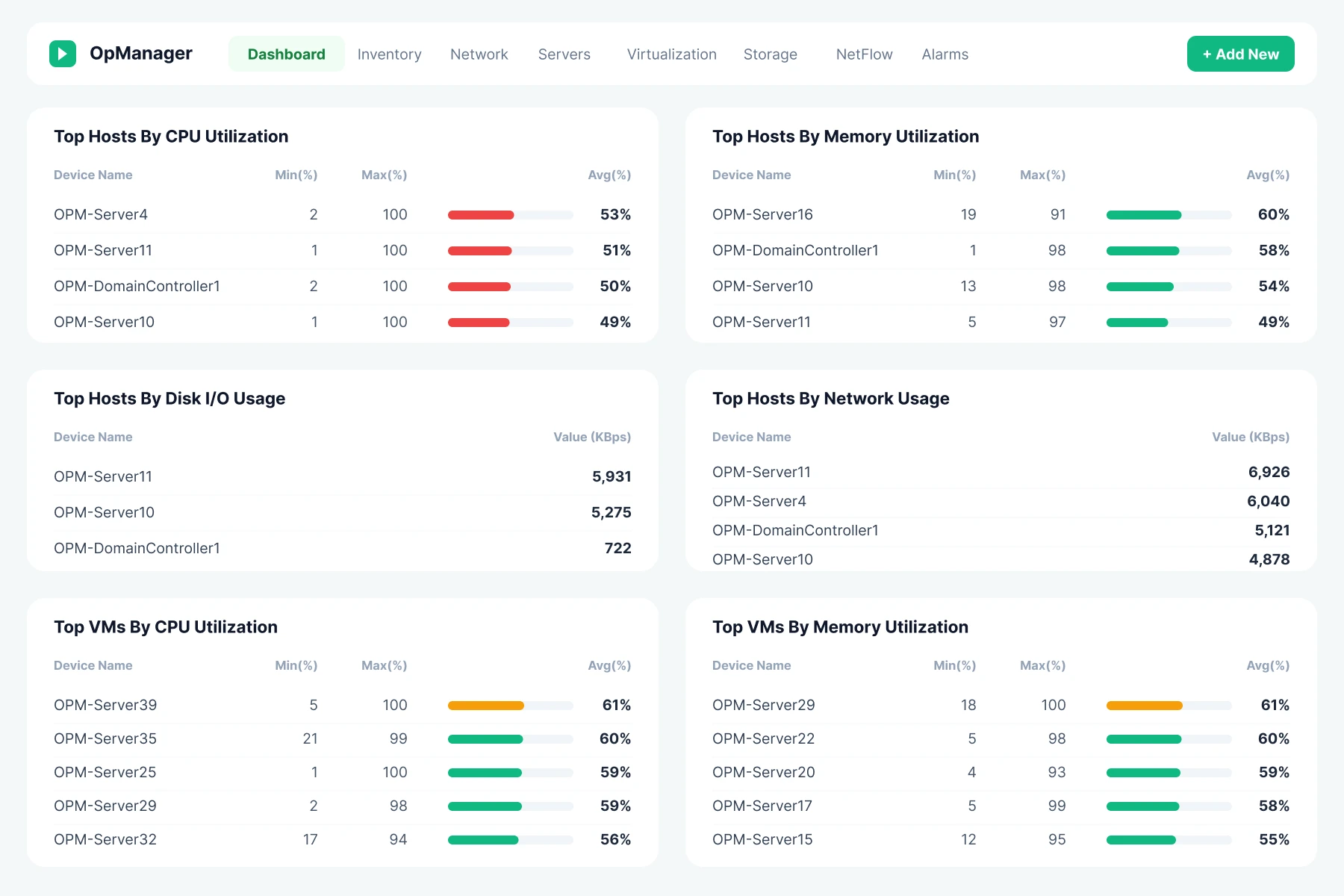
Wireless LAN controller monitoring in OpManager
OpManager's WLC monitoring enables IT teams to track wireless signal strength, access point performance, and rogue devices trying to join the network. Using a single console, you can monitor and manage your WiFi networks to get optimal performance.
Why choose OpManager for WLC monitoring
Monitor multi-vendor estates
Supports 30+ WLC and access point vendors out-of-the-box. This makes it suitable for multi-vendor estates and multi-branch SD-WAN.
Minimize MTTR
AI-driven monitoring, context-rich alerts, and multi-channel notifications reduce MTTD. Workflows, ITSM integrations and AI-driven analysis reduces resolution time.
Automate operations
Staff can spend less time configuring and scanning wireless networks, and more time optimizing performance and resolving issues.
Scale without headcount
OpManager's scalability extends to 50,000+ devices. This allows IT teams to manage large, enterprise-scale wireless estates.
WLC vendors supported in OpManager
OpManager provides extensive support for Wireless LAN Controllers (WLCs) across leading vendors, enabling robust monitoring of wireless network performance, availability, and infrastructure health.
WLC vendors
OpManager can automatically discover, classify, and curate monitors for the following WLC vendors:
- Aruba
- Autelan
- Cisco
- Extreme
- Fortinet
- H3C
- Hongxin
- Huawei
- Ruckus
- Ruije
Practical use cases for WLC monitoring with OpManager

Protecting clinical Wi-Fi controller uptime
A hospital runs hundreds of lightweight APs in split-MAC architecture. Every AP depends on a WLC pair for authentication, roaming, and policy enforcement. Wi-Fi phones, workstations, and connected medical devices rely on this. A controller outage can disrupt patient care.
- OpManager continuously monitors controller health and AP association so problems are caught before they affect patients.
- WLC CPU, memory, temperature, interface status, and redundancy status are monitored via SNMP, with an alert as soon as any metric breaches its threshold.
- Track the APs connected to each controller. Get alerts when APs drop off or failover to the secondary controller, which is an early sign of CAPWAP tunnel or up-link problems.
- Critical controller alarms go into the hospital's ticketing system at high priority, so clinical engineering and network teams can respond within agreed SLAs.

One view of every campus controller
A government agency operates campuses connected over SD-WAN. The campuses have a multi-vendor WLC environment bought across separate procurement cycles. Each controller is managed through its own console, so the central team has no consolidated picture of the network.
- OpManager pulls every controller into one dashboard, whatever its vendor or location.
- Multi-vendor SNMP support monitors controllers from Cisco, Aruba, and other vendors side by side, with key metrics like AP count, client count, and resource usage shown in a consistent format.
- Real-time dashboards and NOC-views show every campus controller's status at a glance, along with the SD-WAN links connecting each site. Users can drill down to individual APs and their clients.
- Comparative reports of client load and CPU usage across controllers help the team spot overloaded campuses and plan AP rebalancing or hardware upgrades.

Enforcing controller configuration compliance
A fin-tech firm must prove that its WLCs enforce approved security settings. These include WPA2/WPA3-Enterprise on corporate SSIDs and correct VLAN separation for guest traffic. A single undocumented change can expose internal systems and become an audit finding.
- OpManager's configuration management makes WLC configuration a monitored, auditable asset.
- WLC configurations are backed up automatically on a schedule. Any change is flagged with a side-by-side diff showing what changed, when, and by whom.
- Compliance policies check controller configurations against internal standards and regulatory frameworks such as PCI DSS, and produce audit-ready reports.
- Real-time alerts notify the security and network teams of unauthorized changes, and the configuration can be rolled back to the last approved version.

Forecasting controller load before peak season
A retail chain uses centralized controllers to manage store APs remotely. Every holiday season causes surges in handheld scanners, mobile POS devices, and shoppers on guest Wi-Fi. Controller's hitting their client and CPU limits on peak days, cause AP disconnects.
- OpManager uses historical trends and machine learning to show where capacity will run out before peak traffic arrives.
- Long-term graphs of client sessions, AP counts, and CPU/memory usage show how controller load grows season over season.
- AI/ML-driven forecasting and adaptive thresholds learn normal load patterns, flag unusual spikes, and project when each controller will reach capacity.
- NetFlow analysis on controller up-links shows which traffic types grow fastest during peaks. This informs decisions on QoS policy, licensing, or adding controllers.
FAQs about WLC monitoring
Learn more about WLC monitoring
Seven best practices for optimizing your WiFi networks
Optimize the WiFi management lifecycle: from designing for capacity to monitoring for performance.
Learn more →Unlock more value with add-ons
Extend easily with complementary products — add deeper traffic visibility, configuration management, and more.
Bandwidth monitoring
Layer NetFlow-based traffic analysis to see who and what is driving every byte across the network.
Try free trial →Firewall management
Audit firewall rule changes, spot shadow rules, and tie every config change back to the network event.
Try free trial →Network configuration
Back up configs, detect drift, and push standardized changes across thousands of devices.
Try free trial →