

- Free Edition
- Quick Links
- Active Directory Auditing
- Active Directory auditor
- Active Directory monitoring
- Account lockout analyzer
- Login monitoring software
- Active Directory change notifier
- User logon audit reports
- AD logon logoff tracker
- User logon failure auditing
- Login history tracking tool
- AD change auditor
- Insider threat detection software
- Permissions change auditing
- Entra ID reporting
- Privileged user monitoring
- User behavior analytics tool
- Active Directory security monitoring
- Group Policy auditing tool
- GPO change auditor
- Entra ID auditing
- Audit user account management
- OU change auditor
- Audit group membership changes
- Active Directory auditing and reporting tool
- GPO reporting tool
- Remote desktop monitoring software
- PowerShell logging and auditing
- Azure password protection auditing
- Azure sign-in risk detection
- File Server Auditing
- Windows Server Auditing
- Employee Tracking
- Workstations Auditing
- Compliance Auditing
- Other features
- SIEM Integration
- Windows DNS - Schema Auditing
- Windows security event log monitoring
- SIEM audit solution
- Schedule Active Directory change reports
- Reports from Archived Data
- Aggregated summary reports
- AD new/old attribute changes
- Audit trail
- Audit Active Directory LAPS
- Scheduled Reports & Alerts
- Account lockout examiner
- Industry
- Documents
- Success Stories
- Related Products
- Log360 (On-Premise | Cloud) Comprehensive SIEM and UEBA
- ADManager Plus Active Directory Management & Reporting
- ADAudit Plus Real-time Active Directory Auditing and UBA
- ADSelfService Plus Identity security with MFA, SSO, and SSPR
- DataSecurity Plus File server auditing & data discovery
- Exchange Reporter Plus Exchange Server Auditing & Reporting
- M365 Manager Plus Microsoft 365 Management & Reporting Tool
- RecoveryManager Plus Enterprise backup and recovery tool
- SharePoint Manager Plus SharePoint Reporting and Auditing
- AD360 Integrated Identity & Access Management
- AD Free Tools Active Directory FREE Tools
Active directory alerts with ADAudit Plus
Beyond keeping you in the know about critical events, ADAudit Plus' AD change alerts allow you to respond to incidents with preconfigured actions.
Pre-configured AD change alert profiles
Be ready to identify critical events from day one with 50+ built-in alert profiles covering account lockouts, group membership changes, GPO deletions, privilege escalations, and more across every major AD object type.
Real-time critical change alerts
Receive a notification the instant a high-risk change occurs, such as a user being added to the Domain Admins group or an audit log cleared, with full context.
Threshold-based and UBA alerts
You can detect patterns in user behavior and set alerts when deviations are detected, or simply configure alerts for sudden spikes in the volume of changes in your AD environment, both of which are critical indicators of compromise.
Detection of known AD attacks
Leverage the dedicated alert profiles for 25+ named AD attacks—including Kerberoasting, Golden Ticket, DCSync, and pass-the-hash—which fire the moment indicators of compromise appear in your environment.
Hybrid and cloud alerts
Alert on events across your on-premises AD and Microsoft Entra ID (previously known as Azure AD) from a single console, without switching between tools or having to correlate logs manually after the fact.
Alert-triggered response automation
When an alert pops up, ADAudit Plus can trigger scripted actions, auto-create a ticket in your ITSM tool, send emails and text messages to the responsible team, and log the full event, so response starts without waiting for someone to review a log.
Custom alert profiles
Build alert profiles that combine specific users, object types, audit actions, and filters into saved configurations. Critical events unique to your environment can get their own dedicated alert logic.
Compliance-mapped alert coverage
Alert profiles span the events scrutinized by SOX, HIPAA, PCI-DSS, GDPR, and other compliance frameworks. Your alert coverage matches what each standard requires you to monitor in your AD.
What AD changes ADAudit Plus alerts you to
| AD area | Alert coverage |
|---|---|
| User account modifications | Account creation, deletion, password resets, enable/disable events, and attribute modifications with old and new values |
| Group membership | Users added to or removed from security groups, especially Domain Admins, Enterprise Admins, and Schema Admins |
| Group Policy Objects and settings changes | GPO creation, deletion, modification, and link changes, including password and account lockout policy updates |
| Privileged accounts | All activity by Domain Admins and other elevated accounts, including logon at unusual times and first-time privilege use |
| Account lockouts | Lockout events with the originating machine, IP address, and root cause identified by the Account Lockout Analyzer |
| Schema and configuration | Schema modifications and configuration partition changes, which carry the highest risk of any AD environment change |
| Permission changes | ACL modifications at the domain, OU, GPO, user, group, and object level, including AdminSDHolder Permission Changes |
| Audit log clearing | System audit log cleared events, which may indicate an attempt to conceal unauthorized activity |
| Inactive accounts | User and computer accounts with no recent logon activity, which remain a persistent attack surface if left enabled |
Alert on critical account and object changes
When a user is added to Domain Admins, when a password policy is loosened, or when an account lockout policy is removed, your team receives an alert before the change propagates to endpoints.
- When a new account is created in a privileged OU, you know immediately, so unauthorized provisioning is caught before the account is activated.
- When a user's password is reset outside of business hours, the alert information shows the resetting admin's identity, machine name, and IP address, giving your team everything needed for a follow-up.
- Account lockout alerts include the root cause identified by the Account Lockout Analyzer: whether the source was a scheduled task, a mapped drive, a mobile device, or a browser session, so your help desk resolves the cause beyond simply unlocking the account.
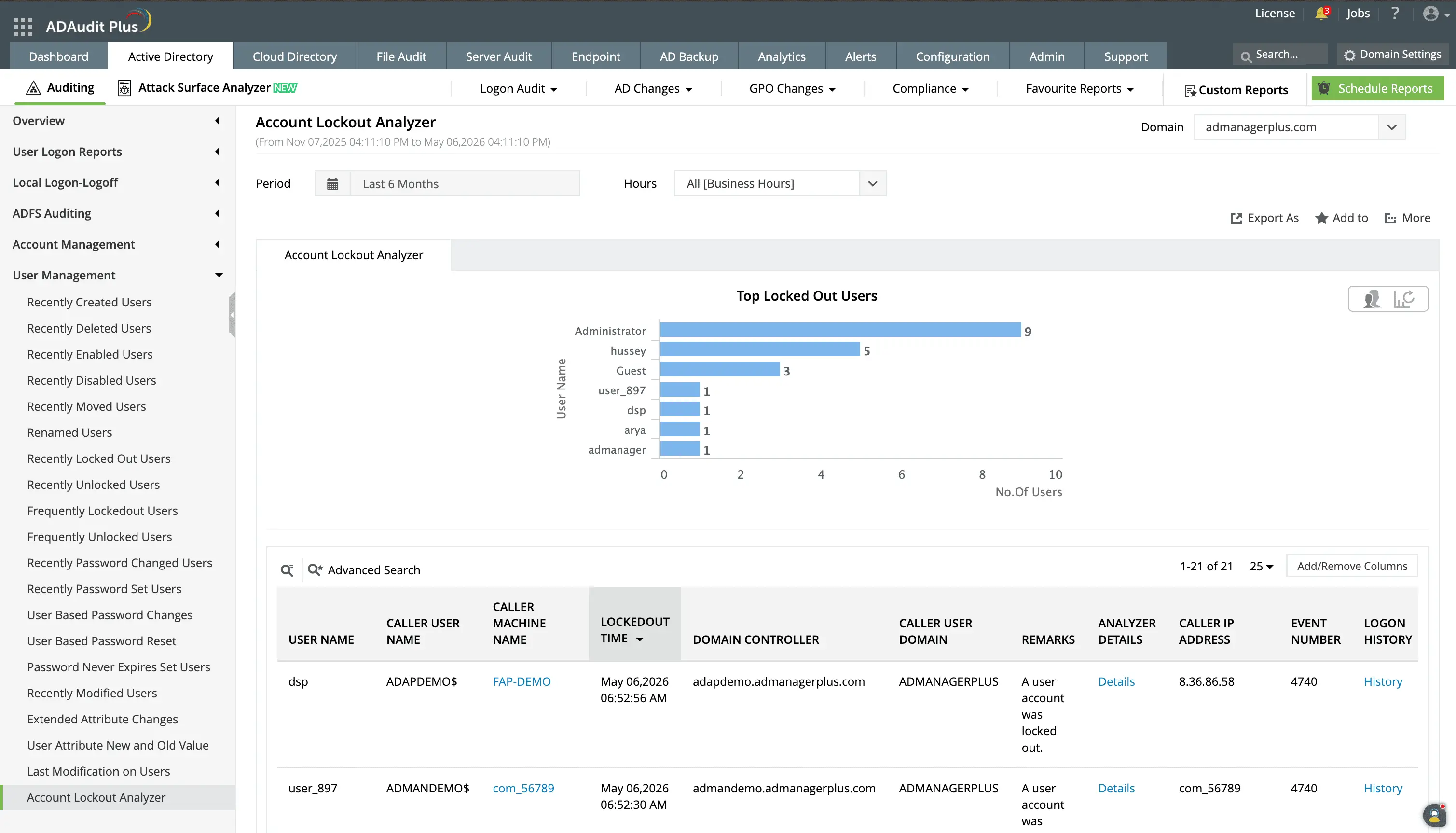
Track and receive alerts for account lockouts, with details about the locked out user, origin machine, and more.
Drill down to identify the source of the lockout to know the device, service, or mapped drive using incorrect credentials.
Alert on Group Policy and schema changes
A single GPO modification can propagate to thousands of endpoints. ADAudit Plus notifies stakeholders the moment a GPO is deleted or a setting within a policy is modified, with before-and-after values included in the notification.
- When account lockout policy settings change, you see the old threshold and the new threshold side by side, not just a notification that a change occurred.
- You can also set alerts for schema modifications since they are irreversible and affect every object class in your domain.
- GPO permission changes, which control who can edit or link a policy, generate an alert showing the exact change and the identity of the person who made it.
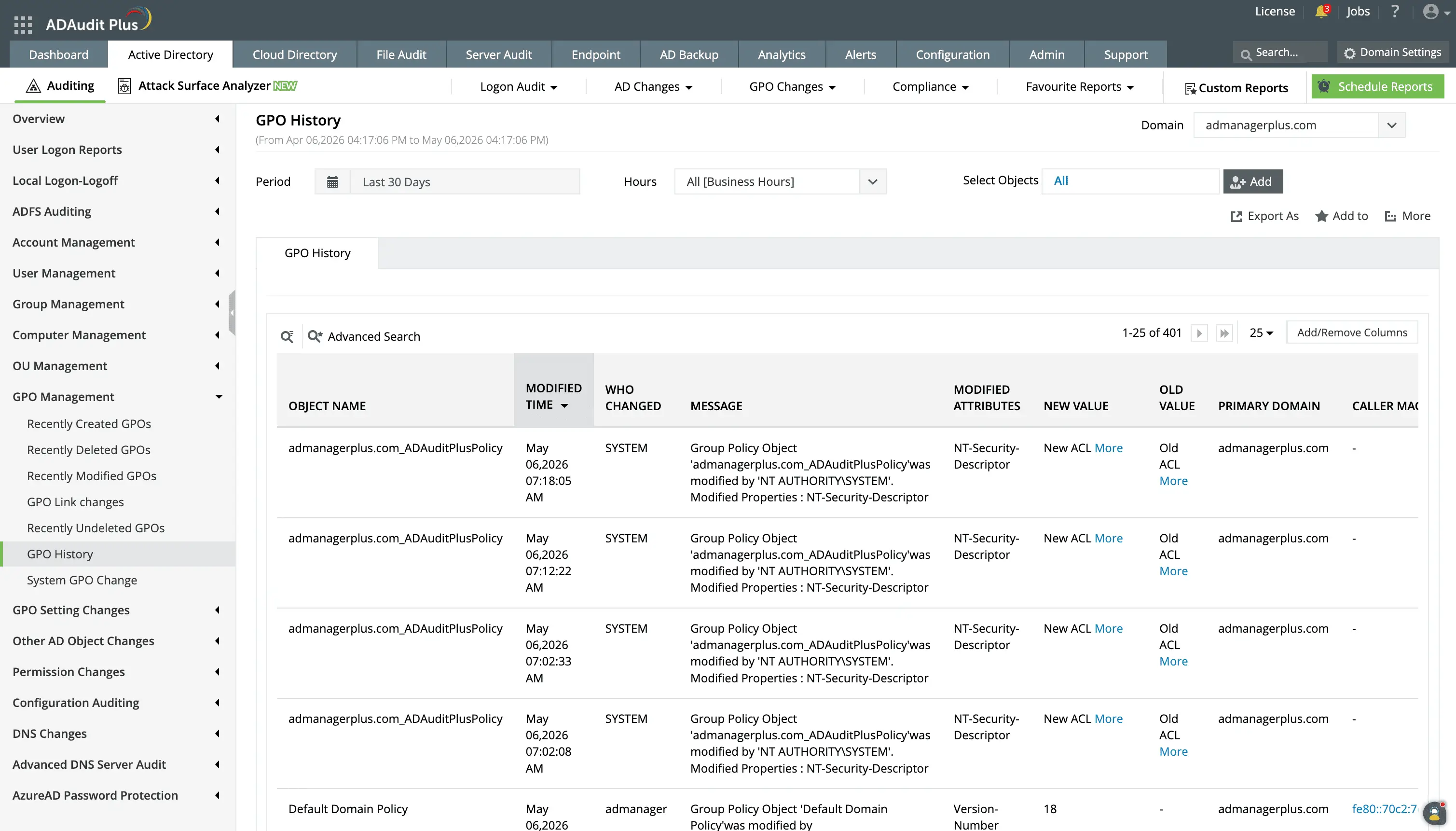
View a detailed history of changes that have occurred on any selected Group Policy Object.
Monitor privileged user activity with targeted alerts
ADAudit Plus provides dedicated alert coverage for every action performed by a privileged account. This is done based on individual events and also from the UBA capability so you can detect actions such as:
- When a Domain Admin account logs on from a machine it has never accessed.
- The first time a privilege is exercised so you can verify intent rather than assume legitimacy.
- When a service account that normally runs scheduled tasks attempts an interactive logon, the behavior is flagged as an anomaly.
- AdminSDHolder Permission Changes, which propagate automatically to all accounts in protected groups. An unauthorized change to AdminSDHolder silently propagates to your entire administrative tier.
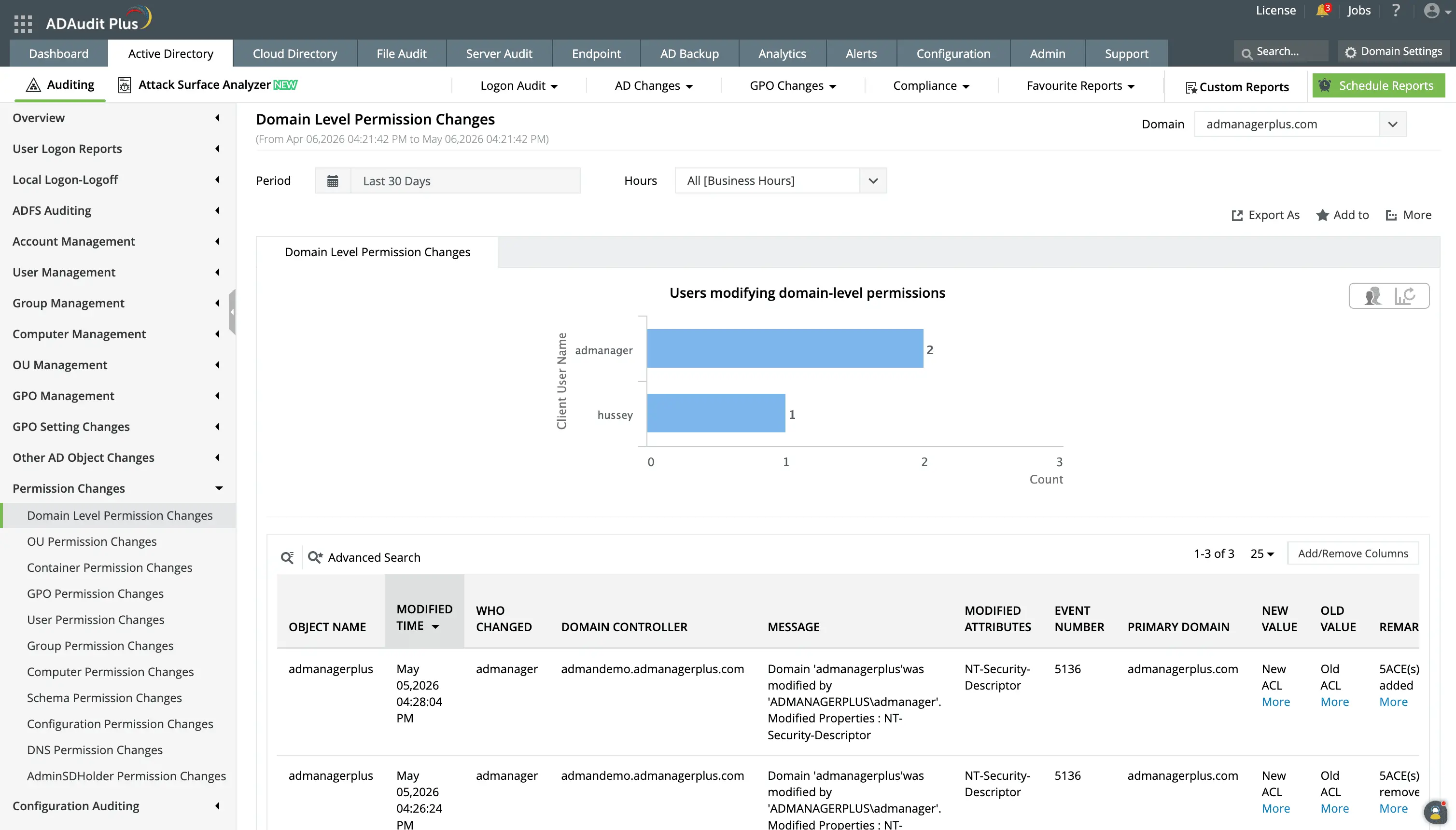
Domain-level permission changes are modifications to access rights or privileges that affect the entire Active Directory domain, such as changes to privileged groups, domain-wide policies, or critical access control settings. You can track these with detailed reports and alerts.
Detect attacks with threat-aware alert profiles
ADAudit Plus includes dedicated alert profiles for 25+ well-known AD attack techniques, which fire the moment event log patterns associated with each technique appear. With Attack Surface Analyzer, you can detect:
- Kerberoasting attempts, Golden Ticket attacks, and DCSync attacks, which have dedicated alert profiles that fire on the specific event sequences associated with each technique.
- Pass-the-hash and pass-the-ticket attacks are detected through authentication anomalies: NTLM authentication from accounts that normally use Kerberos, or Kerberos tickets presented from unusual source machines.
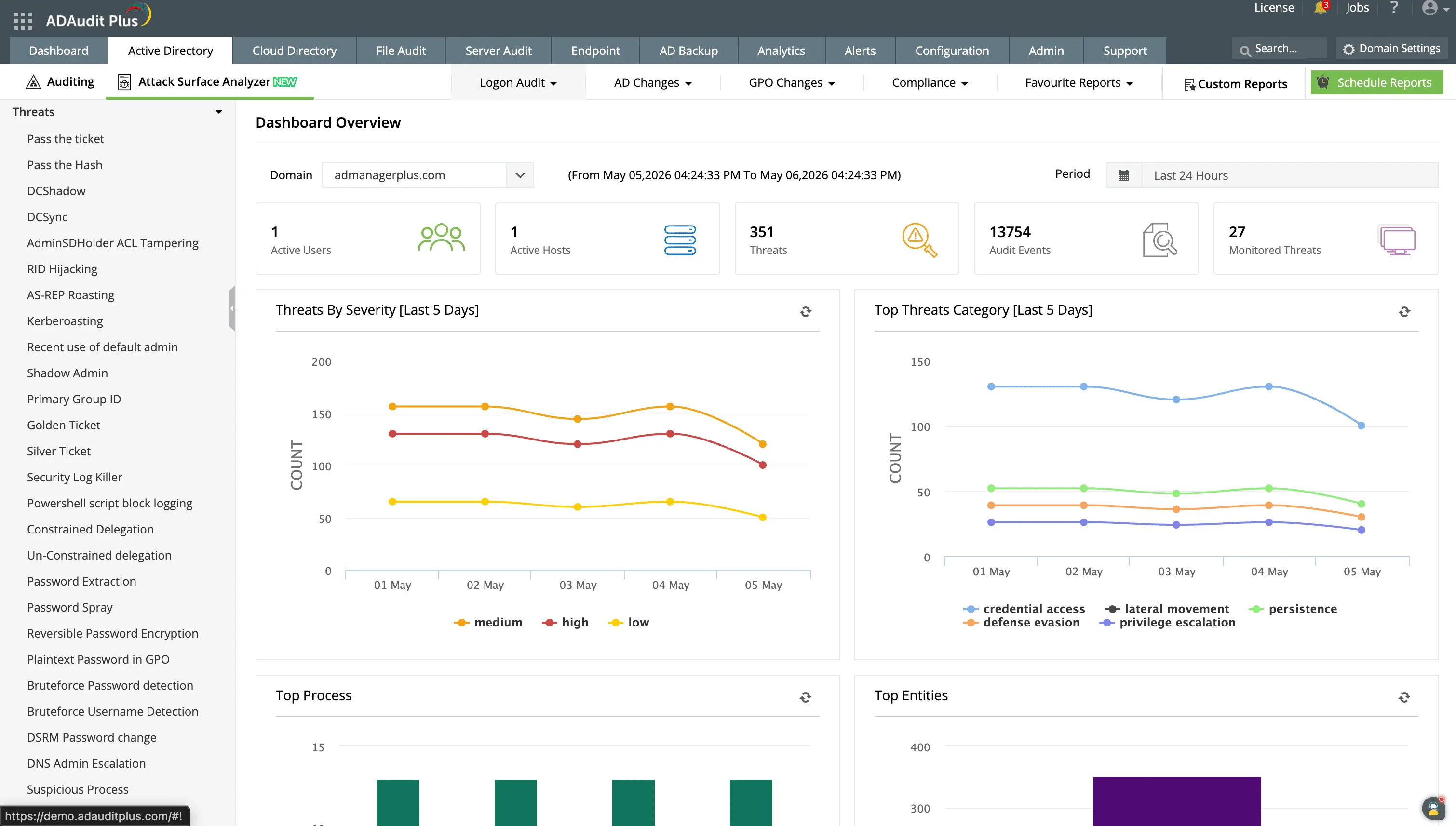
Detect 25+ well-known AD attacks with information on the affected user accounts, originating machine IP address, and event timeline showing attacker actions before and after detection.
Extend alerts to hybrid and cloud environments
Most organizations run on-premises AD alongside Microsoft Entra ID. Separate alerting configurations create gaps an attacker can exploit when pivoting between environments. ADAudit Plus provides a single alert configuration point for your entire identity environment.
Alert coverage for Microsoft Entra ID includes risky sign-ins, password spray detections, impossible travel events, OAuth2.0 permission grants, and Conditional Access policy changes.
Automate your response with alert-triggered actions
An alert without automated follow-through adds latency to incident response. ADAudit Plus connects its alert engine directly to your response workflow, so detection and containment happen in sequence rather than in separate queues.
When an alert is triggered, ADAudit Plus can auto-create a ticket in ServiceNow, Jira, ManageEngine ServiceDesk Plus, Freshservice, Zendesk, or Kayako, with full event details pre-populated. Your on-call engineer opens a ticket that already contains the who, what, when, and from where of the incident.
Response automation also covers direct actions: ADAudit Plus can disable a user account, disconnect an active session, or shut down an endpoint when specific alert conditions are triggered, with no manual review required.
Meet compliance requirements with audit-ready alerts
Compliance-specific alert activity reports show auditors which events were monitored, which alerts were triggered, and what response was taken. Custom report profiles let your audit team pull up saved configurations for specific users, object types, and event criteria without IT involvement.
Each alert-triggered ticket creates a documented record of the detection and response chain, satisfying incident response requirements for regulations.
Why native tools fall short for AD change alerting
Windows does not include a built-in notification mechanism for AD changes. Event Viewer collects security events on each domain controller locally, but it has no capability to notify your team when a defined condition is met.
PowerShell can poll event logs and send notifications, but maintaining those scripts across domains requires ongoing development, and any gap in collection creates a silent blind spot with no failure indication.
ADAudit Plus replaces that patchwork with a centralized collection engine that covers every domain controller, applies alert criteria in real time, and delivers notifications through managed profiles, with no requirement for scripting or maintenance overhead.
4 compelling reasons to choose ADAudit Plus
Widely recognized
ADAudit Plus has been recognized as a Gartner Peer Insights Customers' Choice for Security Incident & Event Management (SIEM) for four consecutive years.
Easy deployment
Go from downloading ADAudit Plus to receiving predefined reports and alerts in under 30 minutes, without any professional help.
Competitive pricing
ADAudit Plus is licensed per-server, unlike other IT auditors which are licensed per-user. With per-server licensing, even with a growing number of users each year, you can continue to ingest log data without additional costs.
Unified visibility
ADAudit Plus consolidates auditing, security, and compliance across Active Directory, Entra ID, Windows servers, workstations, and file servers into a single pane of glass, eliminating the need to juggle multiple tools.
Frequently asked questions
Active Directory alerts are real-time notifications that fire when a defined change or event occurs in your AD environment. ADAudit Plus collects Windows Security events from every domain controller, applies your alert criteria, and sends a notification through email, SMS, or your ITSM tool the moment a match is found. Native Windows tools do not include a built-in mechanism for this, so without a third-party solution, most critical changes go unnoticed until a manual log review or a compliance audit.
The highest-priority events for AD alerting include user additions to privileged groups such as Domain Admins and Schema Admins, GPO deletions and password policy modifications, account lockout events, schema changes, AdminSDHolder Permission Changes, and audit log clearing. You should also alert on account creation outside business hours, password resets by non-owners, and first-time privilege use by an administrator account.
Event ID 4738 records any change to a user account attribute in Active Directory, including password settings, account control flags such as password never expires, and group memberships. It captures the modified attribute with old and new values when advanced audit policy is enabled. ADAudit Plus captures Event ID 4738 in user management reports and can alert on specific attribute changes, such as the password never expires flag being enabled on a service account.
The Attack Surface Analyzer capability monitors indicators of compromise across 25+ named attack techniques, including Kerberoasting, Golden Ticket, DCSync, and pass-the-hash. When an event pattern is detected, a dedicated profile fires with the affected account, originating machine, and event timeline.
Yes. ADAudit Plus provides unified alerting across on-premises Active Directory and Microsoft Entra ID (previously known as Azure AD) from a single console. Alert coverage includes risky sign-ins, password spray, impossible travel, role additions, OAuth2.0 permission grants, and Conditional Access policy changes, all through the same profiles as on-premises AD.
ADAudit Plus delivers alerts by email and SMS to defined stakeholders. It integrates with ITSM tools including ServiceNow, Jira, ManageEngine ServiceDesk Plus, Freshservice, Zendesk, and Kayako, auto-creating tickets with full event context when an alert fires. For high-risk conditions, script-based response automation can perform actions such as disabling an account, disconnecting a session, or shutting down a machine without manual intervention.