

- Free Edition
- Quick Links
- Active Directory Auditing
- Active Directory auditor
- Active Directory monitoring
- Account lockout analyzer
- Login monitoring software
- Active Directory change notifier
- User logon audit reports
- AD logon logoff tracker
- User logon failure auditing
- Login history tracking tool
- AD change auditor
- Insider threat detection software
- Permissions change auditing
- Entra ID reporting
- Privileged user monitoring
- User behavior analytics tool
- Active Directory security monitoring
- Group Policy auditing tool
- GPO change auditor
- Entra ID auditing
- Audit user account management
- OU change auditor
- Audit group membership changes
- Active Directory auditing and reporting tool
- GPO reporting tool
- Remote desktop monitoring software
- PowerShell logging and auditing
- Azure password protection auditing
- Azure sign-in risk detection
- File Server Auditing
- Windows Server Auditing
- Employee Tracking
- Workstations Auditing
- Compliance Auditing
- Other features
- SIEM Integration
- Windows DNS - Schema Auditing
- Windows security event log monitoring
- SIEM audit solution
- Schedule Active Directory change reports
- Reports from Archived Data
- Aggregated summary reports
- AD new/old attribute changes
- Audit trail
- Audit Active Directory LAPS
- Scheduled Reports & Alerts
- Account lockout examiner
- Industry
- Documents
- Success Stories
- Related Products
- Log360 (On-Premise | Cloud) Comprehensive SIEM and UEBA
- ADManager Plus Active Directory Management & Reporting
- ADAudit Plus Real-time Active Directory Auditing and UBA
- ADSelfService Plus Identity security with MFA, SSO, and SSPR
- DataSecurity Plus File server auditing & data discovery
- Exchange Reporter Plus Exchange Server Auditing & Reporting
- M365 Manager Plus Microsoft 365 Management & Reporting Tool
- RecoveryManager Plus Enterprise backup and recovery tool
- SharePoint Manager Plus SharePoint Reporting and Auditing
- AD360 Integrated Identity & Access Management
- AD Free Tools Active Directory FREE Tools
File server permissions auditing with ADAudit Plus
Know when file server permissions are changed across your Windows file servers and NAS devices.
Track DACL changes with old and new values
Every folder permission change is captured with the exact permission state before and after the change, the user who made it, and the originating machine. Verify intent so you can reverse unauthorized access in minutes.
Audit SACL changes
Changes to folder audit policies are logged the moment they occur. When an attacker disables auditing to cover their tracks, ADAudit Plus catches it before it becomes a blind spot.
Monitor file ownership changes
When a user takes ownership of a file, they can often alter permissions to grant themselves or others full access. By monitoring ownership changes you can ensure that file ownership aligns with job roles and prevent data leakage.
Get real-time permission change alerts
Configure alerts to notify stakeholders the moment a critical permission change is detected on a monitored folder, protected AD object, or share that should never change.
Audit AdminSDHolder permission changes
Changes to AdminSDHolder permissions propagate automatically to every protected AD account. ADAudit Plus surfaces these changes as a distinct audit area so nothing slips through under the cover of an automatic propagation.
Detect anomalous file activity with UBA
Machine learning establishes a baseline of normal file activity per user. File activities that deviate from that baseline trigger an alert, with no manual threshold configuration required. This allows you to spot critical actions such as permission changes at abnormal times or in high volumes.
Cover Windows, NAS, and cloud file storage
ADAudit Plus audits Windows file servers; several NAS device types including NetApp, EMC, and Synology; Amazon FSx; and Azure File Share, all from a single console, with detailed report coverage across every platform.
Meet compliance requirements for file changes
Pre-configured compliance reports map file server access events and permission changes to SOX, HIPAA, PCI-DSS, GDPR, and ISO 27001. Custom report profiles let you combine users, actions, and filters to match what an auditor requests.
File server permissions auditing tool
Permission drift rarely announces itself. A folder opens to a broader group due to inheritance changes, an audit policy disappears, or a folder changes ownership with no change request attached, and none of it generates a visible alert in native Windows tools. By the time someone investigates, the Security event log entry may have already rolled over.
ADAudit Plus gives you continuous visibility into every layer of file server permission activity. It captures DACL changes, SACL changes, folder ownership changes, failed access attempts, and all standard file operations across Windows file servers, NAS devices, and cloud file storage platforms, with each report entry showing the details such as the source user and machine.
What ADAudit Plus audits across your file server environment
ADAudit Plus covers every event type relevant to file server permissions and access, from the moment a permission changes to the moment someone fails to access a folder they should not be attempting to.
| Audit area | What ADAudit Plus captures |
|---|---|
| Folder permission changes (DACL) | Every change to folder access control lists, with the permission state before and after the change, the user who made it, and the originating machine |
| Folder audit setting changes (SACL) | Changes to folder audit policies, including when auditing is disabled on a folder, which can indicate an attempt to suppress future events |
| Folder ownership changes | Every transfer of folder ownership, with the previous and new owner |
| File access (read, write, create, delete, move, rename) | All successful file and folder operations, with user, machine, file path, and access type |
| Failed file access attempts | Denied read, write, and delete attempts; a concentration of failures on a single account or path is a strong indicator of unauthorized access |
| Share-level changes | Network share additions, modifications, and deletions |
| AdminSDHolder permission changes | Changes to AdminSDHolder permissions, which Windows automatically propagates to all protected AD accounts |
| Stale and inactive account file activity | File access events attributed to accounts with no recent logon activity; stale accounts exploited for unauthorized access appear here |
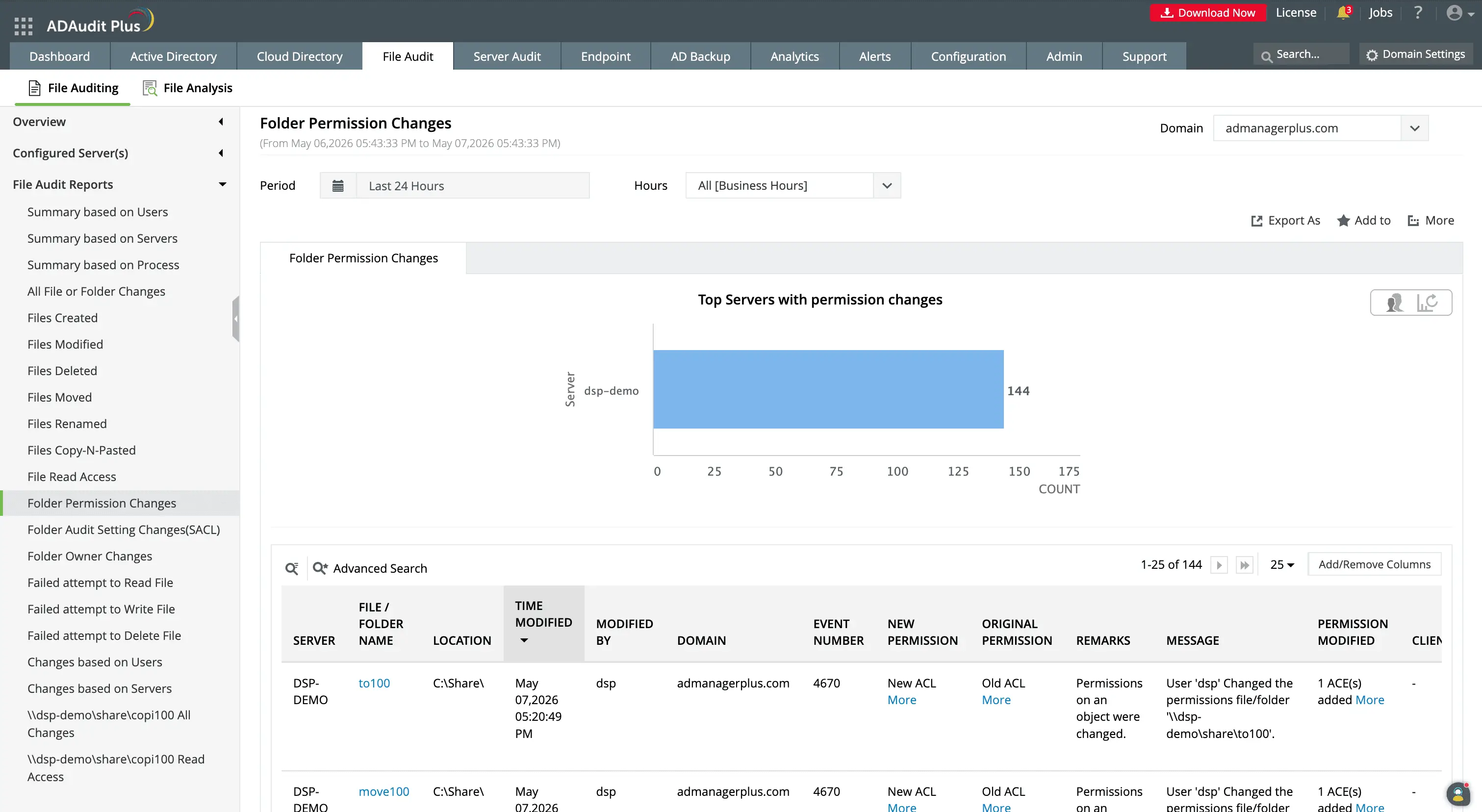
The Folder Permission Changes report shows file server name, folder path, user who made the change, modified time, and permission values for each DACL change event.
Track permission changes with before-and-after values
ADAudit Plus records the exact permission state before and after every folder permission change, including DACL, SACL, and ownership events. Each event includes the user who made the change, the machine it came from, and the timestamp.
- Old and new permission values are displayed in reports, giving you a complete before-and-after record for every change.
- Every SACL change is recorded with who made it and when, so audit gaps are visible as soon as they are created.
- Folder ownership transfers are captured with the previous owner and the new owner, with the full event context.
- Both SACL and ownership event types appear alongside DACL changes in the same file server audit view.
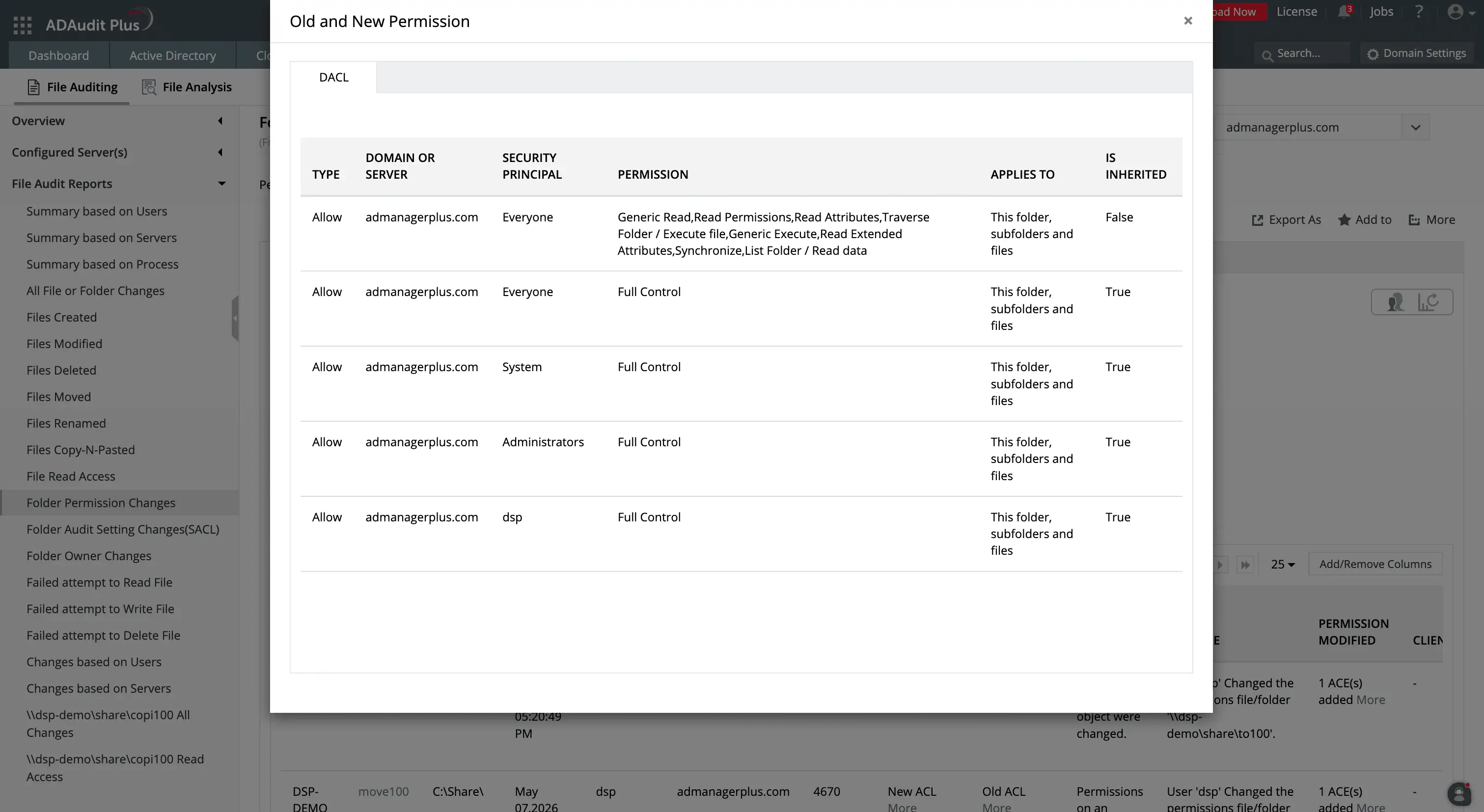
You can track what ACLs have been changed by using the Old and New ACL details in the permission change reports.
Monitor privileged user activity on file servers
Privileged accounts generate a disproportionate share of file server permission changes. ADAudit Plus captures all file server activity attributed to privileged accounts, including permission changes, file accesses, and failed access attempts. ADAudit Plus can:
- Record permission changes made by Domain Admin accounts.
- Show service account file activity alongside interactive user activity, with no separate audit stream.
- Filter any file audit report by user to isolate the activity of a single account across your entire file server environment.
Detect failed access attempts and anomalous file activity
Failed file access attempts are one of the clearest early signals of unauthorized access. A user repeatedly failing to read a file they do not have permission to open, or a service account suddenly generating denied write attempts on a share it has never touched, are patterns worth investigating.
ADAudit Plus records every failed read, write, and delete attempt with the user, machine, file path, and access type. Beyond static failure tracking, the UBA engine establishes a baseline of normal file activity per user and flags deviations from that baseline. This enables you to detect:
- When failed file access attempts spike above a user's normal volume.
- When file modification volume exceeds a user's baseline, which is a strong indicator of ransomware encryption activity.
- Unusual file deletion volumes are flagged separately, distinguishing bulk deletion from normal file management.
- File activity occurring outside a user's established working hours is reported as a time-based anomaly, independent of volume thresholds.
- First-time access to a file server resource by a user who has never accessed it before is recorded as a lateral movement signal.
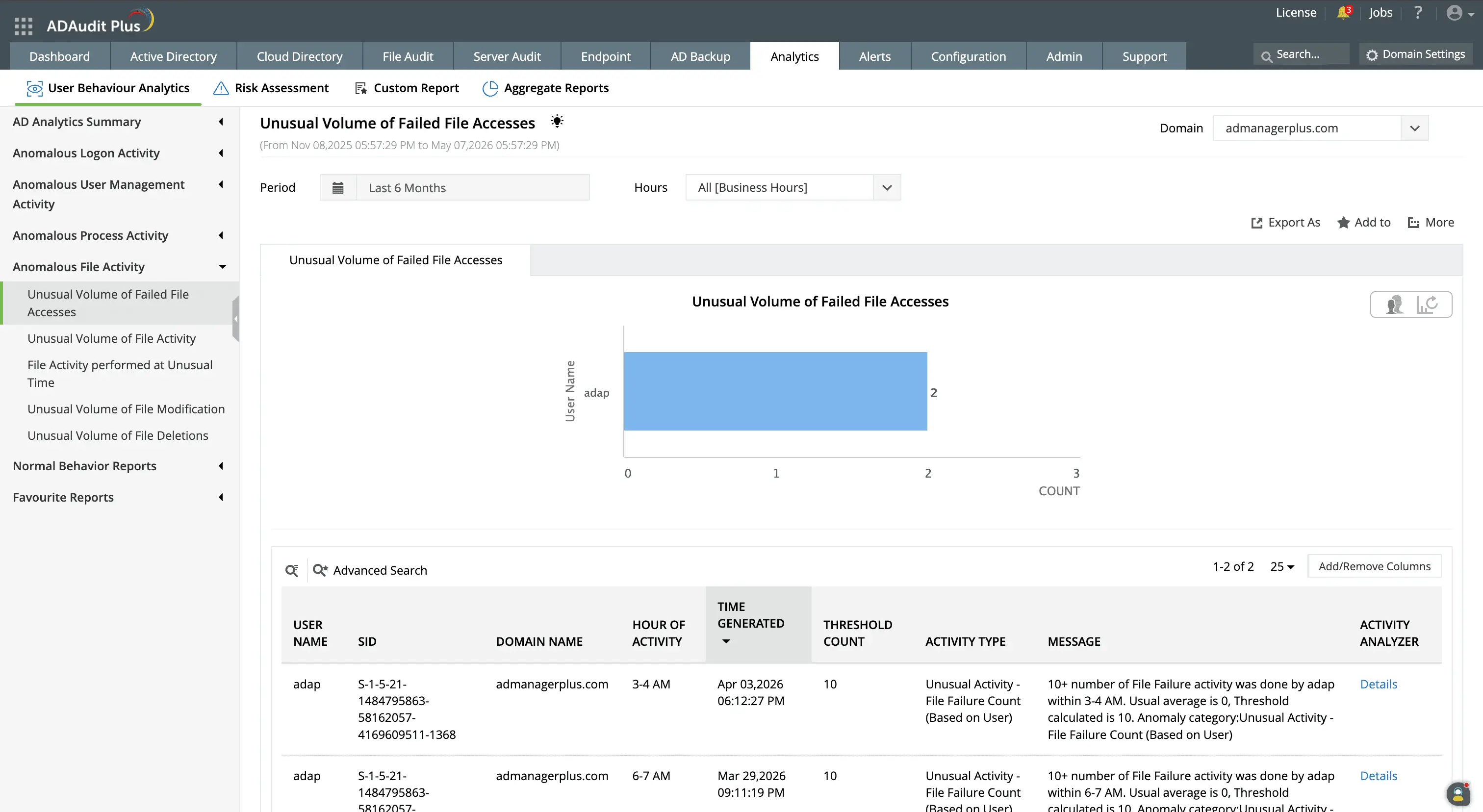
The user behavior analytics capability built into ADAudit Plus detects abnormal spikes in failed access attempts to files.
Get real-time alerts on critical permission changes
Audit reports tell you what happened. Alerts tell you what is happening right now, while there is still time to act. ADAudit Plus comes with pre-configured alert profiles for the file server and permission change events that carry the highest risk, and you can configure additional profiles for any event combination relevant to your environment. Alert thresholds and scope are configurable, so high-volume environments only escalate changes on the shares and users that actually require immediate attention. You can configure alerts for:
- When a folder permission change occurs on a monitored share, your team is notified immediately, so unauthorized access grants are caught before users discover them.
- DACL changes, giving you a real-time notification with the user, machine, old permission value, and new permission value.
- AdminSDHolder Permission Changes to be aware the moment that object is modified, before the automatic propagation reaches the protected accounts.
- Possible Ransomware activity, when file modification and deletion patterns match ransomware behavior, giving your team a window to isolate the affected machine before encryption spreads.
- Auto-creating a ticket in ServiceNow, Jira, or ManageEngine ServiceDesk Plus, for high-priority events so the right team is notified without manual triage.
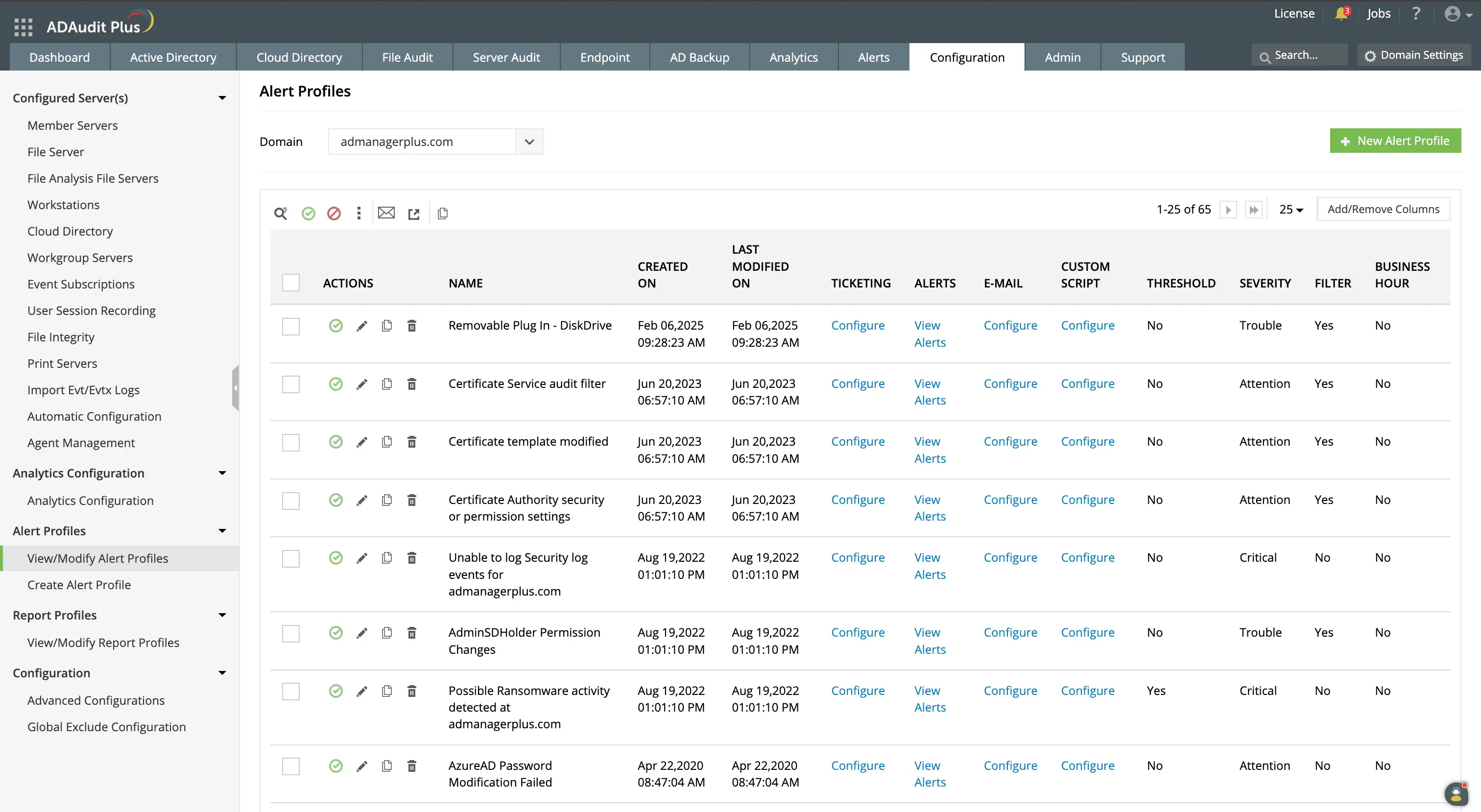
ADAudit Plus comes with prepackaged alert profiles for critical events like possible ransomware activity, AdminSDHolder permission changes, and so on.
You can also customize file server alerts for your organization's unique needs.
Meet compliance requirements for file server access
Compliance frameworks that touch file server environments require a complete, attributable audit trail for file access and permission change events. ADAudit Plus includes pre-configured compliance reports for every major standard, plus custom report profiles for audit cycles that require specific scoped views.
You can create custom report profiles that combine specific users, audit actions, time windows, and file paths into a saved view that generates on demand across audit cycles.
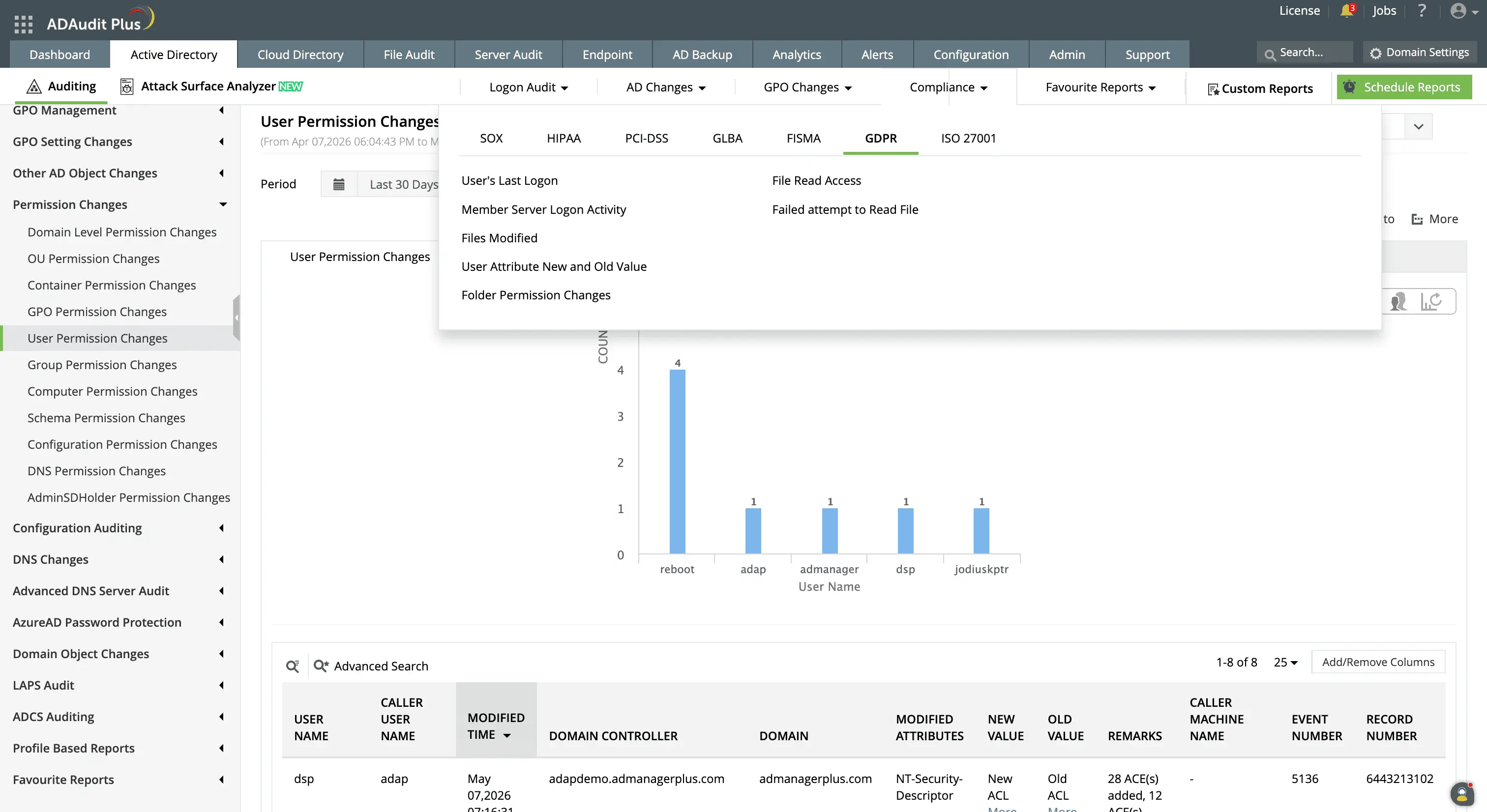
Easily generate reports for compliance audits, including ones for file server changes, user attribute changes, and so on.
Extend file permissions auditing to hybrid storage environments
Most file server environments now include Amazon FSx volumes and Azure File Share instances alongside on-premises servers, with user accounts that are hybrid identities authenticated through both on-premises Active Directory and Microsoft Entra ID. ADAudit Plus audits these platforms with consistent report coverage from a single console:
Windows file server and failover cluster, NetApp, EMC and EMC Isilon, Hitachi NAS, Huawei OceanStor, Synology NAS, Amazon FSx, QNAP NAS, Azure File Share, CTERA, Nutanix Files, and Qumulo NAS.
Why native tools fall short on file server permissions auditing
Windows records permission change events but the native infrastructure for working with those events has real limitations for any organization auditing file server permissions at scale.
- Security event logs are stored locally on each file server. There is no built-in mechanism to aggregate events across multiple servers, so investigating a permission change that spans several shares means logging into each server individually.
- Event Viewer has no alerting capability. You can view events after the fact, but there is no native path from a permission change event to a notification sent to the responsible team.
- The Security log has a fixed maximum size and overwrites the oldest events when it fills. In high-volume file server environments, events from earlier in the week may no longer exist by the time someone investigates.
- PowerShell can query event logs programmatically, but building and maintaining scripts for permission change tracking, before-and-after value extraction, and multi-server aggregation requires ongoing effort and produces no built-in audit trail of its own.
ADAudit Plus collects events from all monitored file servers centrally, retains them for the duration required by your compliance policy, and surfaces them in pre-configured reports with old and new permission values, with no scripting or manual log collection required.
4 compelling reasons to choose ADAudit Plus
Widely recognized
ADAudit Plus has been recognized as a Gartner Peer Insights Customers' Choice for Security Incident & Event Management (SIEM) for four consecutive years.
Easy deployment
Go from downloading ADAudit Plus to receiving predefined reports and alerts in under 30 minutes, without any professional help.
Competitive pricing
ADAudit Plus is licensed per-server, unlike other IT auditors which are licensed per-user. With per-server licensing, even with a growing number of users each year, you can continue to ingest log data without additional costs.
Unified visibility
ADAudit Plus consolidates auditing, security, and compliance across Active Directory, Entra ID, Windows servers, workstations, and file servers into a single pane of glass, eliminating the need to juggle multiple tools.
Frequently asked questions
A file server permissions auditing tool captures changes to folder access control lists (DACLs), folder audit setting changes (SACLs), folder ownership transfers, failed file access attempts, and all standard file operations. Each event is attributed to the user account and machine responsible for the change. ADAudit Plus does this with detailed reports for compliance audits, alerts for critical events, and automated responses for mitigating damage.
Windows records explicit permission changes on a folder as Event ID 4670. Inherited changes propagate silently because the event fires on the parent, not the child folder. ADAudit Plus captures both and links inherited permission propagation events to the originating folder change for a complete audit trail.
ADAudit Plus audits Windows file servers, Windows failover clusters, and several NAS device Types including NetApp (7-Mode and C-Mode), EMC Isilon, Synology, Hitachi, Huawei OceanStor, QNAP, Nutanix Files, CTERA Edge Filers, Qumulo, Amazon FSx, and Azure File Share.
Retention is configurable in ADAudit Plus archive settings and depends on your compliance obligations. ADAudit Plus supports configurable log retention and archive scheduling so audit records remain available for the full duration your standard requires.
AdminSDHolder in Active Directory holds the permission template for all protected privileged accounts. When its permissions change, Windows propagates the new permissions to every account in groups like Domain Admins and Backup Operators. ADAudit Plus reports these changes as a distinct event so you catch them before propagation completes.
ADAudit Plus uses machine learning to establish a baseline of normal file modification and deletion volume per user. When activity exceeds that baseline (a pattern consistent with ransomware encryption), an alert fires, giving your team time to isolate the affected machine before encryption spreads further.