

- Free Edition
- Quick links
- Active Directory management
- Active Directory reporting
- Active Directory delegation
- Active Directory permissions management and reporting
- Active Directory automation
- Governance, risk, and compliance
- Microsoft 365 management and reporting
- Microsoft 365 management and reporting
- Microsoft 365 management
- Microsoft 365 reports
- Microsoft 365 user management
- Microsoft 365 user provisioning
- Microsoft 365 license managementn
- Microsoft 365 license reports
- Microsoft 365 group reports
- Dynamic distribution group creation
- Dynamic distribution group reports
- Exchange management and reporting
- Active Directory integrations
- Popular products
What is an AD explorer?
An AD explorer is a specialized utility that allows IT administrators and security professionals to navigate, view, and analyze their AD structure. Unlike the standard ADUC console, an advanced AD explorer provides a raw, hierarchical view of the directory tree, enabling users to inspect object properties, attributes, and permissions that are often hidden in default views.
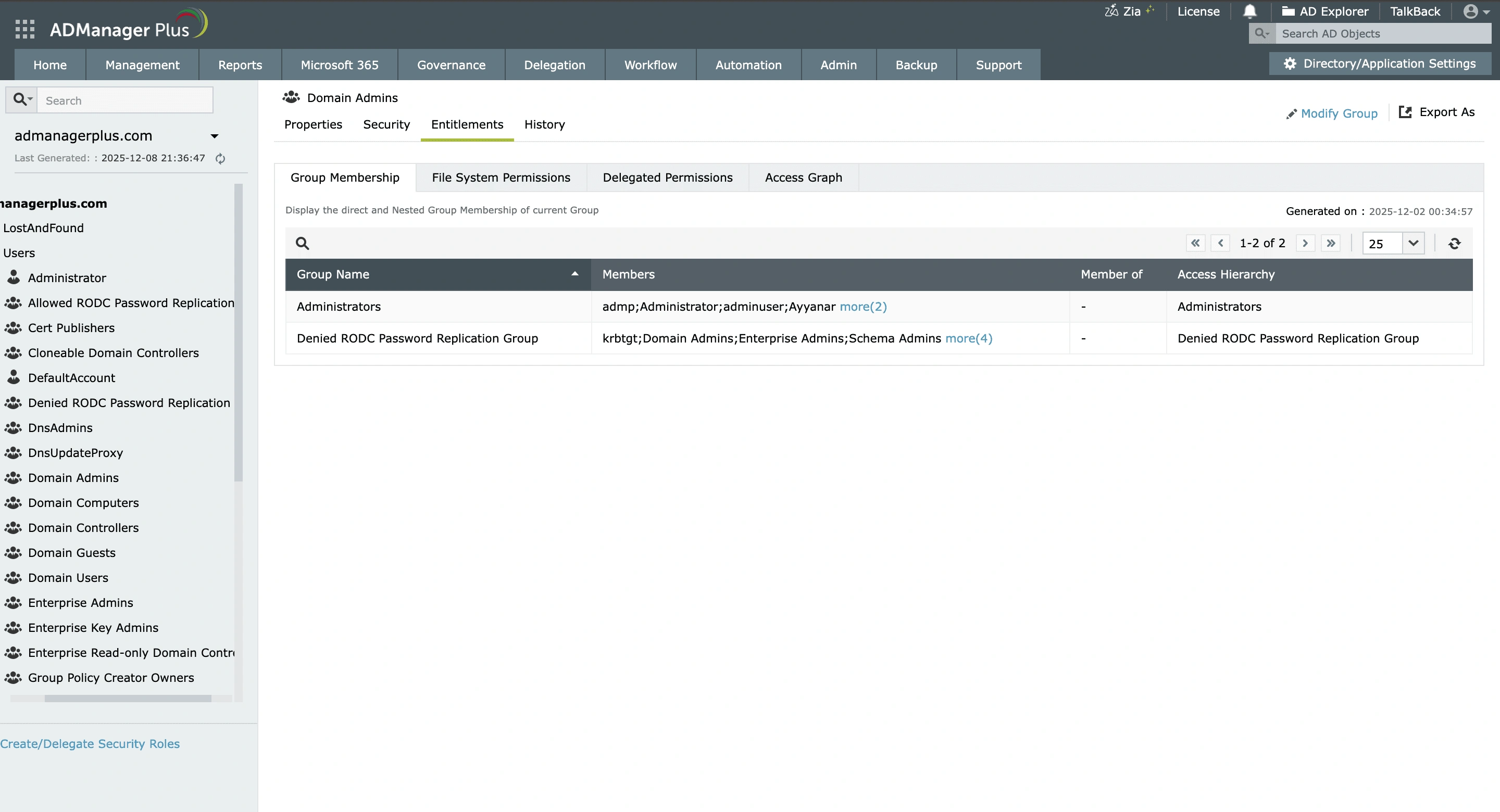
While traditional AD explorers are often desktop-based, a modern AD viewer, such as ADManager Plus, transforms how you view AD by offering a unified interface that displays complete object information, permissions, entitlements, and access relationships all on a single screen.
The need for complete visibility
While the native AD explorer suffices for basic tasks like password resets and user modification, it hits a wall when faced with complex infrastructure challenges. Critical operations like troubleshooting deep replication errors, auditing granular security permissions, or visualizing the full inheritance of an AD hierarchy require more than just a flat list of objects; they require an advanced AD viewer capable of deep inspection.
ADManager Plus, a comprehensive AD management solution, grants you full visibility into your AD structure, moving beyond simple data presentation to offer deep hierarchical insights. It allows you view hidden attributes, security descriptors, and much more, giving you the clarity needed to manage and secure your AD infrastructure effectively.
"ManageEngine ADManager offers native integration with Active Directory and includes status summaries, reporting, and automation. Together, these features streamline management and provide strong visibility into the environment."
-Jose M, CyberSecurity Administrator
Rated 5/5 on G2
Why upgrade to an advanced Active Directory explorer?
Managing AD today means seeing beyond surface-level attributes to understand the complex web of effective access that defines your security posture. Upgrading to a dedicated AD explorer ensures you have the depth of visibility required to protect your AD domain.
-
Unified AD view
Stop jumping between different screens and tools to manage your network. Instead of installing software on every computer or logging in to different servers, ADManager Plus puts everything in one place. You can search for users and computers across all your domains at once, making it much faster to find what you need.
-
In-depth entitlement analysis
ADManager Plus goes beyond basic attribute lookups to provide a comprehensive analysis of user and machine entitlements. It instantly reveals nested group memberships, helping you uncover shadow admins and similar accounts hidden deep within complex group structures. Furthermore, you can view file and delegated AD security permissions for users, allowing you to proactively prevent privilege creep.
-
Access graphs
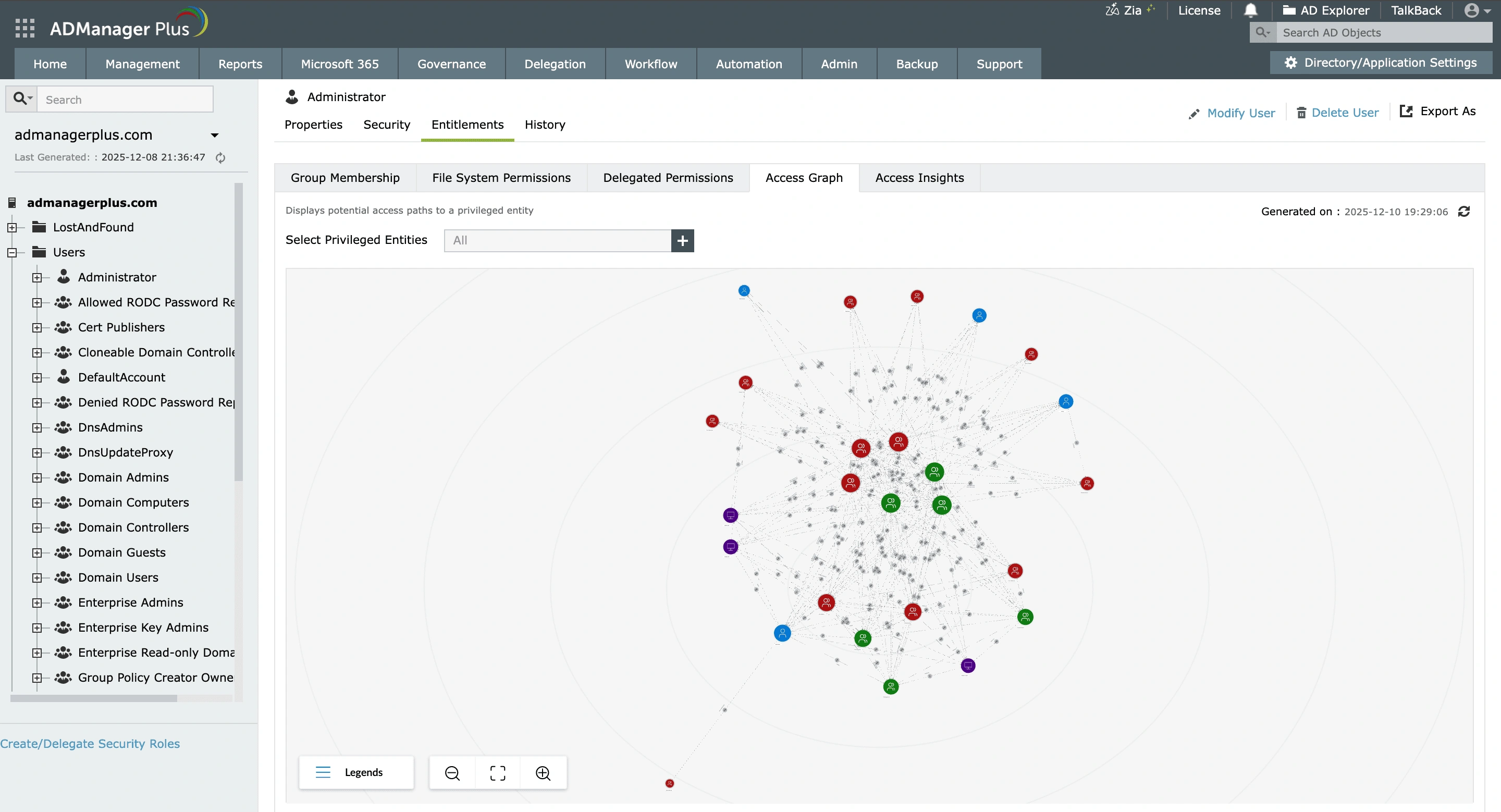
With ADManager Plus' access graphs, visualize how attackers can move laterally across a network and map out potential routes a compromised user could take to reach privileged entities. By visualizing these attack paths, you can identify and sever dangerous connections where low-level users have unintended write access, effectively hardening your security posture before an incident occurs.
-
Zia access insights
Zia access insights enhances our AD explorer by adding intelligent context to AD visibility. It highlights risky or unusual memberships, prioritizes high-impact privilege relationships, and helps administrators focus on access paths that matter most. By reducing the need for manual analysis, Zia turns raw AD data into actionable insight, helping teams proactively address access risks before they lead to security incidents or audit findings.
-
Powerful search capabilities
Find anything in your AD environment instantly with flexible search options designed for both quick lookups and complex investigations. Filter by object types or specific conditions to get precise results in seconds.
Key benefits of our AD explorer
- Unified visibility: Search and view users, groups, and objects from a single, unified AD explorer.
- Faster and secure AD visibility: Explore and view objects with zero risk of unintended changes in your AD environment.
- Reduced security risk: Uncover hidden and indirect privilege escalation paths using visual access graphs.
- Streamlined certification: With audit-ready, read-only visibility into entitlements and access relationships, you can simplify access reviews and audits.
Other features
Active Directory Management
Make your everyday Active Directory management tasks easy and light with ADManager Plus's AD Management features. Create, modify and delete users in a few clicks!
Active Directory Reports
A catalog of almost every report that you will need from your Active Directory! Comprehensive and Reliable reporting. Schedule reports to run periodically. Manage your AD right from within the reports.
Active Directory Delegation
Unload some of your workload without losing your hold. Secure &amb; non-invasive helpdesk delegation and management from ADManager Plus! Delegate powers for technician on specific tasks in specific OUs.
Microsoft Exchange Management
Create and manage Exchange mailboxes and configure mailbox rights using ADManager Plus's Exchange Management system. Now with support for Microsoft Exchange 2010!!
Active Directory Cleanup
Get rid of the inactive, obsolete and unwanted objects in your Active Directory to make it more secure and efficient...assisted by ADManager Plus's AD Cleanup capabilities.
Active Directory Automation
A complete automation of AD critical tasks such as user provisioning, inactive-user clean up etc. Also lets you sequence and execute follow-up tasks and blends with workflow to offer a brilliant controlled-automation.
Need Features? Tell Us
If you want to see additional features implemented in ADManager Plus, we would love to hear. Click here to continue


