Perform smarter site migrations with complete control
Modern SharePoint environments demand flexible and efficient migration solutions, especially as organizations shift to hybrid or cloud-based models. Native tools like the SharePoint Migration Tool lack the automation and depth to handle complex structures and metadata. SharePoint Manager Plus offers a fast and seamless migration experience, whether you're moving a SharePoint site to another tenant or between on-premises versions, including SharePoint 2019, 2016, 2013, and Subscription Edition. Minimize disruptions to your environment and move entire farms and site collections or specific sites with ease.
Planning your SharePoint site migration
Planning a site migration involves defining the scope, cleaning up existing content, designing the new information architecture, and preparing for user communication and training.
- Assessment and planning
Start by defining the migration scope and auditing all SharePoint data, including usage and structure. Cleaning up redundant or outdated content will reduce clutter and simplify the process.
- Preparation
Choose a SharePoint migration tool that can handle your environment and provide automated reports and back up data beforehand. Prepare users and help desk staff with clear communication and training.
- Execution and validation
Run a test migration with a small user group to identify issues and gather feedback, then execute the full migration while monitoring the progress. Afterwards, validate that all data has been migrated accurately and securely, and finalize the migration with a cutover to the new environment if you're using an incremental approach.
How to perform SharePoint site migration
SharePoint Manager Plus helps you migrate SharePoint sites to another tenant or across farms in a few clicks. Follow these steps to perform site migration:
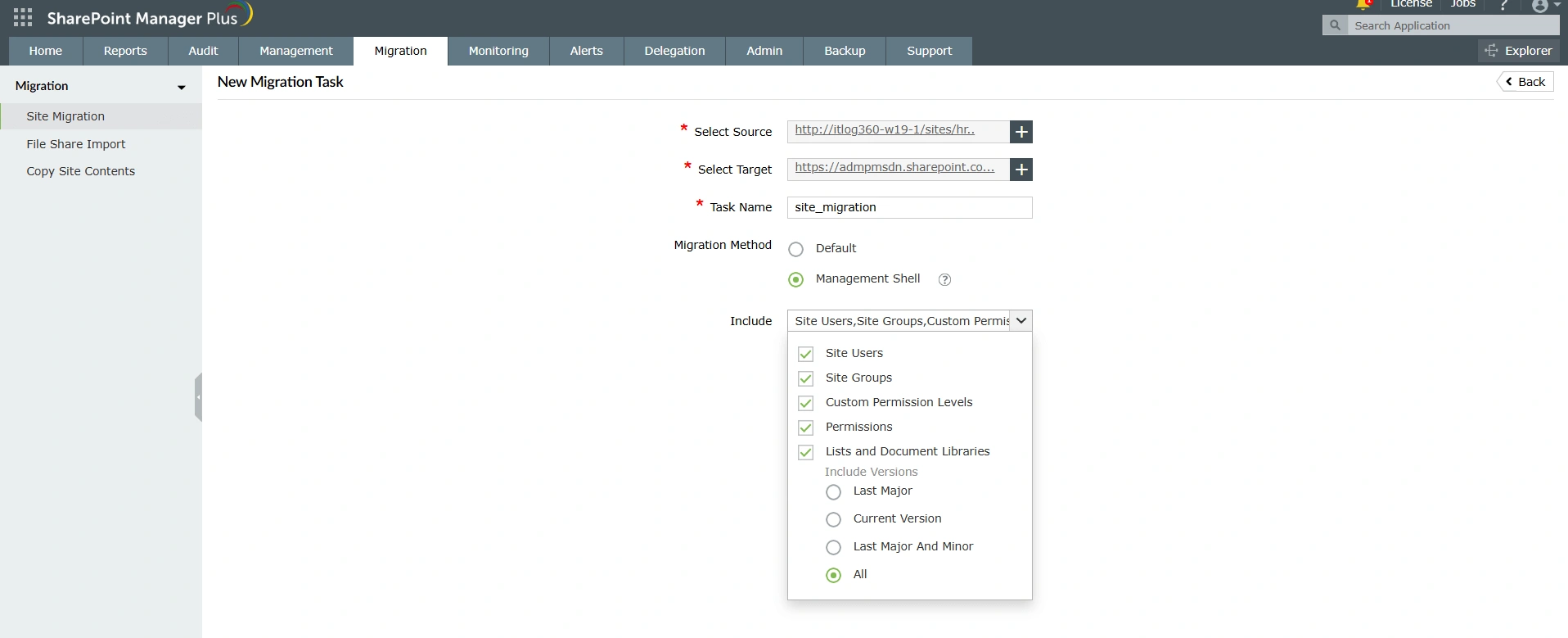
- Log in to SharePoint Manager Plus and navigate to Migration > Site Migration and click + Add Migration Task.
- Choose the source and destination sites using the Select Source and Select Target fields.
- Select all necessary objects to be included, like site users, groups, permissions, and lists.
- Click Run Now or Run Later based on your preference. You can see the status in the Site Migration page.
- Upon completion, click View Details under the Result column to get a summary report.
Key features that make your migrations easier
SharePoint Manager Plus simplifies every stage of your migration—from planning and execution to monitoring and validation.
Flexible migrations
Migrate complete site collections in bulk or select individual sites and subsites using a hierarchical view with expandable nodes. Understand how sites are structured, including permissions and object properties, using the architecture explorer tool.

Permission and list preservation
Select exactly what objects you'd like to migrate. Customize the task by selecting users, groups, custom permissions, lists, and even list versions.
Migration monitoring and summary
Once a migration task has been added, you can either run it immediately or later. Track task progress and review it with detailed summary reports once the process is complete. Pair insights with powerful SharePoint reporting to track changes post-migration.

Benefits of migrating with SharePoint Manager Plus
- Run multiple migrations at once Don't wait for a migration to complete to begin another. SharePoint Manager Plus lets you run multiple migrations simultaneously, boosting your efficiency.
- Bulk SharePoint data migration Select whole site collections to bulk-migrate resources to a new environment.
- Accelerate SharePoint Online migration Experience faster migration speeds by leveraging the SharePoint Online Management Shell. This also enables you to migrate list and document library versions.
- Manage while you migrate Don't let a migration affect your productivity! Continue managing, reporting on, and auditing your SharePoint environment while your resources migrate.
- Hassle-free access Perform migrations without needing specific or high-level permissions, simplifying the process and reducing admin overhead.
- Comprehensive support Migrate sites between SharePoint Online and SharePoint Server 2019, 2016, 2013, and Subscription Edition.
FAQs
A SharePoint migration is the process of moving content, sites, configurations, and applications from one SharePoint environment to another. This usually involves upgrading from an older on-premises version, like 2013, to a newer one, or transitioning from an on-premises server to the cloud (SharePoint Online). The primary goals are to modernize the system, improve security, enhance collaboration features, and cleanse data.
Microsoft's native solution, the SharePoint Migration Tool, offers features for organizations to migrate to SharePoint Online. However, this tool has several limitations and challenges, such as lack of support for cross-tenant migrations, restricted file types, and limited visibility to plan your migrations. Third-party tools like SharePoint Manager Plus help migrate between different SharePoint versions and provide a more comprehensive feature set to streamline the process.