Most teams running applications in Kubernetes monitor node CPU and memory usage, pod health, restart counts, and cluster-level metrics. These metrics are essential for understanding the health of the Kubernetes environment, but they do not show whether application transactions are completing successfully or identify the specific code causing errors and performance issues. As a result, an K8s infrastructure monitoring dashboard may appear healthy while users continue to experience slow response times, failed requests, or degraded application performance.
Application performance monitoring (APM) complements Kubernetes monitoring by providing visibility into application transactions, code execution, dependencies, database queries, and errors. This article explains how to establish real-time APM in a Kubernetes environment and maintain it consistently as applications scale.
Extending Kubernetes monitoring with application-level visibility
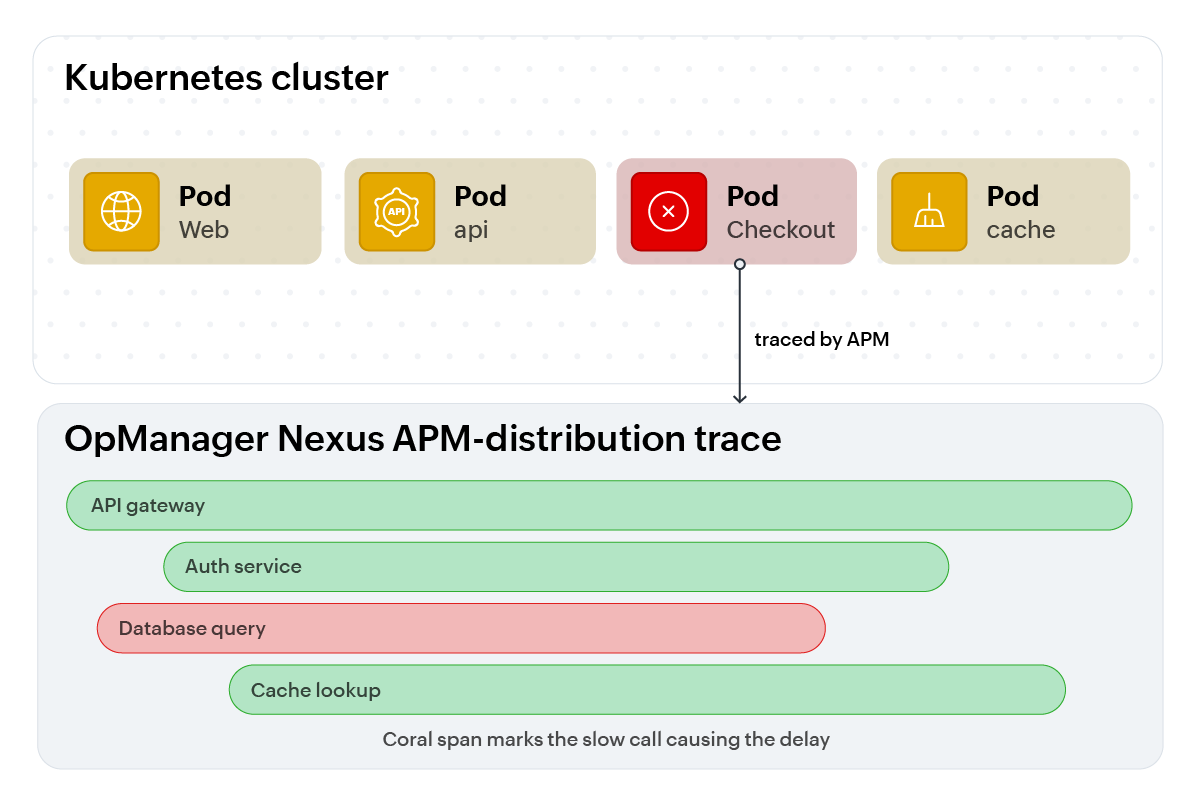
Kubernetes manages the application infrastructure lifecycle by scheduling pods, restarting failed containers, scaling replicas based on CPU or memory thresholds, and routing traffic as pods are created or removed. These capabilities provide the orchestration required to operate applications reliably in a dynamic environment.
However, Kubernetes monitoring alone cannot explain why a request took longer than expected, which downstream service timed out during a distributed transaction, or which line of Java, Python, or .NET code triggered an inefficient database query.
It provides visibility into the state of containers and cluster resources. It does not provide detailed visibility into the execution of application code. That code-level visibility is the role of APM.
For example, a resource-utilization dashboard may show that a pod is experiencing high CPU usage. However, it may not reveal whether the increase is caused by an unindexed database query executed repeatedly during checkout, an inefficient algorithm, or a downstream dependency that is causing repeated retries.
K8s monitoring provides valuable operational context, but application-level instrumentation is required to understand what is happening inside the application process.
When Kubernetes has infrastructure monitoring but no APM
Running an application in a Kubernetes environment without APM can create a significant troubleshooting gap. Teams may have detailed information about nodes, pods, containers, and resource utilization while still lacking the information required to identify the root cause of application-level problems.
Diagnostic information can disappear when pods are replaced
Kubernetes can automatically restart failed containers or replace unhealthy pods. Although this helps maintain availability, important diagnostic information may be lost when the affected container terminates.
A cluster dashboard may show an increase in restart counts or a container entering a crash loop. However, it may not retain the stack trace, slow database query, memory-leak pattern, or application exception that caused the failure.
APM helps preserve this context by collecting application errors, transaction data, and performance information before the affected process terminates.
A healthy cluster can still host a slow application
An application endpoint may experience increased latency even when CPU and memory usage remain within acceptable limits. This can occur when the bottleneck is an inefficient database query, a slow external service, lock contention, or an application-level configuration issue.
Infrastructure metrics can confirm that the cluster is operating normally, but they cannot identify which transaction or dependency is responsible for the delay. APM provides transaction-level visibility to show where the request spent its time.
Latency can be distributed across multiple services
A single user request may pass through several microservices, namespaces, internal APIs, external services, and databases. Without distributed tracing, an alert such as “the checkout API is slow” gives engineers limited information about where to begin their investigation.
They may need to inspect multiple services and correlate logs manually to determine whether the delay originated in the application, a downstream dependency, or the database.
Distributed tracing provides an end-to-end view of the request path. It helps engineers identify the service, method, database call, or external dependency that contributed most to the overall latency.
Autoscaling may respond to symptoms rather than causes
The Kubernetes Horizontal Pod Autoscaler can add replicas when resource usage increases. This can be useful when additional capacity is genuinely required, but scaling does not resolve every type of performance problem.
For example, an unindexed database query may force every request to scan a large table. Adding more application replicas may distribute the same inefficient workload across additional pods without resolving the database bottleneck.
This approach can increase infrastructure consumption while leaving the underlying problem unchanged. In some cases, it may only mask the symptoms temporarily, making the issue more difficult to identify and troubleshoot later.
APM helps distinguish between genuine capacity constraints and application-level inefficiencies. It can show which transactions, database queries, or dependencies are driving the increase in resource usage.
Mean time to resolution increases with cluster complexity
As Kubernetes environments grow, applications may span multiple clusters, namespaces, nodes, services, and external dependencies. The number of possible causes behind a single performance symptom increases accordingly.
Infrastructure metrics alone may not provide enough context to narrow down the cause. Without application-level dependency mapping, transaction tracing, and code-level diagnostics, engineers may need to perform a manual investigation of the services.
APM reduces this complexity by connecting application transactions with the infrastructure and services through which they run.
APM instrumentation patterns for Kubernetes
APM instrumentation in Kubernetes generally follows one of several deployment patterns. Each pattern collects telemetry from the application process or attaches to the running process to provide application-level performance data.
The most appropriate approach depends on the application language, deployment model, security requirements, operational preferences, and the level of configuration control available to the platform team.
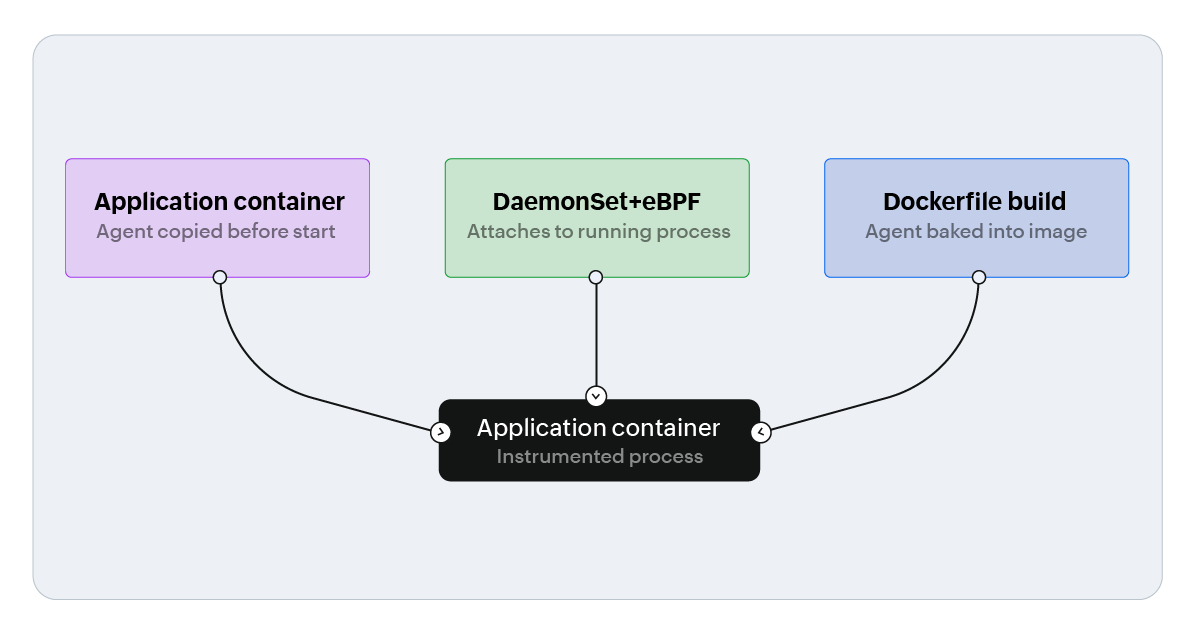
Init container-based installation
With this approach, an init container downloads or copies the required APM agent binaries into a shared volume before the primary application container starts.
The application container mounts the shared volume and loads the agent using the appropriate runtime configuration. Depending on the language, this may involve environment variables such as JAVA_TOOL_OPTIONS, NODE_OPTIONS, or an agent-specific startup hook.
This pattern keeps the agent installation separate from the application image. It can simplify agent upgrades and allow teams to apply instrumentation without rebuilding every application image.
However, it requires changes to the workload definition, including the init container, shared volume, volume mounts, and relevant environment variables.
DaemonSet with eBPF
For supported languages and runtime environments, a privileged DaemonSet can use eBPF uprobes to attach to running processes without modifying the application binary.
This approach can reduce the need for application code changes or agent packaging. It is particularly useful in environments where rebuilding application images is difficult or where teams want to apply instrumentation across multiple workloads.
However, eBPF-based monitoring generally requires elevated node-level permissions. The same consideration applies to operator- or auto-profiler-based installation methods when they require privileged access to the host or running processes.
Therefore, this approach should be evaluated against the organization’s security policies, runtime restrictions, and workload-isolation requirements.
Dockerfile-based installation
With Dockerfile-based installation, the APM agent is added to the application image during the build process.
This approach creates a self-contained image with the required agent already available at runtime. It can simplify deployment configuration and make the instrumentation behavior more predictable across environments.
The trade-off is that the application image becomes slightly larger and the image build process must be updated whenever the agent is added or upgraded. This approach also requires changes to the application image and, in some cases, changes to the application workload YAML to configure the runtime hook.
Managing APM at Scale
For teams using OpManager Nexus, the Kubernetes operator reduces much of the manual work involved in applying APM instrumentation across Kubernetes workloads. It helps standardize instrumentation as services are added, updated, redeployed, and scaled.
At scale, the main challenge is not selecting an instrumentation pattern once. The challenge is ensuring that APM remains active and consistently configured across every deployment.
A scalable implementation should include the following practices:
- Template instrumentation settings in Helm charts so that new services inherit the required APM configuration by default.
- Store license keys and application naming details in Kubernetes Secrets and ConfigMaps instead of hard coding them in individual deployment manifests.
- Use automatic application discovery so that new pods, replicas, and namespaces appear in the monitoring platform without a separate manual setup step.
- Apply consistent naming conventions so that applications, services, environments, and namespaces can be identified easily.
- Use adaptive performance thresholds where appropriate instead of relying exclusively on static thresholds that may become unsuitable as traffic patterns and replica counts change.
These practices complement K8s infrastructure monitoring rather than replace it. Infrastructure metrics show the health and state of the cluster, nodes, pods, and containers. APM provides the application-level transaction, code, dependency, and database visibility needed to investigate user-facing performance issues.
Setting up OpManager Nexus APM in your Kubernetes cluster
OpManager Nexus APM supports the same instrumentation patterns across major application frameworks, including Java, .NET/.NET Core, Node.js, Go, Python, PHP, and Ruby, so teams do not need a different APM approach for each language stack. The setup is generally the same:
- Create a namespace-scoped secret for the OpManager Nexus license key.
- Add an InitContainer, or for Go, a privileged DaemonSet, to copy the language-specific APM agent into a shared volume mounted by the application container.
- Set the runtime hook through the appropriate environment variable, such as JAVA_TOOL_OPTIONS for Java, NODE_OPTIONS for Node.js, or the CoreCLR profiler variables for .NET. For Go, use the process-name/port mapping ConfigMap for the eBPF agent.
- Deploy and verify the updated manifests. Confirm that the InitContainer or DaemonSet completes successfully and that transactions start appearing in the OpManager Nexus console within a few minutes of traffic reaching the service.
From there, code-level diagnostics, transaction tracing, dependency mapping, and database query isolation work the same way they do for VM or containerized environments.
Kubernetes remains the deployment layer, while the platform maps the application automatically rather than treating it as a separate monitoring problem.
Frequently asked questions
1. How do you monitor application performance in Kubernetes?
You can monitor application performance in Kubernetes by combining Kubernetes infrastructure monitoring with an APM solution. Kubernetes metrics show pod, container, node, and resource health, while APM tracks application transactions, response times, errors, database queries, dependencies, and code-level performance.
2. Why is APM needed in addition to Kubernetes monitoring?
Kubernetes monitoring shows whether the cluster and workloads are healthy, but it does not explain why an application request is slow or failing. APM provides transaction-level and code-level visibility to help identify bottlenecks, exceptions, inefficient queries, and slow downstream services.
3. How do you set up an APM agent in a Kubernetes environment?
You can deploy an APM agent in Kubernetes using an init container, a Dockerfile-based installation, or a DaemonSet with eBPF, depending on the application runtime and security requirements. The agent is then configured with the required license key, application details, and runtime hook before the workload is deployed.
4. Can Kubernetes APM monitor microservices and distributed transactions?
Yes. Kubernetes APM can monitor microservices and trace requests across application services, APIs, databases, and external dependencies. Distributed tracing helps identify the specific service or dependency contributing to latency or transaction failures.
5. How does APM help troubleshoot Kubernetes application issues?
APM correlates Kubernetes events, suchs as pod restarts and resource pressure, with transaction traces and application telemetry. This helps engineers identify the affected service, slow database query, failed dependency, exception, retry pattern, or code path and resolve the root cause faster.
6. Does OpManager Nexus support both Kubernetes infrastructure monitoring and APM?
Yes. OpManager Nexus provides end-to-end Kubernetes observability, covering both infrastructure-level cluster metrics and application-level performance monitoring in a single platform. Teams do not need separate tools to monitor cluster health and application transactions.