What is a certificate chain?
A certificate chain (also called a trust chain or certification path) is a hierarchical sequence of digital certificates that links a specific website's SSL certificate all the way back to a trusted source, known as a certificate authority (CA). Think of it as a chain of endorsements where each link validates the one before it. When you visit a secure website showing the padlock icon, your browser verifies this entire chain before establishing an encrypted connection. The certificate must trace back to a CA that your browser already trusts.
Every link in the chain validates the one before it, creating a verifiable path of authenticity. If any link in the chain is broken or untrustworthy, the browser will not trust the website and will show a familiar NET::ERR_CERT_AUTHORITY_INVALID or similar security warning to the user. This entire process is what is often called the chain of trust.
In simple terms, a certificate chain of trust is the digital paper trail that proves a website's identity by linking it through a series of authoritative signatures back to a globally recognized CA that your browser already trusts.
What is the purpose of certificate chaining?
At a high level, certificate chaining is to establish a secure and verifiable line of trust for all communications over the internet. It accomplishes critical security goals that set the foundation for the modern online world, such as:
Authentication and identity verification
Certificate chains prove a website is what it claims to be, preventing attackers from impersonating legitimate sites. This stops phishing attacks where criminals create fake websites that look identical to bank sites, shopping sites, or login pages.
End-to-end encryption
Once the SSL certificate chain establishes trust, it enables the encryption of all data transmitted between your browser and the web server. This protects sensitive information including but not limited to login credentials and passwords, credit card and payment information, personal data in forms, private messages and communications, and medical records in healthcare portals.
Regulatory compliance
Valid certificate chains are legally required for businesses handling sensitive data. Organizations must maintain proper certificate chains to comply with the PCI DSS, HIPAA, SOC2, the GDPR, and more when processing payments, protecting patient and customer data, and performing other operations.
What are the 3 core components of a certificate chain?
Every TLS certificate chain is composed of three distinct types of certificates and each one has a specific role in building the chain of trust.
The root certificate
The intermediate certificate
The server certificate
The root certificate
The root certificate is the ultimate source of trust in the entire system. It belongs to a highly trusted CAs, like Let's Encrypt, Sectigo, or Digicert. These root certificates are self-signed and come pre-installed in your web browser or operating system in a special location called a trust store.
Think of the root CA as a government that issues passports. Your browser trusts this government inherently. Because the root CA's private key is so powerful, it is kept extremely secure and offline to prevent compromise. A compromised root key would be a catastrophic event for internet security.
The intermediate certificates
Because root certificates are too valuable to use directly, CAs issue intermediate certificates that act as authorized deputies. These certificates:
- Are signed by the root CA, effectively saying "I trust this entity to issue certificates on my behalf."
- Actually issue the day-to-day SSL/TLS certificates for websites.
- Can be revoked if compromised without affecting the entire system.
- Allow CAs to delegate authority to regional offices or specialized services.
An intermediate CA is like a regional passport office authorized by the government. If one regional office is compromised, the government can shut it down without invalidating every passport in the country.
Certificate chains can have multiple intermediate certificates linked together, with each one signing the next until reaching the final server certificate. Modern implementations typically use one to three intermediate certificates.
The server certificate
- Is issued specifically for a particular domain (like www.zylker.com).
- Sits at the very end of the certificate chain.
- Is signed and validated by an intermediate CA.
- Contains the public key used for encryption.
- Has a relatively short validity period (typically 90 days to one year).
When your browser receives this certificate, it verifies the digital signature using the public key from the intermediate certificate that issued it. The browser continues checking signatures up the chain until reaching a root certificate in its trust store.
What happens when a certificate chain breaks?
The chain structure provides robust protection by limiting damage from security compromises. When a link in the chain breaks or becomes untrustworthy, the entire connection fails. This is also exactly what should happen.
How does the chain architecture prevent widespread failure?
If an attacker compromised a root CA's private key, they could theoretically issue fake, trusted certificates for any website. This would be a complete breakdown of internet trust, forcing every browser and operating system worldwide to manually remove that root. The hierarchical chain structure mitigates this risk by doing the following:
Keeping root keys offline
Root CA private keys are stored in highly secure, offline hardware security modules and used only occasionally to sign intermediate certificates.
Using expendable intermediates
If an intermediate key is compromised, the CA can quickly revoke just that certificate without affecting thousands of websites.
Enabling granular delegation
CAs can authorize different intermediates for different purposes (domain, organization, or extended validation certificates) or geographic regions.
Providing recovery options
The system can adapt and recover without requiring every end user to take action.
How does the certificate chain work in practice?
Let's walk through the process that happens when you connect to a secure website. All of the following happens in milliseconds:
Connection request
You type a website address into your browser. Your browser requests the website's SSL certificate.
Certificate presentation
The web server sends back its server certificate, along with the entire chain of intermediate certificates.
Chain verification
Your browser examines the chain. It starts with the server certificate and verifies its digital signature using the public key of the intermediate CA that issued it.
Climbing the chain
The browser then verifies the intermediate certificate's signature against the public key of the next certificate up the chain. It repeats this process for every intermediate certificate.
Reaching the root
Finally, the browser reaches an intermediate certificate that was signed by a root CA.
Trust store check
The browser checks its local trust store to see if it has a matching root certificate.
Trust established
If the root certificate is in the trust store and every signature in the chain is valid, the browser trusts the server certificate. It displays the padlock icon, and a secure, encrypted connection is established.
If any step fails—for example, if a signature is invalid or the root certificate is not in the trust store—the browser will display a prominent security warning.
How do you view the certificate chain of every website?
You can view the certificate chain for any secure website by accessing the security details directly within your browser. The padlock icon in the address bar typically serves as the entry point to inspect the site's certificate, where you will find a visual representation of the entire chain, illustrating its link from the server certificate back to the trusted root authority.
Example of how to find the certificate chain of trust
To view the digital certificate chain of trust for any website in your browser, follow these steps based on your browser:
Chrome (Desktop)
- Click the tune (padlock) icon in the address bar.
- Select Connection is secure.
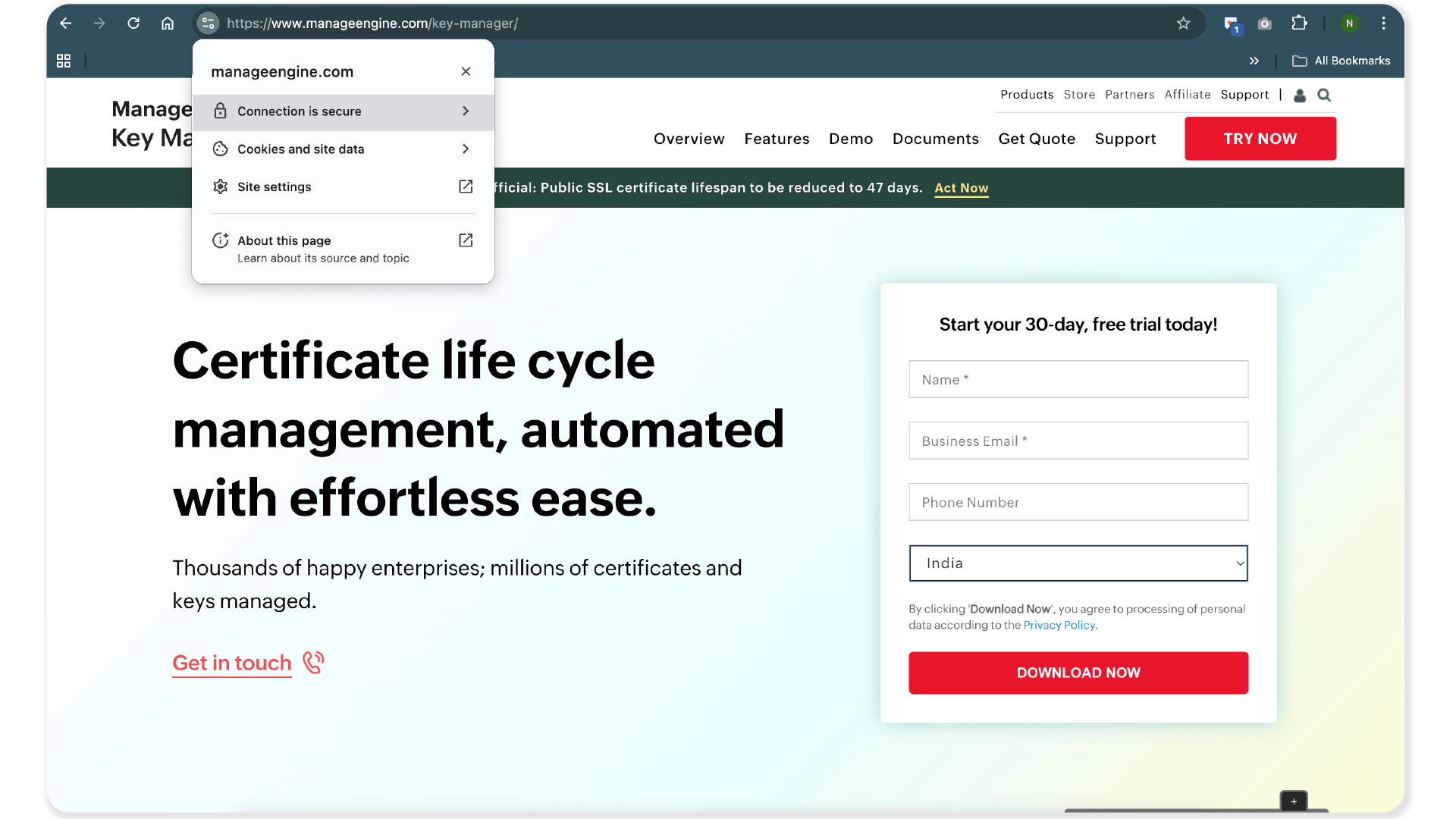
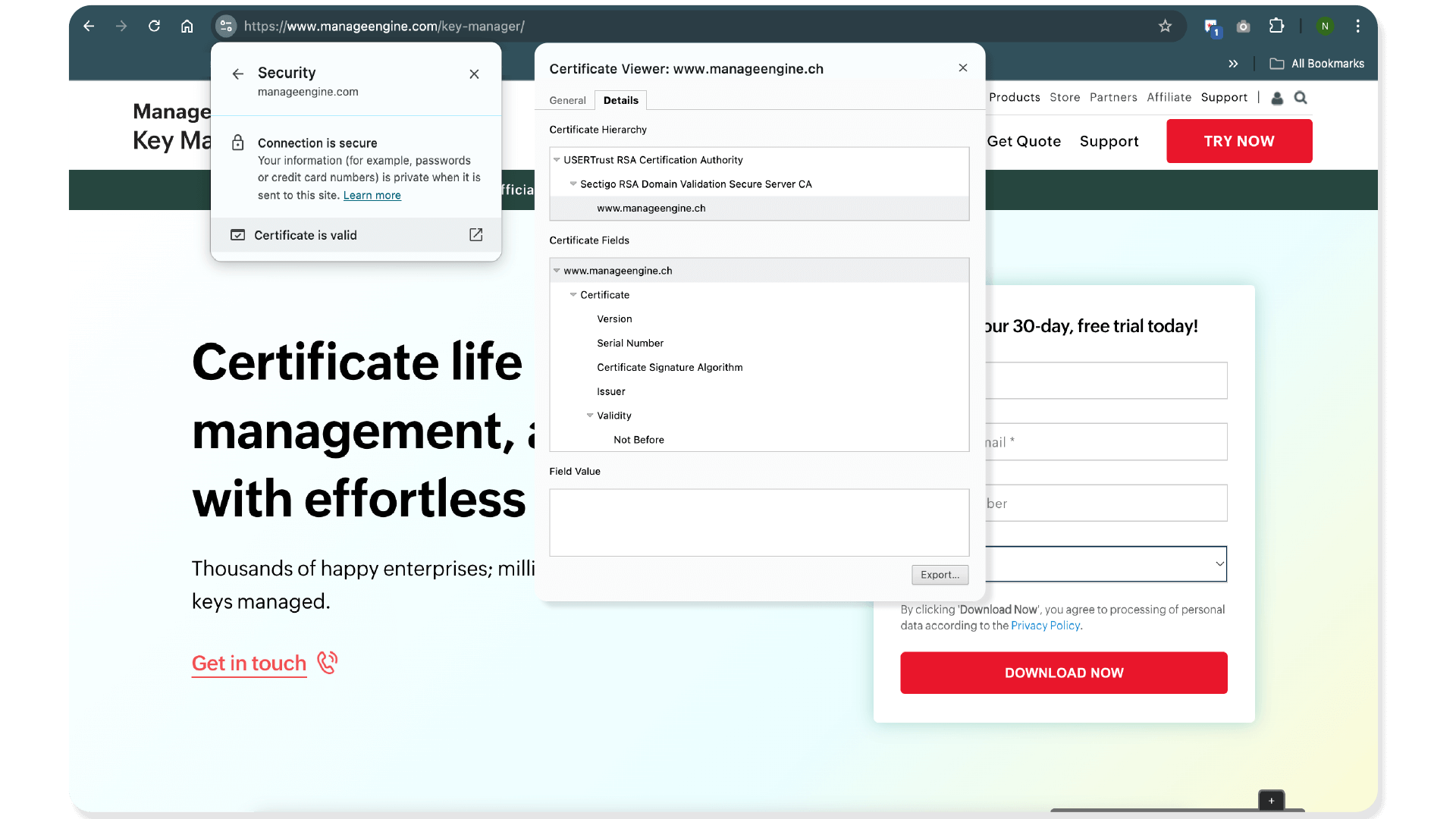
- Click Certificate is valid.
- The Details tab shows the complete certificate hierarchy.
Firefox (Windows or Mac)
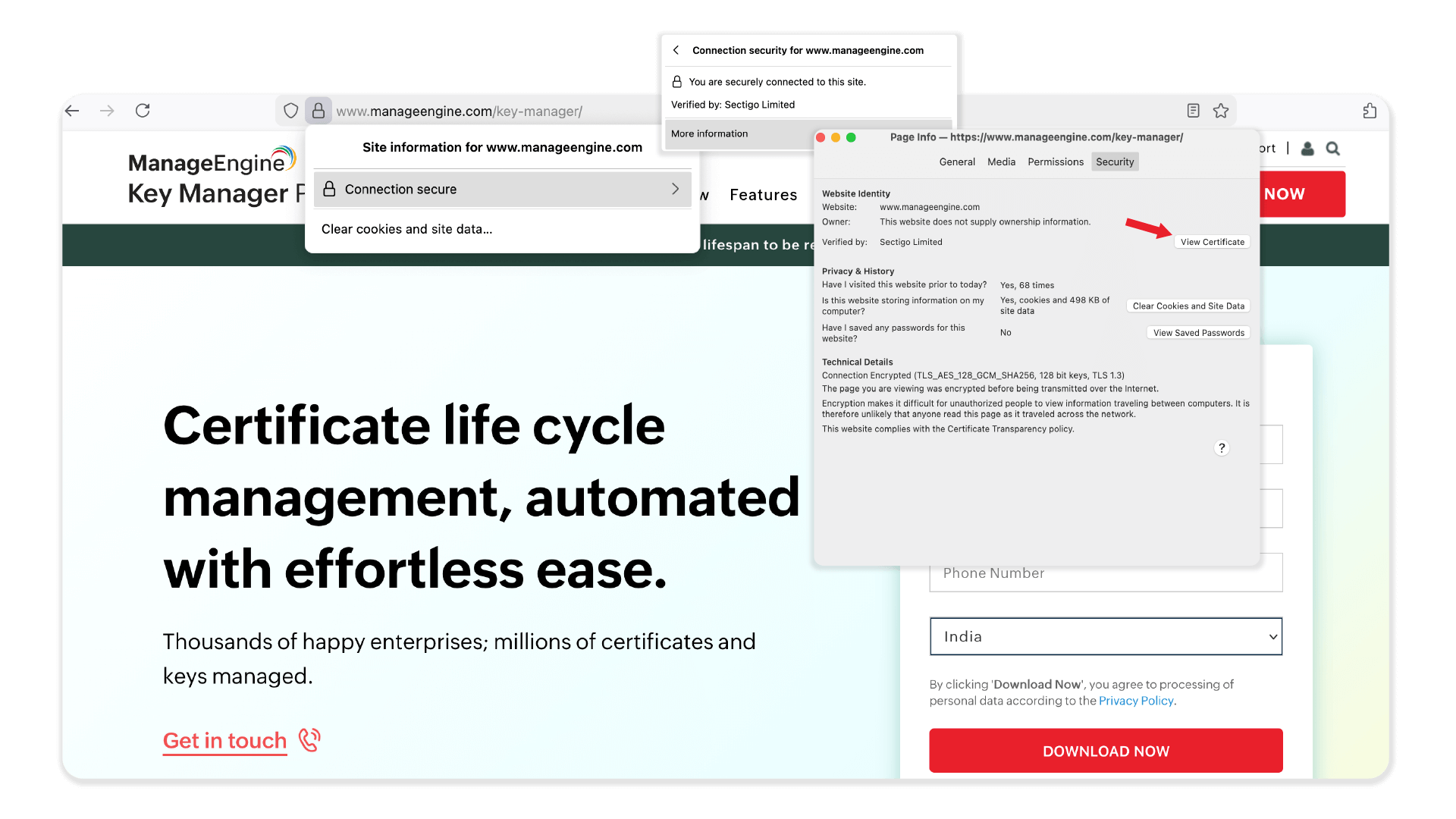
- Click the padlock in the address bar.
- In the Site Information panel, click Connection secure.
- Click More Information, then select View Certificate.
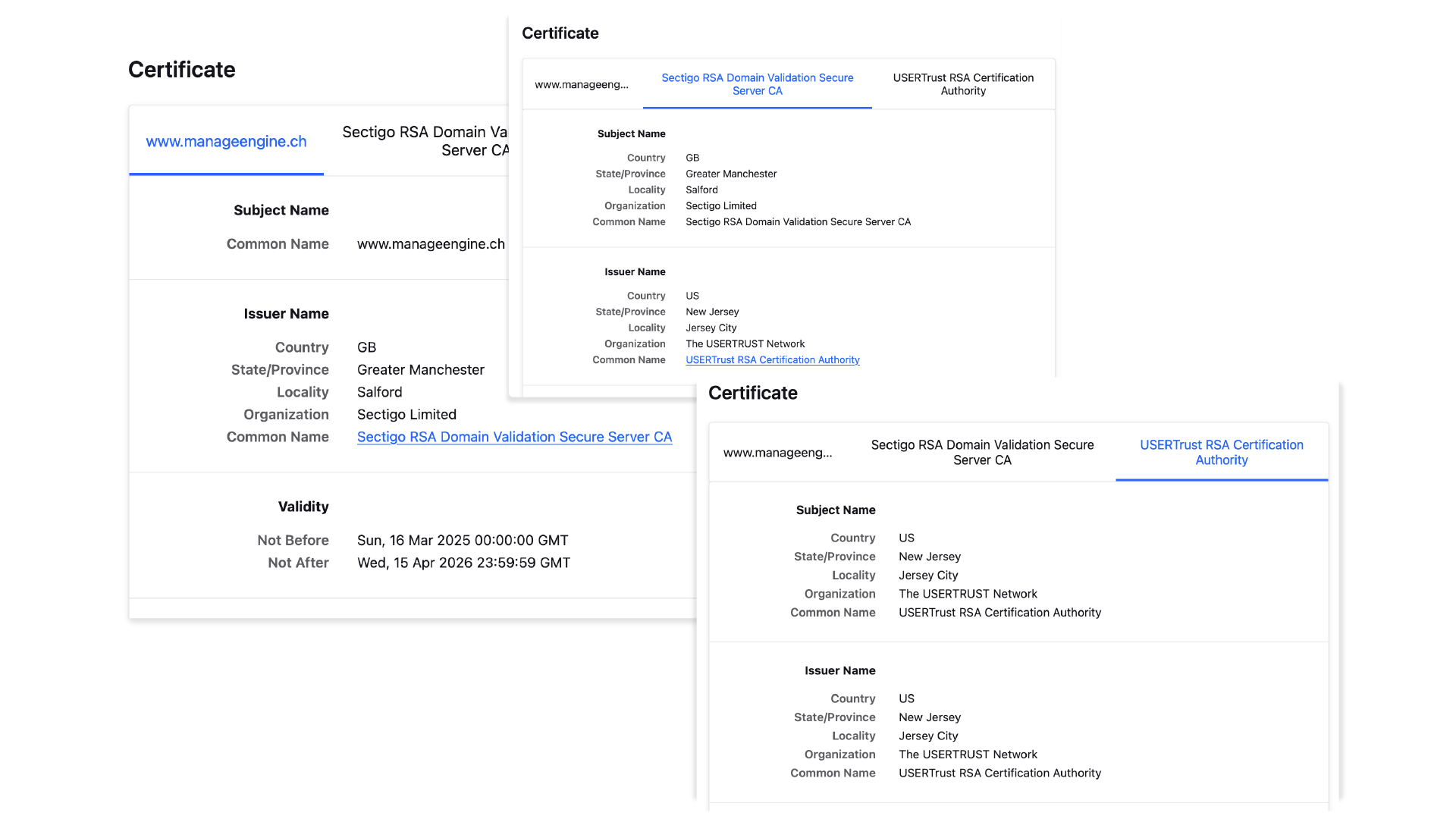
- The Certificate Details page includes tabs showing the end-entity, intermediate, and root certificates.
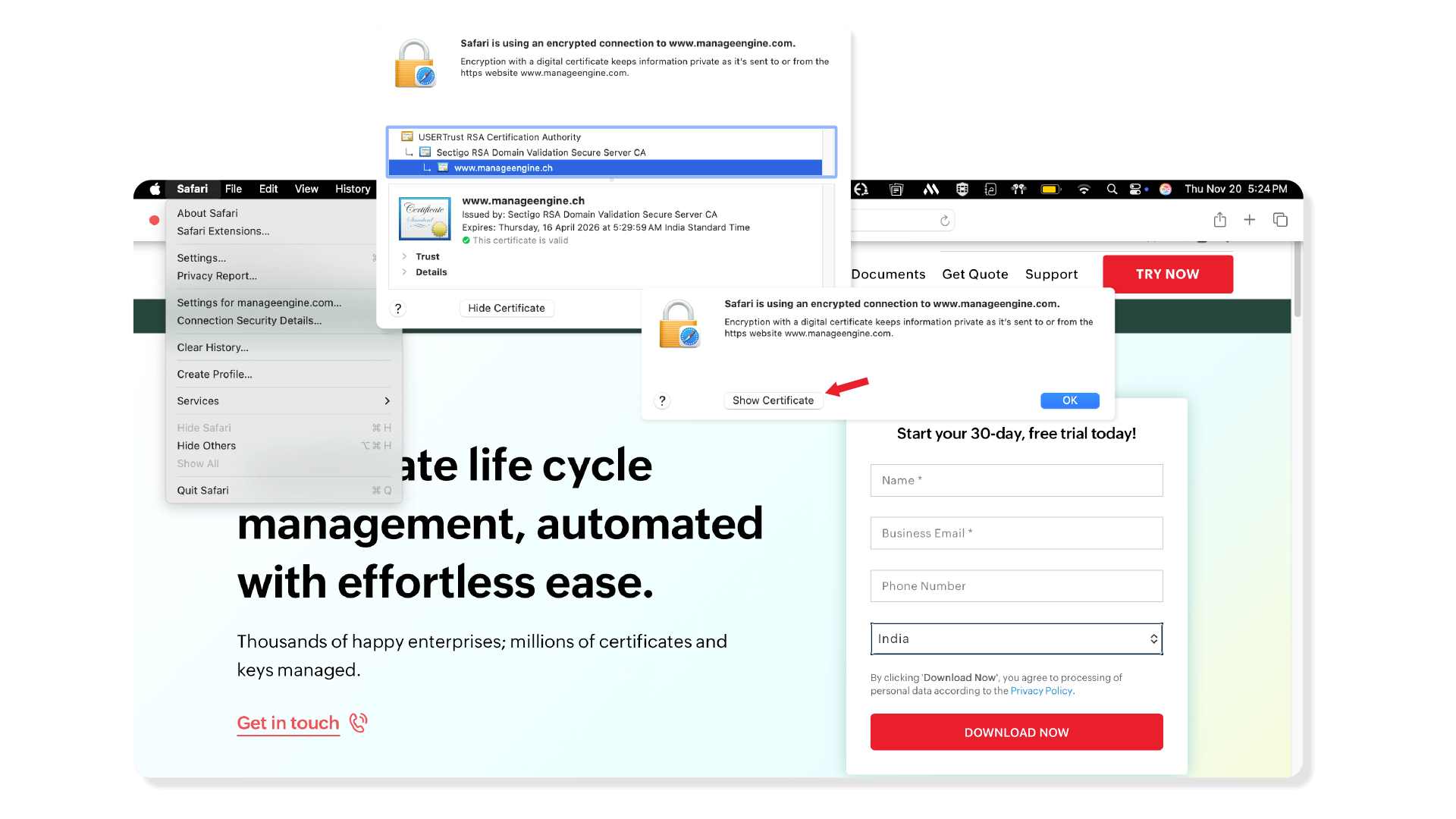
Safari (Mac)
- Click Safari from the menu bar.
- Select Connection Security Details.
- Click Show Certificate to view the complete certificate chain.
FAQs
- What is the certificate chain of trust?
A certificate chain of trust is the mechanism your browser uses to verify a website's identity. When you connect to a secure site, the server presents a chain of certificates. Your browser checks that each link in the chain is properly signed by the link above it. If this trail successfully leads back to a root certificate already stored in your browser's trust list, the website's identity is confirmed, and the connection is considered secure.
- How does a browser decide to trust a certificate?
A browser trusts a certificate by successfully validating its entire chain of trust. It verifies that the website's certificate is signed by a trusted intermediate, which in turn is signed by a root certificate that is already pre-installed in the browser's own trust store. During this process, the browser also confirms that the certificate is not expired, has not been officially revoked, and that the domain name on the certificate perfectly matches the address of the site you are visiting. If all these checks pass, the certificate is trusted.
- What causes "certificate not trusted" errors?
Certificate not trusted errors most often occur when a web server is misconfigured and fails to send the complete certificate chain, leaving the browser unable to link the website's certificate back to a trusted root. Other common causes include the certificate being self-signed (not issued by a public CA), expired, or issued for a different domain name than the one you are trying to access. The error can also appear if the certificate chains back to a root authority that the browser does not recognize.
- What is a broken certificate chain? How do you fix it?
A broken certificate chain is a common issue that causes security warnings. This usually happens when the web server is not configured correctly. The most frequent cause is a missing intermediate certificate. For example, a server administrator might install the server certificate but forget to include the necessary intermediate. When a browser tries to validate the chain, it hits a dead end and cannot link the server certificate back to a trusted root.
- How do you fix broken certificate chain issues?
To fix broken certificate chain issues, ensure the complete certificate chain is installed on the server. When you receive your SSL certificate from a CA, they typically provide a file bundle (often a .crt or .pem file) that contains not only your server certificate but also all the required intermediate certificates. Installing this full bundle correctly will resolve the broken chain error.
- Can a certificate chain have more than one intermediate certificate?
Yes, and this is quite common. A chain can have multiple intermediate layers for various structural or security reasons. Your browser is designed to follow this chain, verifying each certificate's signature against the next one in the sequence until it finds a root certificate that it trusts.
- What is a self-signed certificate? Should I trust it?
A self-signed certificate is one signed by its own private key, not by a trusted CA. It provides encryption but no validation of identity. They are only safe for use in closed, internal development or testing environments. You should never trust a self-signed certificate on a public website. Your browser has no way of knowing if the entity presenting the certificate is who they claim to be. For this reason, browsers will always show a major security warning.