
Bitdefender GravityZone
Last updated on:
In this page
Overview
Bitdefender GravityZone is an Endpoint Detection and Response (EDR) solution that provides advanced detection and remediation capabilities against process-based, behavior-based, and signature-based threats.
The extension allows you to collect EDR (Endpoint Detection and Response) logs and ingest them into the product for long-term storage, compliance, and advanced correlation with SIEM events.
While EDRs primarily focus on detection and immediate remediation, these capabilities are extended by offering:
- Longer log retention for compliance and auditing needs.
- Correlation with SIEM events to reduce false positives and provide broader incident context.
- Out-of-the-box reports, alert profiles, detection rules, and dashboards tailored for EDR threat detection and remediation.
- False positive reduction by correlating EDR detections with SIEM events.
- Centralized security analytics for endpoint, network, and user activities.
By integrating Bitdefender GravityZone, you can centralize EDR logs for advanced analytics, compliance reporting, and correlation with events across your IT infrastructure.
Bitdefender GravityZone supports syslog-based log forwarding for both on-premises and cloud deployments.
Prerequisites
- Ensure the Syslog port is open and reachable between Bitdefender GravityZone and the product/agent.
- Ensure you have the necessary administrative permissions in Bitdefender GravityZone to configure log forwarding.
- For GravityZone Cloud, installation of the Bitdefender Syslog Connector is required.
Workflow architecture
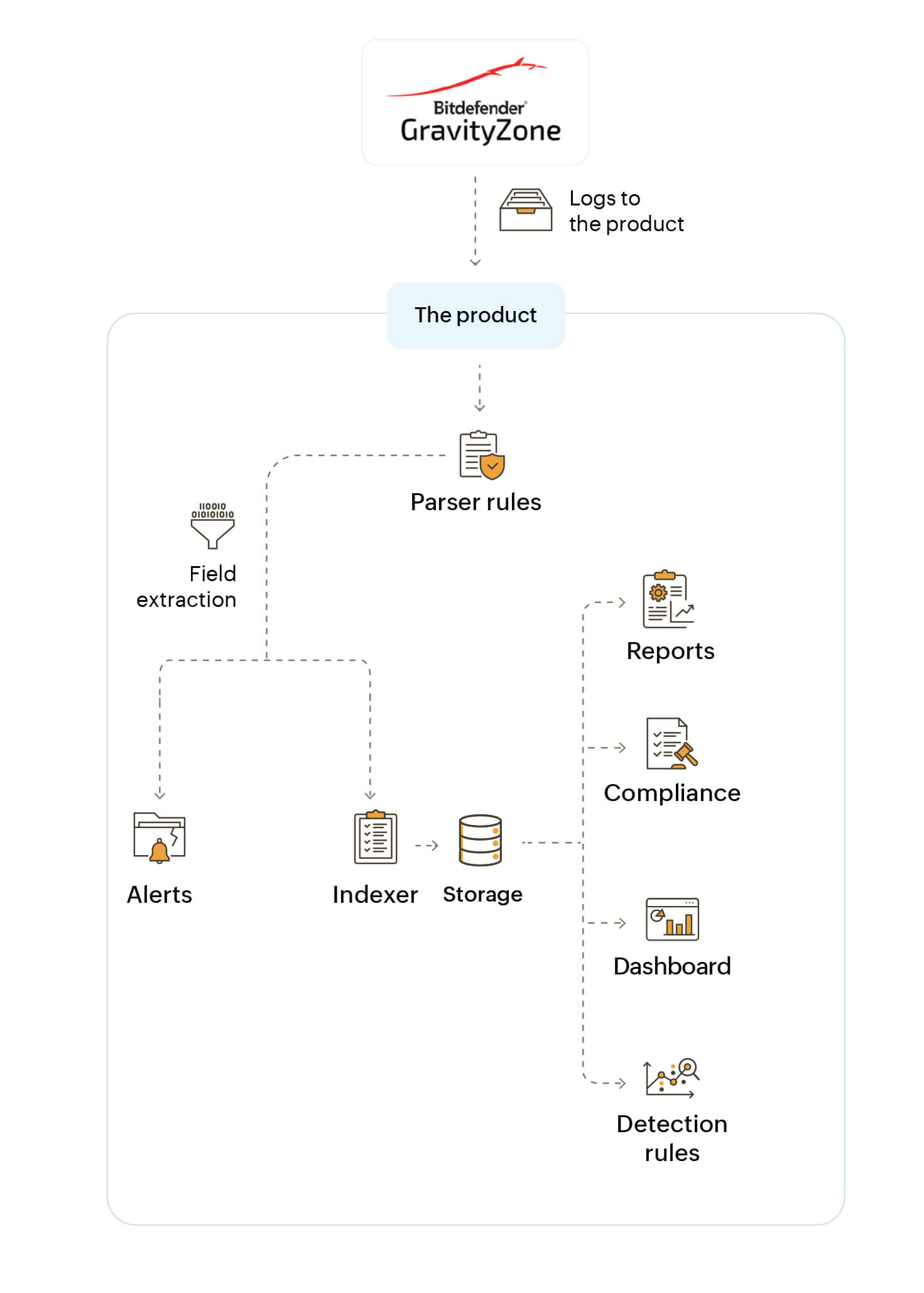
Configuration steps
Adding Bitdefender GravityZone as an application
- In the product console, navigate to Settings > Applications > Other Applications.
- Click +Add Other Applications.
- From the log source type list, select Bitdefender GravityZone . Click the + icon to select the log source.
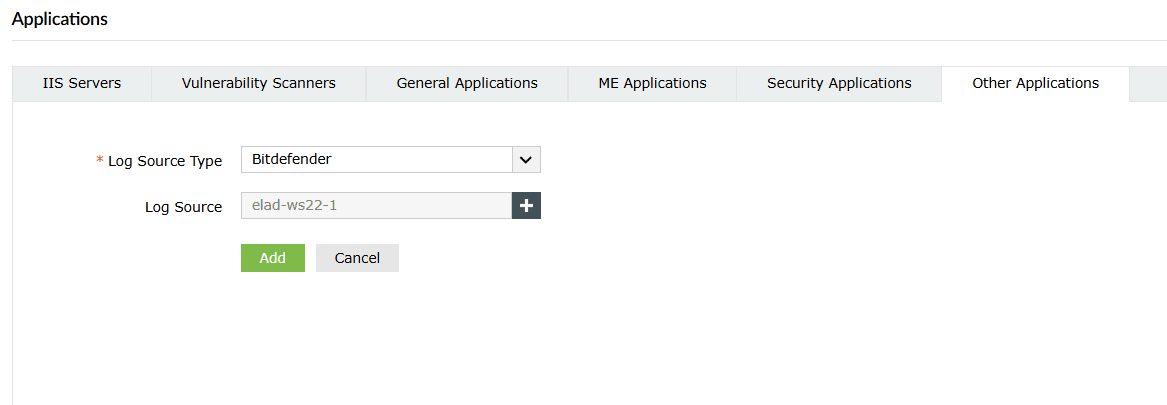
Image: Bitdefender GravityZone application configuration in the On-premise version - In the On-demand deployments, select Agent or leave it as Automatically Identify.
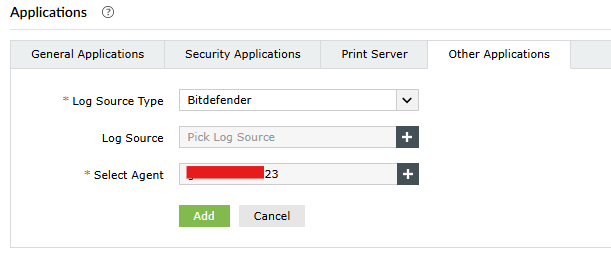
Image: Bitdefender GravityZone application configuration in the On-demand version
Configuring Syslog log forwarding in Bitdefender GravityZone application
Bitdefender On-Premises version
- Connect to the Bitdefender GravityZone Control Center.
- From the left-side menu, go to Configuration > Miscellaneous.
- Select Enable Syslog.
- Enter the following details:
- IP address of the product/agent
- Protocol (TCP/UDP)
- Syslog listening port
- Set the format to JSON.
- Click Add in the Action column.
Bitdefender Cloud version
For Bitdefender GravityZone Cloud, follow the official Bitdefender syslog connector documentation. Key steps include:
- Check the prerequisites
- Install the connector
- Obtain the security certificate for authentication
- Test the connector
- Configure GravityZone to send messages to the SIEM
Outcome of integration
Once the integration is complete:
- Log management and auditing: Centralize and retain Bitdefender detection logs for extended periods, ensuring compliance.
- Advanced correlation: Combine Bitdefender EDR detections with SIEM events to reduce false positives and uncover the broader incident context.
- Prebuilt detection rules: The product provides dedicated detection rules for Bitdefender to enhance threat detection and investigation.
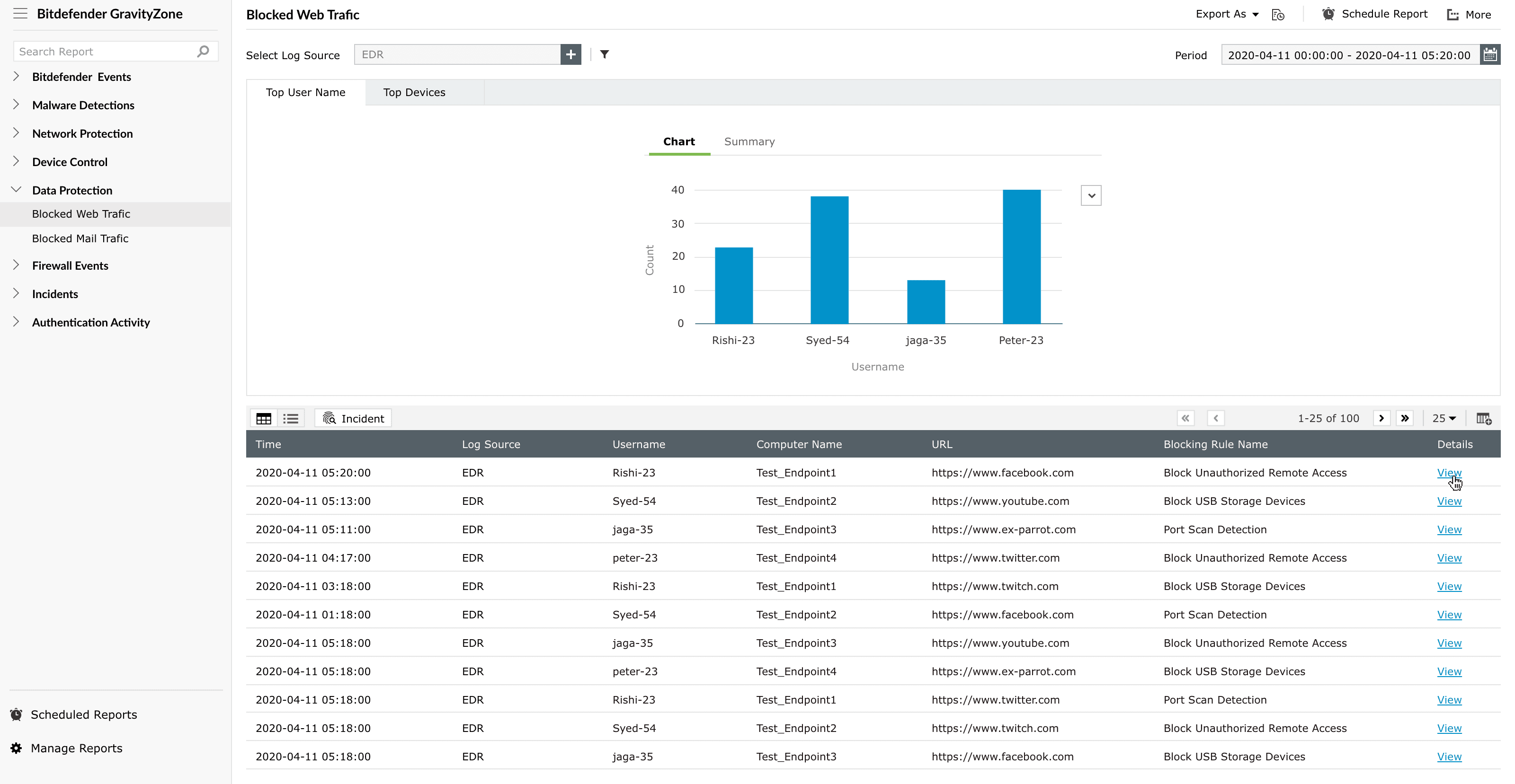
Reports
The following out-of-the-box reports are available once integration is complete:
| Reports group | Reports |
|---|---|
| Bitdefender Events |
|
| Antimalware |
|
| Network Protection |
|
| Device Control |
|
| Data Protection |
|
| Firewall Events |
|
| Incidents |
|
| Authentication Activity |
|
| System Events |
|
Dashboard widgets
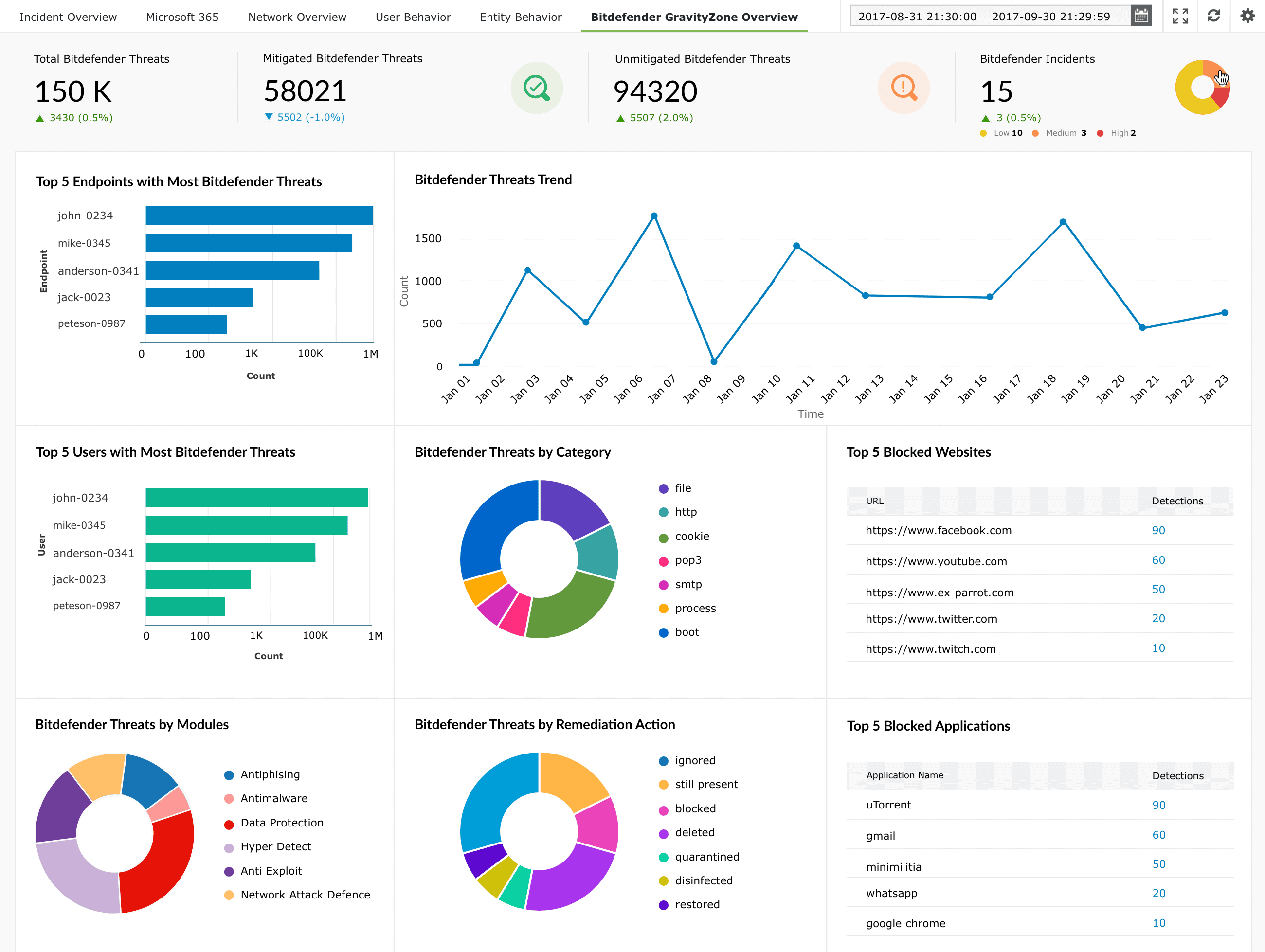
- Total Bitdefender Threats
- Mitigated Bitdefender Threats
- Unmitigated Bitdefender Threats
- Bitdefender Incidents
- Top 5 Endpoints with Most Bitdefender Threats
- Bitdefender Threats Trend
- Top 5 Users with Most Bitdefender Threats
- Bitdefender Threats by Category
- Top 5 Blocked Websites
- Bitdefender Threats by Module
- Bitdefender Threats by Remediation Action
- Top 5 Blocked Applications
Alert profiles
Below alert profiles list the predefined alerts available for monitoring Bitdefender GravityZone-generated events. These alert profiles help detect potential threats early and support proactive action to prevent security incidents.
| Alerts profile name | Event description |
|---|---|
| Bitdefender Threat Unmitigated | This event is generated when a threat is detected on an endpoint, but no remediation or mitigation action has been successfully applied. |
| Bitdefender Module Status Changed | This event is generated when a security module on the installed agent is enabled or disabled. |
| Bitdefender Security Server Overloaded | This event is generated when the scan workload on a Security Server exceeds the configured threshold. |
| Bitdefender Update Server Outdated | This event is generated when the update server is operating with outdated malware signature definitions. |
| Bitdefender Agent Uninstalled Locally | This event is generated when the security agent is uninstalled locally from an endpoint. |
Detection rules
| Rule Name | Description | Objective |
|---|---|---|
| StormScan Coordinated Recon Detection | Detects coordinated port scanning across multiple endpoints. | Identify distributed or repeated port scans to reduce noise and highlight potential lateral movement. |
| Obfuscated PowerShell with Shadow Copy Wipe | Detects encoded PowerShell followed by volume shadow copy deletion. | Identify ransomware-like destructive activity. |
| LateralCred-Harvest | Lateral movement followed by LSASS memory dump. | Identify credential harvesting post lateral movement. |
| Remote Session Script Exploitation | Correlates VPN login events with subsequent script engine executions that are allowed by antivirus but involve commonly abused scripting tools. | Identify potential post-login script abuse during remote sessions by detecting executions of tools such as wscript, cscript, and mshta following VPN access. |
To learn more about this extension-specific detection rules, refer to the Rule Library page.
Incident workbench widgets
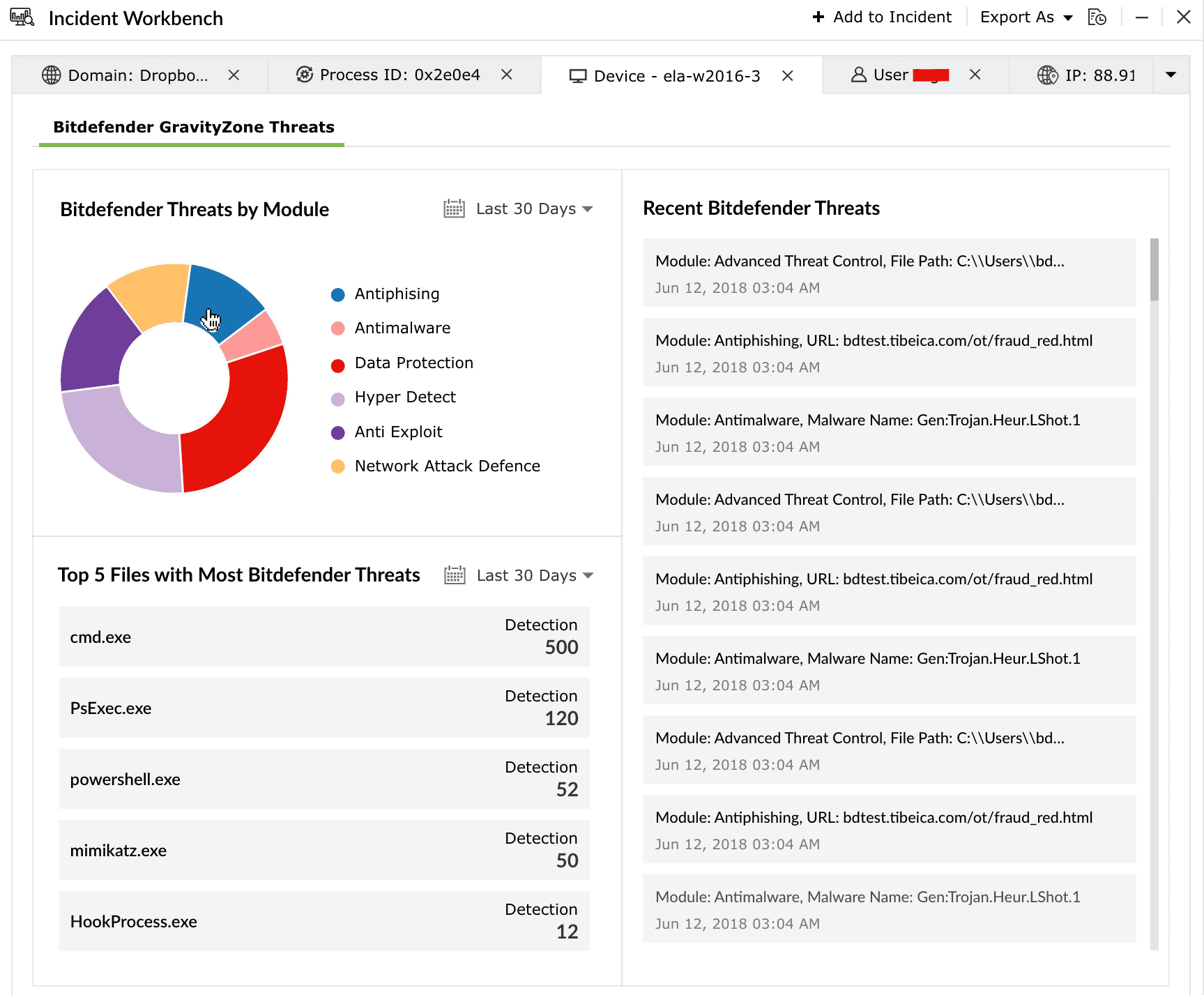
- Bitdefender Threats by Module
- Top 5 Files with Most Bitdefender Threats
- Recent Bitdefender Threats
Supported SOAR functionalities
The Bitdefender GravityZone extension provides custom functions that enable playbooks to interact with Bitdefender GravityZone APIs. These functions can be used to manage endpoints, enforce security policies, handle incidents, and perform automated remediation actions.
1. bitdefender_addFileToQuarantineTask
Adds a file to quarantine on specified endpoints.
| Parameter | Parameter Type | Param description | Mandatory |
|---|---|---|---|
| connectionName | Connection | Name of the pre-configured Bitdefender GravityZone connection used for authentication and API access. | Yes |
| endpointIds | List | List of endpoint IDs where the file needs to be quarantined. | Yes |
| filePath | String | Path of the file to be quarantined. | Yes |
Reference link:
https://www.bitdefender.com/business/support/en/77209-140261-createaddfiletoquarantinetask.html
2. bitdefender_addToBlocklist
Adds items to the security blacklist to prevent execution.
| Parameter | Parameter Type | Param description | Mandatory |
|---|---|---|---|
| connectionName | Connection | Name of the Bitdefender connection. | Yes |
| type | String | Type of rules to create. | Yes |
| rules | List | List of rules and their configurations. | Yes |
| recursive | Bool | Applies rules recursively to all companies. | No |
| companyId | String | Company identifier. | Yes |
Reference link:
https://www.bitdefender.com/business/support/en/77209-135327-addtoblocklist.html
3. bitdefender_assignPolicy
Assigns security policies to endpoints or groups.
| Parameter | Parameter Type | Param description | Mandatory |
|---|---|---|---|
| connectionName | Connection | Bitdefender connection name. | Yes |
| targetIds | List | IDs of endpoints or groups. | Yes |
| inheritFromAbove | Bool | Enables inheritance from parent policy. | No |
| policyId | String | Policy ID to assign. | No |
| forcePolicyInheritance | Bool | Applies policy to all child endpoints. | No |
Reference link:
https://www.bitdefender.com/business/support/en/77209-924802-assignpolicy.html
4. bitdefender_changeIncidentStatus
Updates the status of a security incident.
| Parameter | Parameter Type | Param description | Mandatory |
|---|---|---|---|
| connectionName | Connection | Bitdefender connection name. | Yes |
| incidentId | String | Incident identifier. | Yes |
| type | String | Type of incident. | Yes |
| status | Int | Status to assign. | Yes |
Reference link:
https://www.bitdefender.com/business/support/en/77209-317162-changeincidentstatus.html
5. bitdefender_createCustomGroup
Creates a custom group.
| Parameter | Parameter Type | Param description | Mandatory |
|---|---|---|---|
| connectionName | Connection | Bitdefender connection. | Yes |
| groupName | String | Name of the group. | Yes |
| parentId | String | Parent group ID. | No |
Reference link:
https://www.bitdefender.com/business/support/en/77209-128485-createcustomgroup.html
6. bitdefender_createCustomRule
Creates a custom security rule.
| Parameter | Parameter Type | Param description | Mandatory |
|---|---|---|---|
| connectionName | Connection | Bitdefender connection. | Yes |
| type | Int | Rule type. | No |
| name | String | Rule name. | Yes |
| description | String | Rule description. | No |
| tags | List | Tags for the rule. | No |
| settings | Map | Configuration settings including severity, criteria, and actions. | Yes |
| returnRuleId | Bool | Returns rule ID if true. | No |
Reference link:
https://www.bitdefender.com/business/support/en/77209-135332-createcustomrule.html
7. bitdefender_createIsolateEndpoint
Creates a task to isolate an endpoint.
| Parameter | Parameter Type | Param description | Mandatory |
|---|---|---|---|
| connectionName | Connection | Bitdefender connection. | Yes |
| endpointId | String | Endpoint identifier. | Yes |
Reference link:
https://www.bitdefender.com/business/support/en/77209-135330-createisolateendpointtask.html
8. bitdefender_createRestoreEndpointFromIsolationTask
Restores an endpoint from isolation.
| Parameter | Parameter Type | Param description | Mandatory |
|---|---|---|---|
| connectionName | Connection | Bitdefender connection. | Yes |
| endpointId | String | Endpoint identifier. | Yes |
Reference link:
9. bitdefender_createScanTaskByMac
Creates a scan task using MAC addresses.
| Parameter | Parameter Type | Param description | Mandatory |
|---|---|---|---|
| connectionName | Connection | Bitdefender connection. | Yes |
| macAddresses | List | List of MAC addresses. | Yes |
| type | Int | Scan type. | Yes |
| name | String | Task name. | No |
| customScanSettings | Map | Custom scan configuration (depth and paths). | Yes |
| returnTaskId | Bool | Returns task ID if true. | No |
Reference link:
https://www.bitdefender.com/business/support/en/77209-128496-createscantaskbymac.html
10. bitdefender_createScanTask
Creates a scan task for endpoints.
| Parameter | Parameter Type | Param description | Mandatory |
|---|---|---|---|
| connectionName | Connection | Bitdefender connection. | Yes |
| targetIds | List | Target endpoint or group IDs. | Yes |
| name | String | Task name. | No |
| customScanSettings | Map | Custom scan configuration. | Yes |
| type | Int | Scan type. | Yes |
| returnAllTaskIds | Bool | Returns all task IDs if true. | No |
Reference link:
https://www.bitdefender.com/business/support/en/77209-128495-createscantask.html
11. bitdefender_createSubmitToSandboxAnalyzerTask
Submits files to sandbox for analysis.
| Parameter | Parameter Type | Param description | Mandatory |
|---|---|---|---|
| connectionName | Connection | Bitdefender connection. | Yes |
| targetId | String | Endpoint ID. | Yes |
| samplePaths | List | File paths to submit. | Yes |
| commandLines | List | Custom execution parameters. | No |
| taskName | String | Task name. | No |
Reference link:
https://www.bitdefender.com/business/support/en/77209-952310-createsubmittosandboxanalyzertask.html
12. bitdefender_deleteCustomGroup
Deletes a custom group.
| Parameter | Parameter Type | Param description | Mandatory |
|---|---|---|---|
| connectionName | Connection | Bitdefender connection. | Yes |
| groupId | String | Group ID. | Yes |
| force | Bool | Forces deletion if group is not empty. | No |
Reference link:
https://www.bitdefender.com/business/support/en/77209-128486-deletecustomgroup.html
13. bitdefender_deleteCustomRule
Deletes a custom rule.
| Parameter | Parameter Type | Param description | Mandatory |
|---|---|---|---|
| connectionName | Connection | Bitdefender connection. | Yes |
| type | Int | Rule type. | Yes |
| ruleId | String | Rule ID. | Yes |
Reference link:
https://www.bitdefender.com/business/support/en/77209-135334-deletecustomrule.html
14. bitdefender_deleteEndpoint
Deletes an endpoint.
| Parameter | Parameter Type | Param description | Mandatory |
|---|---|---|---|
| connectionName | Connection | Bitdefender connection. | Yes |
| endpointId | String | Endpoint ID. | Yes |
Reference link:
https://www.bitdefender.com/business/support/en/77209-128491-deleteendpoint.html
15. bitdefender_deleteTask
Deletes a task.
| Parameter | Parameter Type | Param description | Mandatory |
|---|---|---|---|
| connectionName | Connection | Bitdefender connection. | Yes |
| taskId | String | Task ID. | Yes |
Reference link:
https://www.bitdefender.com/business/support/en/77209-577743-deletetask.html
16. bitdefender_getBlockListItems
Retrieves blacklist items.
| Parameter | Parameter Type | Param description | Mandatory |
|---|---|---|---|
| connectionName | Connection | Bitdefender connection. | Yes |
| page | Int | Page number. | No |
| perPage | Int | Items per page. | No |
Reference link:
https://www.bitdefender.com/business/support/en/77209-135328-getblocklistitems.html
17. bitdefender_getCustomRuleList
Retrieves custom rules.
| Parameter | Parameter Type | Param description | Mandatory |
|---|---|---|---|
| connectionName | Connection | Bitdefender connection. | Yes |
| page | Int | Page number. | No |
| perPage | Int | Items per page. | No |
| companyId | String | Company ID. | No |
| type | Int | Rule type. | No |
Reference link:
https://www.bitdefender.com/business/support/en/77209-135333-getcustomruleslist.html
18. bitdefender_getEndpointList
Retrieves managed endpoints.
| Parameter | Parameter Type | Param description | Mandatory |
|---|---|---|---|
| connectionName | Connection | Bitdefender connection. | Yes |
| parentId | String | Parent group ID. | No |
| page | Int | Page number. | No |
| perPage | Int | Items per page. | No |
| isManaged | Bool | Filters managed endpoints. | No |
| filters | Map | Filtering criteria for endpoints. | No |
| options | Map | Additional response options. | No |
Reference link:
https://www.bitdefender.com/business/support/en/77209-128483-getendpointslist.html
19. bitdefender_getNetworkInventoryItems
Retrieves network inventory items.
| Parameter | Parameter Type | Param description | Mandatory |
|---|---|---|---|
| connectionName | Connection | Bitdefender connection. | Yes |
| parentId | String | Parent group ID. | No |
| filters | Map | Filtering criteria. | No |
| page | Int | Page number. | No |
| perPage | Int | Items per page. | No |
| options | Map | Response options. | No |
Reference link:
https://www.bitdefender.com/business/support/en/77209-128494-getnetworkinventoryitems.html
20. bitdefender_getQuarantineItemsList
Retrieves quarantined items.
| Parameter | Parameter Type | Param description | Mandatory |
|---|---|---|---|
| connectionName | Connection | Bitdefender connection. | Yes |
| endpointId | String | Endpoint ID. | No |
| page | Int | Page number. | No |
| perPage | Int | Items per page. | No |
| filters | Map | Filtering criteria. | No |
| service | String | Service type. | No |
Reference link:
https://www.bitdefender.com/business/support/en/77209-140256-getquarantineitemslist.html
21. bitdefender_getScanTasksList
Retrieves a list of scan tasks.
| Parameter | Parameter Type | Param description | Mandatory |
|---|---|---|---|
| connectionName | Connection | Name of the Bitdefender connection. | Yes |
| name | String | Name of the task. | No |
| status | Int | Status of the task. | No |
| page | Int | Page number for pagination. | No |
| perPage | Int | Number of items per page. | No |
Reference link:
https://www.bitdefender.com/business/support/en/77209-128498-getscantaskslist.html
22. bitdefender_getTaskStatus
Retrieves the status and details of a specific task.
| Parameter | Parameter Type | Param description | Mandatory |
|---|---|---|---|
| connectionName | Connection | Bitdefender connection. | Yes |
| taskId | String | ID of the task. | Yes |
| returnSubtasks | Bool | Includes subtask details if true. | No |
| page | Int | Page number. | No |
| perPage | Int | Items per page. | No |
| status | Int | Filters subtasks based on status. | No |
| endedAfter | String | Filters tasks ended after specified time. | No |
| endedBefore | String | Filters tasks ended before specified time. | No |
Reference link:
https://www.bitdefender.com/business/support/en/77209-440638-gettaskstatus.html
23. bitdefender_killProcess
Terminates a running process on an endpoint.
| Parameter | Parameter Type | Param description | Mandatory |
|---|---|---|---|
| connectionName | Connection | Bitdefender connection. | Yes |
| processId | Int | Process identifier. | Yes |
| path | String | Path of the process file. | Yes |
| endpointId | String | Endpoint where process is running. | Yes |
| incidentId | String | Related incident ID. | No |
Reference link:
https://www.bitdefender.com/business/support/en/77209-952304-killprocess.html
24. bitdefender_moveCustomGroup
Moves a custom group to another parent group.
| Parameter | Parameter Type | Param description | Mandatory |
|---|---|---|---|
| connectionName | Connection | Bitdefender connection. | Yes |
| groupId | String | Group ID to move. | Yes |
| parentId | String | Destination parent group ID. | Yes |
Reference link:
https://www.bitdefender.com/business/support/en/77209-128487-movecustomgroup.html
25. bitdefender_moveEndpoints
Moves endpoints to a different group.
| Parameter | Parameter Type | Param description | Mandatory |
|---|---|---|---|
| connectionName | Connection | Bitdefender connection. | Yes |
| endpointIds | List | List of endpoint IDs. | Yes |
| groupId | String | Destination group ID. | Yes |
Reference link:
https://www.bitdefender.com/business/support/en/77209-128489-moveendpoints.html
26. bitdefender_releaseQuarantineExchangeItem
Releases quarantined Exchange items.
| Parameter | Parameter Type | Param description | Mandatory |
|---|---|---|---|
| connectionName | Connection | Bitdefender connection. | Yes |
| quarantineItemsIds | List | List of quarantined item IDs. | Yes |
Reference link:
27. bitdefender_removeFromBlockList
Removes items from the security blacklist.
| Parameter | Parameter Type | Param description | Mandatory |
|---|---|---|---|
| connectionName | Connection | Bitdefender connection. | Yes |
| ids | List | IDs of items to remove. | Yes |
Reference link:
https://www.bitdefender.com/business/support/en/77209-135329-removefromblocklist.html
28. bitdefender_removeQuarantineItemTask
Creates a task to remove quarantined items.
| Parameter | Parameter Type | Param description | Mandatory |
|---|---|---|---|
| connectionName | Connection | Bitdefender connection. | Yes |
| quarantineItemsIds | List | List of quarantine item IDs. | Yes |
Reference link:
https://www.bitdefender.com/business/support/en/77209-140257-createremovequarantineitemtask.html
29. bitdefender_ updateIncidentNote
Updates or adds notes to an incident.
| Parameter | Parameter Type | Param description | Mandatory |
|---|---|---|---|
| connectionName | Connection | Bitdefender connection. | Yes |
| incidentId | String | Incident ID. | Yes |
| type | String | Type of incident. | Yes |
| note | String | Note content. | Yes |
Reference link:
https://www.bitdefender.com/business/support/en/77209-317161-updateincidentnote.html
30. bitdefender_restoreQuarantineItemTask
Creates a task to restore quarantined items.
| Parameter | Parameter Type | Param description | Mandatory |
|---|---|---|---|
| connectionName | Connection | Bitdefender connection. | Yes |
| quarantineItemsIds | List | List of quarantine item IDs. | Yes |
| locationToRestore | String | Target restore location. | No |
| addExclusionInPolicy | Bool | Adds exclusion in policy if true. | No |
Reference link:
https://www.bitdefender.com/business/support/en/77209-140259-createrestorequarantineitemtask.html
31. bitdefender_setEndpointLabel
Sets a label for an endpoint.
| Parameter | Parameter Type | Param description | Mandatory |
|---|---|---|---|
| connectionName | Connection | Bitdefender connection. | Yes |
| endpointId | String | Endpoint ID. | Yes |
| label | String | Label to assign. | Yes |
Reference link:
https://www.bitdefender.com/business/support/en/77209-128492-setendpointlabel.html
Read also
This page explained how to integrate Bitdefender GravityZone with the product to collect, correlate, and analyze EDR detection logs for advanced security analytics. To explore related configurations and integrations, refer to the following pages: