
Overview
Last updated on:
In this page
About Failover
Failover in ManageEngine Log360 ensures high availability and resilience by automatically switching roles between nodes when a server or network disruption occurs. It supports both application and web server failover, so users can continue to access the product interface without interruption. By redirecting log collection and processing to available Log Processors during outages, Failover prevents data loss and ensures continuous access to the application.
Use cases
Web Server based Failover management
Our architecture offers UI-level failover configuration. If a primary web server becomes unreachable, standby servers automatically take over using virtual IPs, maintaining uninterrupted access.
- Active-passive failover - A standby web server remains idle and takes over automatically if the primary fails.
- Active-active failover - Multiple web servers run concurrently, sharing the load and ensuring high availability.
Module based Failover management
The product also supports module-based failover for Log Processors. Multiple processors can be assigned the same functional roles, such as alerting, indexing, forwarding, or archiving. Instead of an failover switch during an outage, the system relies on redundancy through load balancing.
If at least one Log Processor with the assigned role remains available, the respective function continues to operate without interruption. For critical roles, it is recommended to configure a minimum of two processors. This eliminates single points of failure and ensures continuous module-level availability.
Architecture
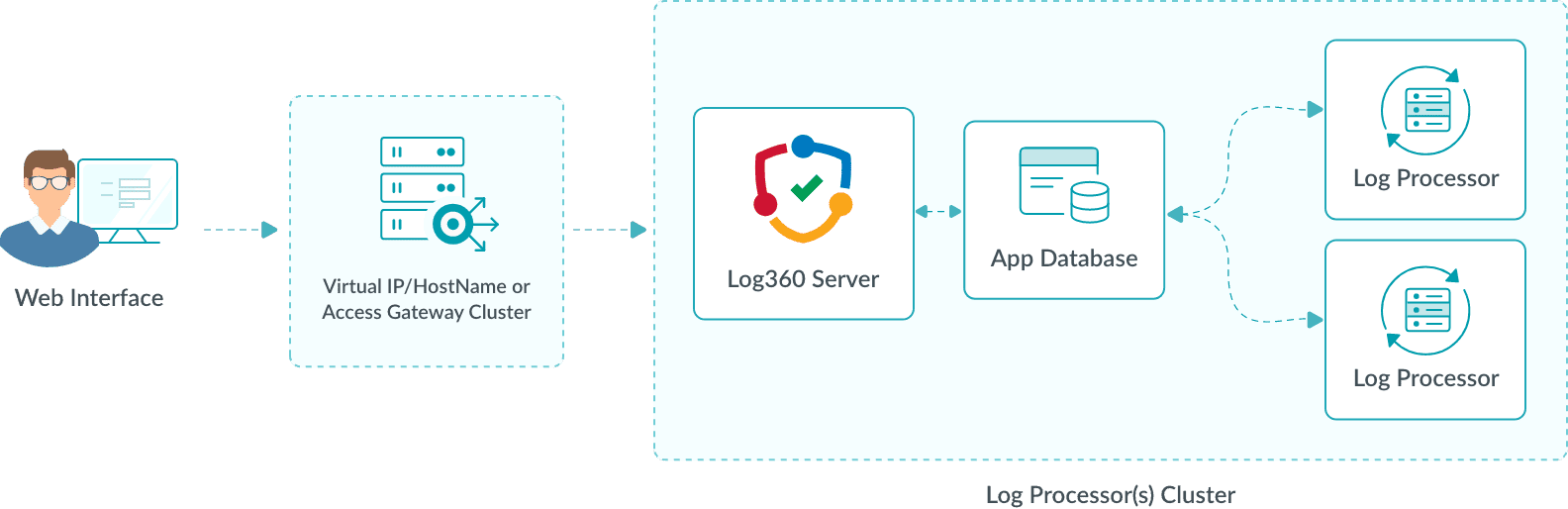
1. Server with backup Log Processors
In a failover-enabled setup, the application is accessed through a virtual IP or hostname. This provides a consistent entry point for users and agents, regardless of which node is active. Servers can handle all central functions, including coordination with Log Processors, correlation, and communication with the database and indexing clusters. Additional Log Processors are configured to take over if needed, ensuring fault tolerance, load distribution, and seamless transitions during outages.
2. Handling web server unavailability
If a server becomes unreachable due to a network failure or system issue, the virtual IP (or hostname) is automatically reassigned to an available node, enabling continuous user access without manual intervention.
3. Module-based Failover
In the event of a failure, a standby Log Processor automatically assumes the responsibilities of the failed node without requiring manual intervention. It seamlessly continues all processing tasks, including log collection, parsing, enrichment, correlation, alert generation, log forwarding, and archiving.
This ensures:
- Continuous log ingestion and analysis
- Zero data loss
- Consistent system performance across disruptions
Pre-requisites
- You must configure a common database (PostgreSQL or Microsoft SQL) to use Failover.
- The same version of the product must be installed on all servers.
- All servers must be able to communicate with each other without restrictions from firewalls or antivirus programs.
- Any configuration changes can only be made from the primary server.
- To use the same subnet access mode, all servers must be in the same subnet.
- The product must be run by a user with administrator privileges to bind or unbind the virtual IP in the same subnet mode.
- A minimum of two servers is required. Select one server to act as the primary server. All other servers will function as secondary servers and use the database configured on the primary server.
- The following ports must be available and accessible across all servers in the cluster:
- Cluster port (Default: 7800)
- Product port
Read also
This page explained the overview, use cases, architecture, and pre-requisites for managing failover in Log360. To learn how to configure and manage these components effectively, refer to the following articles: