
What is a network disaster recovery plan?
A Network Disaster Recovery Plan (NDRP) is a structured, repeatable framework that outlines how an organization restores its network devices, connectivity layers, and configuration states after an unexpected disruption. Unlike traditional disaster recovery approaches that focus primarily on servers or application data, an NDRP is specifically designed to protect routers, switches, firewalls, wireless controllers, VPN gateways, and all the configuration logic that keeps a network functioning.
It captures how network teams detect outages, which actions they take to restore functionality, and what processes ensure configurations return to a known-good state within acceptable time limits.
A modern NDRP ensures that no matter the incident, whether caused by human error, ransomware injection, hardware malfunction, or large-scale environmental failure, your network can be restored quickly, consistently, and securely.
Why network disaster recovery matters today
Networks have become the backbone of modern digital operations. With hybrid work models, distributed data centres, SaaS adoption, SD-WAN, IoT, and cloud-first architectures, the network is more complex than ever before. This complexity directly increases the risk of outages.
Most network outages today are not caused by massive disasters; they stem from misconfigurations, rushed updates, unauthorized changes, outdated firmware, and ransomware attacks targeting network infrastructure. These failures can instantly break connectivity for thousands of users and applications.
The cost of downtime goes beyond lost productivity. It affects customer satisfaction, service availability, SLAs, compliance, and even brand reputation. Business leaders now expect recovery processes that are fast, automated, and verifiable. The reality is simple: servers can recover only when the network is functional. Without a network disaster recovery plan, even the strongest disaster recovery strategy collapses.
Core components of a modern network disaster recovery plan
A strong Network Disaster Recovery Plan goes beyond backing up configs. It brings structure, clarity, and speed to every stage of recovery so teams can restore connectivity with minimal disruption. These are the core components that shape a modern, reliable NDRP:
1. Network asset & configuration inventory
A robust NDRP begins with a centralised, accurate inventory of every network device across your environment. This includes core switches, distribution routers, firewalls, wireless controllers, load balancers, and edge devices distributed across branches.
Beyond simply listing devices, the inventory must capture every version of running and startup configurations, firmware details, interface mappings, serial numbers, and version history. When an outage occurs, teams rely on historical configuration versions to identify what changed, when it changed, and which version they need to restore. A thorough inventory eliminates guesswork and accelerates recovery.
2. RTO, RPO & recovery prioritisation
Every organization operates with different expectations for acceptable downtime. This is why defining Recovery Time Objective (RTO) and Recovery Point Objective (RPO) is critical.
RTO determines how fast a device must be restored before business operations are affected. RPO defines how recent the configuration backup should be to avoid data loss or configuration drift.
Based on these values, devices should be categorised into tiers; core firewalls and WAN routers typically fall under the critical tier, while access switches might be secondary. This prioritisation ensures that recovery efforts always begin with the systems that maintain backbone connectivity.
3. Backup strategy for network devices
Backups form the foundation of disaster recovery. Without complete, recent, and verified configuration backups, restoring a network is nearly impossible.
An NDRP must include automated configuration backups, both time-based and change-based, to ensure no updates slip through unnoticed. Firmware version trees should also be frequently captured, since firmware mismatches can prevent devices from booting or accepting configs.
Backups should be securely stored (preferably encrypted and replicated to offsite locations) with strict retention policies that support rollback for months or even years. Equally important is backup integrity testing, which validates whether the saved configuration is complete, error-free, and ready to deploy during emergencies.
4. Recovery and restoration procedures
A disaster recovery plan must include clear, step-by-step restoration workflows. These workflows outline how teams restore individual devices, full branches, or entire sites after disruptions.
Device-level restores allow engineers to deploy the exact configuration version needed to recover functionality. Site-level restores support bulk deployment when a branch-level failure or environmental event affects multiple devices.
Misconfigurations are one of the top causes of outages, and must be addressed through config rollbacks, which help teams revert to the most stable baseline instantly. A well-maintained baseline version becomes the anchor for all recovery actions, ensuring predictable behaviour after restoration.
5. Network automation for faster recovery
Automation dramatically improves the speed and consistency of disaster recovery. Automated backup scheduling, automated config deployment, and real-time change tracking reduce human dependency and eliminate manual errors.
During a disaster, automation tools can deploy standard templates to multiple devices simultaneously, detect drift, enforce compliance, and revert unauthorized changes.
Automation isn’t just a convenience; it is a critical requirement for modern disaster recovery plan, where response time directly impacts business continuity.
How to build an effective network disaster recovery plan (step-by-step)
A solid NDRP gives your team the clarity to react fast, restore stability, and bring critical connectivity back online with confidence. The steps below outline a practical, modern workflow that helps you prepare for unexpected failures and recover from them without delay:
1. Identify business-critical network components
Start by mapping the devices that directly influence connectivity, security enforcement, and service delivery. These include edge routers, core switches, VPN concentrators, domain firewalls, and SD-WAN controllers. Any device whose failure disrupts business flow should fall into the critical recovery tier.
2. Document device configurations thoroughly
Build a detailed, centralised repository that stores every configuration snapshot such as running configs, startup configs, firmware details, and interface-level data. This documentation must stay continuously updated through automated backups so teams always have a reliable baseline ready for restoration.
3. Define practical RTO and RPO values
Shape your NDRP around realistic RTO and RPO targets. A core firewall may require near-zero downtime tolerance, whereas secondary devices allow some flexibility. These values guide backup schedules, restoration urgency, and overall recovery strategy.
4. Automate backup frequency and change capture
To eliminate blind spots, schedule automated backups based on your RPO requirements. Add change-based triggers to capture configurations the moment they are updated. Automated backups prevent the network from drifting more than a few minutes away from the last known-good configuration.
5. Maintain version-controlled configuration repositories
Keep a complete archive of every configuration version, enriched with metadata such as timestamps, authors, change notes, compliance records, and device context. This version control helps teams trace issues to the exact configuration that caused a disruption and enables fast, accurate rollbacks.
Network disaster recovery metrics that matter
Tracking the right metrics helps you understand how well your disaster recovery strategy performs in real conditions; not just on paper. The KPIs below show whether your network can bounce back quickly, consistently, and with minimal risk.
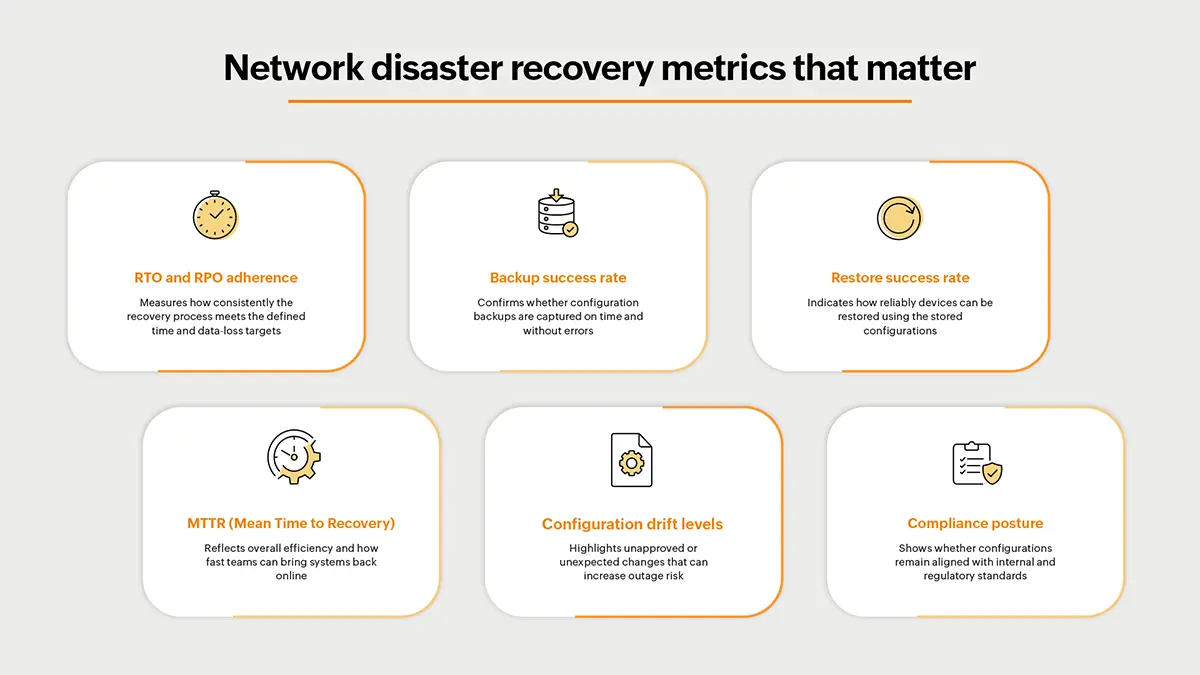
These metrics allow teams to improve their disaster recovery readiness continuously and strengthen resilience across the network.
How ManageEngine Network Configuration Manager helps with network disaster recovery
When a network outage strikes, the speed and accuracy of your recovery process determine how quickly business operations bounce back. ManageEngine Network Configuration Manager brings all the essential capabilities together that includes backup automation, version intelligence, compliance control, and bulk restoration, to help teams recover devices and services with confidence.
Automated multi-vendor configuration backups: ManageEngine Network Configuration Manager captures scheduled and real-time backups for routers, switches, firewalls, and controllers. Every configuration update is safely stored, giving teams immediate access to the latest and older versions during recovery.
Deep version control with change comparison: The platform maintains complete configuration histories and provides line-by-line configuration comparison . Engineers can quickly identify the exact change that triggered an outage and restore the most stable version without delay.
Real-time configuration drift detection: ManageEngine Network Configuration Manager alerts teams immediately when an unauthorized or accidental change occurs. This early detection prevents faulty configurations from spreading across the network.
One-click restore and rapid rollback: During misconfigurations or outages, engineers can instantly deploy a known-good configuration . This capability significantly reduces Mean Time to Recovery and brings critical services back online quickly.
Secure backup encryption and role-based access control: All configuration backups are encrypted, and access is tightly governed through role-based permissions. Only authorized personnel can view, download, or modify sensitive network configuration data.
Compliance detection with automated remediation: ManageEngine Network Configuration Manager includes built-in and fully customizable compliance policies . When violations occur, automated remediation templates can immediately reset devices to compliant states.
Programmable configlets and bulk operations after a disaster:Configlets allow teams to automate complex recovery steps across multiple devices. After a disaster, bulk deployment helps restore entire branches or large device groups with minimal manual intervention.
Post-recovery compliance and backup reports: The platform generates audit-ready reports that confirm each device has been restored properly, is backed up, and meets regulatory compliance requirements after recovery.
A strong Network Disaster Recovery Plan is no longer optional. It is essential for maintaining uptime, meeting compliance requirements, and protecting business continuity in an environment where outages, misconfigurations, and security risks continue to rise. With clear processes, automated backups, and fast restoration workflows, organizations can minimize downtime, prevent configuration loss, and recover quickly even during major disruptions.
Take the next step: Strengthen your disaster recovery strategy by downloading the 30-day free trial of ManageEngine Network Configuration Manager or scheduling a free personalized demo to keep your network ready for anything.
FAQs on network disaster recovery plan
1. What is the difference between DR and BCP?
Disaster Recovery (DR) focuses on restoring IT systems after disruptions. Business Continuity Planning (BCP) outlines how the entire organization continues operations during and after a disaster.
2. How often should network configs be backed up?
Backups should occur on schedule (daily/weekly) and automatically whenever a change is detected. Critical devices often require change-based backups.
3. What causes most network disasters?
Misconfigurations, unauthorized changes, outdated firmware, hardware failure, and security attacks are among the most common causes.
4. How do you test a disaster recovery plan?
Testing includes simulated restores, config integrity checks, failover drills, compliance validation, and documenting whether RTO/RPO goals are met.

By Akash,
Product marketer, ManageEngine