Creating a network map: Process and purpose
Creating a network map is the process of discovering the devices on your network, identifying how they're connected, and representing those relationships in a visual diagram. Depending on the size and complexity of the environment, this can be done manually using a diagramming tool or automatically using network discovery software that continuously updates the map as the network changes.
An accurate network map helps admins troubleshoot connectivity issues, plan network changes, document infrastructure, and understand how different parts of the network depend on one another.
In this guide, you'll learn what makes a network map useful, how to create one, and the common mistakes to avoid.
The three stages of creating a network map
Every network map should answer one or more of these operational questions clearly:
- What's connected?
- Where does traffic flow?
- What breaks if this device or link fails?
The clearer a map answers those questions, the more useful it is during troubleshooting, planning, documentation, and change management. Creating a useful network map involves three stages:
- Scope the map.
- Build the map.
- Validate the result.
Scope the network map
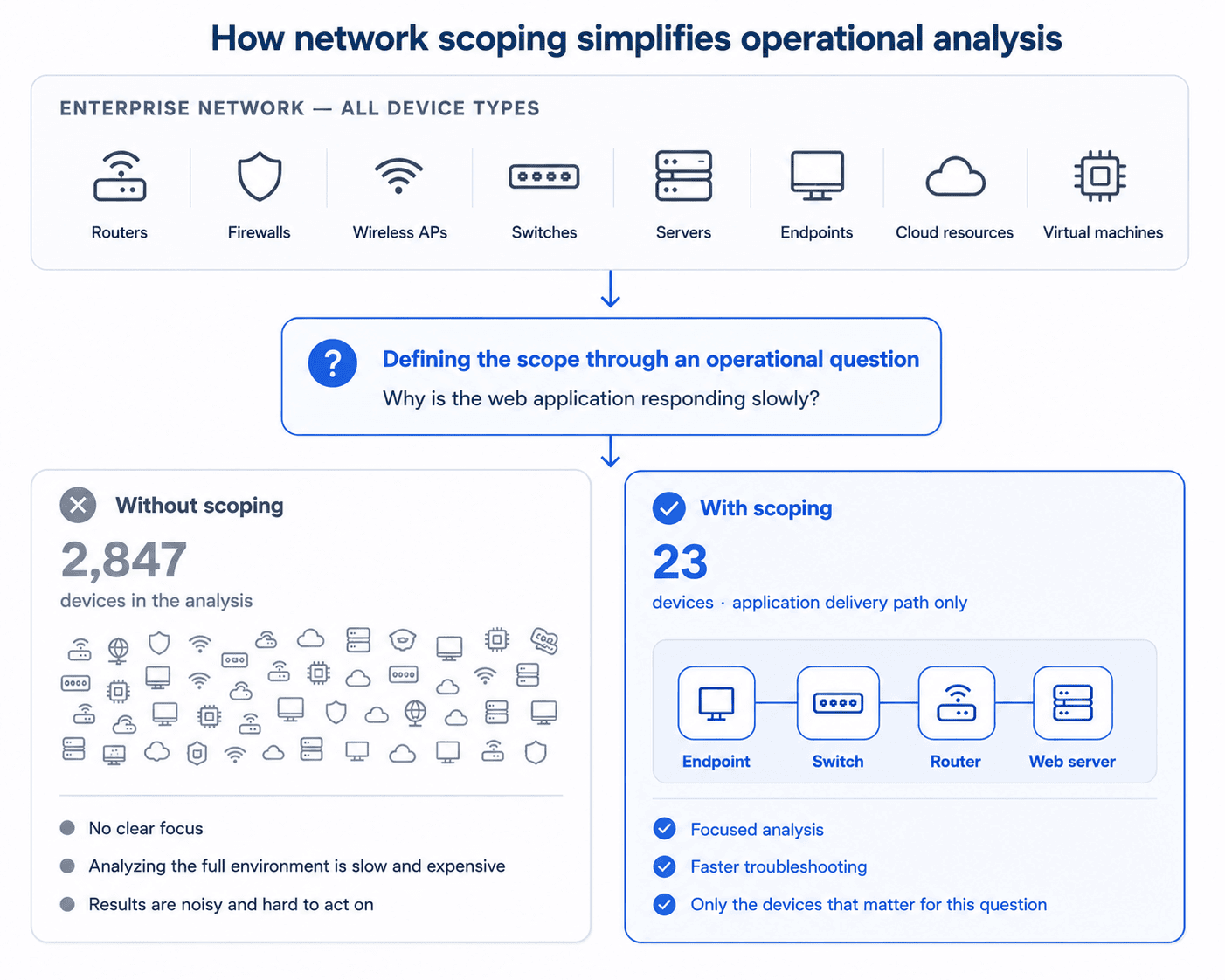
Scoping defines what the network map should represent before you begin building it. A well-scoped map answers one operational question clearly instead of trying to visualize everything at once. Scoping comes down to three decisions:
- Choose the type of map you need.
- Define the part of the network it should cover.
- Discover the network and filter the results to match that scope.
Choose the right type of network map
The type of network map you create depends on the aspect or layer of the network you want to view.
| Map type | What it shows | Best for |
|---|---|---|
| Physical topology | Cabling, ports, and hardware connections | Physical troubleshooting and infrastructure documentation |
| Logical topology | Traffic flow, VLANs, routing relationships, and network segmentation | Understanding network design and communication paths |
| Layer 2 topology | Switching relationships between neighboring devices | Switch-level troubleshooting and VLAN management |
| Layer 3 topology | Routing paths between networks | Routing analysis and WAN troubleshooting |
| Hybrid and cloud topology | Relationships across on-premises, virtual, and cloud infrastructure | Hybrid IT environments |
Smaller networks may only require a single map. Larger environments typically benefit from multiple maps because different operational tasks require different views of the network.
Define the scope
Once you've chosen the type of map, define the portion of the network it should cover. That might be a site, department, VLAN, data center, cloud environment, or business service. The goal is to include everything needed to answer the question the map was created for and exclude anything that distracts from it.
Discover the network
With the scope defined, identify the devices and relationships that belong within it. Depending on the map's purpose, this may include routers, switches, firewalls, wireless controllers, servers, virtual machines, cloud resources, SD-WAN components, storage systems, and other network-connected assets. The goal isn't to inventory every device in the environment, but every component needed to answer the operational question the map is intended to support.
Because no single discovery method provides a complete picture of the network, network mapping combines information from multiple sources. Common discovery methods include:
• ICMP identifies reachable devices.
• SNMP collects device identity, interfaces, and system information.
• LLDP and CDP identify directly connected neighboring devices.
• ARP and MAC address tables associate endpoints with switch ports.
• Routing tables reveal Layer 3 paths between networks.
• Cloud APIs, SSH, and WMI collect information from cloud platforms, virtual infrastructure, and operating systems.
Discovery identifies everything it can find, while scoping determines what belongs in the final map. The result is a network map that's focused on answering a specific operational question instead of documenting every part of the environment.
Build the network map
Once you've identified the devices and their relationships, organize them into a diagram that's easy to understand, navigate, and maintain. Here's how you do it:
Structure the layout
Arrange devices according to the network hierarchy so relationships are easy to follow. Most network maps place core infrastructure above distribution and access layers, with endpoints below.
If the diagram becomes crowded, split it into multiple maps instead of trying to represent the entire environment in a single view.
Label the map
Choose labels based on who will use the map.
Engineers typically need technical identifiers such as IP addresses, interface names, VLAN IDs, and device names. Business stakeholders often benefit from labels that describe the role of each system instead of its technical details.
Whichever convention you choose, apply it consistently throughout the map so information can be understood quickly.
Keep the map current
A network map becomes less useful as the network changes.
If you're using automated discovery, schedule rediscovery so topology changes are reflected automatically. If you maintain diagrams manually, establish a clear ownership process so updates become part of normal network operations.
An accurate network map isn't created once but maintained over time. For practical guidance on keeping topology maps accurate as networks evolve, see our guide to Network Mapping Challenges and Best Practices.
Validate the network map
Before relying on a network map for troubleshooting, planning, or documentation, verify that it accurately represents the network. Validation ensures the map can be trusted when decisions depend on it.
Compare the map with the live network
Verify that the devices, interfaces, links, and network paths shown on the map match the current network.
If the network has changed since discovery, run another discovery cycle or update the diagram before treating it as an authoritative reference.
Check that the map answers its intended purpose
A network map should answer the operational question it was created for.
For example, a physical topology map should accurately represent device locations and connections, while a Layer 3 topology map should clearly show routing relationships. If the map doesn't support its intended purpose, refine its scope or create additional maps for different operational needs.
Review the map with the people who use it
Review the completed map with the engineers or teams responsible for that part of the network. They can identify missing devices, incorrect relationships, or outdated information that automated discovery may not detect.
Once validated, the network map becomes a reliable operational reference that teams can use with confidence.
Common mistakes to avoid when creating a network map
Even an accurate network map becomes difficult to use if it's poorly organized or no longer reflects the network. Some of the most common mistakes include:
- Trying to represent the entire network in one map. Large environments are easier to understand when divided into multiple maps based on location, function, or network layer.
- Choosing the wrong type of map. Physical, logical, Layer 2, and Layer 3 maps each answer different operational questions.
- Relying on a single discovery method. Combining multiple discovery sources produces a more complete view of the network.
- Including unnecessary information. Devices, links, and labels that don't support the map's purpose make it harder to read.
- Allowing the map to become outdated. Schedule regular network discovery or establish ownership for manual updates so the map continues to reflect the live environment.
For a deeper look at these challenges and practical ways to address them, see our guide to Network Mapping Challenges and Best Practices.
Create and maintain accurate network maps with ManageEngine OpManager
ManageEngine OpManager simplifies network mapping by automatically discovering devices, collecting topology information from multiple discovery protocols, and generating up-to-date Layer 2 and Layer 3 topology maps. As the network evolves, OpManager continuously updates its network model, helping IT teams visualize connectivity, troubleshoot issues faster, assess the impact of infrastructure changes, and maintain accurate network documentation.
Whether you're documenting a new environment, troubleshooting an outage, or planning future network changes, OpManager provides the visibility needed to keep your network maps accurate and operationally useful.
Create and maintain accurate network maps with ManageEngine OpManager
Download nowFrequently asked questions
When should I create a new network map instead of updating an existing one?
In most situations, updating an existing network map is sufficient. Creating a new map is more appropriate when documenting a newly deployed site, validating infrastructure after a major migration, capturing the network before a complex infrastructure change, documenting inherited networks after a merger or acquisition, or preparing for a compliance audit.
Where should I start if I'm mapping an undocumented network?
Can automated discovery create a complete network map?
Should I create one network map or several?
How do I validate that my network map is accurate?
How often should a network map be updated?
By Javith Razvi,
ManageEngine Team