What is network mapping?
Network mapping is the process of discovering, organizing, and maintaining an accurate model of a network and the relationships between its components. The model captures information such as devices, interfaces, IP addresses, ports, VLANs, and Layer 2 and Layer 3 relationships.
That information can then be represented in different ways depending on what needs to be understood:
- Topology maps show how devices and network segments connect.
- Logical maps show how different parts of the network communicate.
- Business service maps show dependencies between services and infrastructure.
- Device, rack, floor, and geographic views provide other perspectives of the same environment.
As the network changes, the underlying model needs to change with it. Devices are added or removed, connections change, configurations are modified, and infrastructure moves between physical, virtual, and cloud environments. Network mapping keeps this information organized and current so the resulting maps remain useful.
At its core, network mapping answers:What does my network actually look like right now?
In this article, you'll learn:
- How network mapping how it works.
- Why organizations use network mapping.
- What information network mapping captures and how it is visualized.
- Use cases of network mapping in modern IT operations.
- The challenges of network mapping.
- How accurate a network map can be
- The tools commonly used for network mapping.
Why do organizations use network mapping?
Network mapping is important because it gives IT teams an accurate view of what is connected, how components relate to one another, and what could be affected by a failure or change.
Every operational decision starts with questions such as:
- What devices are currently connected to the network?
- How are those devices connected?
- What changed since the network was last documented?
- Which systems or applications depend on this device?
- How far could an outage or planned change affect the network?
- Are there unexpected devices, links, or topology changes that require investigation?
Network mapping helps IT teams answer these questions when they are:
- Troubleshooting outages and incidents
- Planning network changes, expansion, and upgrades
- Investigating unexpected devices or topology changes
- Documenting infrastructure and transferring network knowledge
To learn which capabilities support these requirements in different environments, read Key features of a network mapping tool.
How does network mapping work?
Network mapping works by discovering network resources, identifying their relationships, organizing that information into a network model, generating relevant views, and keeping the information updated as the network changes.
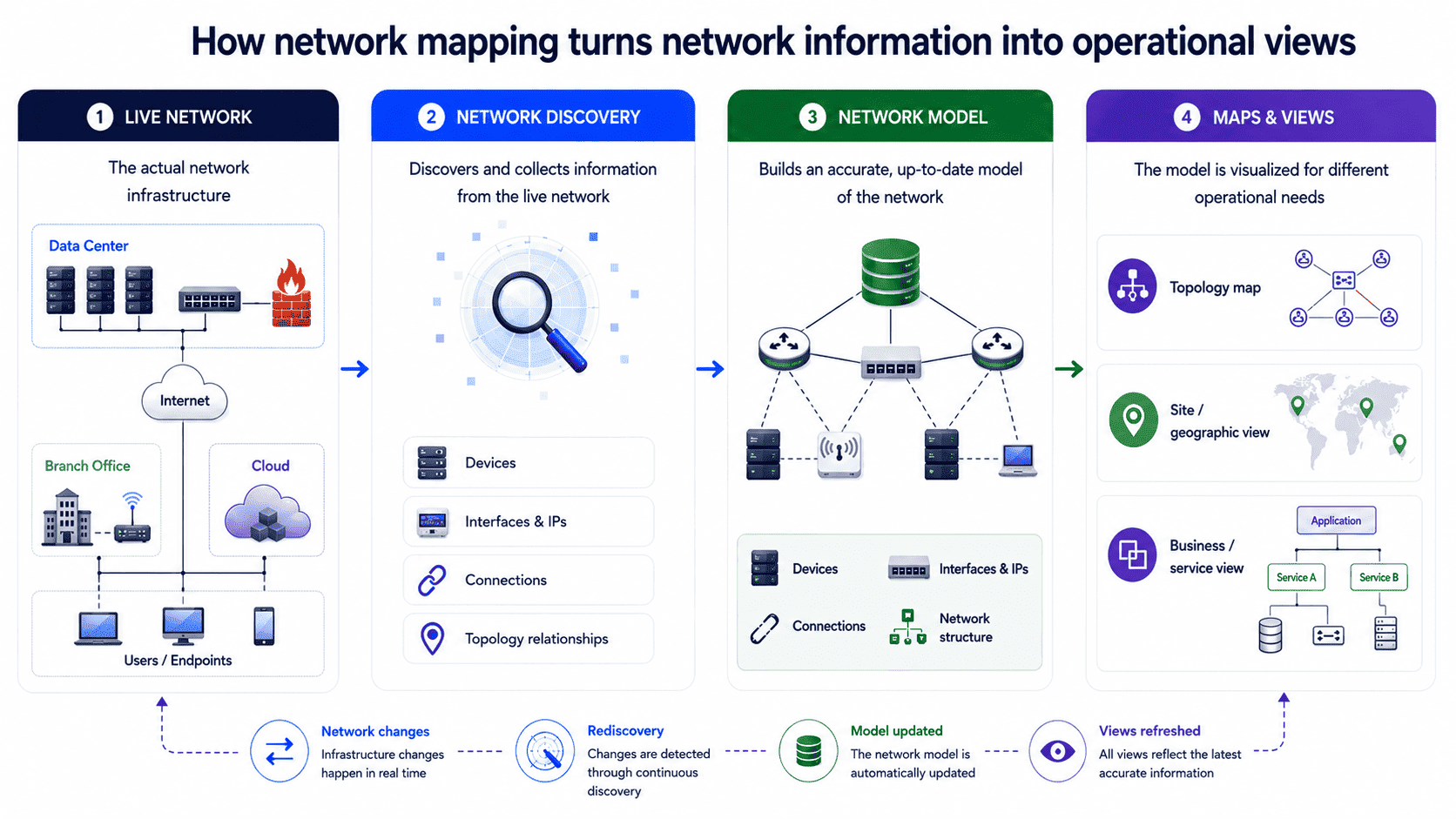
1. Discover network resources
The process starts with finding the devices and infrastructure that make up the environment: routers, switches, firewalls, servers, wireless devices, cloud resources, and other connected systems.
For a manually created map, an engineer may gather this information from device configurations, command-line outputs, existing documentation, and physical inspection. Mapping software can automate much of the discovery using information exposed by network devices and infrastructure.
2. Identify relationships
Knowing that a switch or router exists tells you very little about the topology by itself. The mapping process also needs to determine how discovered devices relate to one another.
This can include physical connections, Layer 2 adjacencies, routing relationships, switch-port associations, and other relationships that describe how traffic and infrastructure move through the environment.
3. Build the network model
The discovered devices and relationships are organized into a structured representation of the network. This becomes the source for the maps, inventories, and other views generated from the discovered information.
4. Generate operational views
The information can then be presented according to what an engineer needs to see. A Layer 2 topology view can expose switching relationships. A logical map can show networks, VLANs, and routing relationships. A business or service view can connect applications with the infrastructure supporting them.
5. Keep the information updated
A manually maintained map has to be revised whenever the network changes. That can become difficult as the environment grows or changes frequently.
Automated network mapping can periodically or continuously rediscover infrastructure and update the network information as devices, links, and configurations change. This reduces the manual work involved in keeping the resulting maps aligned with the live environment.
To learn how automated discovery, relationship mapping, and continuous rediscovery work in practice, read Automated Network Mapping.
What information does network mapping capture?
Network mapping can capture information about devices, device attributes, connectivity, network structure, and dependencies, which varies based on the environment and capabilities of the network mapping tool.
| Information category | Typical information captured |
|---|---|
| Devices | Routers, switches, firewalls, servers, wireless devices, endpoints, cloud resources |
| Device details | Hostnames, IP addresses, MAC addresses, interfaces, operating systems, hardware details |
| Connectivity | Layer 2 connections, Layer 3 paths, switch-port associations, routing relationships |
| Network structure | VLANs, subnets, network segments, sites, racks, locations |
| Dependencies | Relationships between network components and, where supported, applications and business services |
Together, this information describes what is present in the network and how its components relate to one another. Mapping tools use it to build the maps and other views used by engineers and operations teams.
To deep-dive into how network mapping tools discover and correlate this information, read Network Discovery and Mapping.
What types of network visualizations can network mapping produce?
Network mapping can produce physical, logical, Layer 2, Layer 3, geographic, rack, floor, data center, and business or service views, depending on the information captured and the tool's visualization capabilities:
- Physical network maps represent physical devices and connections using information about infrastructure, interfaces, ports, and physical relationships. They help teams understand how the network is physically laid out and support infrastructure documentation and physical troubleshooting.
- Logical network maps represent the logical organization of the network using information such as IP addresses, subnets, VLANs, and routing relationships. They show how different parts of the network communicate regardless of their physical location.
- Layer 2 and Layer 3 maps represent relationships at their respective network layers. Layer 2 views show switching relationships and adjacencies, while Layer 3 views show routed relationships between networks and the paths connecting them.
- Geographic maps place network infrastructure across physical locations such as offices, branches, and data centers, giving teams a location-based view of distributed infrastructure.
- Rack, floor, and data center views place discovered devices within their physical environments, which can be useful for infrastructure documentation, physical troubleshooting, and planning.
- Business and service views can show relationships between applications or services and the infrastructure supporting them, helping teams trace infrastructure dependencies from a service perspective.
For differences between physical, logical, Layer 2, and Layer 3 topology maps, read Network Topology Mapping.
How is network mapping used in modern IT operations?
Network mapping provides network context for monitoring, incident response, change management, security operations, capacity planning, and ITSM or CMDB workflows.
Network monitoring: Trace an alert through the topology
A monitoring system can tell you that a switch, interface, or link is unavailable or degraded. The topology around that alert tells you what the affected component connects to and where it sits in the network.
That context helps engineers trace neighboring devices and connected paths, determine whether several alerts may have a common point of failure, and narrow down where to investigate.
Incident response: Determine the impact of a network failure
When a critical network device fails, the first concern is often how much of the environment could be affected.
A current network map can show the devices, links, network segments, and dependencies connected to the failed component. Incident teams can use that information to establish the potential scope of the failure and prioritize what needs attention.
Change management: Assess the impact of a planned change
Replacing a switch, changing a router configuration, modifying a VLAN, or altering a network path can affect infrastructure beyond the component being changed.
A network map gives engineers a view of the surrounding topology and connected infrastructure before the change is made. That information can be used to identify dependencies, assess potential disruption, and plan the change with fewer unknowns.
Security operations: Investigate unexpected network changes
An unfamiliar device or unexpected connection becomes easier to investigate once its position in the network is known.
A network map can show where the device connects, which switch port or neighboring infrastructure it uses, and what surrounds it. Security and network teams can use that context to determine whether the change is expected or requires further investigation.
The same network baseline can also support Zero Trust initiatives. Understanding which devices, segments, and services communicate with one another gives security teams a clearer basis for defining segmentation boundaries and identifying unexpected paths between systems.
Capacity planning: Plan network expansion around existing infrastructure
Adding a new site, network segment, link, or group of devices requires an understanding of the infrastructure already in place.
A current network map provides that baseline: existing devices, connections, sites, and network structure. Engineers can use it to determine where new infrastructure fits and how it will interact with what is already there.
ITSM and CMDB: Keep infrastructure records connected to the network
ITSM and CMDB systems rely on accurate information about the infrastructure they manage.
Network mapping can provide discovered device and relationship information to these systems, where it can be used alongside configuration, incident, and service records. This reduces the need to maintain network relationships entirely by hand.
What are the challenges of network mapping?
The main challenges of network mapping are incomplete visibility, accurately establishing network relationships, keeping the map current as the network changes, and presenting enough information without creating clutter.
Incomplete visibility
A mapping process cannot represent infrastructure it cannot reach or interrogate. Missing credentials, disabled protocols, network segmentation, unsupported devices, or unavailable APIs can leave parts of the environment outside the model.
Establishing accurate relationships
Finding a device is relatively straightforward compared with determining exactly how it connects to everything around it.
Physical connections, Layer 2 adjacencies, routing relationships, and dependencies can require different sources of information. When those sources are incomplete, the resulting topology can be incomplete as well.
Keeping up with a changing network
Devices, links, configurations, sites, virtual resources, and cloud infrastructure change continually. A map that was accurate when it was created can therefore become outdated without anyone deliberately making it wrong.
Presenting enough information without creating clutter
A network contains more information than most teams need to see at once. Engineers troubleshooting a switching problem may need a different view from someone planning a new site or investigating a business service.
The mapping system therefore needs to capture enough information to support those tasks while allowing the relevant parts of the environment to be presented clearly.
For best practices on improving discovery coverage, maintaining accuracy, validating changes, and keeping network maps useful over time, read Network Mapping Best Practices.
How accurate can a network map be?
A network map cannot always represent every detail of a changing network perfectly. Its practical value depends on whether the information is accurate and current enough for the decisions the team needs to make.
Since a network map represents a changing environment, some degree of imperfection is unavoidable. Discovery can have blind spots. Infrastructure can change between discovery cycles. Some relationships may require information that isn't available to the mapping system. Even a well-maintained map can therefore still have limitations. What matters in practice is whether the information is accurate and current enough for the decisions the team needs to make.
It also helps when those limitations are visible. Engineers should be able to understand what has been discovered, which relationships have been established, and where the mapping process may not have complete visibility.
The practical goal is a map the team can rely on for the work it needs to do, rather than one that claims to reproduce every detail of the network perfectly.
What tools are used for network mapping?
Network mapping can use dedicated mapping platforms, network monitoring and IT management platforms, diagramming tools, discovery and diagnostic tools, or vendor-specific management tools.
Network monitoring and IT management platforms
Many network monitoring platforms include automated discovery, topology mapping, and visualization alongside monitoring data. This is useful when engineers need topology information while monitoring and troubleshooting the network, rather than maintaining it as a separate documentation exercise.
Diagramming and documentation tools
Tools such as Visio or Draw.io can be used to create network diagrams manually. They give engineers considerable control over how the environment is represented, but the underlying device and relationship information has to be collected and maintained separately.
Network discovery and diagnostic tools
Tools such as Nmap, Ping, and Traceroute can help engineers discover hosts or investigate connectivity and paths. They can provide useful information for network mapping, although they aren't necessarily complete network mapping platforms themselves.
Vendor-specific management tools
Network equipment vendors may provide mapping or management capabilities tailored to their own infrastructure. These can provide detailed visibility into supported devices, but their usefulness can vary in multi-vendor environments.
For organizations looking for a dedicated or integrated platform, the options range from free and open-source tools to commercial network mapping and monitoring platforms.
For a detailed comparison of the leading free, open-source, and commercial options, read Best Network Mapping Tools.
Frequently asked questions about network mapping
Is network mapping the same as network discovery?
No. Network discovery identifies devices and collects information about the infrastructure. Network mapping uses that information to establish relationships between network components and build a representation of how the network is structured.