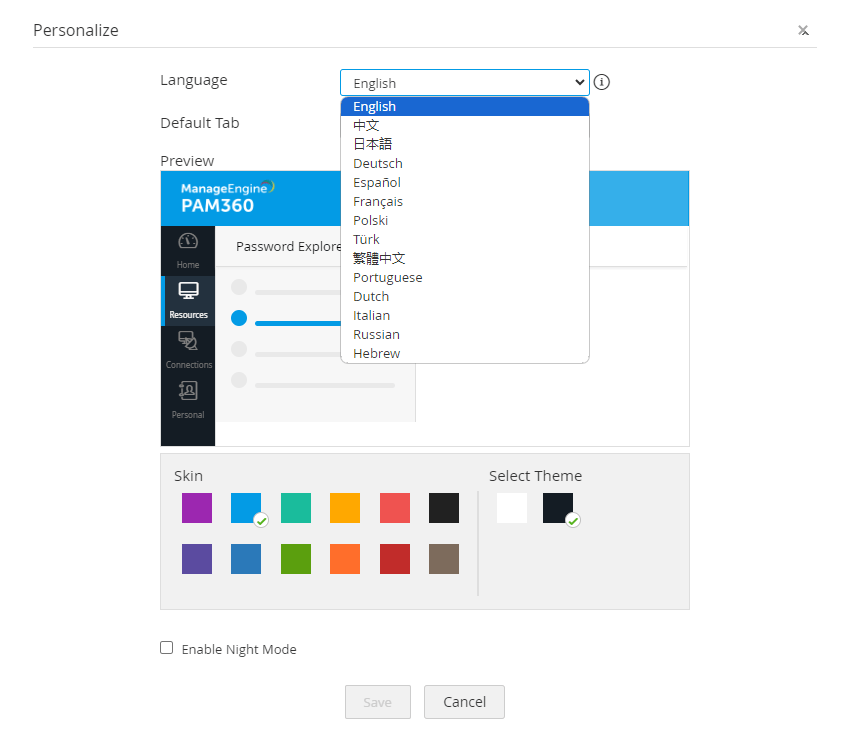
Languages supported by PAM360
- English
- French
- German
- Japanese
- Polish
- Simplified Chinese
- Spanish
- Traditional Chinese
- Turkish
- Portuguese
- Italian
- Russian
- Dutch
- Hebrew
Steps to choose your preferred language in PAM360:
1. Click the My Profile icon on the top right corner and choose Personalize from the drop-down menu.
2. From the Language drop-down menu, choose your preferred language for the web interface.
3. Click on Save. PAM360 will then be available in the chosen language.