

Account lockout duration
Written by Sakthi Sri, IT security team, ManageEngine Updated on August 2025
What is Account lockout duration?
Account lockout duration is a security setting in Windows Group Policy that defines how long a user account remains locked out before it is automatically unlocked. Locking out the account for a set time deters potential attackers from attempting to compromise it using brute-force or dictionary attacks.
Account lockout duration best practices
The Account lockout duration setting can have any value between 0 and 99,999 minutes. Setting it to 0 will make it necessary for an administrator to manually unlock the account, which is ideal for highly privileged users with extensive permissions. For normal users, a shorter lockout duration offers convenience but might expose the accounts to prolonged attacks, while a longer duration enhances security but can inconvenience users experiencing accidental lockouts. Therefore, it's crucial to balance security and usability by setting a reasonable lockout duration. Generally, a duration of around 30 to 60 minutes is considered the best practice.
How to configure the Account lockout duration
To configure the Account lockout duration:
- Go to Server Manager > Tools > Group Policy Management.
- Right-click the GPO within which you wish to configure the account lockout policies for the domain and select Edit.
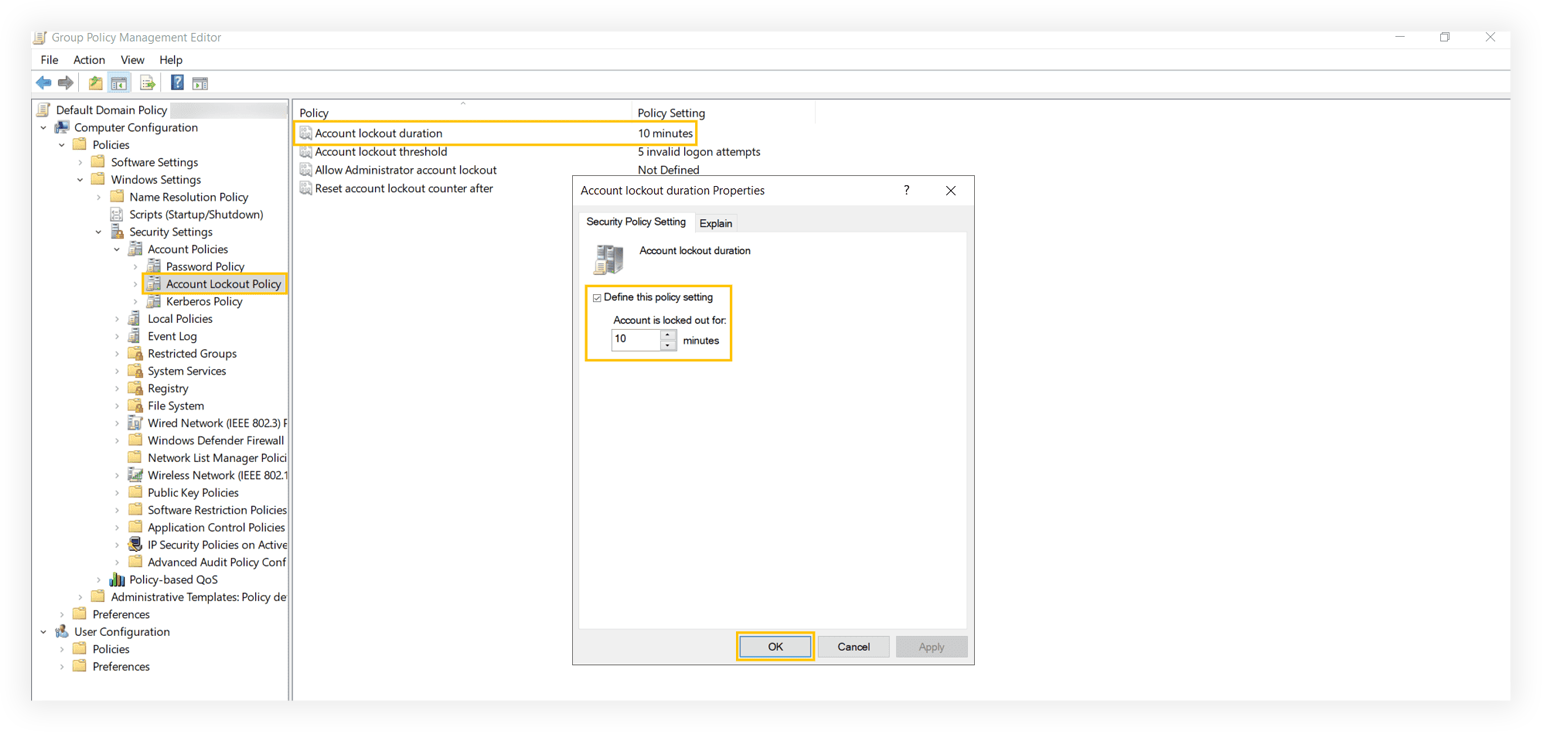
- In Group Policy Management Editor, go to Computer Configuration > Policies > Windows Settings > Security Settings > Account Policies > Account Lockout Policy.
- On the right pane, right-click Account lockout duration and select Properties.
- In the Account lockout duration Properties window, check the Define this policy setting checkbox and specify a suitable lockout duration.
- Click OK.
Why is it necessary to audit account lockout policies?
The Account lockout duration, along with the other Group Policy settings, is crucial for securing your Active Directory (AD) user accounts. To prevent attackers from infiltrating the AD environment, administrators must closely monitor these Group Policies and remediate any changes immediately. Achieving this level of visibility into your AD GPOs is impossible with native Windows auditing.
ManageEngine ADAudit Plus is a unified auditing, security, and compliance solution that helps keep AD, Entra ID, file servers, Windows servers, and workstations both secure and compliant. Equipped with exclusive reports detailing GPO settings changes, ADAudit Plus makes it easier for you to view the before and after values of the modified GPO settingsin just a few clicks. But that's not all. With ADAudit Plus' extensive capabilities, you can:
- Troubleshoot repeated AD lockouts easily with our account lockout analyzer.
- Monitor group membership changes with dedicated reports.
- Track the creation, deletion, and modification of security and distribution groups.
- Identify AD logon failures using our user logon failure auditing tool.
- Detect insider threats proactively with UBA-powered insider threat detection.
- Audit every change across your Entra ID environment with our Entra ID reporting tool.
- Analyze unauthorized file changes across Windows, EMC, NetApp, Synology, Hitachi, and Huawei NAS devices with our file change monitoring tool.
- Gauge the productivity of your users with our employee productivity tracker.
- Streamline compliance using our AD compliance reporting for the GDPR, HIPAA, the PCI DSS, and other mandates.
- Elevate the security of your on-premises, cloud, and hybrid environments with our attack surface analyzer.
Try all these features and more for 30 days with a free, fully functional trial. Alternatively, you can schedule a personalized demo for a guided walk-through of ADAudit Plus.
Don't wait for your annual compliance audit.
- Audit your AD and Azure
- Monitor user logon
- Troubleshoot AD lockouts
Thanks!
Please check your inbox for demo details.









