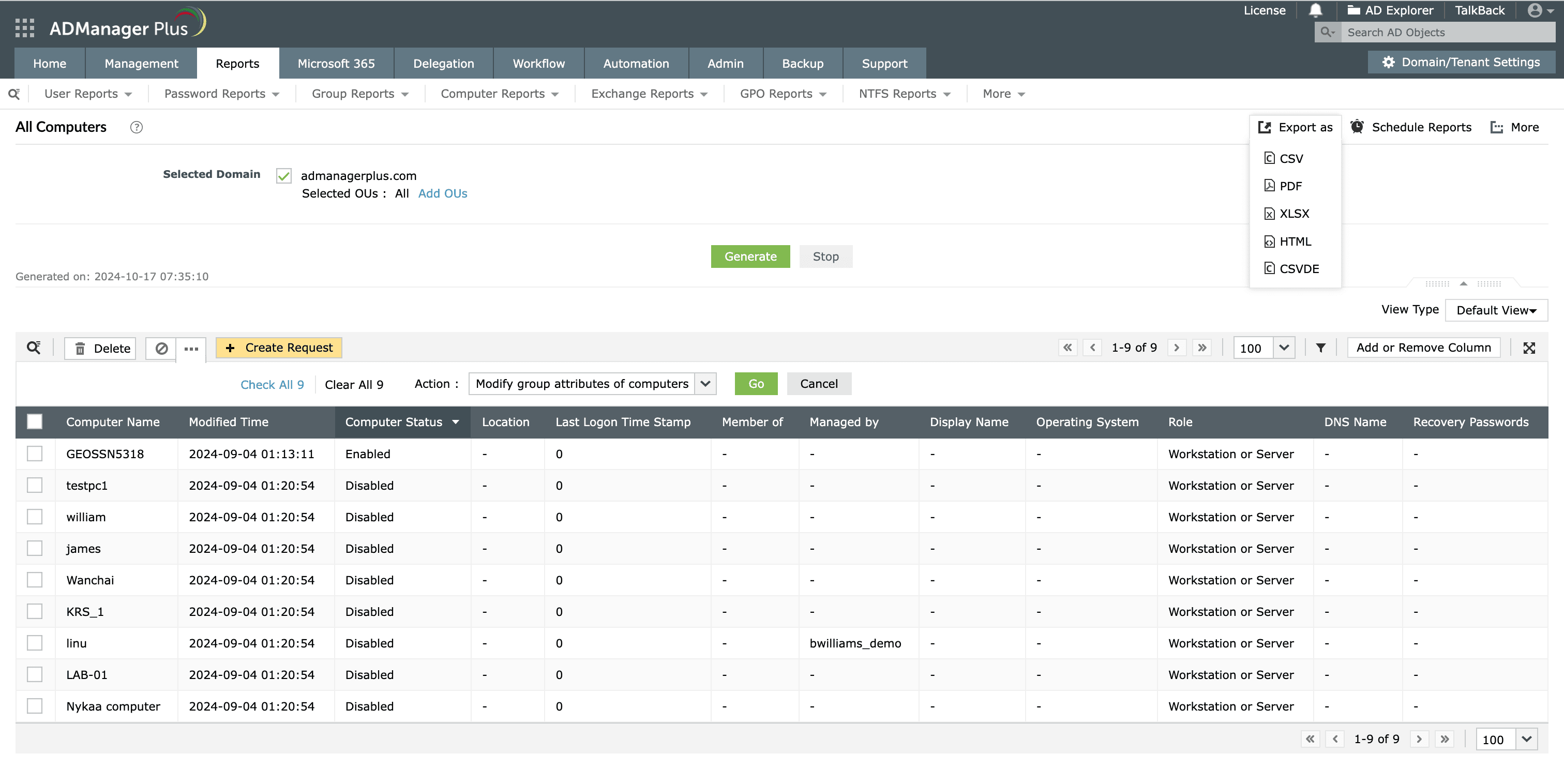
Steps to export computers in ADManager Plus

This report displays the details of all computers within the specified domain. Use this report to export the list of computers from Active Directory in just a few clicks.

  1. Log in to ADManager Plus.
  2. Click the Reports tab.
  3. Navigate to Computer Reports > General Reports > All Computers.
  4. Select the domain for which you wish to generate the report.
  5. To export the computers in a specific organizational unit (OU), click Add OUs located beside the domain field. In the window that opens up, select the desired OUs.
  6. Click OK.
  7. Click Generate to view the report.
  8. Click More Actions to perform computer modifications like reset computers, delete computers, and more.
  9. Once the report is generated, click Export as to export the report in various formats, such as CSV PDF, XLSX, HTML, or CSVDE.
How to export All Computers report in ADManager Plus
View the details of all computers within the specified domain.

Key use cases of exporting the AD computers report

Use case 1: Efficient computer management

Regularly identifying and removing inactive computers helps IT departments keep AD streamlined and organized. This process ensures that only active, relevant computers remain in AD, streamlining management by reducing clutter.

Use case 2: Comprehensive security and compliance audits

Exported computer reports allow organizations to identify unauthorized or non-compliant devices, ensuring that only approved computers with the correct security settings are active in the network. This is especially useful during compliance audits for frameworks like SOX and HIPAA.

Benefits of using ADManager Plus as an AD reporting tool

Comprehensive reporting

Manage and generate reports on AD objects using a centralized platform with a user-friendly dashboard.

Export-ready reports

Export the generated reports in various formats, such as PDF, XLSX, CSV, CSVDE, and HTML.

On-the-fly reporting

Enable and disable computers, delete computers, and do even more directly from reports.

Script-free reporting

Effortlessly generate AD reports without the need for complex scripting, saving time and increasing productivity.

Need further
assistance?

Fill this form, and we'll contact you rightaway.

Request Callback

  •  
  • *
     
  • *
     
  • *
     
  • *
     
  • By clicking 'Submit' you agree to processing of personal data according to the Privacy Policy.

Thank you!

We’ve received your callback request and will get back to you shortly.

ADManager Plus Trusted By

The one-stop solution to Active Directory Management and Reporting