Steps to export AD group members using ADManager Plus

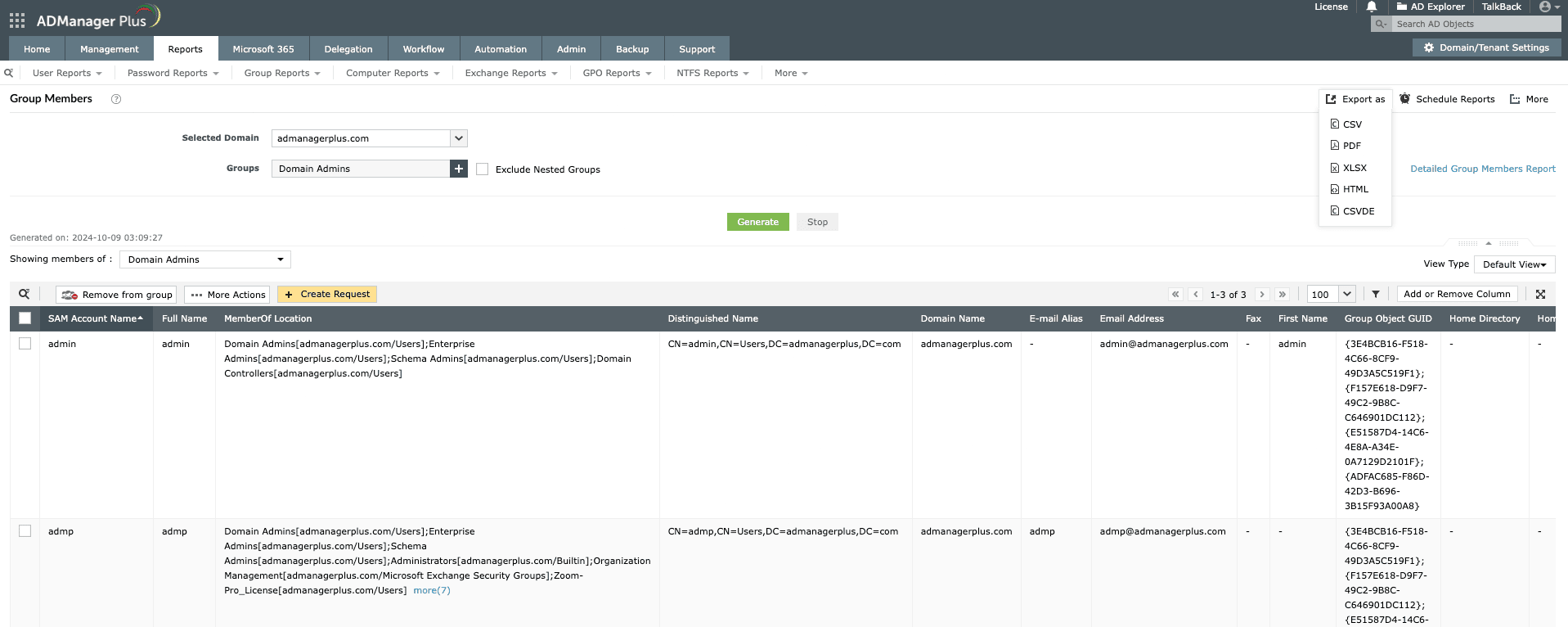
The Group Members report in ADManager Plus displays detailed information about the users in the selected group. Use this report to export the information on members of a group with just a few clicks.

  1. Log in to ADManager Plus.
  2. Click the Reports tab.
  3. Navigate to Group Reports > Member-based Reports > All Groups.
  4. Select the domain and group for which you wish to generate the report.
  5. Click Generate to view the report.
  6. Click More Actions to perform bulk group modifications like move groups, delete groups, and more.
  7. Once the report is generated, click Export as to export the report in various formats, such as CSV PDF, XLSX, HTML, or CSVDE.
How to export group members report in ADManager Plus
View the details of all users in a group within the specified domain

Key use cases of exporting AD group members report

Use case 1: Export members of a specific group

Exporting the members of a specific AD group is essential for managing user access and permissions effectively. This report allows administrators to gain visibility to the detailed list of users within a particular group, which can be used for auditing purposes. It also ensures that only authorized users have access to sensitive data, enhancing the organization's security.

Use case 2: AD cleanup

By regularly exporting the group members report, administrators can identify inactive or outdated accounts that no longer require access to specific resources. This helps in streamlining the AD process by removing inactive accounts and ensuring that only active users remain in the group. Frequent AD cleanups can enhance an organization's security, reducing the risk of unauthorized access.

Benefits of using ADManager Plus as an AD reporting tool

Hassle-free reporting

With the user-friendly UI, effortlessly generate predefined reports and view detailed insights.

Exportable reports

Export the generated reports in various formats, such as PDF, XLSX, CSV, CSVDE, and HTML.

Scheduled reporting

Schedule and automatically generate reports at regular intervals using the report scheduler.

Script-free reporting

Effortlessly generate AD reports without the need for complex scripting, saving time and increasing productivity.

Need further
assistance?

Fill this form, and we'll contact you rightaway.

Request Callback

  •  
  • *
     
  • *
     
  • *
     
  • *
     
  • By clicking 'Submit' you agree to processing of personal data according to the Privacy Policy.

Thank you!

We’ve received your callback request and will get back to you shortly.

ADManager Plus Trusted By

The one-stop solution to Active Directory Management and Reporting