How to export the AD users list to CSV

  1. Log in to ADManager Plus.
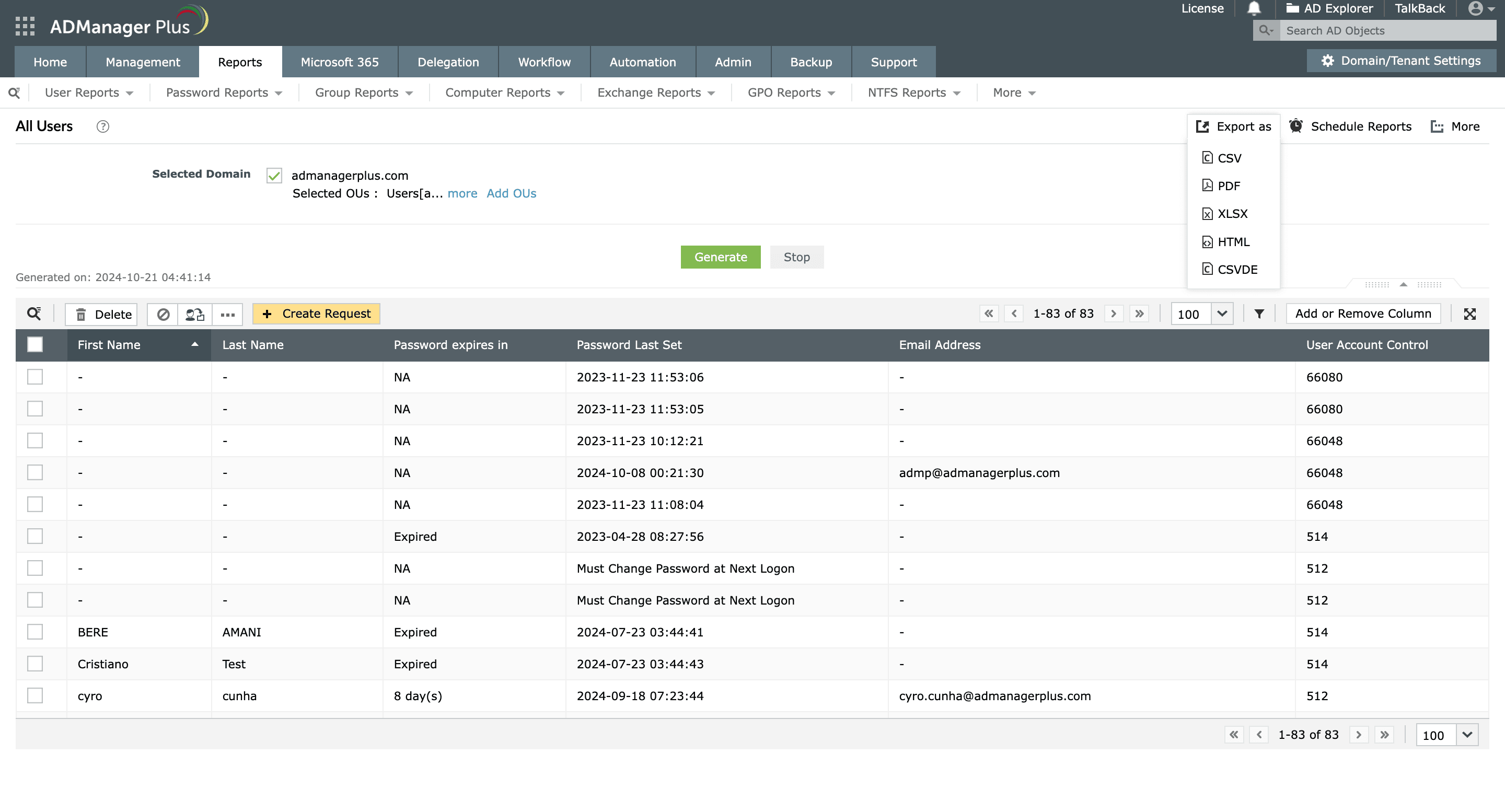
  2. Navigate to Reports > User Reports > General Reports > All Users.
  3. Select the AD domains whose users you wish to export and click Generate. A list of all the AD users in the selected domains will be displayed.
  4. Click the Add or Remove Column button to determine which columns should be included in the results before exporting.
  5. Click the Filter icon and configure a condition to refine the reports' results and export only selected AD users. For instance, if you'd like to export a list of AD users from the sales department, you can construct a condition saying department is sales, filter the results, and then export them.
  6. Click Export as to export the users to CSV, HTML, PDF, or other formats.
Different file formats available for exporting AD reports in ADManager Plus.
Different file formats in which ADManager Plus' reports can be exported.

Key use cases of exporting the AD users list

Use case 1: User account management

Exporting the AD users list helps organizations manage user accounts effectively. By analyzing these exported reports, IT administrators can identify accounts that need to be reviewed, cleaned up, or reactivated. This ensures that only active and authorized users have access to the network, improving overall security.

Use case 2: Compliance demonstration

One of the critical use cases of exporting AD reports is to meet compliance requirements. By periodically reporting on AD users and exporting the AD users list, organizations can demonstrate compliance with internal security policies and external regulations like the GDPR or HIPAA.

Benefits of using ADManager Plus to export the AD users list

Scheduled reporting and exporting

Schedule and have reports exported and mailed to stakeholders in multiple formats, like CSV or PDF.

Column customization

Customize the columns that must be included in the report before exporting.

Multi-platform report generation

Generate reports on AD, Microsoft 365, and Google Workspace environments and export them instantly.

Instant report generation

Generate reports and export them in desired formats in a matter of few clicks.

Need further
assistance?

Fill this form, and we'll contact you rightaway.

Request Callback

  •  
  • *
     
  • *
     
  • *
     
  • *
     
  • By clicking 'Submit' you agree to processing of personal data according to the Privacy Policy.

Thank you!

We’ve received your callback request and will get back to you shortly.

ADManager Plus Trusted By

The one-stop solution to Active Directory Management and Reporting