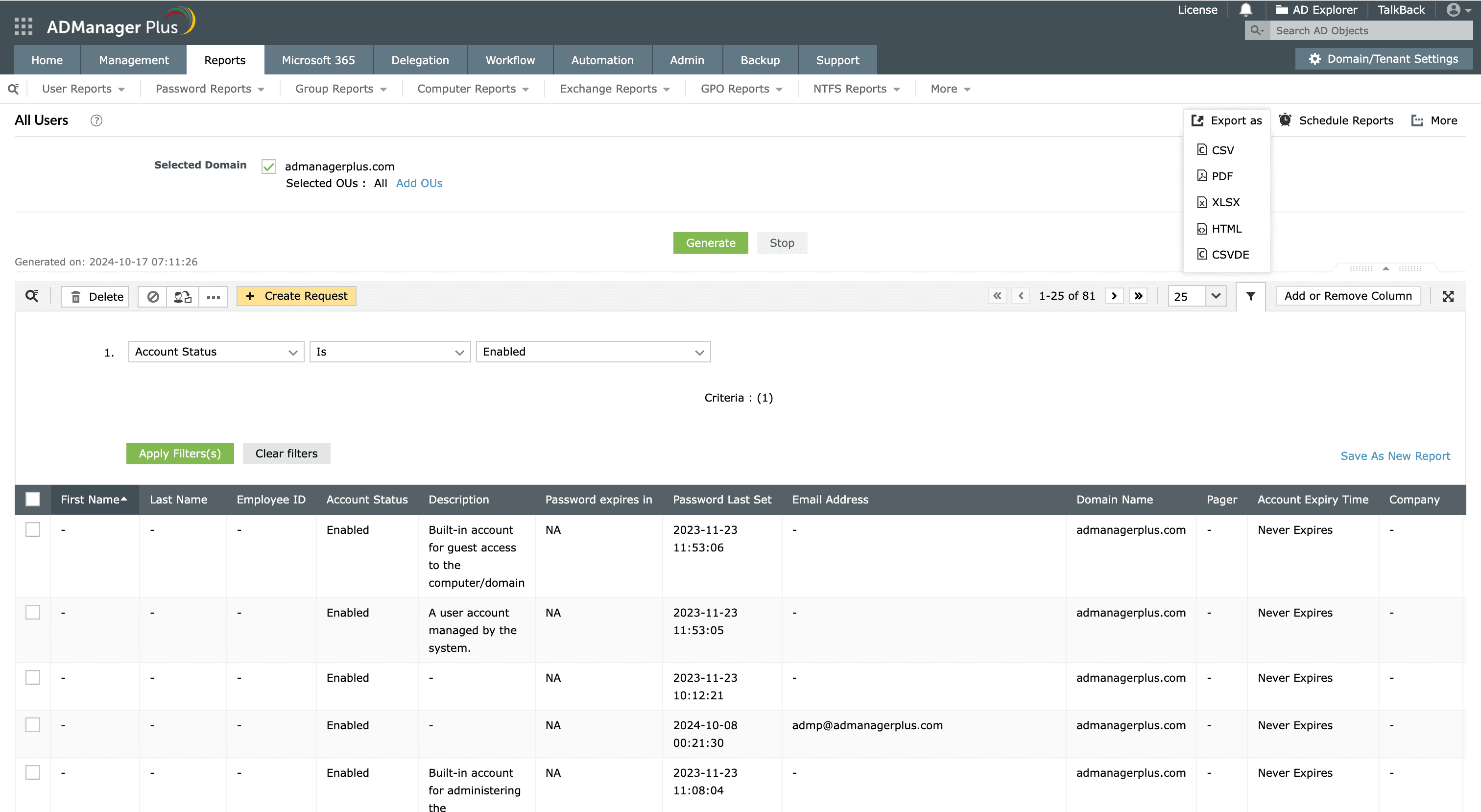
Steps to export active users using ADManager Plus

Using the All Users report in ADManager Plus, administrators can view and export all the active users in Active Directory.

  1. Log in to ADManager Plus.
  2. Click the Reports tab.
  3. Navigate to User Reports > General Reports > All Users.
  4. Select the domain for which you wish to generate the report.
  5. To select a specific organizational unit (OU), click Add OUs located beside the domain field. In the window that opens up, select the desired OUs.
  6. Click OK.
  7. Click Generate to view all the users in the specific domain.
  8. Use the Filter option to refine your criteria by selecting Account Status and then Enabled from the drop-down menu. This allows you to narrow down the results only to display the active users.
  9. Click Apply Filter(s).
  10. Click Add/Remove Columns to add or remove columns.
  11. Click More Actions to perform user management actions like reset password, unlock users, and more.
  12. Once the report is generated, click Export as to export the report in various formats, such as CSV PDF, XLSX, HTML or CSVDE.
How to export active users in ADManager Plus
Export all the active users within the specified domain

Key use cases of exporting active AD users

Use case 1: Comprehensive security audits

Regularly exporting lists of active users is essential for security audits. Organizations can analyze the exported data to identify any discrepancies, such as unusual access patterns or unauthorized users. This process helps enhance security measures and ensures that access controls are effectively enforced.

Use case 2: Efficient resource optimization

By exporting active users, organizations can efficiently track and allocate resources, such as user permissions, ensuring they are only assigned to active users. This process helps administrators prevent unnecessary access and optimize resource usage by enabling teams to quickly identify and deactivate inactive accounts that may still be consuming resources.

Benefits of using ADManager Plus as an AD reporting tool

Real-time reports

Get real-time insights on AD objects for accurate and up-to-date reporting.

Customizable reports

Generate customized AD reports to meet the organization's needs using the custom report builder.

Exportable reports

Export the generated reports in various formats, such as PDF, XLSX, CSV, CSVDE, and HTML.

Domain-specific reports

Generate domain-specific reports for detailed insights into each AD object.

Need further
assistance?

Fill this form, and we'll contact you rightaway.

Request Callback

  •  
  • *
     
  • *
     
  • *
     
  • *
     
  • By clicking 'Submit' you agree to processing of personal data according to the Privacy Policy.

Thank you!

We’ve received your callback request and will get back to you shortly.

ADManager Plus Trusted By

The one-stop solution to Active Directory Management and Reporting