Support
 
Phone Live Chat
 
Support
 
US: +1 888 720 9500
US: +1 800 443 6694
Intl: +1 925 924 9500
Aus: +1 800 631 268
UK: 0800 028 6590
CN: +86 400 660 8680

Direct Inward Dialing: +1 408 916 9393


Knowledge Base

How to add users to groups and automatically remove them after a specific time period

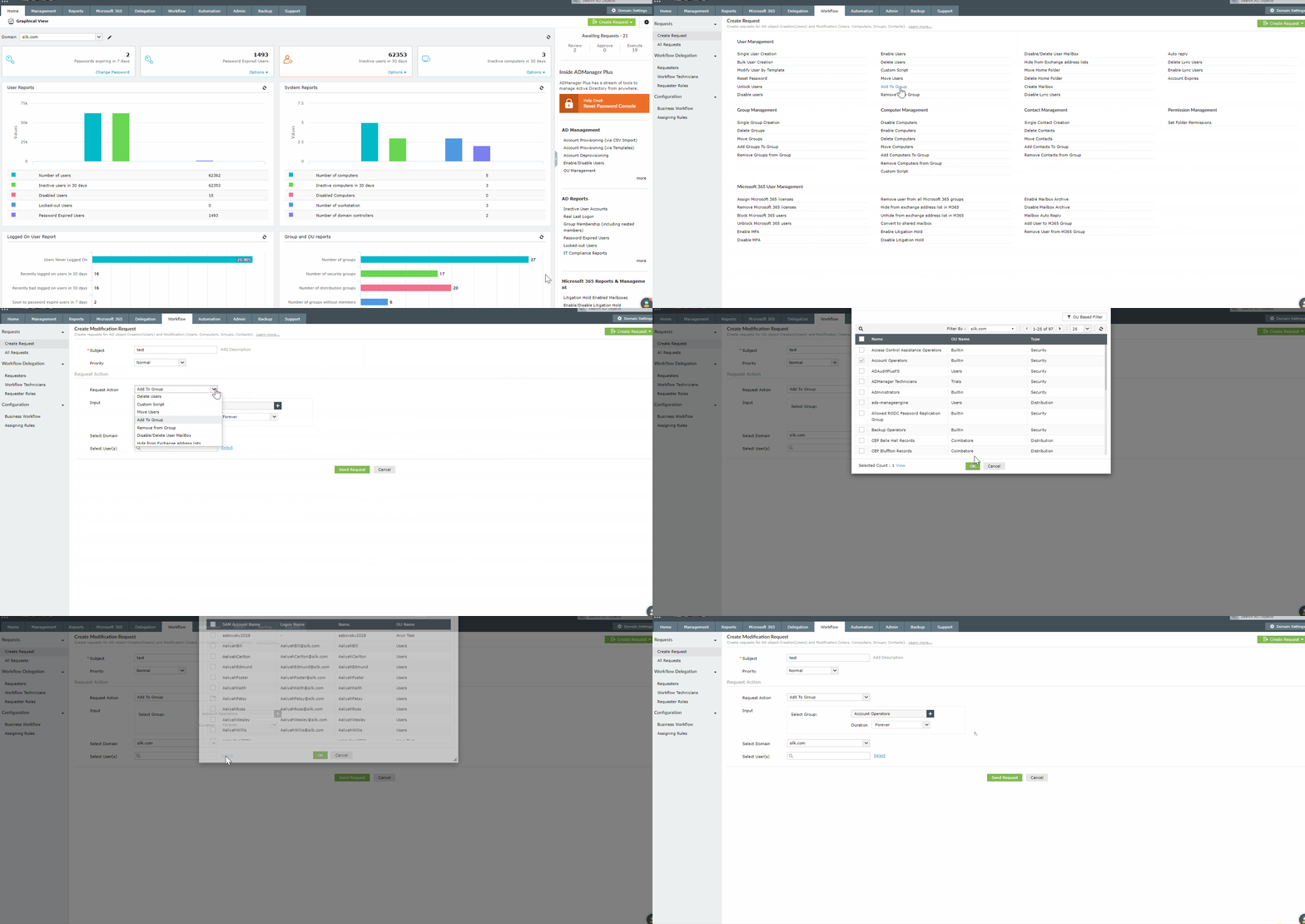
Using the Workflow feature in ADManager Plus, you can add users to groups and have them automatically removed after a specific time period.

Steps to provide time based group memberships to users

  1. Log in to ADManager Plus and navigate to the Workflow tab.
  2. In the left pane, navigate to Requests > Create Request.
  3. Under User Management, click Add to group.
  4. Enter a suitable subject for the request and set the priority as per your requirements.
  5. The request action will be set to Add to Group.
  6. In the Select Group field, select the group(s) to which the users must be added.
  7. In the Duration field, specify the duration after which the users must be removed from the selected group(s).
  8. Select the domain, and search and select the user(s) that you would like to add to the selected group(s).

    Note: You can also import a CSV file to specify the users. The first row of the CSV file will be considered as the header row, and it must contain any of the following attributes:
    • distinguishedName
    • sAMAccountName
    • name
  9. Now, click Send Request to create the request.

Steps to provide time based group memberships to users


Select a language to translate the contents of this web page:

Need further assistance?

Fill this form, and we'll contact you rightaway.

Request Support

  •  
  • *
     
  • *
     
  • *
     
  • By submitting you agree to processing of personal data according to the Privacy Policy.

"Thank you for submitting your request.

Our technical support team will get in touch with you at the earliest."

ADManager Plus Trusted By

The one-stop solution to Active Directory Management and Reporting
Email Download Link email-download-top












