How to granularly delegate attributes to a help desk technician
Steps to granularly delegate attributes to a help desk technician in ADManager Plus
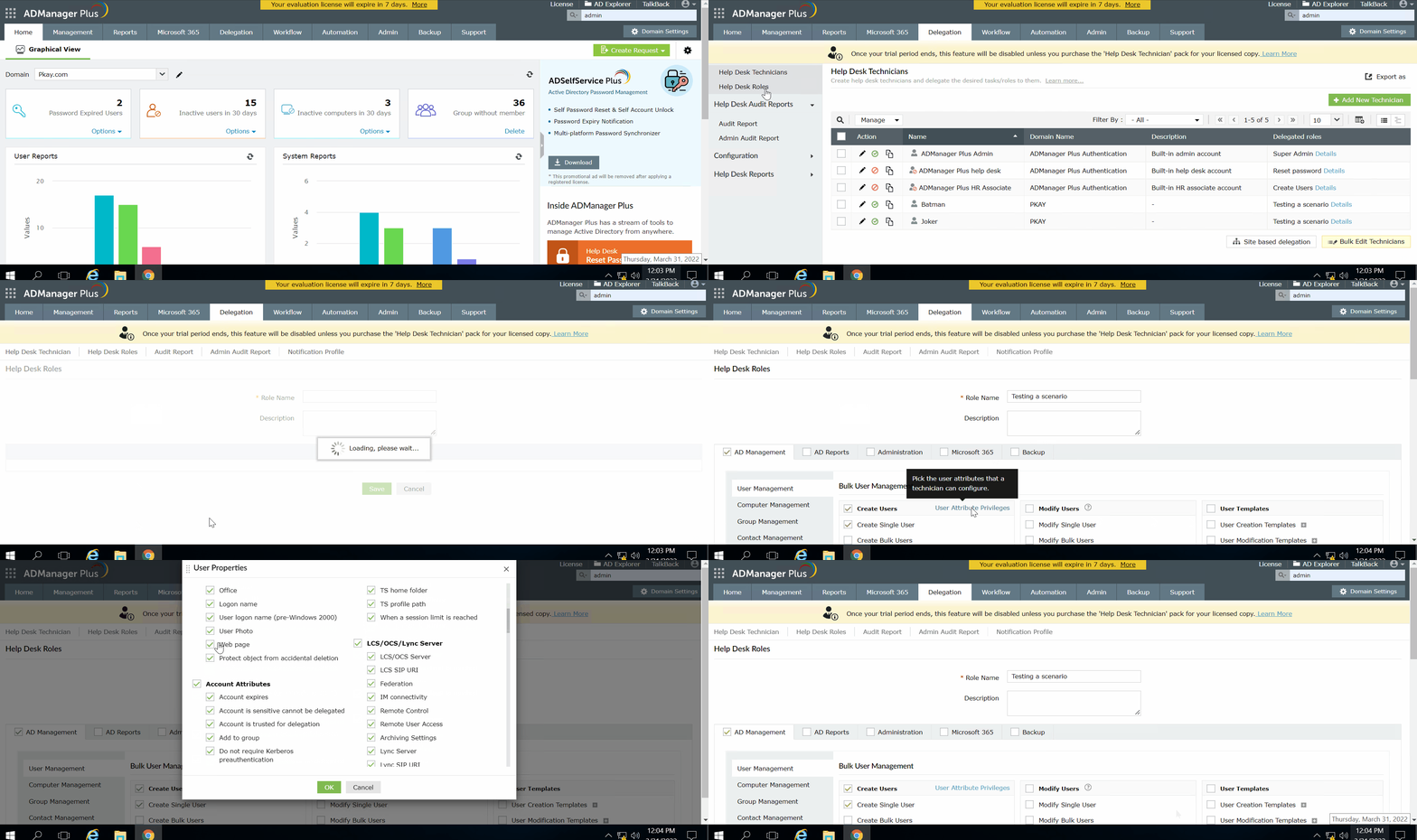
Log in to ADManager Plus and navigate to the Delegationtab.
Navigate to Help Desk Delegation > Help Desk Roles.
Click the Edit icon in the Actions column of the existing help desk role that you would like to modify.
Click the User Attribute Privileges option in the Create Users section and check the user attributes that the technicians will be able
to configure while creating users and clickOK.
Click the plus sign (+) next to an attribute and select the attribute's properties that technicians will be able to configure while modifying users.
Click Update.
Select a language to translate the contents of this web page:
Need further assistance?
Fill this form, and we'll contact you rightaway.
Request Support
"Thank you for submitting your request.
Our technical support team will get in touch with you at the earliest."
ADManager Plus Trusted By
The one-stop solution to Active Directory Management and Reporting