Support
 
Phone Live Chat
 
Support
 
US: +1 888 720 9500
US: +1 800 443 6694
Intl: +1 925 924 9500
Aus: +1 800 631 268
UK: 0800 028 6590
CN: +86 400 660 8680

Direct Inward Dialing: +1 408 916 9393


Knowledge Base

How to migrate users using ADManager Plus

Organizations are often required to migrate Active Directory (AD) objects and resources during organizational changes, such as acquisitions and mergers. These transfers might be to a new domain or between domains in a trusted forest. You can use the native Active Directory Migration Tool (ADMT) or directly perform the migration with ADManager Plus. The migration capability in this AD management tool ensures that user accounts, groups, GPOs, and configurations are securely and efficiently transferred.
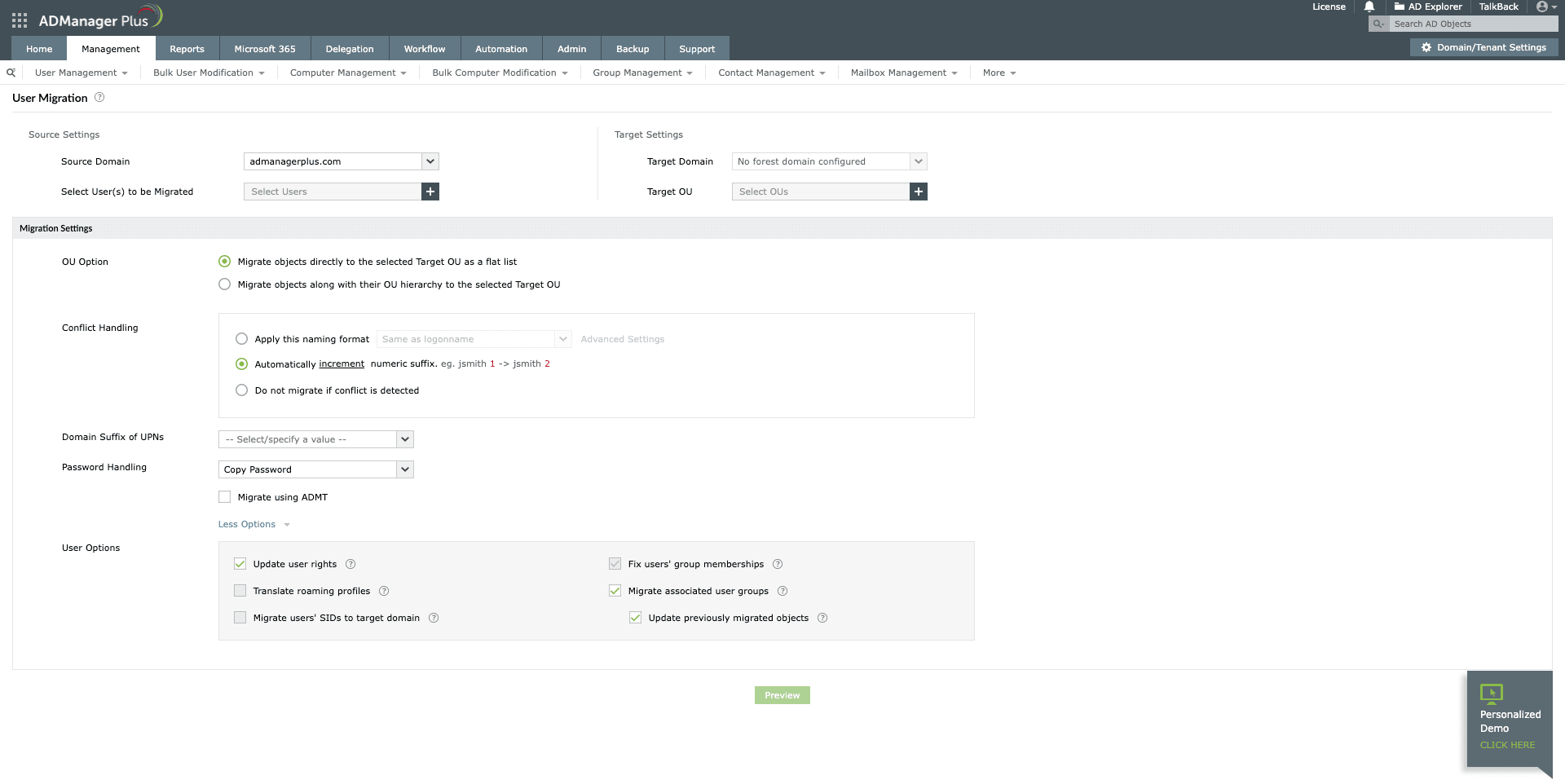
Steps to migrate users in AD using ADManager Plus:

  1. Log in to ADManager Plus and navigate to the Management tab.
  2. Choose Migration > User Migration.

    How to migrate users using ADManager Plus

  3. Under Source Settings, select the Source Domain and Select user(s) to be Migrated from the drop-down menus.
  4. Under Target Settings, choose the Target Domain and the Target OU.
  5. Under OU Option, choose one of the following options:
    • Migrate objects directly to the selected Target OU as a flat list: This option migrates the user exactly as-is into the chosen target OU.
    • Migrate objects along with their OU hierarchy to the selected Target OU: This option migrates the user along with their source OU to the target domain.
  6. Under Conflict Handling, you can also select a conflict handling option to avoid duplication during migration:
    • Apply this naming format: Select a naming format from the drop-down. This template will be applied while migrating the users. Click Advanced Settings to set the application order.
    • Automatically append number from: This option allows you to append or increment the suffix of a conflicting user attribute value. If you select append, use Advanced Settings to define the suffix length and the characters to fill any length gap.
    • Do not migrate if a conflict is detected: Choose this option if you wish not to migrate the duplicate user.
  7. Choose or enter the domain suffix for the user being migrated from the Domain Suffix of UPNs option.
  8. You can also decide how to handle the user's password during migration.
    • Copy Password: Choose to copy the existing password of the user from the source.
    • Random Password: Generate a random password as per the configured password policy.
    • Type a Password: Type a new password for the user.
    • Same as User Logon Name: The user logon name will be used as the new password.
  9. Now, you can either choose to perform the migration action using the native ADMT (learn more about ADMT installation) or you can migrate using ADManager Plus. Check the Migrate using ADMT check box accordingly.
  10. To match the migrated users' rights with those from the source domain, select the Update User Rights check box.
  11. Click More Options to configure:
    • Update User Rights: Assign the rights from the source domain to the migrated users.
    • Translate Roaming Profiles: Transfer roaming profiles from the source domain to the target domain.
    • Fix Group Memberships: Ensure the migrated user accounts are added to corresponding target domain groups if they were members in the source domain.
    • Migrate Associated Groups: Create groups linked to the migrated user accounts and retain their memberships in the target domain.
    • Update Previously Migrated Objects: Update group memberships for groups that were migrated earlier.
  12. Click Preview to review and edit conflicts, selected users, and associated accounts. Use Review to see the final migration list.
  13. Select Migrate Now to migrate the chosen user accounts.

That's how easy it is to migrate AD users to your target domain. Want to try it for yourself? Explore this and more migration capabilities in ADManager Plus with a free trial!


Select a language to translate the contents of this web page:

Need further assistance?

Fill this form, and we'll contact you rightaway.

Request Support

  •  
  • *
     
  • *
     
  • *
     
  • By submitting you agree to processing of personal data according to the Privacy Policy.

"Thank you for submitting your request.

Our technical support team will get in touch with you at the earliest."

ADManager Plus Trusted By

The one-stop solution to Active Directory Management and Reporting
Email Download Link email-download-top












