Direct Inward Dialing: +1 408 916 9393
Returning error codes in PowerShell scripts allows you to communicate the success or failure of script execution to other scripts, programs, or users. By using the exit statement followed by a numeric value, you can set the error code to indicate different outcomes. Typically, an exit code of 0 indicates success, while non-zero values signify errors. This facilitates error handling, automation, and monitoring of script execution, enhancing the reliability and maintainability of your PowerShell automation solutions.
Error handling in PowerShell scripts involves implementing mechanisms to gracefully manage and respond to errors that may occur during script execution. This includes using try-catch blocks, error action parameters, error variables such as $Error and $LASTEXITCODE, and the throw statement. By employing these techniques, PowerShell scripts can effectively detect, handle, and report errors, enhancing their reliability and usability.
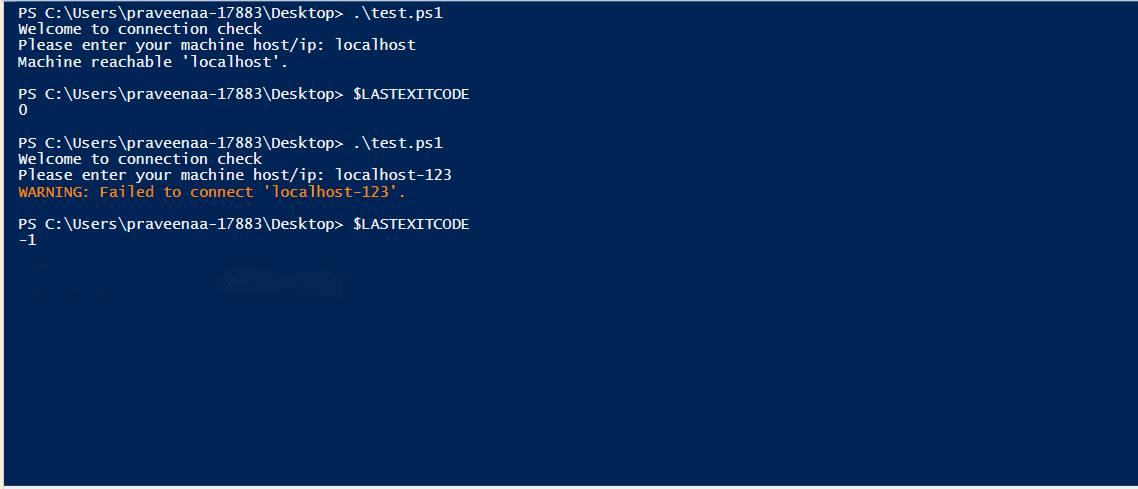
The $LASTEXITCODE automatic variable stores the exit code of the last command executed in your script. This can be helpful for capturing the exit code of external tools or commands you call within your script. A sample script is shown below.
Script
Write-host "Welcome to connection check"
$machine = Read-Host "Please enter your machine host/ip"
$pingResult = Test-Connection -ComputerName $machine -quiet
if ($pingResult -eq $true) {
Write-Host "Machine reachable '$machine'."
exit 0
} else {
Write-Warning "Failed to connect '$machine'."
exit -1
}
Output
In the realm of AD management, PowerShell scripting has been a crucial tool for automating repetitive tasks and streamlining administrative workflows. However, the complexity and syntax of PowerShell often pose challenges for IT administrators in their routine AD tasks.
This is where ADManager Plus steps in as a comprehensive AD management tool, surpassing PowerShell to simplify scripting and empower administrators with intuitive automation capabilities. Here are some benefits of choosing ADManager Plus as your alternative for PowerShell.
Select a language to translate the contents of this web page:
Fill this form, and we'll contact you rightaway.
Our technical support team will get in touch with you at the earliest."














