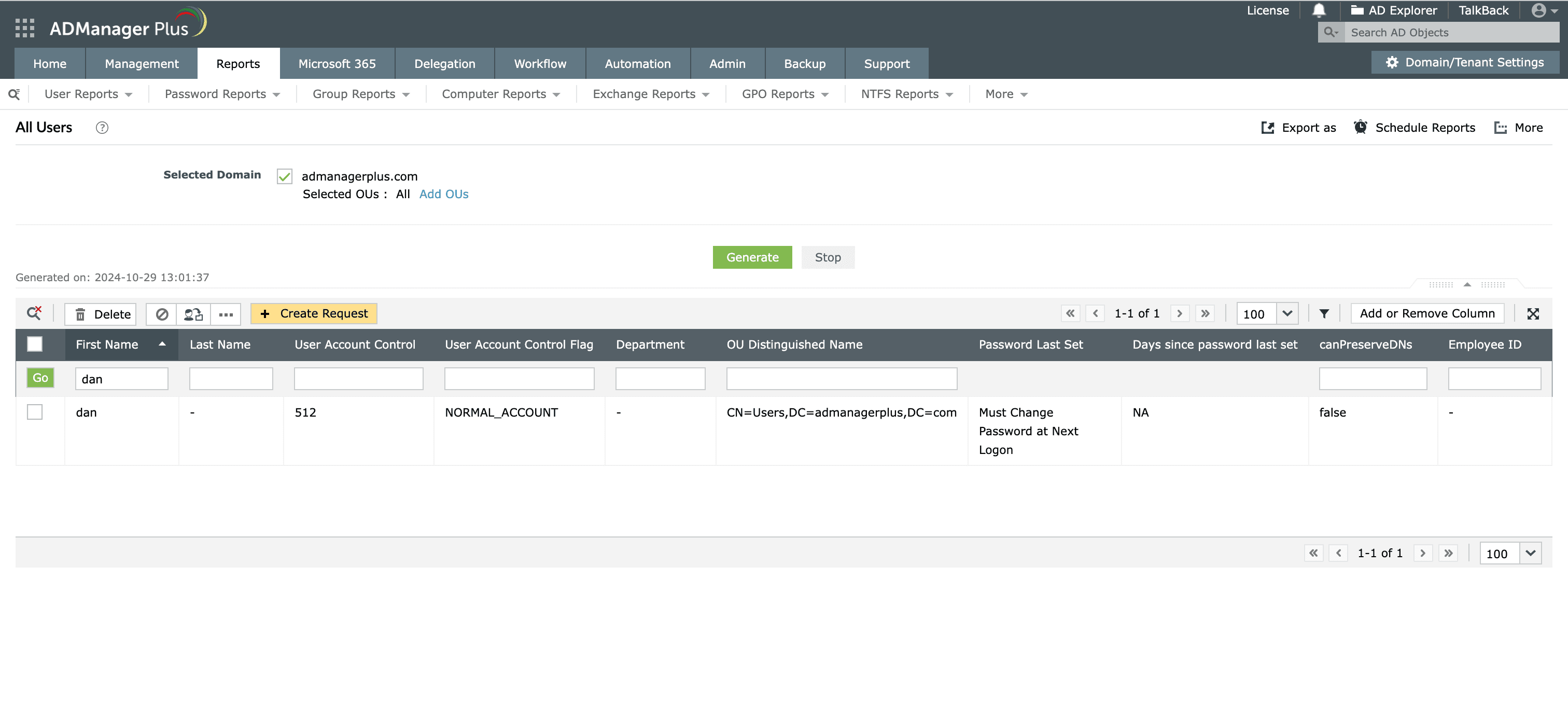
Steps to search Active Directory users in ADManager Plus

The All Users report in ADManager Plus helps administrators to easily find users in Active Directory and edit their attributes directly.

  1. Log in to ADManager Plus.
  2. Click the Reports tab.
  3. Navigate to User Reports > General Reports > All Users.
  4. Select the domain for which you wish to generate the report.
  5. To select a specific organizational unit (OU), click Add OUs located beside the domain field. In the window that opens up, select the desired OUs.
  6. Click OK.
  7. Click Generate to view all the users in the specific domain.
  8. Click the Quick Search icon at the top of the report to narrow down your search based on specific criteria, such as username, email address, department, or other AD attributes. Select the user you searched for to modify their attributes in the window that appears.
  9. Click More Actions to perform user management actions like move users, modify profile attributes, reset password, and more.
  10. Once the report is generated, click Export as to export the report in various formats, such as CSV PDF, XLSX, HTML or CSVDE.
How to search AD users in ADManager Plus
Quick search AD users using ADManager Plus.

Key use cases of searching AD users

Use Case 1: Department-wide updates

Administrators often need to update profile attributes for all department members when there is an organization-wide change within a department. This process is simplified by allowing administrators to search and select department users, enabling bulk updates such as adding users to specific groups or updating multiple profile details all at once. This streamlined approach saves time and ensures consistency across all user accounts within the department.

Use Case 2: Password reset and account unlocks

Forgotten passwords or users locked out of their accounts pose a significant challenge for administrators. The process of searching for the affected accounts and manually resetting passwords or unlocking accounts can be a time-consuming process. Using the search option, administrators can reset passwords or unlock accounts directly from the generated report, minimizing downtime and enhancing user satisfaction.

Benefits of using ADManager Plus

Bulk user management

Efficiently manage multiple user accounts simultaneously, saving time and reducing administrative effort.

In-depth reporting

Generate comprehensive and customizable reports on user accounts, permissions, and activities for better visibility.

Scheduled automation

Automate routine tasks and generate reports on a scheduled basis to enhance productivity.

Customized workflows

Develop customized workflows with SLAs to ensure prompt handling of requests.

Need further
assistance?

Fill this form, and we'll contact you rightaway.

Request Callback

  •  
  • *
     
  • *
     
  • *
     
  • *
     
  • By clicking 'Submit' you agree to processing of personal data according to the Privacy Policy.

Thank you!

We’ve received your callback request and will get back to you shortly.

ADManager Plus Trusted By

The one-stop solution to Active Directory Management and Reporting