Access certification refers to the process of reviewing an identity's access rights and attesting to their validity. It is an important compliance requirement and security practice that ensures users have appropriate rights to network resources, curbing privilege-related attacks in an organization. With access certification, organizations can implement several security practices such as the principle of least privilege and JIT access to network resources.
Access certification in ADManager Plus
The access certification feature in ADManager Plus enables organizations to periodically review their users' access rights and secure resources from unauthorized access. Along with providing risk assessments, comprehensive compliance reports, and more, ADManager Plus can help organizations meet their IGA goals from a single platform.
How to create an access certification campaign in ADManager Plus
Log in to ADManager Plus and navigate to the Governance tab.
Note: For builds earlier than 8020, navigate to Automation > Access Certification > Access Certification Campaign.
On the left pane, under Access Certification, click Access Certification Campaign.
Click + Create New Campaign and perform these steps:
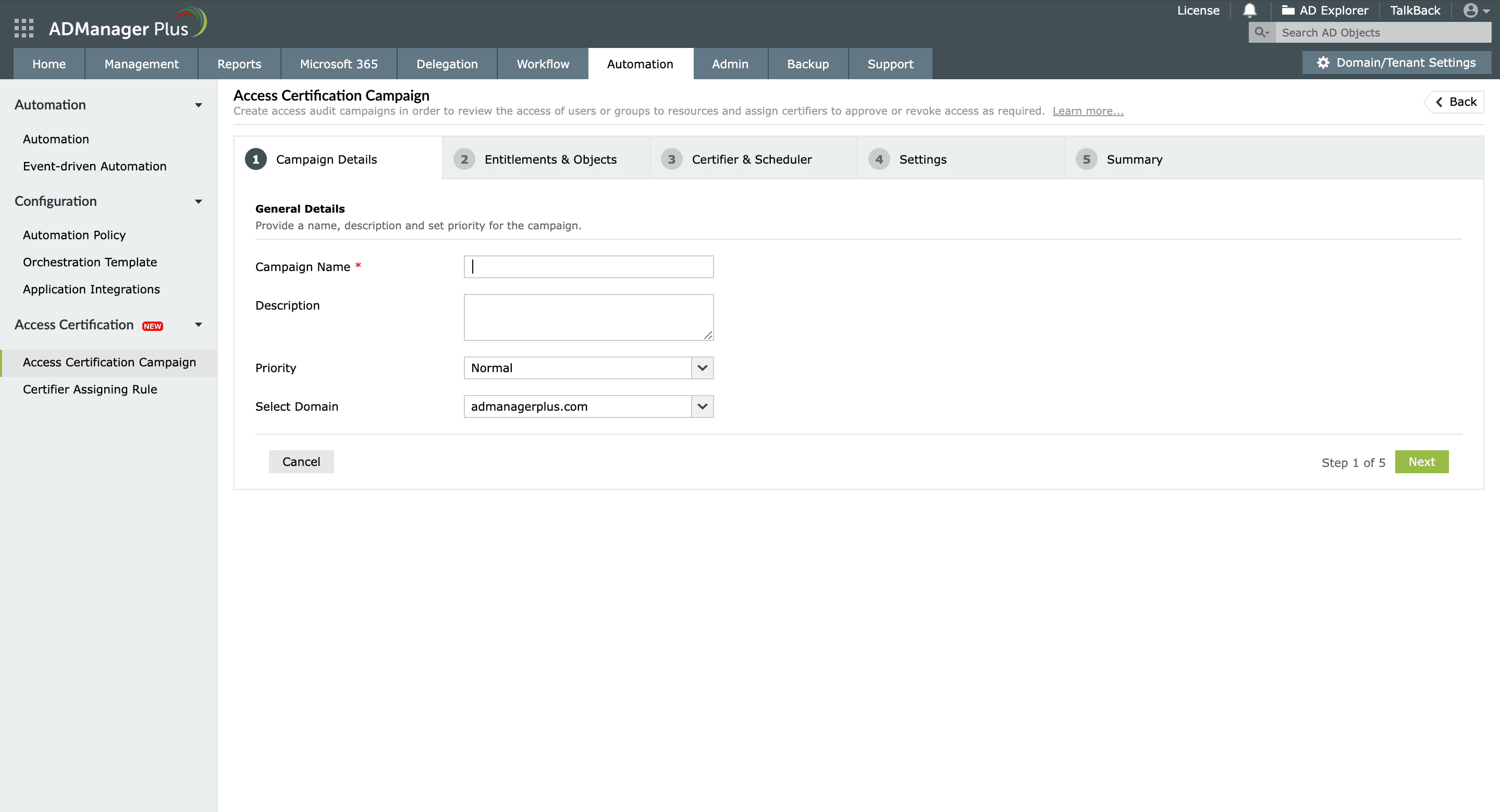
Configure campaign details.
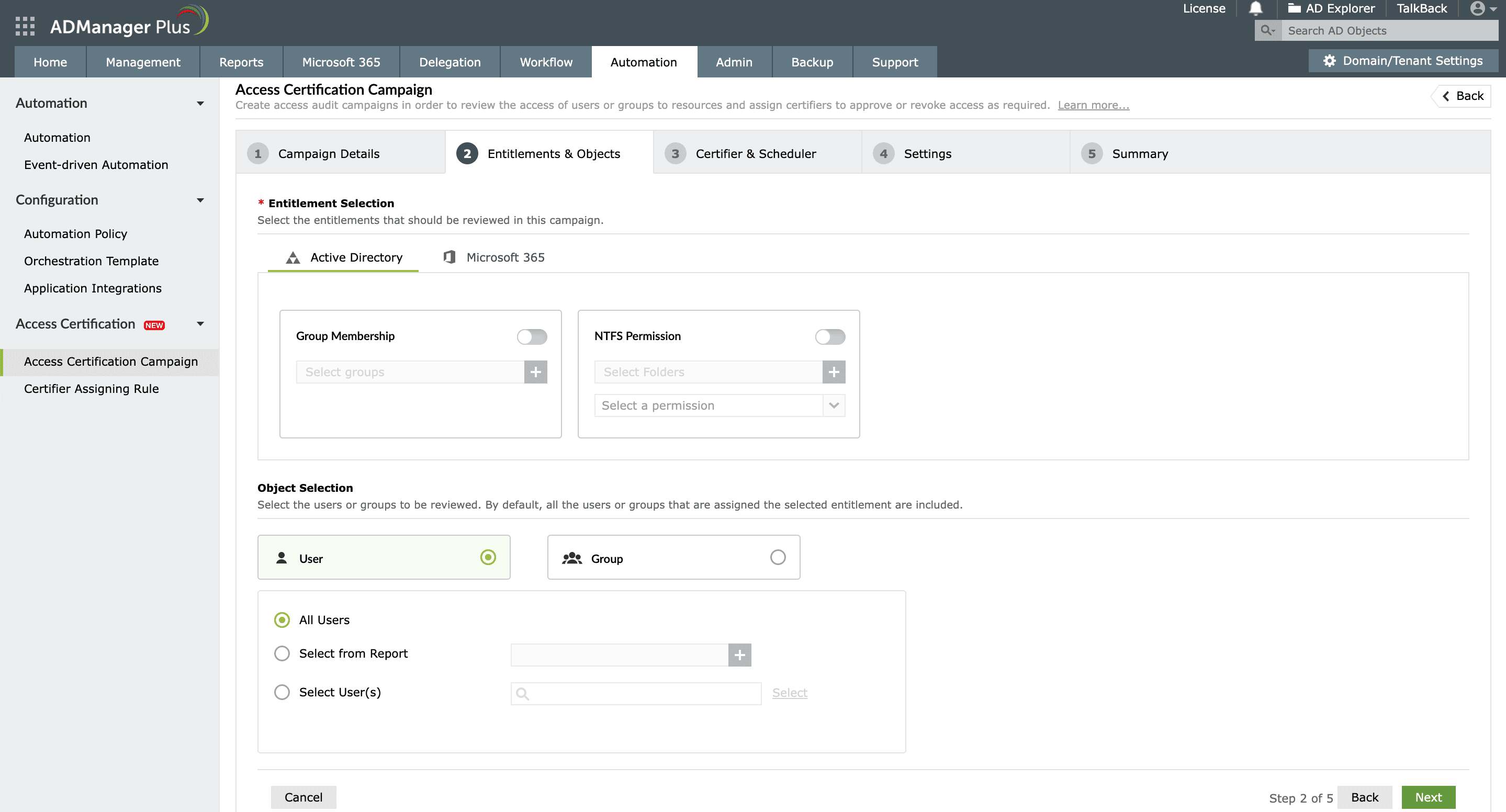
Select entitlements and objects.
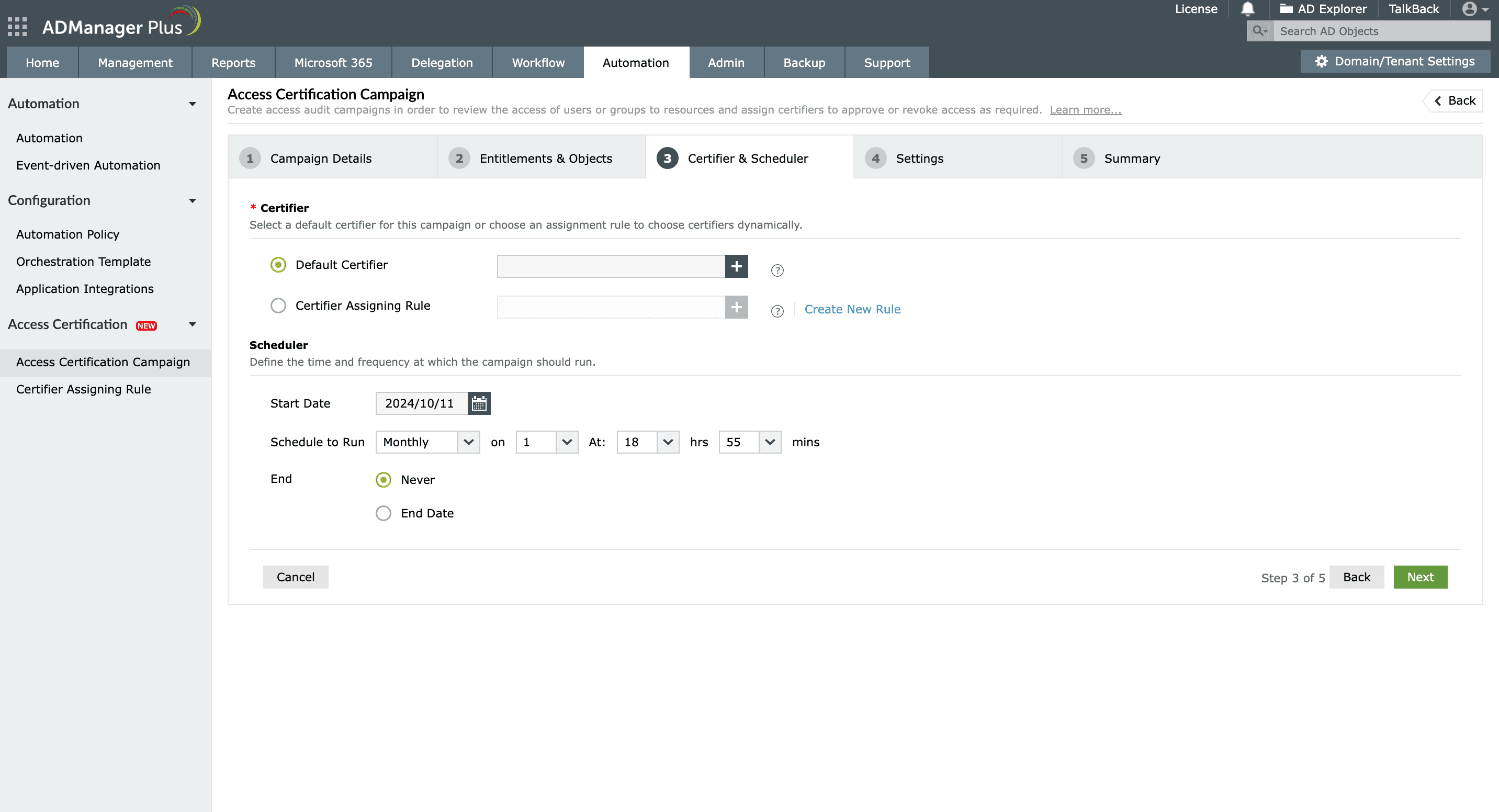
Select a certifier and schedule the campaign.
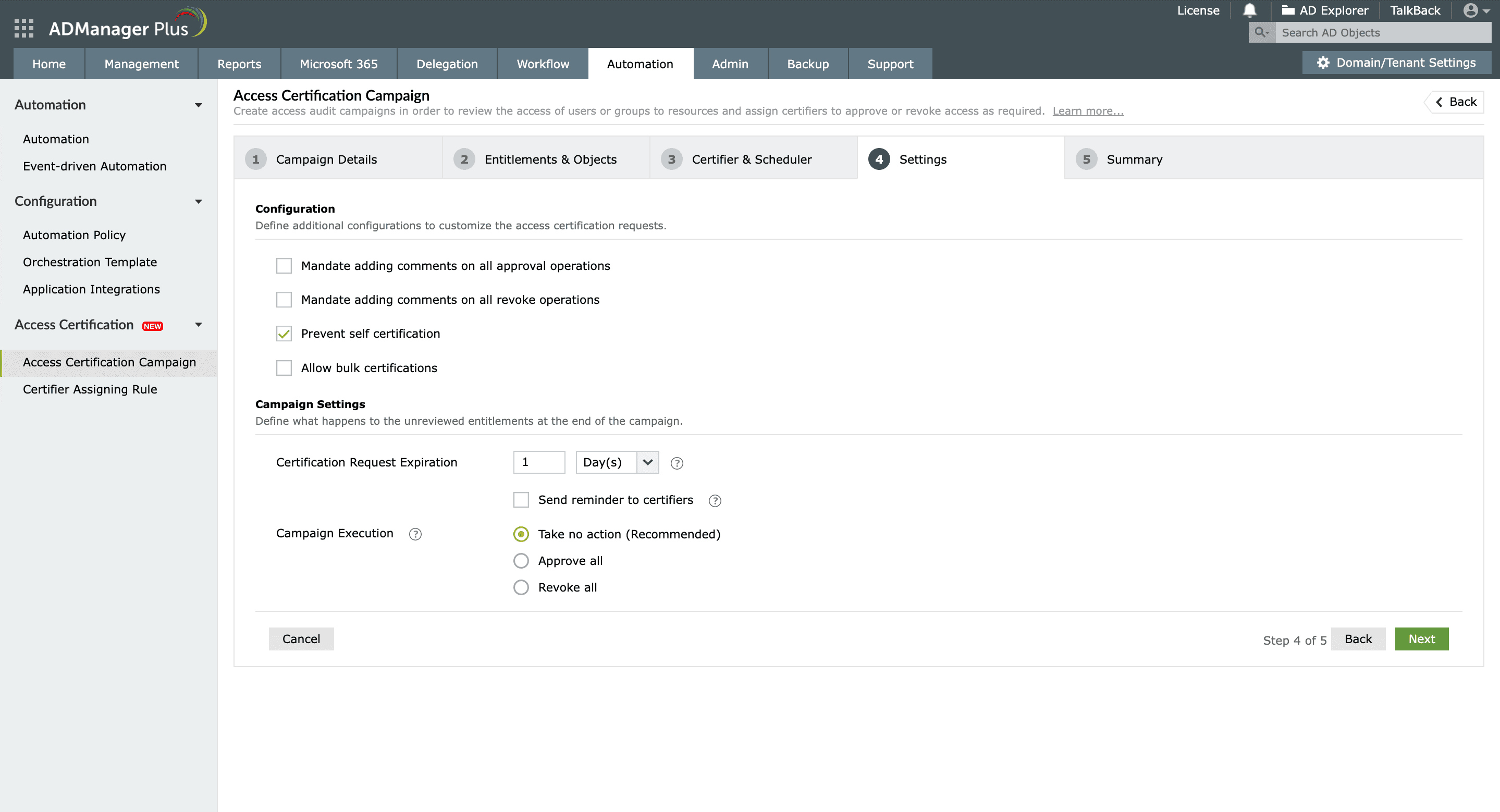
Configure campaign settings.
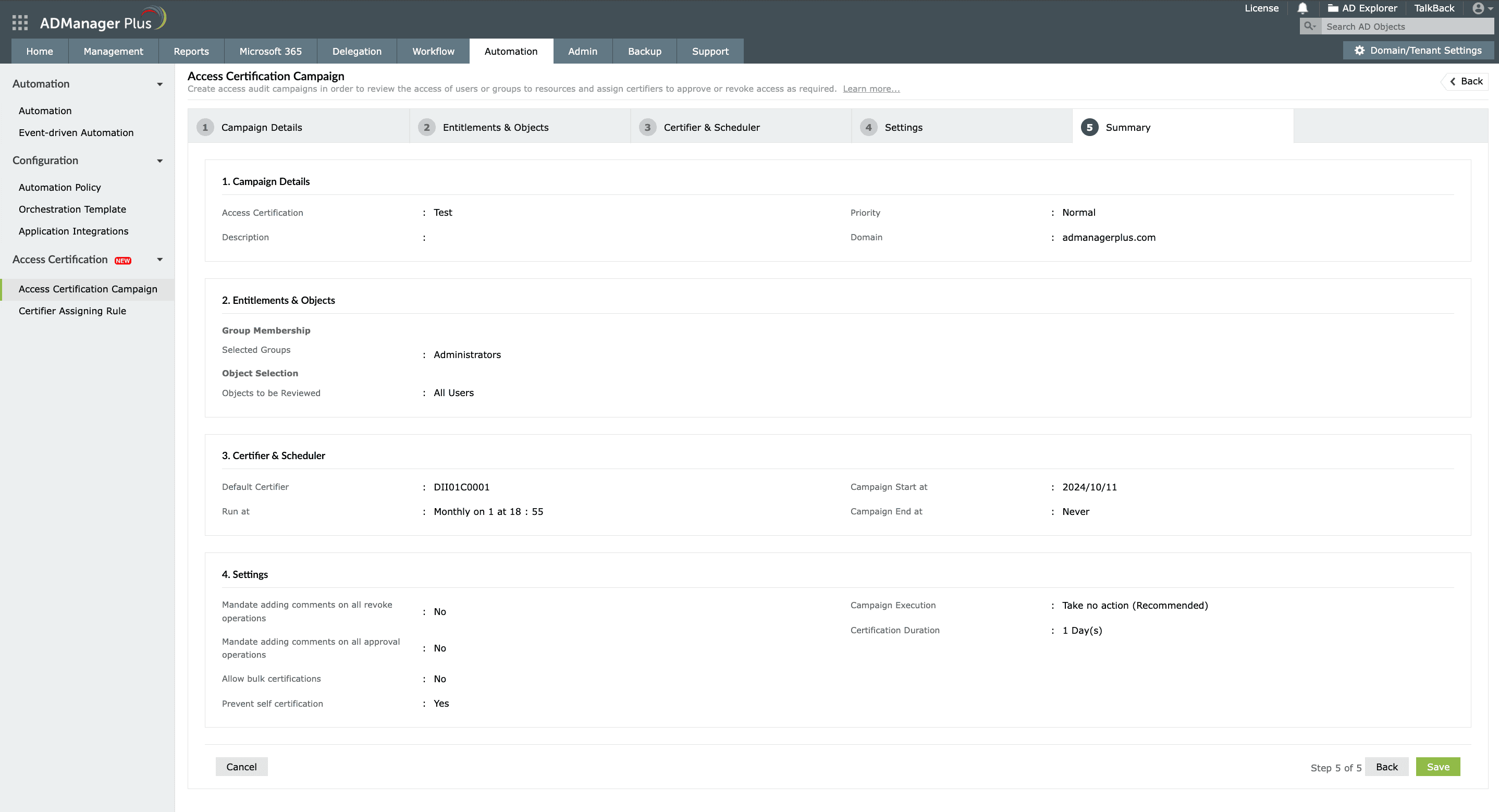
Review and run the campaign.
Configure campaign details
Enter the campaign name and description in the Campaign Name and Description fields.
From the Priority drop-down, select the priority level for this campaign.
Select the domain in which this campaign must run and click Next.
Select entitlements and objects
In the Entitlement Selection section, choose the entitlement that has to be validated by toggling its button on. For instance, if you would like to review a Microsoft 365 group's membership, click the Microsoft 365 tab and enable Microsoft 365 Group Membership.
Select the desired entities under the entitlements.
In the Object Selection section, select the users or groups that need to be reviewed. You can choose:
All users or groups under the entitlement.
Specific objects by selecting reports or by searching and locating them.
Click Next.
Select a certifier and schedule the campaign
In the Certifier section, choose from the following options:
Default Certifier: Select an existing workflow executor as the campaign certifier.
Certifier Assigning Rule: Select a rule based on which the certifier will be assigned. To configure a rule, navigate to
Access Certification > Certifier Assigning Rule.
In the Scheduler section, configure when this campaign must run and its frequency:
Start Date: Specify when this campaign must start.
Schedule to Run: Specify how frequently this campaign must run. You can choose from weekly, monthly, quarterly, and more options.
End: Specify if you would like to run this campaign indefinitely or when you would like for it to end.
Click Next.
Configure campaign settings
In the Configuration section, configure the certification settings for this campaign; mandate comments on access approval and revocation operations,
prevent self-certification, and more.
In the Campaign Settings section, define what must happen to unreviewed entitlements when this campaign ends; configure the certification period,
campaign execution actions, and more.
Click Next.
Review and run the campaign
Review the campaign settings, make necessary changes by navigating to the respective tabs, then click Save to execute the campaign.
To discover more about configuring access certification campaigns in ADManager Plus, click here.
Benefits of access certification
By implementing an access certification process, organizations can reap the following benefits:
Enhanced security
Regularly audit access to sensitive data and minimize the risk of unauthorized access.
Streamlined compliance with regulations
Comply with various mandates like HIPAA and the PCI DSS, which require regular access reviews to ensure compliance.
Minimized privilege creep
Reduce privilege creep by regularly reviewing users' access rights and ensuring that their privileges are relevant to their job functions.
Improved governance
Perform periodic access reviews to allow administrators to govern users' access rights and ensure that they're aligned with organizational policies and procedures.
Select a language to translate the contents of this web page:
Need further assistance?
Fill this form, and we'll contact you rightaway.
Request Support
"Thank you for submitting your request.
Our technical support team will get in touch with you at the earliest."
ADManager Plus Trusted By
The one-stop solution to Active Directory Management and Reporting