Employee Offboarding Across Two Domains: What Broke, and How We Fixed It
1. Offboarding looks simple until it isn’t
On paper, offboarding an employee sounds like one action: disable the account. In practice, it’s a closely knit process that includes a sequence of actions such as reset the password, strip AD group memberships, pull the account out of cloud security groups, remove the mailbox, revoke Microsoft 365 licenses, remove role assignments, convert the mailbox if it needs to survive as a shared resource, move the object, and eventually delete it, on a schedule that’s neither too early nor too late.
Every one of these steps has to run consistently in the right order every single time. That’s manageable when you’re running it manually, when offboarding one person at a time for a week.
It stops being the same when it’s done every month across an organization running multiple entities and domains.
At that point, “manual” is no longer a process, it’s a liability. Something, somewhere, gets missed. And it’s rarely obvious what it was until it’s too late.
This is the story of an organization that exhibited the same behaviour in practice, and a three-stage automation we built to fix it.
2. Two domains, one workforce
It’s about Meredian Group (name changed), a well-established group of companies, and one of its subsidiaries is a concierge services business. It used to be a service wing inside the parent company itself, before it spun off into its own branded business. Today, the parent company runs its own Active Directory domain, which we’ll call Domain 1, and the concierge business runs a separate, independent one, which we’ll call Domain 2.
Because the business running Domain 2 started out as part of the same group that runs Domain 1, the two domains are closely linked.
That link shows up in how people move between the two companies. Some employees have worked across both the parent company and the concierge business, or moved from one to the other without their original account ever being closed. So the same person can technically and legitimately have an account on each domain, one tied to their role at the parent company and one tied to their role at the concierge business.
That’s what makes offboarding risky here.
Say Meredian’s offboarding process, which is manual by default, is to find the user’s account and delete it. That works when a person has only one account, but it doesn’t work here.
The process only looks at the domain it’s running against, so it has no way of knowing if the person holds another identity on the other domain. The result can be the deletion of an account on either Domain 1 or Domain 2, leaving the offboarding itself incomplete.
3. Where it actually breaks
The obvious first instinct when an organization has operational overhead caused by a manual offboarding process is to just automate the typical sequence starting with reset password, strip groups, remove mailbox, revoke licenses, delete, then let it run unattended. That’s a reasonable place to start, and it’s also exactly where it falls apart. Run that kind of process long enough, manually or automated, and the same failure scenarios show up on a loop, which typically are:
- A missed litigation hold means the account gets deleted anyway, an expensive compliance mistake to undo.
- A missed duplicate identity means the wrong account, or the only remaining copy of the right one, gets deleted along with it.
- “Offboarded” getting marked without anyone confirming the account is actually disabled.
- Admin-level access outlives the identity it belonged to, because a role assignment never got stripped off.
- A license fails to revoke quietly, and whatever access it grants just keeps existing.
- An exception happens and never reaches the ticketing system, so there’s no record of anything that went wrong.
The reason all these issues keep showing up is the same: the process only runs steps in order and has no judgment, whether it’s done manually or by an automation that isn’t tailored to the environment.
It doesn’t know to stop for a litigation hold or a flagged attribute. It doesn’t know to check whether the account it’s about to delete has a twin on the other domain.
Running the same steps faster and at a greater scale doesn’t make offboarding safer, it just repeats the same oversights more quickly than doing it by hand.
None of the potential failure scenarios are missing steps. They’re missing decisions: points where the process stops, checks a condition, or chooses whether to continue, hand off, or halt.
4. Decision blocks before any action
The fix for Meredian isn’t more automation for its own sake. It’s building judgment into the offboarding workflow, so that at key points the process checks a condition and decides whether to continue, hand off, or stop. Decision blocks are one common way to build that in, and they’re how we implemented it here.
Depending on the environment, offboarding can be gated on a number of attributes and conditions, and we’ll look at two of them as examples. The first is an Extension Attribute, one of fifteen general-purpose custom fields (extensionAttribute1 through extensionAttribute15) that ship blank in every Active Directory schema, leaving it up to the admin to decide what to store in them. In an environment like Meredian’s, admins can use it as a marker when an account’s HR/provisioning sync has completed.
The second is Litigation Hold, a standard Exchange/Microsoft 365 feature that preserves a mailbox’s contents and prevents them from being permanently deleted, typically because the account is relevant to ongoing or anticipated legal action, an investigation, or a regulatory requirement. While a hold is active, the mailbox has to stay intact regardless of what else happens to the account. Meredian, like most other organizations, applies holds whenever a legal matter comes up.
These two matter because of how Meredian is set up. With accounts spread across two domains, the process can only act safely on an account whose HR sync state is confirmed, and as a group of companies Meredian has legal preservation obligations that a deletion must never override.
So before the offboarding procedure does anything unintended or irreplaceable, it has to be clear on two checks:
- Does the custom ExtensionAttribute have a value? If it’s blank, the account’s provisioning/HR sync state can’t be trusted. The automation stops right there, no AD actions are initiated, and a ticket is routed to the ticketing tool for manual handling.
- Is the Litigation Hold enabled on the mailbox? If yes, same outcome: hard stop and push it for manual handling.
Actual offboarding work begins only after both checks clear. This is where ManageEngine ADManager Plus comes in.
Our role was to implement this workflow for Meredian using ADManager Plus’s orchestration templates, which let you chain offboarding actions together with decision blocks and webhooks in between.
The chained actions carry out the cleanup steps, the decision blocks run the two primary checks above, and the webhooks write results back to the configured ticketing tool.
We built three automations, each as its own orchestration template, to split the work:
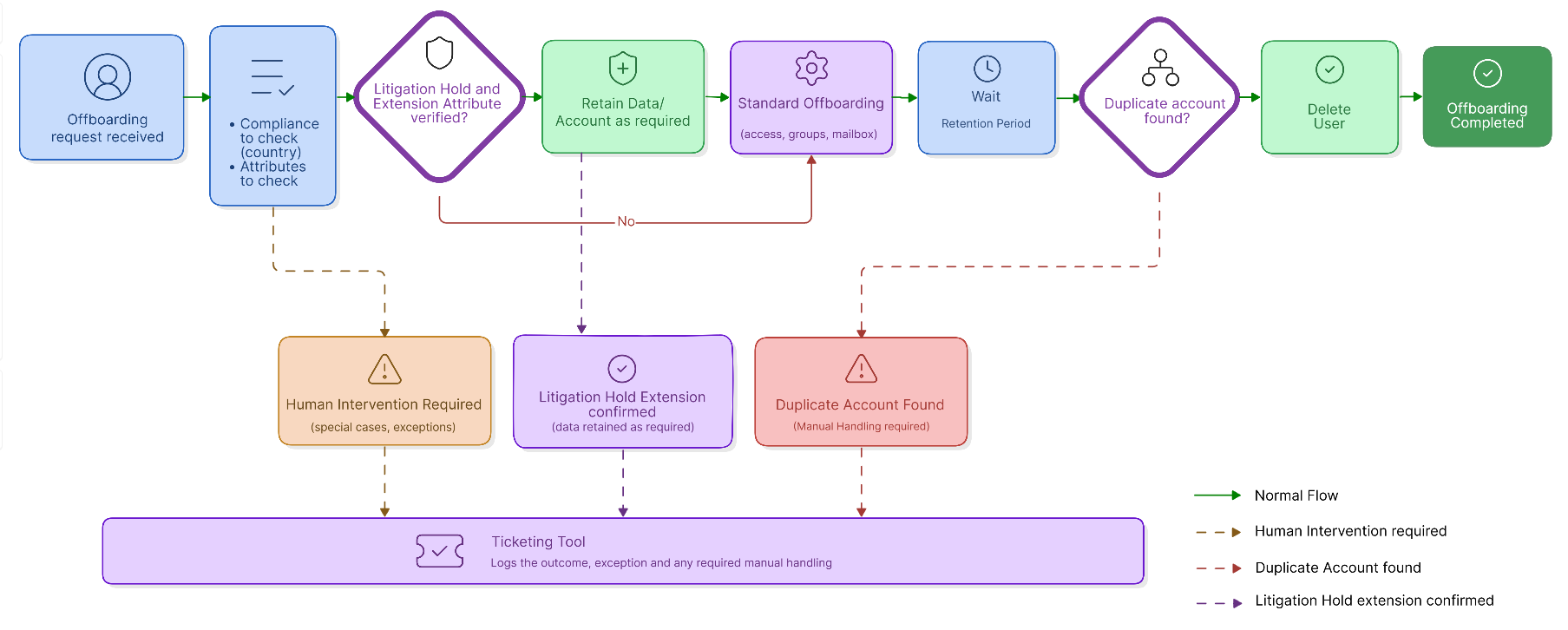
Automation 1: Domain 1-native offboarding. Runs the standard cleanup chain with password reset, timestamped Description update, group/license/role revocation, mailbox removal. Then it checks the user’s country attribute. For example: is this an EU/UK account or not?
- Non-EU/UK: disable the account, move it to a specific OU, and if the move succeeds, delete it after a 90-day delay.
- EU/UK: same path, plus one extra step, after the 90-day wait, re-verify if the account is actually disabled before deleting it. That second check exists because EU/UK carries tighter compliance expectations.
Automation 2: Domain 2-native offboarding. Same two checks, same core cleanup chain, plus a mailbox conversion and an extension attribute update. Instead of a region check, the final step here is a duplicate-identity check against Domain 1. For example:
- No duplicate found: normal close-out, writeback to the ticketing tool, 90-day delay and proceed with deletion.
- Duplicate found: the automation refuses to delete. It writes the duplicate account’s email address back to the ticketing tool and opens a new ticket instead of guessing which identity is safe to remove.
Automation 3: The cleanup handler. This one exists purely to finish what Automation 2 flags. It runs the same two checks and the same cleanup chain, but skips the duplicate check entirely, and by the time an account lands here, that check has already happened upstream. A success means write back to the ticketing tool and deletion after 90 days, and a failure is routed for a human to handle.
5. Closing the loop: every outcome gets a ticket
None of this works as an ambiguous black box. Every final outcome writes back to the configured ticketing tool as a ticket someone can act on manually if needed, not just internally logged.
A decision block failure writes back as a manual-handling ticket before any AD action runs. A completed offboarding writes back as confirmation. A duplicate identity found on the other domain writes back with the duplicate’s email address and opens its own ticket, which is what carries the account into the cleanup handler automation instead of leaving it unresolved. Every outcome the automation can reach, be it a clean success, hard stop, or handoff, has a matching writeback, so nothing finishes silently.
That’s what actually closes the “exceptions disappear silently” gap, because in this case a failure doesn’t just stop the automation, it produces a record that a person picks up.
6. Conclusion
What started as operational overhead and compliance risk at Meredian, where going through every user manually while also risking the accounts that could get deleted out from under a litigation hold, or a duplicate identity mistaken for a clean exit, was solved by rethinking what “automated” actually needs to mean. It isn’t enough for offboarding to run without a person clicking through each step. It has to know when not to proceed, and it has to leave a record every time it stops. That’s the difference between a script and a system: where one executes, the other decides.
That shift is visible in what actually changed once this went live. The offboarding went from a manual sequence that assumed nothing would go wrong, to a governed automation that assumes something will eventually be missed and is built to catch it instead of hoping that it doesn’t happen. The litigation hold got checked before anything decisive fired. Duplicate identities got detected before deletion, not after. Disabled status got verified, not assumed. And every exception left a paper trail instead of disappearing.
Which is exactly how it turned out when it was built out in practice with ADManager Plus’s orchestration templates. It used decision blocks that fork on real AD and mailbox conditions, chained action sequences for the cleanup work itself, and webhook writebacks that kept a ticketing tool in the loop on every outcome, be it a success or failure. The architecture came first, while ManageEngine ADManager Plus was the platform used to implement it.
7. Takeaways
The risks we ran into at Meredian aren’t unique to Meredian and its concierge subsidiary alone. Any organization running multiple domains, through M&A, a spin-off, a subsidiary, or a legacy system that never got fully consolidated, has the same duplicate-identity exposure this design was built to catch. Any organization under legal or regulatory obligations has the same reason to check for litigation holds before anything gets deleted.
The lesson underneath the architecture isn’t “automate offboarding.” Automation without judgment just executes mistakes faster and at a greater scale. What makes offboarding trustworthy is a process designed around the organization’s own environment, one that knows which checks matter and what to do when they fail.