Key MongoDB performance metrics to monitor and why they matter
When running production-grade MongoDB deployments, performance is not just about how much data you can store; it’s about how efficiently you can read, write, and scale without impacting user experience. Monitoring the right MongoDB performance metrics gives you the complete picture: not only when something is broken, but why it broke, how to prevent it next time, and what business impact it can have.
1. Query performance metrics
Query performance is the first line of defense in maintaining MongoDB database performance. If query execution times rise or scan-to-return ratios shift, your application’s responsiveness will degrade.
- Average query execution time:Long-running queries signal inefficient design, missing indexes, or unexpected data growth.
- Slow query count: The number of queries exceeding defined thresholds provides an early warning of regressions.
- Index usage or index hit ratio: A low hit ratio means the database is performing full collection scans instead of using indexes, which increases CPU and disk usage.
- Documents returned vs. documents scanned: A high scanned-to-returned ratio indicates wasted work and the need for index optimization.
- GetMore operations and cursor lifetimes: Long-lived cursors may indicate inefficient pagination or unoptimized aggregation pipelines.
Monitoring these MongoDB query metrics helps trace a slow user action back to a specific query and then to the schema or index that needs adjustment.
2. Resource utilization metrics
Even well-optimized queries can’t compensate for exhausted system resources. Monitoring resource utilization metrics ensures your MongoDB nodes have enough CPU, memory, and I/O capacity to handle workloads efficiently.
- CPU utilization and load average: Sustained high CPU usage may indicate heavy queries or insufficient hardware.
- Memory usage and page fault rate: Frequent page faults or high memory consumption point to memory pressure or suboptimal caching.
- Disk I/O throughput and latency: Monitor for spikes in read/write latency, which can slow down queries and replication.
- Network I/O and bandwidth utilization: Saturated network interfaces cause replication lag and slow client connections.
- Storage growth rate: Track growth trends to forecast capacity requirements and avoid space-related outages.
By keeping these MongoDB performance indicators visible, you can act before resource exhaustion impacts performance.
3. Replication, sharding, and cluster health metrics
MongoDB’s replication and sharding features enable scalability and high availability, but also introduce complexity. Monitoring cluster health ensures consistent data synchronization and uptime.
- Replication lag: The delay between primary and secondary replication. Growing lag increases the risk of stale reads and data loss.
- Oplog size and oplog window: These define how much replication history the system can handle. A small window increases the chance of secondaries falling behind.
- Shard chunk migrations and balance status: Unbalanced chunks cause uneven load distribution and inconsistent performance.
- Replica set elections and node status changes: Frequent elections may signal instability or network latency.
- Secondary sync states: Long or incomplete syncs indicate replica health issues that can impact failover readiness.
Continuous replica set monitoring helps maintain balanced clusters and quick recovery during failovers. You can also explore the database monitoring capabilities in Applications Manager.
4. Connection, concurrency, and throughput metrics
Connection-related metrics provide insights into workload patterns and potential contention.
- Current connections and pool usage: A high number of active connections can slow the database or exhaust available resources.
- Operations per second: Understanding throughput helps evaluate efficiency and detect saturation.
- Lock percentage and contention: High lock time indicates operations competing for shared resources.
- Queue sizes: A growing queue shows that MongoDB is unable to keep up with incoming requests.
By monitoring MongoDB throughput metrics, you can detect workload anomalies and prevent bottlenecks before they affect availability.
5. Security, audit, and access metrics
Monitoring security-related metrics ensures both compliance and operational safety.
- Failed authentication attempts: Frequent failed logins can indicate misconfigurations or intrusion attempts.
- Authorization denials and privilege changes: Unexpected changes might point to misuse or policy violations.
- User activity by role: Identifying which users generate heavy loads helps isolate performance hotspots.
- Audit log volume: Large audit files may impact storage and need rotation or archiving.
6. Capacity planning and trends
Trend analysis turns raw metrics into actionable foresight. It helps forecast resource needs and avoid unplanned downtime.
- Data and index growth: Monitor how both expand relative to one another to forecast when scaling will be necessary.
- Ops per second trend vs. baseline: Compare current throughput to historical averages to detect load anomalies.
- Disk and IOPS headroom: Running close to capacity thresholds increases the risk of performance collapse.
- CPU and memory usage trends: Long-term analysis identifies inefficiencies and right-sizing opportunities.
Proactive MongoDB capacity planning ensures sustainable growth and consistent performance.
Building an effective monitoring strategy
Tracking these metrics is only useful when they translate into clear, actionable insights. An effective monitoring approach combines visibility, correlation, and automation.
- Create unified dashboards that blend query, resource, and cluster data for a complete MongoDB health view.
- Establish performance baselines to define what “normal” looks like for your workload.
- Configure intelligent thresholds to alert on sustained anomalies rather than transient spikes.
- Correlate metrics to identify root causes of performance degradation.
- Regularly review trends and adjust thresholds based on growth patterns.
This approach helps DBAs and DevOps teams move from reactive troubleshooting to proactive optimization.
MongoDB monitoring with ManageEngine Applications Manager
While MongoDB offers native tools such as mongostat and db.serverStatus(), manual monitoring doesn’t scale for production workloads. You need a centralized platform that aggregates, analyzes, and alerts across all nodes and clusters in real time.
ManageEngine Applications Manager’s MongoDB monitoring provides comprehensive visibility into database health, query latency, replication, and resource utilization. It offers:
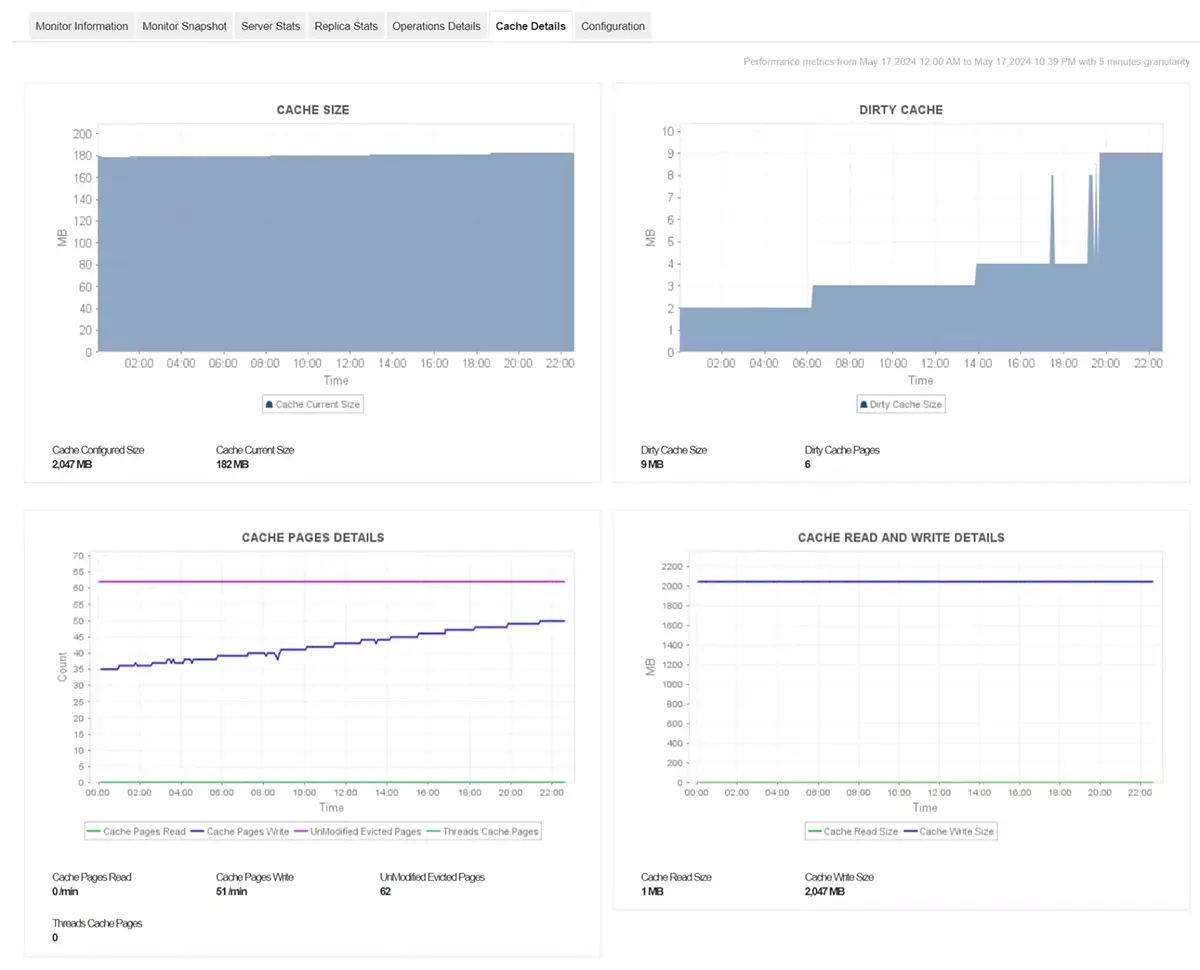
- Preconfigured dashboards for MongoDB performance metrics such as query time, index efficiency, memory usage, replication lag, and connection counts.
- Customizable threshold-based alerts for proactive performance management.
- Support for MongoDB Atlas and on-premises deployments, all from a single interface.
- Capacity forecasting and anomaly detection powered by intelligent baselining.
Applications Manager helps MongoDB administrators visualize trends, automate alerts, and diagnose issues faster, enabling predictable, high-performing database environments.
Monitoring MongoDB isn’t just about detecting slow queries or replication lag, it’s about understanding the why behind the data. With Applications Manager, you get end-to-end MongoDB observability that accelerates troubleshooting, strengthens uptime, and drives reliable application performance.
👉 Get started by downloading a 30-day free trial of Applications Manager now!