Modifying PHP agent configurations
Note: This is only applicable to version 4.1 and above of the agent.
The PHP agent configurations (such as the application name, data port, and status port) can be modified using any of the following methods:
- Linux:
- Windows:
Linux
Set options using the command-line arguments
Execute the configure command along with the directive and its corresponding value:
sudo sh /opt/zpa/bin/agent_php.sh configure <directive> <value>
Example:
Execute the following command to change the default application name and disable capturing MySQL:
sudo sh /opt/zpa/bin/agent_php.sh configure -zpa.application_name "appname" -zpa.capture_mysql 0
Other available options
Refer to the table given below for the list of the other options available:
| Option | Description |
|---|---|
| -php.install_path |
|
| -zpa.application_name |
|
| -zpa.additional_buffer |
Note: Available only in PHP Agent v4.1 and below. |
| -zpa.data_port |
|
| -zpa.status_port |
|
| -zpa.method_threshold |
|
| -zpa.remote_exporter_ip |
|
| -zpa.remote_exporter_hostname |
|
| -zpa.span_limit |
|
| -zpa.stack_depth |
|
| -zpa.capture_casssandra |
|
| -zpa.capture_clirequest | |
| -zpa.capture_distributed_trace | |
| -zpa.capture_http | |
| -zpa.capture_memcached | |
| -zpa.capture_mssql | |
| -zpa.capture_mysql | |
| -zpa.capture_oracle | |
| -zpa.capture_pdo | |
| -zpa.capture_postgres | |
| -zpa.capture_redis | |
| -zpa.track_errors | |
| -zpa.track_exceptions | |
| -zpa.track_zend_execute_internal | |
| -zpa.track_zend_execute |
Set options using environment variables
Export the directive and its corresponding value:
export <directive>= <value>Execute the configure command:
sudo -E sh /opt/zpa/bin/agent_php.sh configure
Example: Execute the following commands to change the default application name and disable capturing MySQL
export ZPA_APPLICATION_NAME="appname"export ZPA_CAPTURE_MYSQL=0sudo -E sh /opt/zpa/bin/agent_php.sh configure
Refer to the table given below for the list of the other options available:
| Option | Description |
|---|---|
| PHP_INSTALL_PATH |
|
| ZPA_APPLICATION_NAME |
|
| ZPA_ADDITIONAL_BUFFER |
|
| ZPA_DATA_PORT |
|
| ZPA_STATUS_PORT |
|
| ZPA_METHOD_THRESHOLD |
|
| ZPA_REMOTE_EXPORTER_IP |
|
| ZPA_REMOTE_EXPORTER_HOSTNAME |
|
| ZPA_SPAN_LIMIT |
|
| ZPA_STACK_DEPTH |
|
| ZPA_CAPTURE_CASSANDRA |
|
| ZPA_CAPTURE_CLIREQUEST | |
| ZPA_CAPTURE_DISTRIBUTED_TRACE | |
| ZPA_CAPTURE_HTTP | |
| ZPA_CAPTURE_MEMCACHED | |
| ZPA_CAPTURE_MSSQL | |
| ZPA_CAPTURE_MYSQL | |
| ZPA_CAPTURE_ORACLE | |
| ZPA_CAPTURE_PDO | |
| ZPA_CAPTURE_POSTGRES | |
| ZPA_CAPTURE_REDIS | |
| ZPA_TRACK_ERRORS | |
| ZPA_TRACK_EXCEPTIONS | |
| ZPA_TRACK_ZEND_EXECUTE_INTERNAL | |
| ZPA_TRACK_ZEND_EXECUTE |
Set options by modifying the configuration.json file
- Modify the configuration.json file.
Execute the configure command:
sudo sh /opt/zpa/bin/agent_php.sh configure
Example: Execute the following commands to change the default application name and disable capturing MySQL
{"php.install_path": "","PHP_agent_configuration": {"extension": "php_zpa.dll","zpa.application_name" : "appname","zpa.capture_mysql" : 0}}sudo sh /opt/zpa/bin/agent_php.sh configure
Refer to the table given below for the list of the other options available:
| Option | Description |
|---|---|
| -php.install_path |
|
| -zpa.application_name |
|
| -zpa.additional_buffer |
Note: Available only in PHP Agent v4.1 and below. |
| -zpa.data_port |
|
| -zpa.status_port |
|
| -zpa.method_threshold |
|
| -zpa.remote_exporter_ip |
|
| -zpa.remote_exporter_hostname |
|
| -zpa.span_limit |
|
| -zpa.stack_depth |
|
| -zpa.capture_casssandra |
|
| -zpa.capture_clirequest | |
| -zpa.capture_distributed_trace | |
| -zpa.capture_http | |
| -zpa.capture_memcached | |
| -zpa.capture_mssql | |
| -zpa.capture_mysql | |
| -zpa.capture_oracle | |
| -zpa.capture_pdo | |
| -zpa.capture_postgres | |
| -zpa.capture_redis | |
| -zpa.track_errors | |
| -zpa.track_exceptions | |
| -zpa.track_zend_execute_internal | |
| -zpa.track_zend_execute |
Windows
Set options by modifying the configuration.json file
Modify the configuration.json file.
Example: To change the default application name and disable capturing MySQL execute the following command.
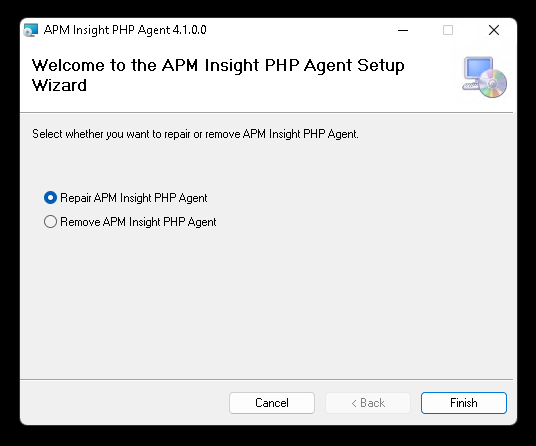
{"php.install_path": "","PHP_agent_configuration": {"extension": "php_zpa.dll","zpa.application_name" : "appname","zpa.capture_mysql" : 0}}Double-click the MSI file, select Repair APM Insight PHP Agent, and click Finish.
Other available options
Refer to the table given below for the list of the other options available:
| Option | Description |
|---|---|
| -php.install_path |
|
| -zpa.application_name |
|
| -zpa.additional_buffer |
Note: Available only in PHP Agent v4.1 and below. |
| -zpa.data_port |
|
| -zpa.status_port |
|
| -zpa.method_threshold |
|
| -zpa.remote_exporter_ip |
|
| -zpa.remote_exporter_hostname |
|
| -zpa.span_limit |
|
| -zpa.stack_depth |
|
| -zpa.capture_casssandra |
|
| -zpa.capture_clirequest | |
| -zpa.capture_distributed_trace | |
| -zpa.capture_http | |
| -zpa.capture_memcached | |
| -zpa.capture_mssql | |
| -zpa.capture_mysql | |
| -zpa.capture_oracle | |
| -zpa.capture_pdo | |
| -zpa.capture_postgres | |
| -zpa.capture_redis | |
| -zpa.track_errors | |
| -zpa.track_exceptions | |
| -zpa.track_zend_execute_internal | |
| -zpa.track_zend_execute |

