Schedule demo

Python Agent Configuration Options


The APM Insight Python Agent Configuration file helps you fine tune the configuration for tracking web based transactions. These settings can be configured from the web client.

Editing the configuration settings

These settings can be configured using the edit option available in the web client.
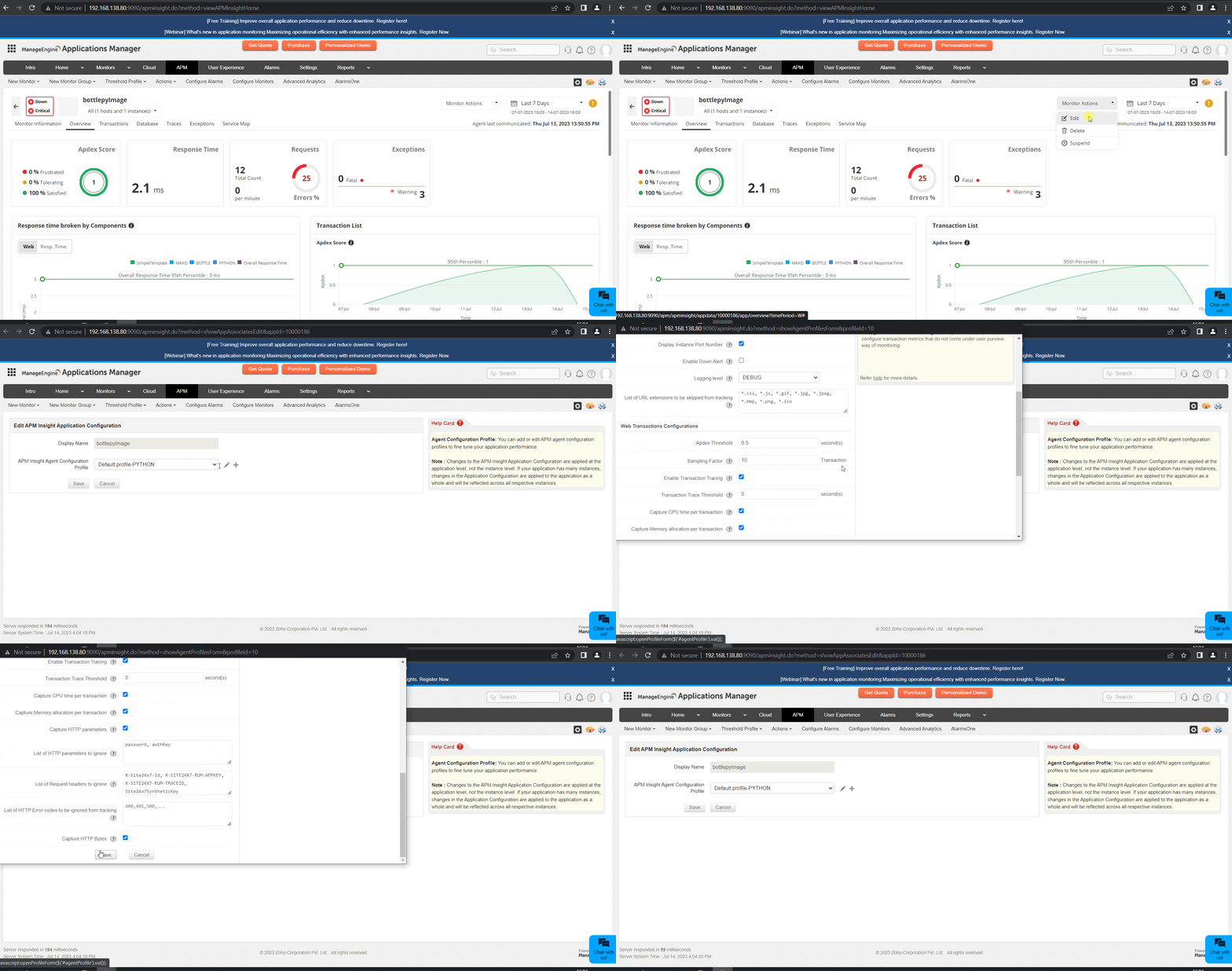
Applications Manager APM Insight Python Agent Configuration Options: Editing Python agent configuration profile settings

Browse through the following topics to view the agent configuration profile for the respective categories of Python agent:

Basic configuration profiles

NameKeyDescriptionDefault value

Capture database SQL Queries

sql.capture.enabled

  • Enabling this option will listen to all SQL Queries which gets executed.

  • If this option is disabled, no Database Metrics will be collected.

True

Obfuscate SQL Parameters

transaction.trace.sql.parametrize

  • Enabling this option will parameterize all SQL Queries in Slow Transaction Traces. (if sql.capture.enabled set to true & transaction.trace.enabled set to true)

  • Disabling this option will give you the real query (with parameters).

  • It is recommended to enable this option if there are queries getting executed using confidential parameters like credit card number, passwords, etc.

True

Stacktrace threshold for SQLs in transaction trace

transaction.trace.sql.stacktrace.threshold

  • Enabling this option will collect the stacktrace whenever any sql query executed above this threshold time value.

3(seconds)

Display Instance Port number

show.instance.port.number

  • Port number of application instances will be shown, if this option is enabled.

True

List of URL extensions to be skipped from tracking

transaction.skip.listening

  • Web transactions of the specified URL patterns will be skipped while tracking

  • Use comma(,) to separate multiple entries

    Example: transaction.skip.listening=*.jpeg, will skip listening to transactions ending with .jpeg

*.css, *.js, *.gif, *.jpg, *.jpeg, *.bmp, *.png, *.ico, *.properties, *.jsf, *.ttf, *.woff, *.woff2, *.otf, *.svg, *.webp

List of exceptions to be skipped from trackingexceptions.ignore
  • The list of exceptions that do not need to be tracked.
None
Exclude Grouping in Transaction Namestransaction.keyword.skip.grouping
  • Provides a list of alphanumeric keywords that should not be grouped together in the transaction names.

    Example: For example, if you configure v1, v2, index1, index2, the transactions api/v2/web3/index2.html and api/v1/web3/index1.html will be obfuscated as api/v2/*/index2.html and api/v1/*/index1.html.

None

Web transaction configurations

NameKeyDescriptionDefault value

Apdex Threshold

apdex.threshold

  • Application Performance Index (simply called Apdex) is measurement of an Application's Performance ranging from 0 to 1.

  • Detailed information about Apdex can be found at www.apdex.org

  • If any transaction response time scores values below the apdex.threshold value, the transaction is labeled as Satisfied.

  • If any transaction response time scores above four times the apdex.threshold, the transaction is labeled as Frustrated.

  • If it is exactly equal to apdex.threshold or in between satisfied and frustrated threshold value it is labeled as Tolerating.

0.5 (seconds)

Sampling factor

transaction.tracking.request.interval

  • Sampling factor helps in tracking sampled transactions.

  • If set to 5, APMInsight tracks only 1 in 5 requests of the same kind

1(request) or 10(seconds)

Enable transaction tracing

transaction.trace.enabled

  • Enabling this option will construct Trace for Slow Transactions.

  • You can view the traces collected in APM Insight Page by selecting Traces tab.

True

List of HTTP error codes to be ignored from tracking

http.errors.ignore

  • This is the list of HTTP error codes, like 400, 401, and 500, that will not be tracked.

None

Capture CPU Time per Transaction?


  • Record CPU time for every HTTP request, if enabled.

True

Group similar transactions by positiontransaction.grouping.by.position
  • Combine similar transactions under a single transaction by position for easy monitoring.
  • Input format: Transaction [*a-zA-Z0-9_/.,-:] : Position [0-9] : Group Name [a-zA-Z0-9_]
None
Exclude Grouping in Transaction Namestransaction.keyword.skip.grouping
  • Provides a list of alphanumeric keywords that should not be grouped together in the transaction names.

    Example: For example, if you configure v1, v2, index1, index2, the transactions api/v2/web3/index2.html and api/v1/web3/index1.html will be obfuscated as api/v2/*/index2.html and api/v1/*/index1.html.

None
Capture HTTP Parameterswebtransaction.trace.input.params.record
  • Enabling this option captures parameters of all GET and POST web requests.
  • To skip capturing specific parameters, use the webtransaction.trace.input.params.ignore key.
  • Captured parameters can be viewed by selecting the required transaction in the Traces tab.
False

Background transaction configurations

NameKeyDescriptionDefault value
Track background transactionsbgtransaction.tracking.enabled
  • Enabling this option, APM Insight agent starts tracking background transactions

  • All transactions other than HTTP are considered as background transactions

True
Capture tracesbgtransaction.trace.enabled
  • Enabling this option, the agent collects traces for slow background transactions, provided bgtransaction.tracking.enabled is set to true
True
Transaction trace thresholdbgtransaction.trace.threshold
  • Traces will be collected for background transactions whose response time have crossed the specified threshold value, provided bgtransaction.trace.enabled is set to true
5 (seconds)
Capture trace if external calls exceedsbgtransaction.trace.external.components.count.threshold
  • Trace snapshot will be taken for background transactions which has total external components (like MYSQL, MEMCACHED, etc) call count equal or higher than the configured number.
50 (Count)
Capture CPU time per transaction?bgtransaction.record.cputime.enabled
  • Record CPU time for every background transaction, if enabled.
False
Sampling factorbgtransaction.tracking.request.interval
  • Sampling factor for background transactions

  • If value is set to 1, agent tracks every transaction. If value is set to n, agent tracks 1 in n transactions of same kind

1 (Request)

Loved by customers all over the world

"Standout Tool With Extensive Monitoring Capabilities"

It allows us to track crucial metrics such as response times, resource utilization, error rates, and transaction performance. The real-time monitoring alerts promptly notify us of any issues or anomalies, enabling us to take immediate action.

Reviewer Role: Research and Development

carlos-rivero
"I like Applications Manager because it helps us to detect issues present in our servers and SQL databases."
Carlos Rivero

Tech Support Manager, Lexmark

Trusted by over 6000+ businesses globally

