Java4Shell mitigation: How to find and patch affected Java installations with Endpoint Central
On November 17, 2026, the security research firm Calif disclosed Java4Shell (CVE-2026-114938), a memory corruption flaw in the Base64 decoder of OpenJDK. A crafted Base64 string can crash a Java process, leak heap memory or, in some cases, let an unauthenticated attacker run code.
The researchers rate it 9.2 (Critical) on CVSS 4.0, while Oracle rates it 8.1 on CVSS 3.1. Oracle addressed the flaw in its November 2026 security update, and other Java distributors are publishing their own updates. CISA has urged immediate patching, although there is no evidence of active exploits as of November 17.
A complete fix is updating affected Java runtimes and restarting the Java processes that use them. That is harder than it sounds: Java runs on servers, on developer machines, and inside applications that ship their own runtime, and few teams hold a complete list. This blog explains what Java4Shell does, which systems are most exposed, and how IT teams can find, patch and verify vulnerable Java with Endpoint Central.
The Risk: CVE-2026-114938
The flaw is in the Java runtime itself, not in your applications; therefore updating your applications or libraries does not fix it. The issue here is OpenJDK uses handwritten assembly to decode Base64 faster on processors with AVX-512 VBMI, but that code miscalculates the output length when the input is malformed in a specific way: in this case, a stray padding character. A malformed string makes Java write 64 bytes into a buffer meant for 50, so the write runs well past the end of the buffer. Base64 carries login headers, tokens, and cookies, so, the decoder can run even before a login check.
Code execution without credentials has been shown against Jira, Confluence, Jenkins and Keycloak, while post-auth remote code executions include Apache Kafka Broker, Apache Solr, Elasticsearch, Gerrit, and Spinnaker. The list is non-exhaustive and they also demonstrated RCE in sample applications built on Apache Struts and Spring Boot.
Which systems are exposed?
Two conditions must be met. A system is at risk only when it runs an affected Java build on an affected processor. Even then, an attack works only if data sent by the attacker reaches the Base64 decoder.
Criteria | Affected | Not Affected |
Java runtime | Affected OpenJDK builds in the 17 release line (from 17.0.6 onward), and affected builds in the 21, 25 and 27 release lines. Distributions built from this code include Red Hat, SAP SapMachine, BellSoft Liberica, Azul Zulu, Amazon Corretto, Eclipse Temurin, Microsoft and Oracle. Oracle separately lists its Java 8 Enterprise Performance Pack build 8u511b33-perf. Check each distributor's advisory for exact build applicability and fixes. | Builds released before 17.0.6, and any build that already includes the fix. |
Processor | x86-64 processor with AVX-512 VBMI support. Intel Xeon: Ice Lake, Sapphire Rapids, Emerald Rapids, Granite Rapids AMD EPYC and Ryzen: Zen 4 or newer | ARM64 CPUs |
On Linux machines, you can check whether a CPU is vulnerable using the following command:
grep -m1 ‘^flags’ /proc/cpuinfo | tr ‘ ‘ ‘\n’ | grep -E ‘^(avx512f|avx512bw|avx512vbmi|bmi2)$’
Is Java4Shell being actively exploited?
As of November 17, there are no reports of active exploits. Also, every target needs a custom exploit chain, so no universal exploit exists. This makes it harder to attack, but it offers little comfort to the owner of an exposed identity provider or build server.
The Solution
The definitive fix is updating the Java runtime and restarting the Java processes that use it.
Oracle published the builds below on November 17, 2026, as part of its November 2026 security update. Oracle's November update fixes the flaw in 8u513-perf (Java 8 Enterprise Performance Pack), 17.0.21.1, 21.0.13.1, 25.0.5.1 and 27.0.1.1 while Temurin, Corretto, Zulu, Red Hat and other distributions have their own release schedules.
However, for cases where immediate patching isn't possible, there are temporary workarounds. Howwever, these workarounds only buy time while you plan the update.
How to detect, mitigate and patch Java4Shell using Endpoint Central?
Detection:
Sync the vulnerability database and scan. Ensure the vulnerability database is up to date and that every managed endpoint has completed a vulnerability scan after the latest sync.
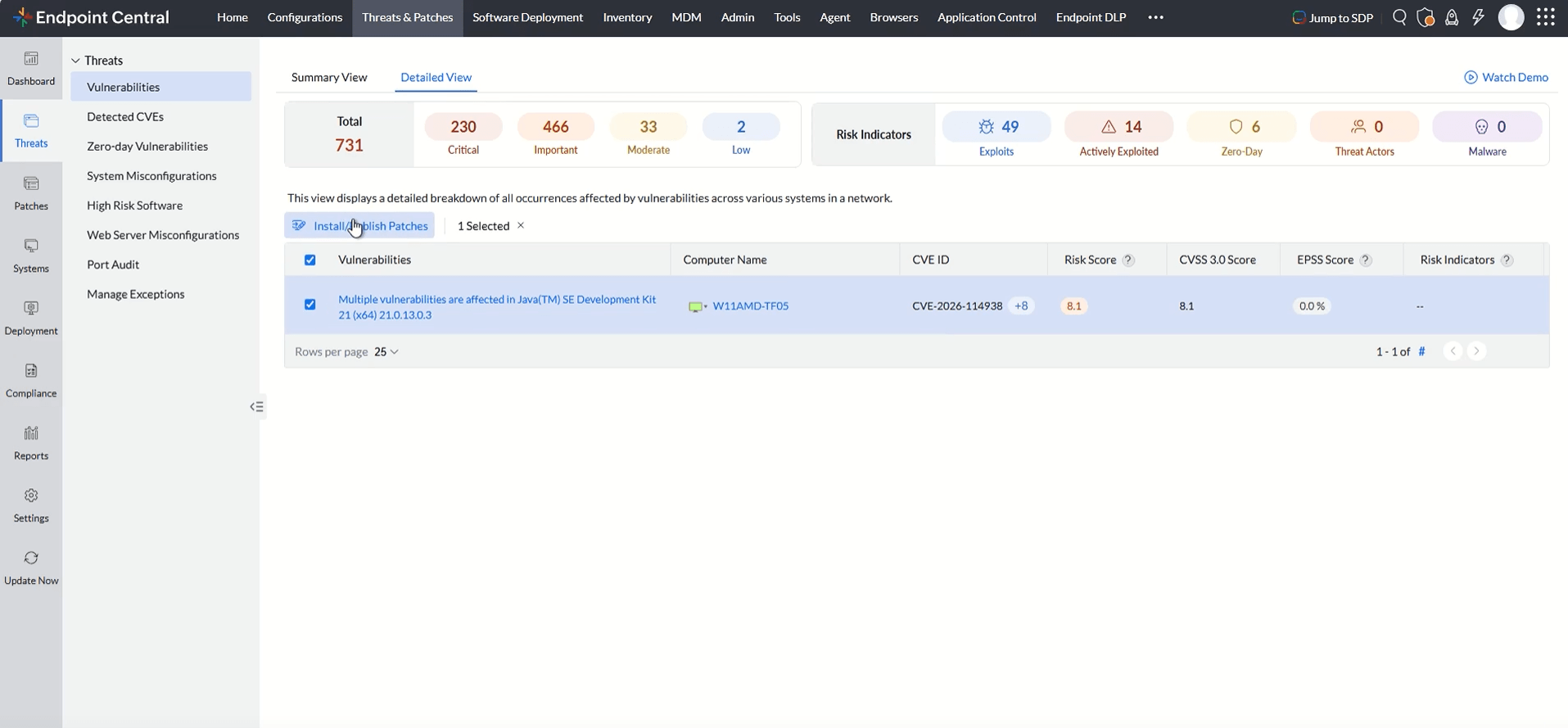
Identify the affected systems. In the Endpoint Central's Threats & Patches tab, search for CVE-2026-114938 in the threats module. The console will display the number of affected systems. You can view the complete details, including the CVE information, risk score, risk indicators, along with remediation details and the vulnerability timeline. Select the affected system and click on install/publish patches.
Remediation:
Deploy the available Java security updates:
Identify systems running affected Java runtimes and development kits and deploy the applicable patches listed above.
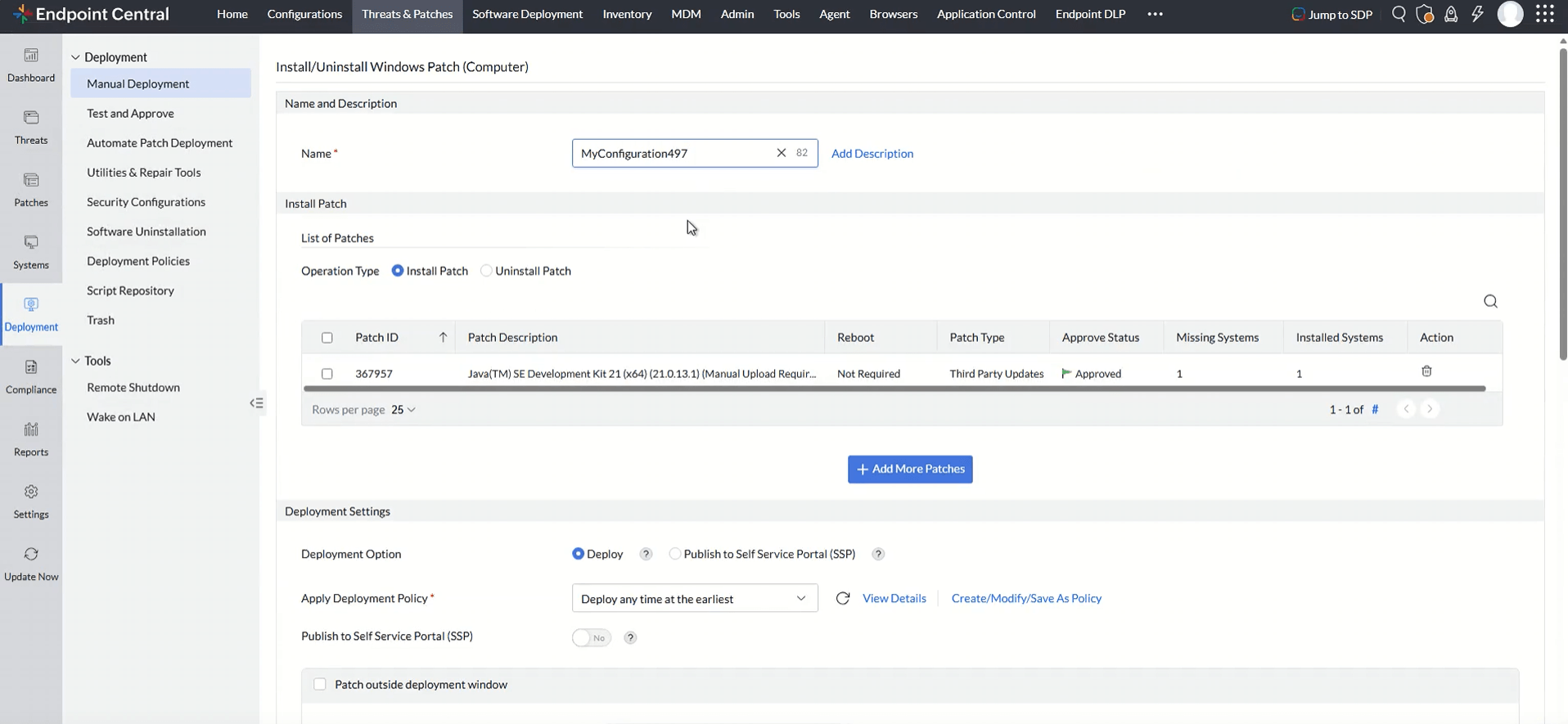
For patches marked Manual Upload Required, download the required installer from the vendor and upload it to ManageEngine Patch Management before deployment.
2. Prioritize internet-facing and business-critical Java applications.
Mitigation:
Use temporary mitigation steps if immediate patching is not possible. As mentioned above, this includes:
Note: These workarounds should only be considered temporary until the relevant Java update is deployed.
Option | What it does |
-XX:+UnlockDiagnosticVMOptions -XX:-UseBASE64Intrinsics | Turns off the hardware optimized Base64 routine, so Java uses its regular code. |
-XX:UseAVX=2 | Stops the JVM from using AVX-512 instructions, which removes the vulnerable path. |
Next Steps
1. Closely monitor internet-facing Java applications until the applicable updates have been deployed.
2. Review application and system logs for unusual behaviour or unexpected process execution.
The sequence is DETECT > REMEDIATE. A system is only fixed once the patch is deployed and a vulnerability scan no longer reports CVE-2026-114938, so set a patch date for every system covered by a workaround.