Mobile Device Management (MDM) for iOS, Android, and Windows
With the growing number of mobile devices in the corporate world, you need a way to scrutinize any mobile device that accesses your enterprise's resources. Endpoint Central, our flagship unified endpoint management software, can help you configure and secure your mobile devices from one central location; it's built for simplified desktop and mobile device management.
What is Mobile Device Management (MDM)?
Mobile Device Management is a set of practices that involve enrolling, managing, monitoring, updating, securing, and troubleshooting mobile devices such as smartphones, tablets, laptops, and more in both LAN and WAN environments from a central location.
Importance of Mobile Device Management
Enterprises today own and manage a diverse set of mobile devices, and this has two direct implications:
- They require a solution that allows system administrators to centrally maintain and keep track of these devices.
- Mobile devices are increasingly used to access corporate networks and resources, which expands the attack surface and poses a serious security risk.
To centrally manage devices and maintain security, system administrators need a Mobile Device Management solution that caters to all their requirements.
How does mobile device management work?
MDM follows the same lifecycle in every organization, whether you manage fifty devices or fifty thousand. Here is how it works in Endpoint Central:
- Enroll devices: Onboard corporate devices in bulk or let employees self-enroll their personal devices. Enrollment is authenticated with a one-time passcode or Active Directory credentials.
- Apply profiles and policies: Push passcode rules, Wi-Fi, VPN, and email configurations, and app restrictions to devices over the air, grouped by department, location, or ownership type.
- Distribute apps and content: Publish approved apps through an enterprise app catalog and share business documents to devices from a central content repository.
- Monitor and audit: Scan devices for policy compliance, track asset details and installed apps, and generate scheduled or on-demand reports.
- Secure and troubleshoot: Track device locations, remotely lock or wipe lost devices, and troubleshoot issues on remote devices in real time.
- Retire devices: Perform a complete wipe on corporate devices or a corporate wipe on BYOD devices, removing business data while personal data stays intact.
Because MDM is built into Endpoint Central's unified endpoint management platform, the same console handles this lifecycle for your desktops, laptops, and servers too.
MDM vs. EMM vs. UEM: What's the difference?
These three terms describe increasingly broader layers of endpoint management. Knowing which one you need prevents you from buying a tool that your organization may outgrow.
| Aspect | MDM | EMM | UEM |
|---|---|---|---|
| What it manages | The mobile device itself: enrollment, policies, security, and remote actions. | Everything MDM covers, plus mobile apps, content, and identity. | All endpoints: mobile devices, desktops, laptops, servers, and IoT. |
| Scope | Smartphones and tablets. | Smartphones, tablets, and the corporate data and apps on them. | Every device an employee uses, managed from one console. |
| Best for | Organizations that only need device-level control. | Organizations securing corporate apps and data on mixed device fleets. | Organizations consolidating device management and security into a single tool. |
| Where Endpoint Central fits | Endpoint Central is a UEM solution with complete MDM and EMM capabilities built in, so mobile and desktop management run from the same console. | ||
Want to see how it stacks up? Compare Endpoint Central's MDM capabilities with other leading vendors in our comparison matrix.
We also offer Mobile Device Manager Plus, a standalone enterprise mobile device management solution available on-premises and in the cloud. If you're looking for a solution to manage only mobile devices, whether corporate-owned or personal, try Mobile Device Manager Plus for free.
Mobile device management for different operating systems
Most organizations run a mix of platforms, and each one has its own enrollment methods, management frameworks, and policy options. Endpoint Central handles them all from one console, so IT teams do not need a separate tool for every operating system.
iOS and iPadOS
Enroll Apple devices automatically through Apple Business Manager or Apple School Manager, distribute apps with Apple's Volume Purchase Program, and enforce passcode, restriction, Wi-Fi, VPN, and email profiles over the air. Single-app kiosk mode, lost mode, and remote lock or wipe are available for iPhones and iPads. Learn more about iOS mobile device management.
Android
Manage Android devices through Android Enterprise and Managed Google Play, with zero-touch and Samsung Knox enrollment for out-of-the-box provisioning. Work profiles keep corporate data separate on personal devices, and OEMConfig support covers rugged handhelds. Read how Desktop Central's mobile device management expanded its support to Android devices, or explore Android device management.
Windows
Onboard Windows laptops and tablets with Windows Autopilot, apply configuration and security policies, deploy apps, and track device and app inventory from the same console used for desktop patching and software deployment. See how Windows mobile device management works in Endpoint Central.
macOS
Enroll Mac devices through Apple Business Manager for zero-touch provisioning, enforce FileVault and password policies with configuration profiles, and keep them patched alongside the rest of your fleet. Our guide to endpoint security for Mac covers the full approach.
ChromeOS and tvOS
Chromebooks and Apple TV devices are covered too, so shared and specialized devices follow the same policies as the rest of your mobile fleet.
Mobile device management capabilities of Endpoint Central
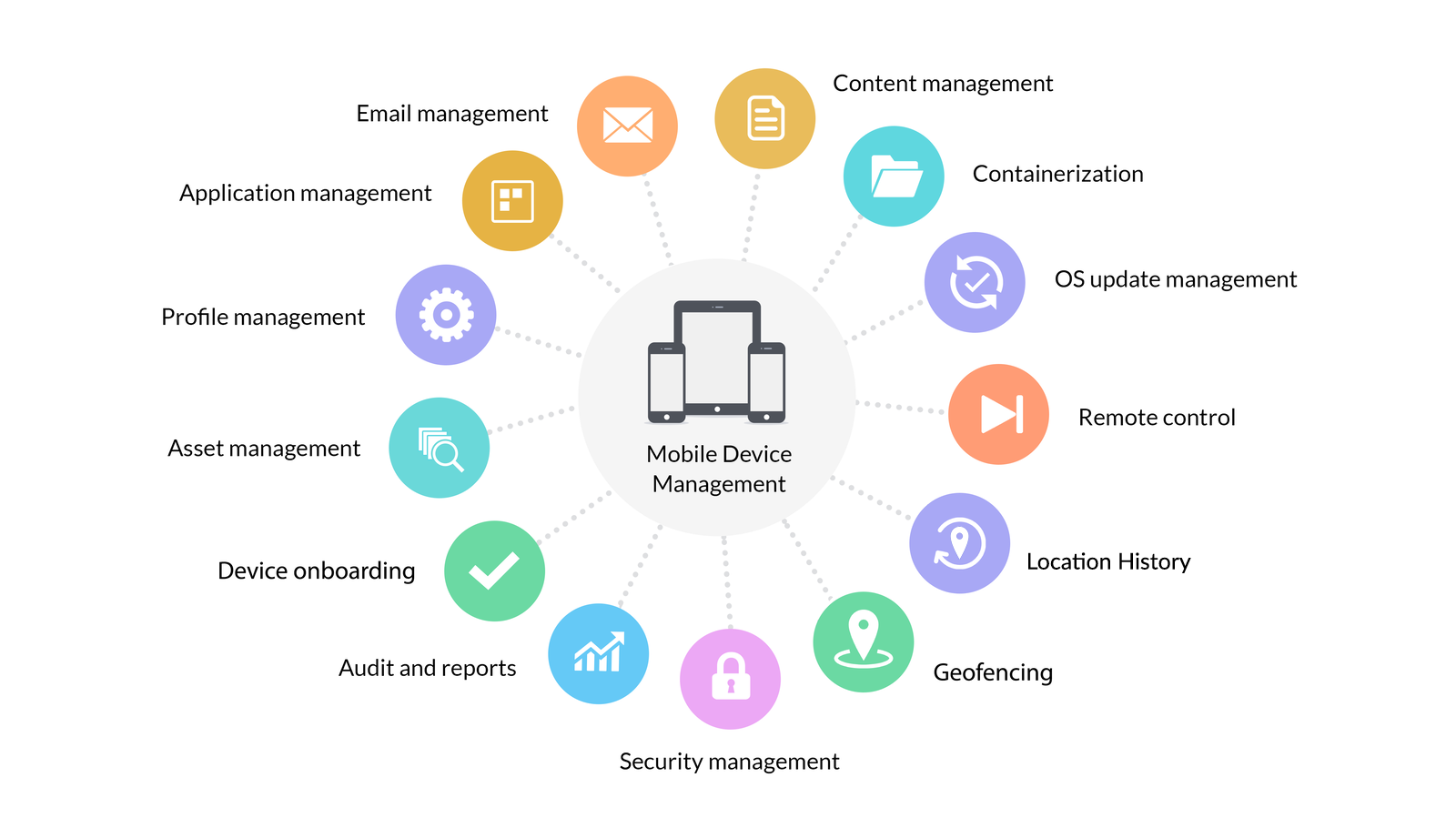
Endpoint Central's mobile device management capabilities include the following:
- Profile management
- Kiosk mode
- Asset management
- Remote troubleshooting
- Mobile application management
- Rugged device management
- Mobile security management
- Mobile content management
- Email management
- Containerization
- Audits and reports
- Device enrollment
- Integrations
1. Profile management
Protect corporate resources by configuring and enforcing policies on mobile devices. You can create and configure policies and profiles for different departments or roles. The same console that manages desktop configurations manages mobile profiles, so policies stay consistent across your fleet.
With the profile and policy management feature, you can:
- Configure policy and profile settings for accessing enterprise resources.
- Restrict the use of applications such as the camera, YouTube, browsers, and more.
- Regulate access to corporate accounts, including email, Wi-Fi, and VPN accounts.
- Create logical groups of devices based on department or location. You can also create groups to distinguish corporate devices from employees' personal devices, then apply policies or restrictions and distribute apps to every device in a group.
Learn more about configuring policies on mobile devices.
2. Kiosk mode
Lock down mobile devices to run a single app or a select set of apps. The application supports lockdown functions for both iOS and Android devices.
You can:
- Permit access to only a limited selection of apps.
- Create a customized homepage with only the permitted apps.
- Restrict access to the task manager and status bar.
Learn more about implementing kiosk mode on mobile devices.
3. Asset management
Unlike traditional workstations that reside within an enterprise's physical workspace, mobile devices are used from multiple locations, complicating the process of managing and controlling them. Pair mobile data with IT asset management for a fuller picture of every device your organization owns.
You can:
- Track and analyze asset information to protect sensitive corporate data.
- Retrieve complete information about devices, including device details, certificates, installed apps, and more.
- Gain complete visibility into devices with out-of-the-box reports.
- Remotely troubleshoot mobile devices in real time.
Learn more about managing mobile devices.
4. Remote troubleshooting
Mobile devices allow users to work remotely, but that also makes it harder for admins to troubleshoot issues on devices they cannot physically reach. With Endpoint Central, you can remotely view or control device screens to troubleshoot mobile devices in real time.
You can:
- Choose between attended and unattended remote sessions.
- Execute commands on devices to perform actions such as rebooting or exiting kiosk mode, reducing user intervention.
- Chat with the user during the remote session to analyze the issue better.
Learn more about remotely troubleshooting mobile devices.
5. Mobile application management
Device management doesn't end with configuring policies, retrieving asset information, and securing your devices. Application management is just as important as setting up employees' mobile devices. Explore Endpoint Central's mobile application management (MAM) capabilities in detail.
You can:
- Create your own enterprise app catalog.
- Manage and distribute both in-house and third-party applications.
- Integrate with the Apple Volume Purchase Program (VPP) and Google's Play for Work, allowing simple distribution of commercial apps.
- Blocklist and allowlist mobile applications.
- Audit your app inventory.
Learn more about managing mobile apps.
6. Rugged device management
Rugged devices used by frontline workers in logistics, manufacturing, healthcare, and field services need the same central management as any other endpoint, plus hardware-level controls that consumer devices don't require. Endpoint Central brings rugged handhelds, including Android-based devices covered by Android device management, under the same console as the rest of your fleet.
You can:
- Onboard rugged devices in bulk with automated enrollment methods.
- Apply OEM-specific configurations using OEMConfig support for leading rugged device manufacturers.
- Lock down devices to work apps with kiosk mode and restrict unused device functions.
- Remotely troubleshoot rugged devices in the field without an onsite visit.
Learn more about managing frontline and rugged devices.
7. Mobile security management
No two enterprises are the same. Enforce stringent policies at various levels to suit your specific security needs. Mobile security sits within Endpoint Central's broader endpoint security capabilities, so policies and visibility stay consistent across devices.
With the mobile security management feature, you can:
- Enforce device passcodes to prevent unauthorized access.
- Remotely lock devices to prevent the misuse of lost or stolen devices.
- Track devices in real time with geolocation tracking.
- Wipe a device's data completely to make it as good as new.
- Perform a corporate wipe to remove corporate data only, leaving personal data intact. This feature is useful in bring your own device (BYOD) environments, where employees access corporate data on their personal devices.
Learn more about securing mobile devices.
8. Mobile content management
When employees use mobile devices for work, they need access to corporate resources on their devices. The application allows admins to remotely share documents to employees' devices without compromising security. Combined with managed apps, content stays inside approved workspaces.
You can:
- Create a content repository to store documents.
- Distribute documents in various formats, including DOC, PDF, PPTX, and more.
- Restrict document sharing between unmanaged devices.
Learn more about leveraging mobile content management.
9. Email management
Securely manage corporate emails through platform containerization and Exchange ActiveSync. With mobile email management, you can configure, secure, and manage corporate email accounts for both enterprise-owned and personal devices.
You can:
- Set up email security policies over the air.
- Containerize data to prevent unauthorized apps from accessing email data.
- Restrict users from modifying or removing their corporate email account.
- Selectively wipe corporate email accounts.
Learn more about managing email on mobile devices.
10. Containerization
In a BYOD environment, employees can perform work-related tasks with their personal mobile devices. However, BYOD management only works if you can effectively manage these devices and protect your data from being compromised.
The application gives you the ability to set policies and restrictions to keep enterprise data safe. You can containerize in the following ways:
- Enroll devices based on ownership.
- Create separate groups and define policies for BYOD and corporate devices.
- Wipe corporate data while leaving user data untouched, and secure corporate data when employees leave your organization.
Read our white paper to learn how you can leverage BYOD.
Learn more about BYOD management.
11. Audits and reports
Tracking and analyzing asset information helps you protect sensitive corporate data. The application provides out-of-the-box reports that allow you to audit devices. See Endpoint Central's wider reporting and auditing capabilities for compliance evidence across your fleet.
With the reporting capabilities, you can:
- Scan devices to ensure they comply with company policy.
- Obtain granular details about the apps running on managed devices.
- Generate predefined or customized reports immediately or at a scheduled time.
Learn more about auditing mobile devices.
12. Device enrollment
The application serves as a unified endpoint management solution that works across many device environments, providing necessary security protocols so unauthorized users cannot access your corporate network. You can enroll devices manually or automatically, enroll devices in bulk, or have users self-enroll their mobile devices. Enrollment options differ by platform, so see the dedicated guides for iOS, Android, and Windows devices.
You are offered:
- Automatic, manual, or over-the-air (OTA) device enrollment.
- Bulk enrollment of mobile devices using a CSV file.
- Authentication of enrollment with a one-time passcode or users' Active Directory credentials.
Learn more about enrolling mobile devices.
13. Integrations
MDM works best when it plugs into the platforms and directories your organization already uses. Endpoint Central integrates with the enrollment programs, app stores, and identity services that mobile management depends on. It also offers helpdesk integrations with ServiceDesk Plus, ServiceNow, Zendesk, and Jira.
You can integrate with:
- Apple Business Manager and Apple School Manager for automated enrollment of Apple devices.
- Android Enterprise and Managed Google Play for app distribution and work profile management.
- Samsung Knox Mobile Enrollment and Android Zero-touch Enrollment for out-of-the-box Android provisioning.
- Windows Autopilot for zero-touch Windows device onboarding.
- Active Directory for user authentication during enrollment.
- Exchange ActiveSync and Office 365 for corporate email management.
Learn more about enrollment integrations.
What customers say about Endpoint Central MDM
IT teams across industries rely on Endpoint Central to manage mobile devices alongside their desktops. Here is what verified reviewers say about its MDM capabilities.
“a Complete MDM and endpoint management solution”
“MDM: Complete control over all our company owned devices.”
“…centralized management of diverse operating systems like Windows, macOS, Android, and iOS.”
“It’s one of those rare tools that actually manages Windows, Mac, and mobile devices all from one spot without a hassle.”
Endpoint Central is rated 4.6 out of 5 on Gartner Peer Insights, 4.5 out of 5 on G2, and 4.6 out of 5 on Capterra.
Benefits of mobile device management
Managing each mobile device by hand works for one device. It breaks down at a hundred, and enterprises may run thousands. Centralizing that work in an MDM solution delivers:
- Reduced attack surface: Every enrolled device carries enforced passcodes, encryption policies, and app restrictions, so an unmanaged phone does not become the weak link into your network.
- Data protection on lost devices: Remote lock, locate, and wipe capabilities help prevent a misplaced device from becoming a data breach.
- BYOD without the risk: Containerization keeps corporate data in a managed workspace on personal devices, and a corporate wipe removes it cleanly when an employee leaves.
- Faster device onboarding: Bulk and self-enrollment get new devices configured with apps, email, and Wi-Fi before they reach employees' hands.
- Audit-ready visibility: Out-of-the-box reports show which devices are compliant, which apps they run, and where they are.
- One console instead of two: Because MDM is native to Endpoint Central, mobile devices are managed alongside patching, software deployment, and the rest of your endpoint operations.