Endpoint Central Summary Server Cloud Architecture
The Summary Server Cloud architecture allows IT administration team and top leadership employees to collaborate and work from a single platform. The Summary Instance will serve as a centerpiece for all management operations. Tasks, such as patching, configuration, and reporting, can be allocated to technicians through the Management Console.
Table of Contents
Summary Server Cloud Architecture
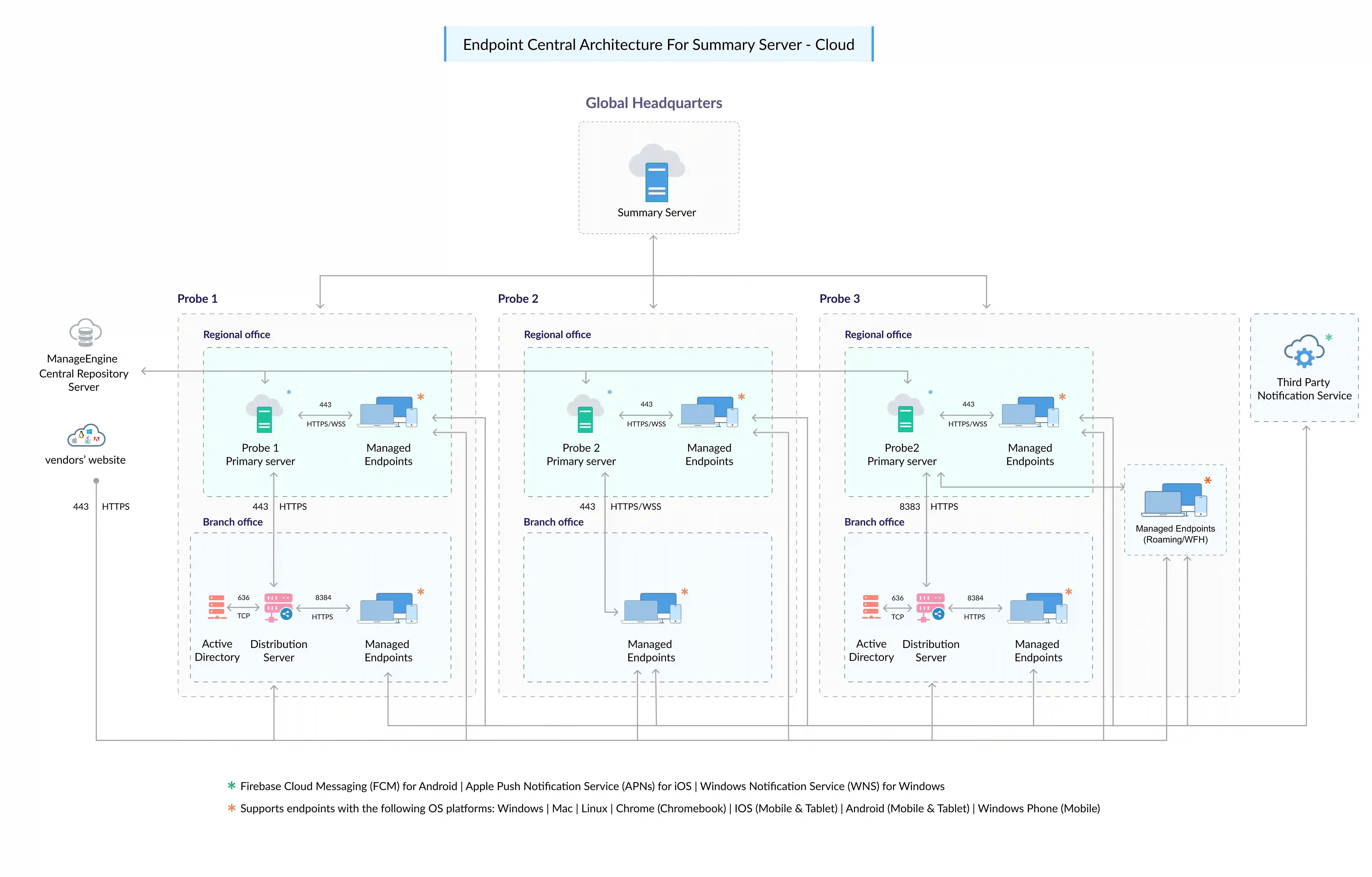
What are the components in the Summary Server Cloud Architecture?
The architecture is built up with the below components:
- Summary Instance
- Probe Instance
- Distribution Server (AD Connector)
- Active Directory
- Patch Database
- Web Console
- Notification Server
- Endpoint Central Agents
Summary Instance
Summary Instance is primarily provided for your top leadership staff to generate insights and make informed decisions. This instance can also be used to manage the IT technicians who access Endpoint Central. Users who have access to the Summary instance can also access all Probe instances. A Summary instance will have multiple instances beneath it, enabling the execution of various administrative operations.
Probe Instance
The Probe instance provides the core functionality that IT technicians use to perform management operations. Both the Summary and Probe instances are currently hosted within the same ManageEngine data center (for a list of our data centers, go to this page). The Probe Instance will be able to monitor both your old and new devices. Probe instances achieve this through the use of platform-independent notification services.
Distribution Server (AD Connector)
The distribution server of the Endpoint Central Cloud Probe instance primarily acts as an AD Connector for your network. Check this page to configure AD Connector in your network. In addition, this can be used as a distribution point to streamline the bandwidth rates through your network. Distribution Server can be setup in any one of your remote/branch offices. IT administrators can setup the distribution server with replication policy rules (the data will be replicated from the Probe instance to the distribution server based on this rule). In addition, the distribution server synchronizes with the Endpoint Central Cloud Probe instance for missing patch details. These patches are then downloaded directly from the respective vendor's website and distributed across the branch office agents depending on the status of the missing patches on each computer.
Hardware requirements for Distribution Servers
* May increase depending on the number of software applications and patches that are deployed
Ports
Ports used by Endpoint Central Cloud are 443 for server agent communication and 8384 for communication between (remote) agent and distribution server. For more details on domains required for agent communication and whitelisted IPs, refer this document.
Supported OS for Distribution Server
- Windows 11
- Windows 10
- Windows 8.1
- Windows 8
- Windows 7
- Windows Server 2022*
- Windows Server 2019*
- Windows Server 2016*
- Windows Server 2012 R2*
- Windows Server 2012*
- Windows Server 2008 R2*
- Windows Server 2025*
Active Directory
Endpoint Central, being a domain based approach to your endpoint solution, will sync resources information from Active Directory or Workgroup. In cloud hosted setup, businesses can populate the resource information using AD Connector.
Patch Database
Patch database is a repository hosted in ManageEngine data center. This database contains all the patch information, which will be passed to the central server at regular intervals. For users working from home, the agent installed on their machine will pull the patch information from this database directly and download and install the patches from the vendor websites.
Web Console
Web Console is the graphical user interface of both the Summary Server and Probe Instances in Endpoint Central. IT administrators and technicians can access the web console anytime, from anywhere, to manage and monitor their devices.
Notification Services
Endpoint Central is tightly integrated with notification services such as Apple Push Notification service (APNs), Firebase Cloud Messaging (FCM), and Zoho Notification Service to manage mobile devices and implement modern management practices.
Endpoint Central Agent
Endpoint Central agent is a lightweight software installed on the endpoints that is required to be managed by your IT administration team. This agent is responsible for carrying out the deployed tasks such as installing software/patches, distributing baseline settings, remote troubleshooting, device diagnosis, and more.
You can use Endpoint Central to manage the computers running on the following operating systems:
*Represents conditional support
For managing mobile devices
- Android: Android devices running on version 4.0 or above
- iOS (including iPhones, iPads, and iPods): iOS devices running on version 4.0 or above
- Windows smartphones: Devices running on version Windows Phone 8.1 or above
- Windows laptops (including Surface Hubs and Surface Pros): Devices running on Windows 10
- Chrome OS: Devices running on version 57.0 or later
- tvOS: Devices running on version 7.0 or above
- macOS: Devices running on version 10.13 or later
Note: A TLS version of 1.2 and above is required for the legacy devices to be managed using Endpoint Central Cloud.
Supported browsers
Any of the following browsers can access the Endpoint Central Cloud console:
- Microsoft Edge
- Mozilla Firefox
- Google Chrome
- Zoho Ulaa
Note: The screen resolution should be 1280 x 1024 pixels or higher.
Currently, all Linux Agents (including the ones under distribution server) only support direct download of patches from the vendor.




