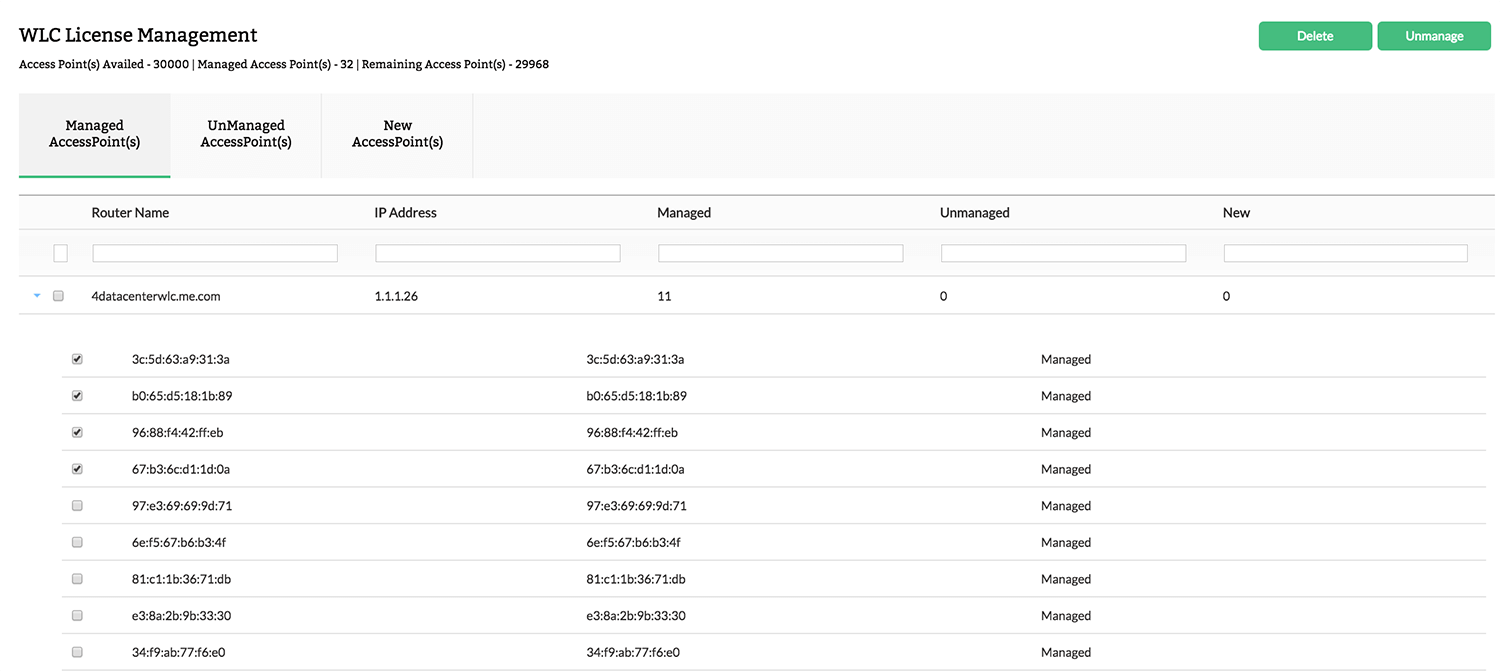
How to manage Access Points?

    1. Navigate to Settings > NetFlow > WLC License Management
    2. To manage newly added APs, select APs from "New Access Point" or "Unmanaged Access Point"
    3. Click Manage

    Note: Make sure you have available license limit to perform the above operation

    How to unmanage Access Points?

    Faster troubleshooting with advanced Forensics

    1. Navigate to Settings > NetFlow > WLC License Management
    2. To unmanage newly added APs, select APs from "Managed Access Point"
    3. Click Unmanage

    How to manage/unmanage new added Access Points?

    1. Navigate to Settings > NetFlow > WLC License Management
    2. To manage newly added APs, select APs from "New Access Point"
    3. Click Manage
    4. To unmanage newly added APs, select APs from "New Access Point"
    5. Click Unmanage

    Thank you for your feedback!

    Was this content helpful?

    We are sorry. Help us improve this page.

    How can we improve this page?
    Do you need assistance with this topic?
    By clicking "Submit", you agree to processing of personal data according to the Privacy Policy.