Microsoft DNS management in OpUtils: One console for complete control
For network administrators, managing DNS has traditionally meant juggling zones and records across separate server interfaces, manually tracking changes, and responding to resolution failures after they’ve already caused disruption.
We’re excited to introduce Microsoft DNS management in ManageEngine OpUtils, bringing DNS zone and record administration directly into the same console you already use for IP address management (IPAM).
What OpUtils already does for DNS
OpUtils has always supported DNS as part of its IPAM capabilities. Administrators can add DNS servers to OpUtils and use them for name resolution to translate hostnames into IP addresses during IP tracking and lookup operations. This integration helps streamline IPAM workflows, with DNS lookups occurring automatically as part of network scans.
However, managing DNS issues often means jumping between tools—detecting the problem in one place and fixing it in another. With the new Microsoft DNS management capability in OpUtils, we're changing that.
What’s new: Full DNS zone and record management
The new Microsoft DNS management capability in OpUtils enables comprehensive zone and record administration without switching between monitoring tools and native servers. Here's what you can do directly from OpUtils, no context switching required:
1. DNS zone creation and management
OpUtils now enables you to create and manage both forward lookup zones (mapping hostnames to IP addresses) and reverse lookup zones (mapping IP addresses back to hostnames through PTR records). You can work with all standard zone types including primary, secondary, and stub, giving you full control over how zone authority and replication are structured across your environment.
Create forward and reverse lookup zones across your Microsoft DNS servers.
Manage primary, secondary, and stub zones from a unified console.
Configure Active Directory replication scope: Domain, Forest, Legacy, or Custom.
Set dynamic update policies: secure-only, secure and non-secure, or disabled.
2. Advanced zone configuration
For primary DNS zones, OpUtils provides a consolidated configuration view that brings together three critical areas in a single pane: replication and scavenging settings, Name Server and Start of Authority (SOA) configuration, and zone transfer policies.
Zone scavenging plays an important role in maintaining DNS hygiene by automatically removing stale records that accumulate over time that can lead to resolution inconsistencies. You can configure no-refresh and refresh intervals to control how frequently records are validated.
The SOA configuration provides visibility into zone versioning and synchronization timing, while zone transfer settings allow you to restrict which servers are authorized to receive zone data, strengthening both redundancy and security.
3. DNS record management
Once zones are configured, you can create and manage DNS resource records directly within OpUtils. The feature supports all commonly used record types:
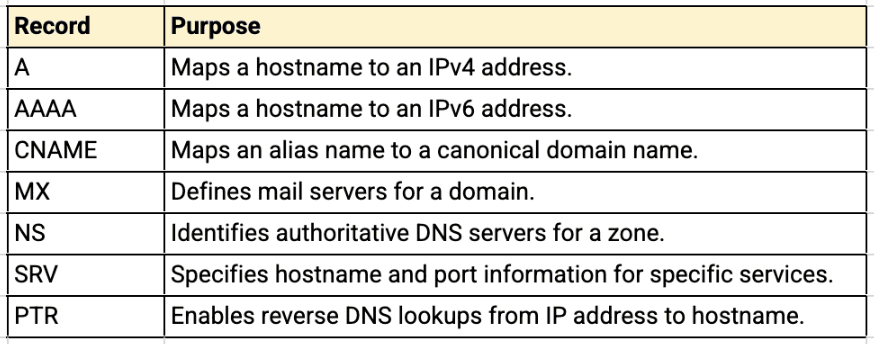
Record aging can be enabled during creation so that zone scavenging policies automatically apply. This helps prevent outdated records from lingering in the DNS database and keeps resolution data accurate without manual cleanup.
4. Secure WinRM-based connectivity
Similar to the recently introduced DHCP management feature, OpUtils communicates with Microsoft DNS servers using Windows Remote Management (WinRM). This agentless approach supports both Kerberos and NTLM authentication, with options for on-demand or persistent connections.
You can manage zones and records remotely without requiring direct server access, enabling centralized, secure, and auditable DNS administration.
Why DNS management matters for your team
DNS management in many enterprise environments is more fragmented than it should be. Administrators often monitor DNS health in one tool, manage zones through server interfaces, and track changes in spreadsheets or ticketing systems. Each context switch slows down troubleshooting and increases the chance of configuration drift or missed updates.
With the addition of Microsoft DNS management, OpUtils now gives you a single place to handle the full DNS life cycle, right from adding DNS servers and scanning their zones to creating records and reviewing SOA configuration.
Combined with the IP address management and switch port visibility that OpUtils already provides, this turns OpUtils into a truly unified console for managing critical network infrastructure in Microsoft-based environments.
The inclusion of zone scavenging configuration and zone transfer controls also helps address a common source of DNS debt in large organizations: stale records that accumulate over time and lead to intermittent resolution problems that are difficult to trace. With centralized visibility and proactive cleanup policies, teams can keep their DNS environment accurate and predictable instead of reacting to issues after they surface.
Download our 30-day, free trial to see how OpUtils makes DNS management easy. You can also schedule a free, personalized demo.