Security Hardening
The Security Hardening section in ADSelfService Plus provides a centralized console for administrators to manage security settings for configured features. These settings help protect the application from potential vulnerabilities by enforcing secure communication protocols, encrypting sensitive data, and applying critical hardening mechanisms. The Security Score offers a quantifiable assessment of the product's security status, based on your enabled security settings.
How to enable security configurations in the Security Hardening tab
To configure the security settings of ADSelfService Plus:
- Navigate to Configuration > Security Center > Security Hardening.
- You can manage these security settings by clicking the Configure, Enable, or Change option corresponding to each setting.
- The following security settings are available on the Security Hardening page:
HTTPS Settings
Enable HTTPS for Product Ensure secure communication between clients and ADSelfService Plus. Enable Secure TLS Version Ensure that secure TLS versions, such as TLSv 1.2, are enabled to maintain strong encryption standards. Enable Secure Cipher Suites Ensure only secure TLSv1.2 cipher suites are enabled for HTTPS to enhance security. Refer to the security deployment guidelines for a detailed overview. Configure Password Encryption for SSL Keystore Encrypt the password used to access the SSL keystore. (or)
To strengthen security, encrypt the keystore password to protect certificate data, as storing it in plain text increases the risk of exposure.
Note: For more details on the above configurations, refer to the Connection settings page
Other Product Settings
Change the Default Admin Password Change the default ADSelfService Plus admin account password to a stronger, more secure one to enhance security and protect accounts from unauthorized access. Enable LDAP SSL Ensure secure communication between Active Directory and ADSelfService Plus by enabling this option. Hide Employee Search/Organization Chart From Login Page Restrict the visibility of employee information to unauthenticated users on the login page. This helps minimize the exposure of organizational data. Refer to this page for more details on this setting. Enable TLS/SSL for Mail Server Ensure secure communication between ADSelfService Plus and the mail server using TLS/SSL. Enable SSL Pinning for Mobile App Prevent man-in-the-middle attacks in the ADSelfService Plus mobile app by revalidating the SSL certificate after the SSL handshake. Check this page for more details. Change Password for Database Backups Protect ADSelfService Plus database backup files with a strong, secure password. Restrict User Access to Agent If SSL Certificate Is Invalid Prevent users from going through the MFA process and performing self-service actions from the login screen if the SSL certificate applied in the product becomes invalid. For more information, refer to this page. Register for Security Updates Configure this option to receive timely alerts and notifications regarding product security patches and updates by providing your subscription details in the prompt that appears. Learn more. - As you configure these security options, your Security Score will improve.
Note: Unconfigured features are excluded from the Security Score calculation.
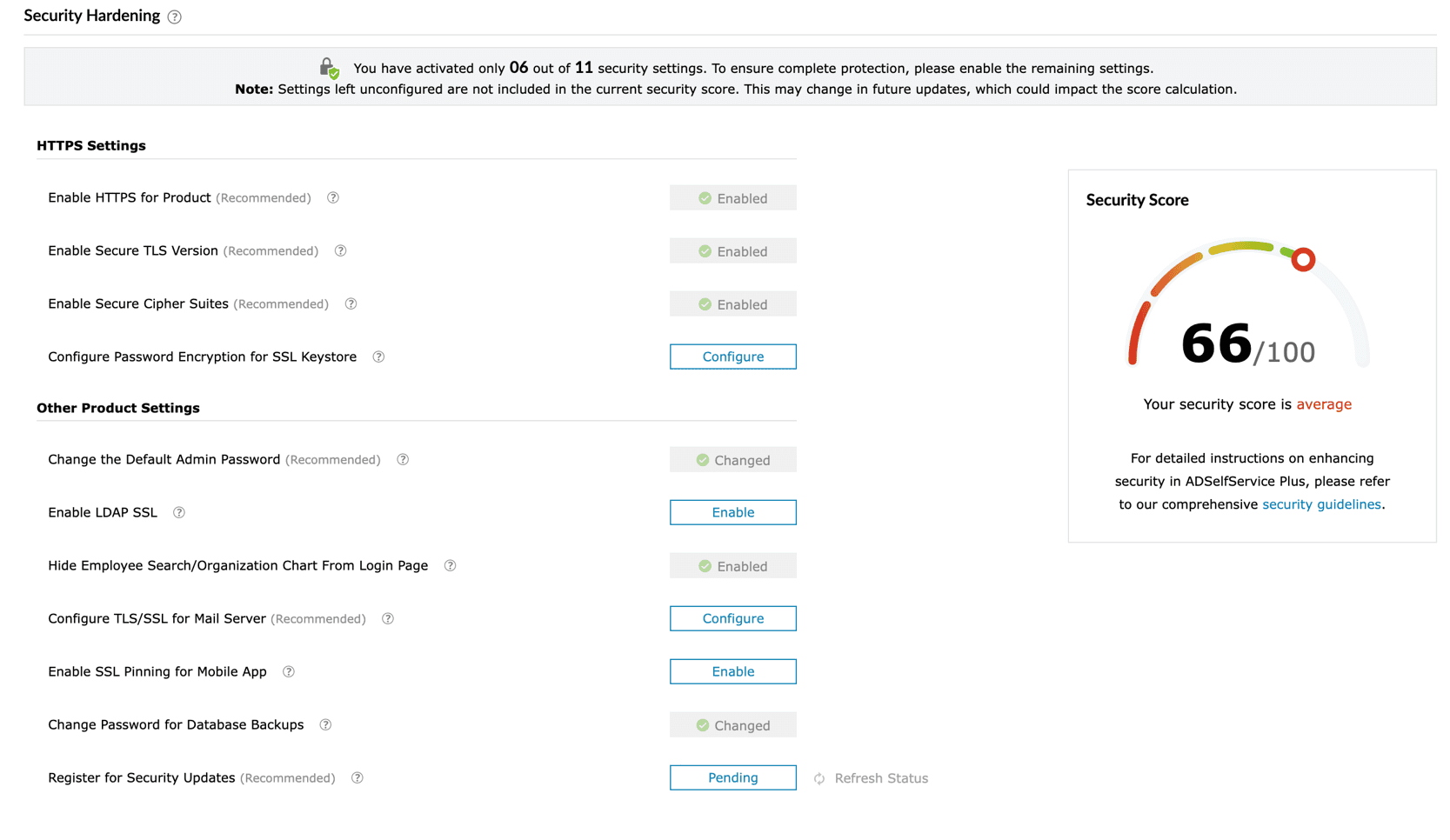
Fig. 1: Configure the Security Hardening settings to enhance the overall security posture of ADSelfService Plus.
- You can follow these steps and configure all security options for the Security Score to reach 100 and ensure you have a fully optimized security posture, minimizing vulnerabilities, and safeguarding ADSelfService Plus from potential threats.
Register for Security Updates
To keep your ADSelfService Plus instance secure, the ManageEngine security team will use the registered contact details to notify you of important security updates. By registering the contact information of your operations or security team, you can ensure timely delivery of these updates.
Previously, security updates were sent only to licensed email addresses. Going forward, they will also be delivered to registered email addresses. These updates cover both internal and external vulnerabilities and will be sent to both the primary and secondary registered email addresses.
When vulnerabilities are identified, they are resolved within defined timelines. Critical vulnerabilities are fixed within 24 hours, while high-risk vulnerabilities are typically resolved within 10 days. Administrators will be notified once each issue has been addressed. In certain cases, proactive measures taken to safeguard against potential public vulnerabilities will also be communicated to registered email addresses.
The registration process ensures that only verified contacts receive updates. For this registration, a verification link will be sent to the provided email address. This link must be confirmed within 7 days; otherwise, security updates will not be delivered. To ensure uninterrupted delivery, registered email addresses must be re-verified every 365 days. The information provided will be used exclusively for sending security updates.
With this enhancement, security updates are no longer limited to licensed email addresses but are also delivered to registered contacts. This ensures that the right teams receive timely notifications, allowing administrators to respond quickly to vulnerabilities and maintain a stronger security posture.