Introducing the all-new ServiceDesk Plus Cloud experience: Reimagining the service desk for the AI era
October 08 | 10 mins read

2026 has been a busy year for us at ManageEngine. From rolling out Zia AI Agents in ServiceDesk Plus and providing support for the Model Context Protocol to strengthening the CMDB with Baselines and Data Quality policies, we have been evolving ServiceDesk Plus into a system of intelligence from one of orchestration.
But as this evolution progresses and users work in close concert with AI, they need to be able to make decisions faster, gain clarity instantly, and work productively through a modern and intuitive interface. They need a platform that's adaptable to the unique ways of work within every team and company, while enabling humans and AI to work together in harmony within a single frame.
This idea sparked a ground-up rethink of the user interface of ServiceDesk Plus, and we are excited to unveil it at the ManageEngine UserConf 2026 Orlando. Please note that all capabilities described here are currently available in closed beta. Please reach out to us at servicedeskplus-cloud-support@manageengine.com for early access.
Ask Zia, AI that remains beside you and always stays in-context
Ask Zia, the conversational virtual agent in ServiceDesk Plus is now evolving into an always-on AI assistant that works based on what module, record, or screen you are on within ServiceDesk Plus. You can ask questions around the module you are in or even anything unrelated to your current work, and return back to the previous conversation. Ask Zia always stays in context. This empowers technicians to work alongside AI—operate on tickets, delegate tasks to Zia, and return to the work on their hands.

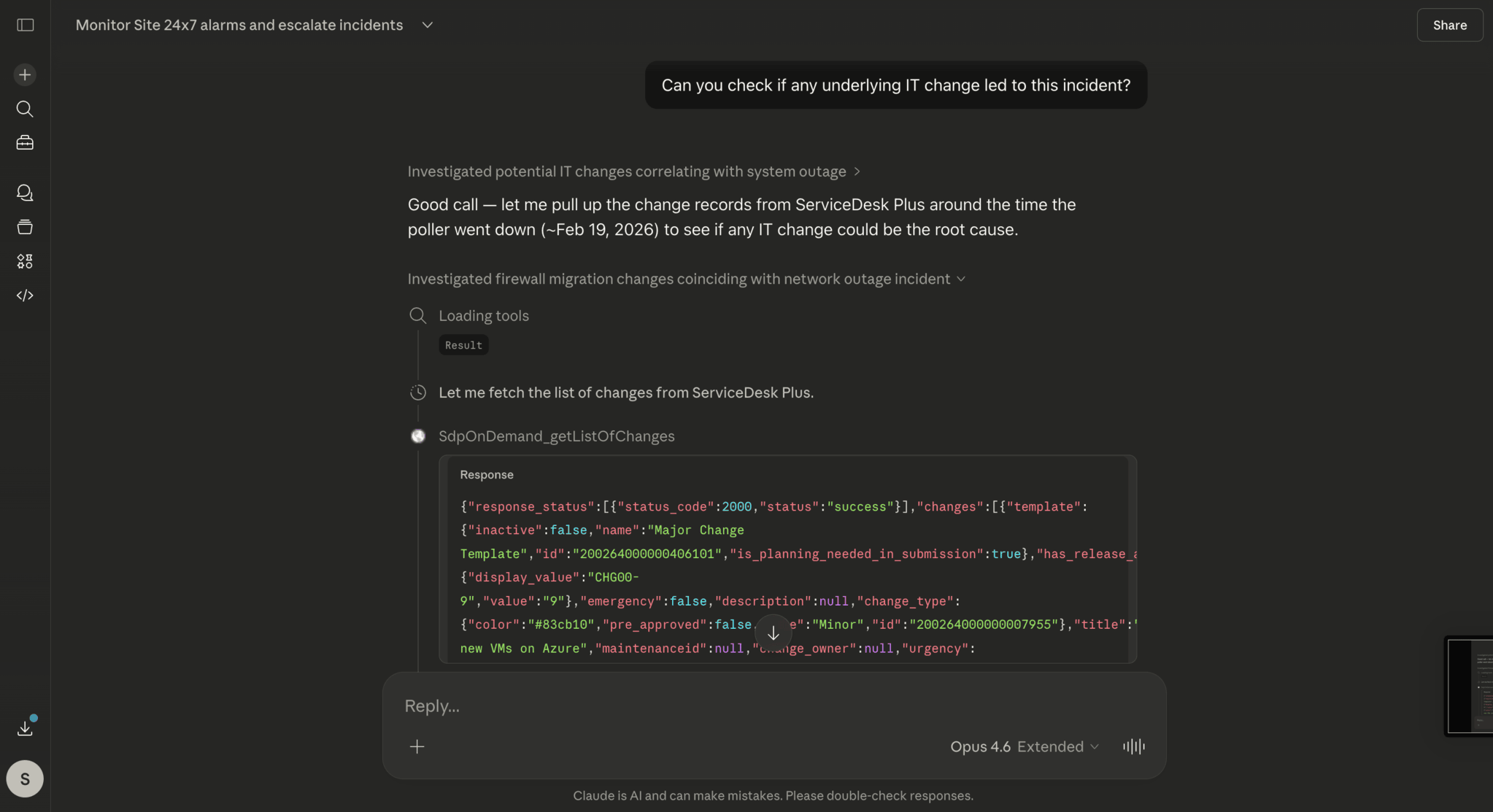
Perhaps you are looking through the list of requests and notice a network outage. You want to understand if there is an associated change that caused it. Quickly query Ask Zia and get your answer. Send the end-user of the ticket a reply on the network outage with priority and fire up a search for similar tickets. You can even invoke Zia AI Agents from within the same pane.
During this work, there is another employee buzzing you about a VPN‐lockout ticket logged by them. Ask Zia can address this ticket autonomously and resolve it. Meanwhile, you work on the major network outage without breaking your current workflow.
Deep customization:The ServiceDesk Plus platform is now hyper-adaptable to your unique needs
ServiceDesk Plus now lets administrators reimagine entire interfaces within the platform—from their appearance and how users interact with various functionalities, to how records are visualized and actioned on—with the new Custom Pages capability.
IT, HR, facilities, and other enterprise service teams can now go beyond customizing the prebuilt GUI to building (vibe-coding) entirely new experiences such as an interactive CMDB home page or a service catalog that feels and works like your favorite online store.
You are only constrained by your imagination when visualizing a different, interactive Custom Page in place of the native pages.

ServiceDesk Plus administrators can bring in Custom Widgets and deploy them as Custom Pages to shape the platform interface the way they want in line with their organization's theme, use-cases, and goals.
What is the new Custom Page capability?
Custom Widgets in ServiceDesk Plus are preexisting, embeddable UI components that you can create on your own using the JavaScript SDK provided by ManageEngine. The idea behind Custom Widgets is to help extend the platform and let customers build unique functionality or niche UI components themselves.
Now, as we observed more and more customers vibe-coding Custom Widgets and solving a plethora of use cases, we decided to further expand the customization framework in ServiceDesk Plus. Today, you can build your own visualization of a landing page for ITSM practices like Request Management and CMDB. Build a bespoke Custom Module like Billing and Spend as a Custom Widget and add it as a Custom Page within ServiceDesk Plus.


A personalized workspace, swifter visualizations, and peek views
A personalized workspace greets every technician with curated widgets that summarize their work at a glance. From overdue tickets and slotted tasks to reminders on a to-do list and pending approvals, technicians can now start their day on a personalized canvas.

Take a peek into tickets, visualize queues, and dive into what matters
The list views across records in ServiceDesk Plus now support Peek Views, which open the record on a sliding side panel while the list view remains in the background. Cycle through records like requests, changes, problems, and releases faster and expand the Peek View when needed. You can also dock the list view on the right-side as you work on a ticket.
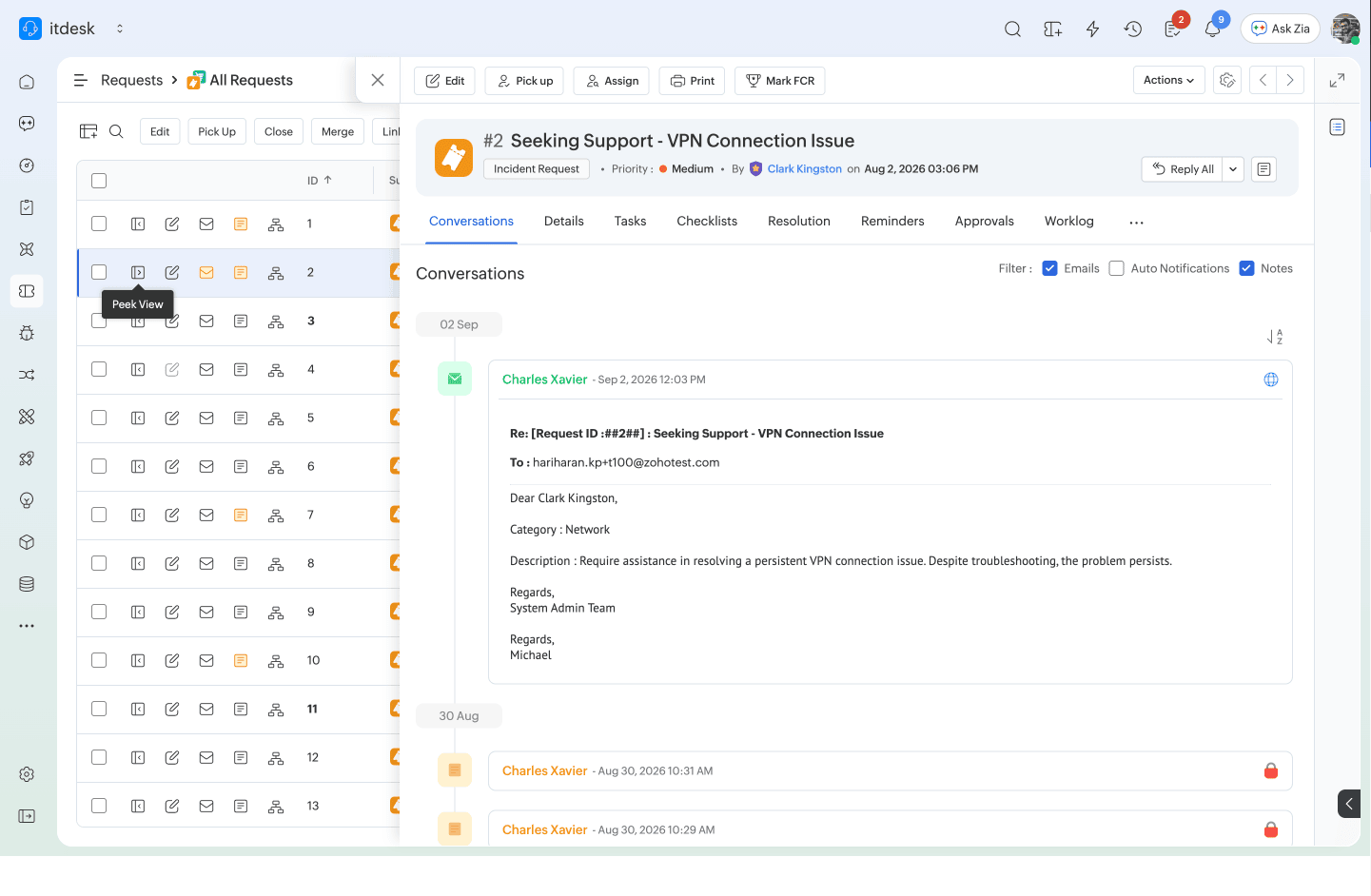

The details tab can be further customized with the sections, tabs, and the right-pane widgets being reordered.
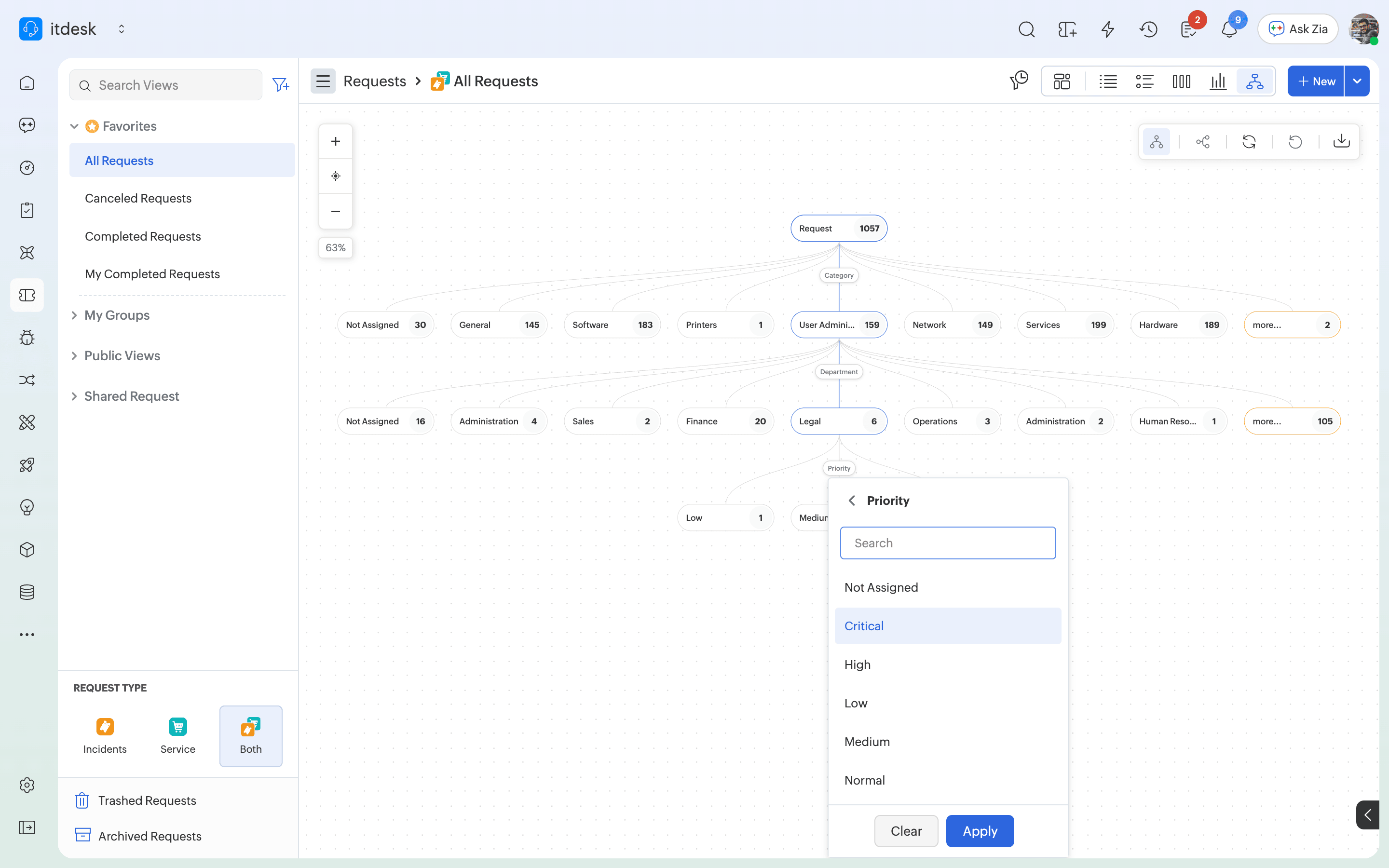
You can now take any saved list view and switch straight away into a chart or a drill-down analysis. Absolutely no report-building is needed. Imagine you are trying to identify how many User Administration category tickets are logged, across which departments, and the distribution of priority. You can simply select the parameters you want to drill down and run this analysis right within the Request List View!

Making ServiceDesk Plus ready for the headless future
As platforms like ServiceDesk Plus evolve to be systems of autonomy, they also need to support interoperability with the AI platforms that our customers choose to work from whether it's Zia, Claude, ChatGPT, Microsoft Copilot, or Cursor. This ensures that AI agents can work on ServiceDesk Plus, just like human technicians do today. As part of this goal, the platform now has three open doors to reach it: the UI, rich REST APIs, and the Zoho MCP servers.
Customers can now run their service operations autonomously by connecting any AI tool with the Zoho MCP server that's created for ServiceDesk Plus. This MCP implementation opens up the ServiceDesk Plus context and action layers to AI agents. Furthermore, Zoho MCP supports actions across Zoho, ManageEngine, and third-party apps like Microsoft Entra ID, Microsoft Teams, BambooHR, Okta, and more! Over 140 ServiceDesk Plus actions are available as MCP Tools today, and and this list is growing as we work to expose more ServiceDesk Plus APIs as MCP tools.
Other enhancements in the all-new ServiceDesk Plus Cloud experience
- A cleaner Setup interface for swift access and better control
- Settings related to Zia are surfaced right at the top, and a dedicated UI Customization Hub groups configurations related to the navigation, theme, layouts, and UI settings. Every new-UI behavior is now admin-configurable.
- Breadcrumb navigation within Setup helps navigate layers of configurations faster, while the new tree-based second‐level navigation makes minor configs and newer features easy to spot.
- Module-centric view of Setup helps you quickly navigate to a configuration for a specific module, instead of investigating it from the global configuration pane.
- A unified navigation bar and a dedicated dashboards module
- Sidebar and sidebar-lite are condensed into a clean unified bar that can be expanded or collapsed in a single toggle.
- Organize the navigation bar straightway instead of juggling clicks.
- Personalization with accent colors, dark, and darker modes
- Select from six accent colors and customize the navigation background with Solid Tone, Tone Shift, Fusion Blend, Deep, and Soft.
- Two low-light themes, Dark and Darker, help you work with dimmed surfaces and OLED displays.
How to get started

The all-new ServiceDesk Plus Cloud experience is now available in closed beta. Please reach out to us at servicedeskplus-cloud-support@manageengine.com for early access.
Once the closed beta is enabled, you can then switch to the new interface with a single toggle and invite specific technicians or technician groups to your organization.