


What is exploitation of remote services (T1210)?
MITRE ATT&CK® T1210 describes a lateral movement technique where adversaries exploit software vulnerabilities or misconfigurations in network-accessible services to gain unauthorized access to additional systems. The critical distinction between T1210 and T1021 (Remote Services) is authentication: T1021 uses valid credentials to connect via legitimate protocols, while T1210 exploits vulnerabilities to reach systems the attacker may not have credentials for.
T1210 encompasses a wide range of exploitation techniques: kernel-level vulnerabilities in Remote Desktop Services (BlueKeep), supply-chain poisoning via WSUS update infrastructure, help desk tool abuse (Quick Assist), and the use of post-exploitation tools (SafetyKatz, SharpHound) that exploit Active Directory relationships and memory access. Detection for T1210 therefore requires monitoring across process trees, DNS queries, command execution, and tool signatures simultaneously.
T1210 in the ATT&CK chain: T1210 sits under Lateral Movement (TA0008). It often follows privilege escalation stages that give attackers the rights needed to exploit internal services. Some T1210 techniques (WSUS exploitation, RDS vulnerabilities) provide SYSTEM-level access directly without a prior privilege escalation step. Log360 ships 6 pre-built detection rules for T1210 across Windows and Sysmon telemetry.
How attackers exploit remote services for lateral movement
T1210 attacks vary significantly by vector, but they share a common pattern: identifying a vulnerable or misconfigured service accessible from the attacker's current position, exploiting it to gain code execution or elevated access on the target, and using that access to continue toward the attack objective. The main T1210 patterns observed in enterprise incidents are:
- Infrastructure service exploitation: Internal services like WSUS (Windows Server Update Services) are often configured insecurely. WSUS using plain HTTP is vulnerable to in-path injection attacks that deliver malicious update payloads to all WSUS clients with SYSTEM privileges. This is particularly impactful in enterprise environments where WSUS manages hundreds or thousands of endpoints.
- Known CVE exploitation against remote services: Unpatched vulnerabilities in RDP (BlueKeep/CVE-2019-0708), ITSM platforms (SysAid), and other internet-accessible or intranet-accessible services allow attackers to execute code without credentials. The MERCURY threat actor exploited SysAid Server vulnerabilities to gain initial access and move laterally.
- Social engineering via remote support tools: Microsoft Quick Assist and similar remote assistance tools can be abused via social engineering, where attackers impersonate IT support staff to obtain interactive access to endpoints. This technique bypasses all technical authentication controls because the victim initiates the session themselves.
- Post-exploitation tools for lateral path discovery: Tools like SharpHound map Active Directory attack paths (Kerberos delegation chains, ACL misconfigurations, group membership overlaps) to identify which systems can be reached from the current position through exploitation rather than authentication. SafetyKatz extracts credentials from memory to fuel subsequent access.
Why T1210 is difficult to contain with patching alone
Vulnerability management closes known CVE vectors, but T1210 also covers misconfiguration exploitation (WSUS HTTP), legitimate tool abuse (Quick Assist), and credential-extraction tools (SafetyKatz). An environment with zero unpatched CVEs can still be fully vulnerable to WSUS injection or SharpHound-based path mapping. Detection-in-depth, not patching alone, is the required posture. Log360's threat detection capabilities cover all four T1210 vectors with pre-built correlation rules.
Exploitation vectors and Log360 rule coverage
WSUS exploitation via SharpWSUS and WSUSpendu
Windows Server Update Services (WSUS) is designed to distribute Microsoft software updates to domain-joined clients. When WSUS is configured to use plain HTTP (not HTTPS) for client communication, any attacker with network access between the WSUS server and clients can intercept and modify update payloads—a technique known as WSUS spoofing or injection. SharpWSUS and WSUSpendu are purpose-built tools that automate WSUS injection, creating malicious update packages that execute with SYSTEM privileges on targeted endpoints. They use specific command structures: SharpWSUS uses -Inject, -PayloadArgs, and -PayloadFile flags; WSUSpendu uses approve, create, and /payload parameters. Log360's HackTool - SharpWSUS/WSUSpendu Execution rule detects both tools via these command-line signature patterns.
SysAid Server exploitation (MERCURY threat actor)
SysAid is an IT service management (ITSM) platform widely deployed in enterprises. The MERCURY threat actor (associated with Iranian nation-state activity) exploited vulnerabilities in SysAid Server to gain initial foothold and lateral movement capability. The exploitation manifests as SysAid's Java process spawning unexpected child processes: specifically, java.exe or javaw.exe running with SysAidServer in the parent command line spawning shell processes (cmd.exe, powershell.exe, bash.exe, pwsh.exe) that are not part of legitimate SysAid build or update operations. Log360's Suspicious SysAidServer Child rule triggers on this parent-child process pattern, providing detection regardless of the underlying CVE exploited, because the post-exploitation shell spawn pattern is consistent across SysAid exploitation variants.
Terminal Service Process Spawn (BlueKeep and RDS exploitation)
BlueKeep (CVE-2019-0708) is a pre-authentication remote code execution vulnerability in Windows Remote Desktop Services that allows unauthenticated attackers to execute arbitrary code on unpatched Windows systems by sending a specially crafted RDP packet. Exploitation causes the terminal services host (svchost.exe with the termsvcs service) to spawn an unexpected child process. In a non-exploited environment, the only legitimate children of the terminal service process are rdpclip.exe, csrss.exe, wininit.exe, and winlogon.exe. Any other child process indicates exploitation or a highly suspicious configuration anomaly. Log360's Terminal Service Process Spawn rule detects this exact condition, covering BlueKeep and structurally similar RDS exploitation attempts. This rule is also mapped to T1021.001 (RDP), reflecting its dual relevance to both exploitation and remote service abuse.
Quick Assist abuse for social engineering-based access
Microsoft Quick Assist is a built-in Windows application (introduced in Windows 10) for remote desktop support. Legitimate Quick Assist use involves an employee requesting help from an IT technician. Abusive use involves an attacker calling an employee and impersonating IT support, tricking them into sharing a Quick Assist session—which gives the attacker full interactive control of the endpoint. This technique has been used by threat actors including Storm-1811 to deploy ransomware. Log360's DNS Query Request By QuickAssist.EXE rule detects DNS queries from QuickAssist.exe to remoteassistance.support.services.microsoft.com, which is the endpoint contacted when a Quick Assist session is being established. Correlating these DNS events against IT help desk ticket timestamps identifies unsolicited sessions with no corresponding support request.
SafetyKatz: credential extraction enabling lateral exploitation
SafetyKatz (and its variant BetterSafetyKatz) is a memory-safe reimplementation of Mimikatz designed to avoid common Mimikatz-specific detection signatures while retaining its credential dumping capabilities. It extracts NTLM hashes, Kerberos tickets, and plaintext passwords from LSASS memory to fuel subsequent pass-the-hash and pass-the-ticket lateral movement attacks. Log360's SafetyKatz Detection rule is mapped to T1210 because SafetyKatz enables the exploitation of Active Directory Kerberos delegation and other credential-based attack paths that fall under remote service exploitation. The rule fires at Critical severity and detects SafetyKatz and BetterSafetyKatz by process name, product name, and original filename. Detecting SafetyKatz early prevents the credential harvest that enables subsequent T1210 and T1550 lateral movement.
SharpHound: Active Directory attack path mapping
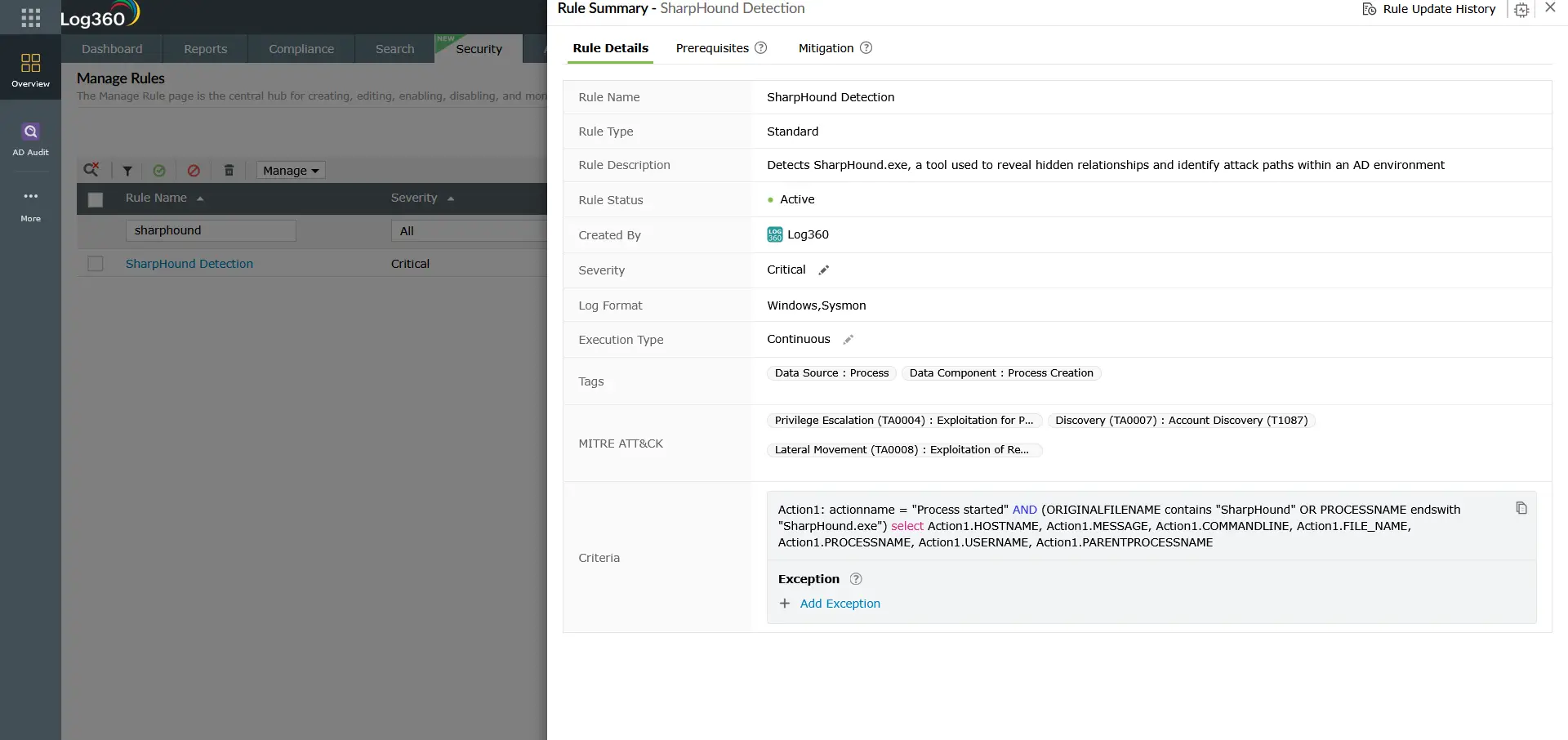
SharpHound is the data collection component of BloodHound, an open-source tool used by both penetration testers and threat actors to map Active Directory attack paths. It queries AD for user memberships, session data, ACL configurations, and Kerberos delegation settings, then visualizes the shortest path from any compromised account to Domain Admin. Log360's SharpHound Detection rule triggers on SharpHound.exe process execution (by name or original filename), providing early detection of the attack planning phase. SharpHound is cross-mapped to T1068 (Exploitation for Privilege Escalation) and T1087 (Account Discovery), reflecting its role in discovering both lateral movement and privilege escalation paths simultaneously.
Detection indicators for T1210
Process tree anomalies
- SysAid Java spawning shells: java.exe or javaw.exe with SysAidServer in the parent command line spawning cmd.exe, powershell.exe, bash.exe, or pwsh.exe in a non-build context.
- Terminal Services spawning unexpected children: svchost.exe -k termsvcs spawning any process other than rdpclip.exe, csrss.exe, wininit.exe, or winlogon.exe.
Command-line signatures
- SharpWSUS patterns: Command lines containing -Inject combined with -PayloadArgs or -PayloadFile, or commands containing approve/create/check/delete combined with /payload: or /updateid:.
- SharpHound execution: Process named SharpHound.exe or with SharpHound in the original filename or product name.
- SafetyKatz execution: Processes named SafetyKatz.exe or BetterSafetyKatz.exe, or with SafetyKatz in the product name or original filename.
DNS indicators
- Quick Assist session initiation: DNS query from QuickAssist.exe to remoteassistance.support.services.microsoft.com. This DNS event is benign in isolation but suspicious when not correlated with an open IT support ticket for the querying user.
Log360 detection rules for T1210
Log360 ships six prebuilt correlation rules targeting T1210 Exploitation of Remote Services across Windows and Sysmon telemetry:
| Rule Name | Detection Vector | Platform | Severity |
|---|---|---|---|
| SafetyKatz Detection | Credential extraction (SafetyKatz / BetterSafetyKatz) | Sysmon, Windows | Critical |
| HackTool - SharpWSUS/WSUSpendu Execution | WSUS exploitation via SharpWSUS or WSUSpendu | Sysmon, Windows | Trouble |
| Suspicious SysAidServer Child | SysAid ITSM exploitation (MERCURY APT pattern) | Sysmon, Windows | Trouble |
| Terminal Service Process Spawn | RDS/RDP exploitation (BlueKeep CVE-2019-0708 indicator) | Sysmon, Windows | Trouble |
| DNS Query Request By QuickAssist.EXE | Quick Assist session initiation (social engineering vector) | Sysmon | Trouble |
| SharpHound Detection | Active Directory attack path mapping (BloodHound collector) | Sysmon, Windows | Trouble |
Note: The Terminal Service Process Spawn rule is cross-mapped to T1190 (Exploit Public-Facing Application) in addition to T1210, reflecting its dual applicability to both internet-facing and lateral movement exploitation scenarios. The SafetyKatz Detection rule is cross-mapped to T1003 (OS Credential Dumping), T1548 (Abuse Elevation Control Mechanism), and T1021.001 (RDP), making it one of the highest-signal individual rules in the TA0008 rule set. SharpHound Detection is cross-mapped to T1068 and T1087.
Threat hunting for T1210
Beyond the six pre-built rules, the following threat hunting queries extend T1210 detection coverage to novel tool variants and low-volume exploitation attempts:
Hunt 1: WSUS server HTTP traffic anomalies
If WSUS is configured on plain HTTP in the environment, hunt for unusual outbound HTTP connections from WSUS clients on the WSUS update port (typically TCP 8530 or 8531) to addresses other than the legitimate WSUS server. A manipulator-in-the-middle WSUS injection will appear as update traffic to an unexpected destination:
Any match indicates potential WSUS traffic interception. Immediately suspend WSUS client updates on affected systems and migrate WSUS to HTTPS.
Hunt 2: Unusual Java process spawns on ITSM servers
For environments running SysAid, ServiceNow, or other Java-based ITSM platforms, hunt for any shell process spawned by the Java runtime:
Filter out results where the parent command line contains known-good build or maintenance arguments. Remaining results from ITSM servers warrant immediate investigation as potential exploitation indicators.
Hunt 3: AD enumeration tool signatures
SharpHound is the most common AD mapping tool, but others exist (ADExplorer, Adalanche, ldapdomaindump). Hunt for AD enumeration patterns beyond SharpHound's signature:
Cross-reference any AD enumeration tool execution against authorized penetration testing schedules before escalating. Unauthorized executions should be treated as active T1210 threat activity.
How T1210 connects to privilege escalation
T1210 and privilege escalation are tightly coupled in the attack chain. In many scenarios, exploitation for privilege escalation (T1068) and exploitation of remote services (T1210) use the same tools and vulnerabilities but at different stages: T1068 achieves elevated rights on the current host, while T1210 achieves access to new hosts.
SharpHound, in particular, bridges both tactics. It maps attack paths that include both valid account abuse paths for privilege escalation and Kerberos delegation chains for lateral movement. SafetyKatz extracts credentials that enable both local privilege escalation (via pass-the-hash to local admin) and lateral movement (via pass-the-hash to remote systems). For a complete detection strategy, pair T1210 detection rules with those in the T1543 Create or Modify System Process detection guide, which covers the persistence mechanism commonly established immediately after successful lateral exploitation.
Investigation steps
- For SafetyKatz or SharpHound alerts—isolate immediately: Both tools indicate an attacker who has already established a foothold and is advancing the attack. Isolate the host from the network and begin forensic analysis. Do not attempt live remediation without first capturing a memory dump and process list, as these tools may have already extracted credentials or generated attack paths that need to be reviewed.
- For WSUS/SharpWSUS alerts—audit WSUS infrastructure: Identify whether SharpWSUS was run on a system with network access to the WSUS server. Review WSUS server logs for any newly created or approved updates that do not match a documented patching cycle. Immediately suspend WSUS client auto-updates and review all updates delivered in the preceding 48 hours.
- For Suspicious SysAidServer Child—contain and assess: Isolate the SysAid server. Capture the child process command line and any files created by it. Review SysAid web server logs for any upload or path traversal patterns in the period before the alert fired. Apply available SysAid patches and review SysAid's vendor security advisories.
- For Terminal Service Process Spawn—check for BlueKeep indicators: Identify the source IP that connected via RDP at the time of the alert. If the source IP has no corresponding authenticated Windows logon event (4624), the connection was likely exploit-based rather than credential-based. Isolate the host, apply the BlueKeep patch (KB4499175), and scan the network for other unpatched RDS systems.
- For Quick Assist DNS alerts—contact the user directly: Call the user on a verified phone number (not through the channel the attacker may have compromised) and confirm whether they are in an active, IT-initiated Quick Assist session. If they are in an unexpected session, the session should be terminated immediately and the endpoint investigated for any actions taken during the session.
- Cross-reference with incident detection and response procedures: Document all T1210 alerts in the incident record and assess whether multiple T1210 alerts across different hosts indicate a coordinated campaign rather than isolated events.
Response playbook
- Patch critical remote service vulnerabilities immediately: BlueKeep (CVE-2019-0708) has been public since 2019 and patches are available for all affected Windows versions. Any unpatched system is at immediate risk. Run a vulnerability scan against all Windows systems in the environment and prioritize RDS-exposed hosts.
- Migrate WSUS to HTTPS: If WSUS uses plain HTTP for client communication, migrate to SSL/TLS immediately. This is the single most impactful remediation for the WSUS exploitation vector. Microsoft's documentation for WSUS HTTPS configuration should be followed to completion, including certificate installation on all WSUS clients.
- Restrict Quick Assist via Group Policy: If Quick Assist is not a sanctioned IT tool, disable it via Group Policy (Computer Configuration → Administrative Templates → System → Remote Assistance). Where it is required, create a process that correlates Quick Assist session events with open help desk tickets in real time.
- Reset all credentials touched by SafetyKatz: If SafetyKatz executed successfully, treat all credentials present in LSASS on the affected host as compromised. This includes domain accounts that recently logged in, service accounts running on the host, and the machine account itself. Force password resets for all of these accounts, and audit their recent activity using Log360's log forensics capabilities.
- Review BloodHound output if SharpHound detected: If SharpHound ran, assume the attacker has a complete map of your Active Directory attack paths. Prioritize remediating the highest-risk paths identified by running BloodHound in your own environment: Kerberoastable accounts with path to Domain Admin, unconstrained Kerberos delegation hosts, and accounts with GenericAll/GenericWrite permissions over sensitive objects.
- Harden SysAid and similar ITSM platforms: Apply all available patches, restrict the SysAid server's outbound network access to only required endpoints, and enable application-level logging for all SysAid actions. Consider network micro-segmentation to isolate ITSM servers from the rest of the corporate network.
ManageEngine Log360 for T1210 detection
Log360 ships six prebuilt correlation rules covering T1210 Exploitation of Remote Services across WSUS injection, ITSM platform exploitation, RDS vulnerability exploitation, Quick Assist social engineering, credential extraction, and Active Directory path mapping. The detection rules span Windows Event Log, Sysmon, and DNS telemetry, providing multi-layer coverage for a technique category that resists single-source detection. The UEBA module adds behavioral baselines that surface novel T1210 variants not covered by signature-based rules.
Need to explore ManageEngine Log360? Schedule a personalized demo
Frequently asked questions
What is the difference between T1210 and T1021 in lateral movement?
T1021 (Remote Services) covers lateral movement via authenticated use of legitimate remote protocols such as RDP, SMB, and WinRM. T1210 (Exploitation of Remote Services) covers lateral movement via exploitation of vulnerabilities or misconfigurations in those same services. The key difference is whether the attacker needs valid credentials: T1021 requires them, T1210 circumvents them. In practice, attackers use both: T1210 to breach systems they lack credentials for, and T1021 to maintain access to systems where they have acquired credentials.
Is SharpHound detection a true T1210 indicator or a false positive?
SharpHound execution is almost never a false positive in production environments. The only legitimate use is by an authorized penetration tester operating under a documented scope of work. Even in that case, the detection should still fire and be acknowledged in the incident management system as an authorized test. Any SharpHound execution outside a documented pen test engagement should be treated as a true positive T1210 indicator and investigated immediately, as it means an attacker (or insider threat) is actively mapping Active Directory attack paths in your environment.
How dangerous is BlueKeep in 2026?
BlueKeep (CVE-2019-0708) primarily affects Windows 7, Windows XP, Windows Server 2003, and Windows Server 2008/R2—operating systems that are end-of-life but often still present in OT/ICS environments, healthcare, and legacy enterprise infrastructure. In those environments, BlueKeep remains a critical risk. The Terminal Service Process Spawn rule in Log360 detects post-exploitation behavior from BlueKeep and structurally similar RDS vulnerabilities, providing coverage even for organizations that cannot immediately patch legacy systems.
Can T1210 occur on cloud infrastructure?
Yes. T1210 applies to cloud environments where remote services are accessible within the cloud network. AWS EC2 instances running unpatched services, Azure VMs with exposed RDP, and cloud-deployed ITSM tools with unpatched vulnerabilities are all T1210 vectors. Log360's cloud log collection from AWS CloudTrail and Azure Activity Logs, combined with Sysmon telemetry from cloud-hosted Windows instances, extends T1210 detection coverage into cloud-native and hybrid environments.
What should I do if SafetyKatz is detected in my environment?
SafetyKatz detection is a Critical severity event that requires immediate incident response. Isolate the affected host from the network immediately to prevent further credential spread. Capture a memory image if forensic capabilities allow. Treat all credentials in LSASS on that host as compromised: reset passwords for every domain account, service account, and local account that was active on the system. Review the attacker's movement from the compromised host using Log360's incident detection and response capabilities, and check for subsequent pass-the-hash attempts from the same source IP.
- What is T1210?
- How attackers exploit remote services
- Exploitation vectors and rule coverage
- Detection indicators
- Log360 detection rules
- Threat hunting
- T1210 and privilege escalation
- Investigation steps
- Response playbook
- FAQ

