


What is lateral tool transfer (T1570)?
MITRE ATT&CK® lateral tool transfer (T1570) describes a lateral movement technique where adversaries transfer tools, malware, or supporting files from one already-compromised system to another within the target network. The transfer stage is distinct from the execution stage, the attacker first moves the payload to the target host, then executes it from there. T1570 is therefore a logistical precursor that appears in the kill chain between initial compromise and execution on a new host.
What makes T1570 difficult to detect is that the file transfer mechanisms are identical to those used by legitimate IT operations. SMB admin shares are used by patch management tools; PowerShell remoting is used by automation scripts; SharePoint is used by every employee. Detection depends on identifying what is transferred and from where, not on blocking the transfer protocol itself.
Lateral tool transfer (T1570) in the ATT&CK chain: T1570 sits under Lateral Movement (TA0008). It typically follows Remote Services (T1021) (which provides the transport channel) and precedes execution on the target. Log360 ships four prebuilt detection rules for T1570 across Windows, Sysmon, and SharePoint Online.
How attackers transfer tools during lateral movement
After gaining a foothold and often after escalating privileges, attackers need to move their toolkit to additional hosts to execute the next stage of the attack. The standard T1570 workflow proceeds as follows:
- Establish administrative access to target: Using credentials obtained through credential dumping or pass-the-hash (T1550), the attacker maps or connects to the administrative share on the target system (ADMIN$, C$, or IPC$). This gives them write access to the target file system without requiring a full interactive session.
- Stage the payload: The attacker copies executables, scripts, or supporting files to a staging location on the target. Common staging paths include the target's temp directory (C:\Windows\Temp), the ADMIN$ share root, or application directories. At this point the file exists on the target but has not yet executed.
- Trigger remote execution: The attacker executes the staged file remotely, typically via a service installation (PsExec pattern), scheduled task, WMI, or WinRM. Log360 correlates the file creation event with subsequent execution events, mapping the full staging-to-execution chain.
- Repeat across the environment: Once a tool is on one system, it may be transferred again to additional hosts, creating a distribution chain. In ransomware scenarios, this chain terminates at the domain controller, from which the ransomware binary is deployed to all domain hosts simultaneously.
Transfer methods and their artifacts
Log360 detects T1570 through the artifacts each transfer method leaves in Windows and cloud telemetry:
PsExec tool staging via admin shares
PsExec is the most documented T1570 tool. When an attacker runs a PsExec command against a remote host, PsExec automatically copies its service binary to the target's ADMIN$ share and creates the PSEXESVC service. Critically, it also writes a key file (C:\Windows\PSEXEC-<hostname>-<hash>.key) to the target file system. This key file is recorded in the USN Journal and is the artifact Log360's PSEXEC Remote Execution File Artefact rule detects. The detection triggers on the file creation of any C:\Windows\PSEXEC-*.key pattern, regardless of the account used, making it resilient to credential-theft-based PsExec abuse. The related PSEXESVC service binary creation (any filename matching \PSEXESVC.exe) is detected by the companion rule targeting file creation events.
SMB over QUIC — transport-layer evasion
SMB over QUIC is a Windows Server 2022 and Windows 11 feature that tunnels SMB (Server Message Block) traffic over the QUIC protocol on UDP port 443, rather than the traditional TCP port 445. From a network security standpoint, this makes the SMB traffic appear as standard HTTPS, bypassing port-based firewall rules that filter on TCP 445. Attackers who gain access to environments where SMB over QUIC is enabled can mount admin shares and transfer tools without triggering network-level SMB detection.
Log360 detects this via two complementary rules:
- SMB over QUIC Via PowerShell Script: Detects New-SmbMapping PowerShell commands containing the -TransportType QUIC parameter in PowerShell Script Block logs.
- SMB over QUIC Via Net.EXE: Detects net use or net1 use command-line executions containing the /TRANSPORT:QUIC flag, covering the command-line variant of the same technique.
Either rule firing warrants immediate investigation, as legitimate enterprise use of SMB over QUIC is uncommon and the feature should be explicitly documented in the environment's change records. Correlate with event correlation across authentication and network logs to determine the source host and account.
Cloud staging via SharePoint Online
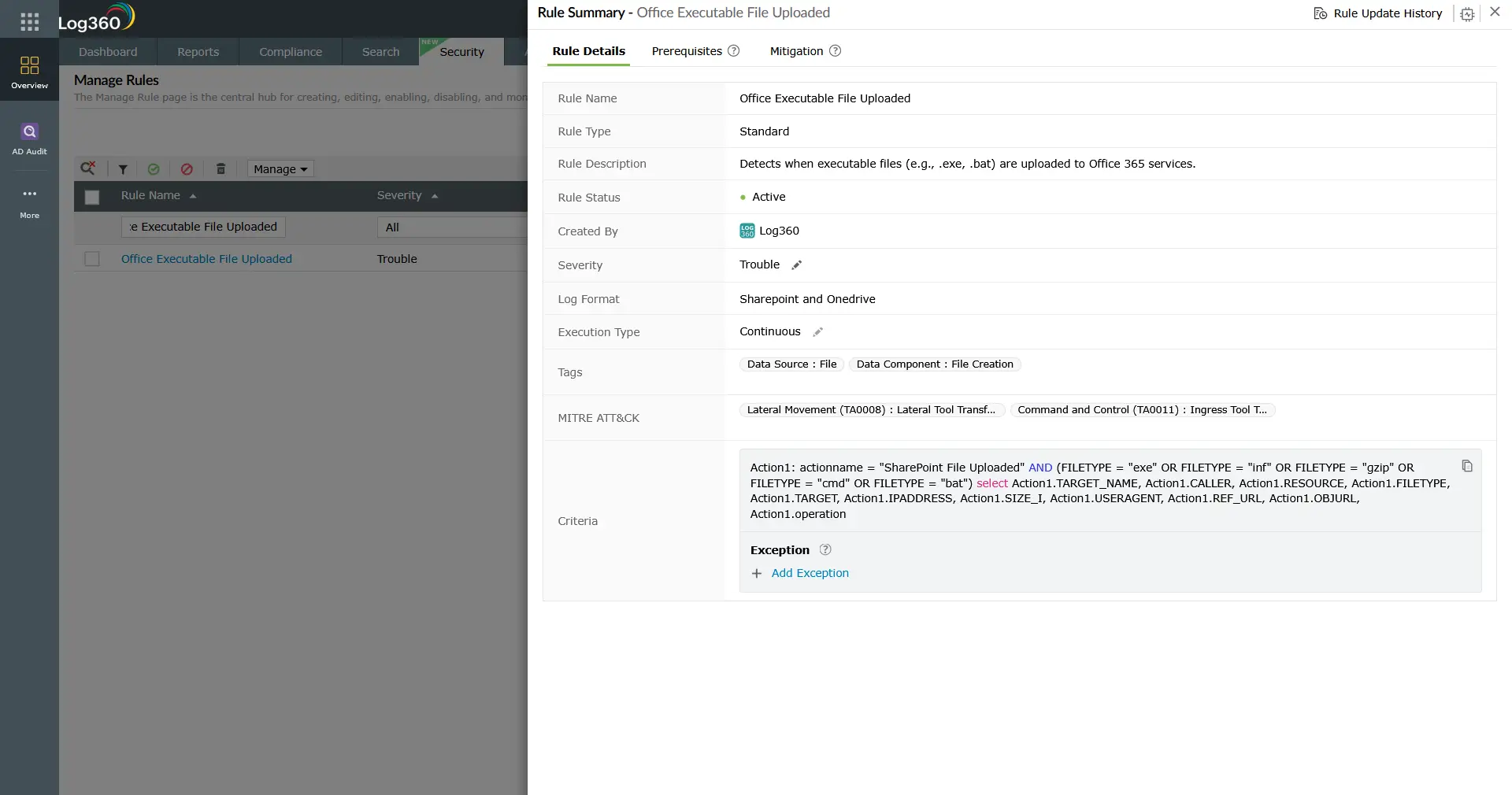
In Microsoft 365 environments, attackers with access to a compromised user's credentials may upload tool executables directly to SharePoint Online or OneDrive, using the cloud service as a staging platform that is both trusted by endpoint security tools and accessible from any corporate device. Log360's Office Executable File Uploaded rule (SharePoint Online telemetry) fires when files with executable extensions (.exe, .bat, .inf, .gzip, .cmd) are uploaded to SharePoint. The rule captures the uploader account, source IP address, file type, object URL, and SharePoint resource, providing the full context needed for investigation.
Correlate SharePoint upload events with endpoint download events from the same time window to confirm whether the staged file was retrieved by another host. The UEBA module in Log360 can baseline which accounts normally upload files to SharePoint and alert on deviations.
Detection indicators for T1570
The following behavioral and artifact-based indicators, when detected in Log360, warrant investigation as potential T1570 activity:
File system artifacts
- PSEXEC key file creation: Any file matching the pattern C:\Windows\PSEXEC-*.key written via a remote process. This file is never created by standard Windows processes.
- PSEXESVC binary drop: A file matching \PSEXESVC.exe appearing under the Windows directory via a remote file creation event.
- Executables in temp or admin share paths: .exe, .ps1, .bat, or .dll files written to C:\Windows\Temp, ADMIN$, or unusual application directories from a remote process or network-linked user.
Process and command-line indicators
- New-SmbMapping with -TransportType QUIC: PowerShell script block log containing this combination indicates SMB over QUIC share mounting, which has no legitimate routine use in most enterprise environments.
- net use with /TRANSPORT:QUIC: Command-line SMB over QUIC share mounting, detectable from process execution logs (Sysmon Event ID 1 or Windows Event ID 4688).
Cloud and M365 indicators
- Executable file uploads to SharePoint: .exe, .bat, .cmd, or .inf files uploaded to SharePoint Online, especially from accounts or source IPs that do not normally perform file upload operations.
Log360 detection rules for T1570
Log360 ships four prebuilt correlation rules targeting T1570 Lateral Tool Transfer across Windows, Sysmon, and SharePoint Online telemetry:
| Rule Name | Technique | Platform | Severity |
|---|---|---|---|
| PSEXEC Remote Execution File Artefact | Lateral tool transfer (T1570) | Sysmon, Windows | Trouble |
| SMB over QUIC Via PowerShell Script | Lateral tool transfer (T1570) | Windows | Trouble |
| SMB over QUIC Via Net.EXE | Lateral tool transfer (T1570) | Sysmon, Windows | Trouble |
| Office Executable File Uploaded | Lateral tool transfer / Ingress Tool Transfer (T1570/T1105) | SharePoint Online (M365) | Trouble |
Note: The PSEXEC Remote Execution File Artefact rule is also cross-mapped to Windows Service (T1543.003) and Domain Account creation (T1136.002), reflecting PsExec's multi-stage footprint. When this rule fires, review the full rule mapping and investigate all associated techniques. For the Office Executable File Uploaded rule, note its dual mapping to Ingress Tool Transfer (T1105, under Command and Control), indicating it detects both lateral staging and external tool download scenarios.
Threat hunting for lateral tool transfer (T1570)
Threat hunting for lateral tool transfer targets the gap between known-bad signatures and novel staging techniques. The following hunts extend Log360's prebuilt rule coverage:
Hunt 1: Executables written to admin shares from non-management systems
Legitimate software deployment tools write executables to admin shares from designated management servers. Any other source writing executables to ADMIN$ or C$ shares is anomalous. Use Log360's log search to query across Sysmon file creation events:
Cross-reference results against known asset management and patching change windows. Matches outside approved change windows warrant immediate triage.
Hunt 2: SMB share mounting from unexpected accounts
Service accounts and standard user accounts should rarely mount administrative shares explicitly. Hunt for net use or New-SmbMapping commands from non-administrative user contexts:
Filter out known-good IT automation accounts and review remaining results against user context. A standard user mounting ADMIN$ on another workstation has no legitimate explanation in most environments.
Hunt 3: SharePoint upload spikes for service accounts
Compromised service accounts or automated credentials uploading executables to SharePoint often produce upload volume anomalies. Log360's UEBA module baselines per-account upload activity; manual hunting can supplement this:
Group results by account and time window. Accounts uploading executable content for the first time, or uploading high volumes in a short period, should be investigated against the user's role and normal SharePoint usage patterns.
Investigation steps
When a T1570 rule fires, the investigation priority is to determine what was staged, where it went, and whether it was executed.
- Identify the staged file: Capture the exact filename, hash (if available from Sysmon), and destination path. Check the file against threat intelligence feeds in Log360's threat intelligence module. A known-bad hash confirms malicious staging immediately; an unknown hash requires further analysis.
- Identify the source account and host: Which account authenticated to the destination host's admin share? From which source host? This is your lateral movement origin point. Correlate Event ID 5140 (share access) and 4624 (logon Type 3) on the target host within the same time window as the file creation event.
- Determine if the file executed: Review Sysmon Event ID 1 (process creation) or Windows Event ID 4688 on the destination host for any process execution matching the staged filename, or for execution of files from the same staging directory, in the minutes following the file creation event. If the file executed, expand the investigation to include all actions taken by that process.
- Trace the lateral movement path: Was the source host also a destination for a previous T1570 event? Build the chain: initial compromise host → intermediate staging host → final target. Use log forensics to reconstruct the timeline across all affected hosts.
- Check for additional staged files: Attackers rarely stage a single file. Query Log360 for all file creation events on the affected destination hosts that match the time window and staging path patterns. Enumerate every file dropped to ensure complete scope assessment before remediation.
- Assess M365 blast radius (if SharePoint rule fired): Determine which users downloaded the staged file from SharePoint. M365 audit logs in Log360 include download events with user, device, and IP address. Every device that retrieved the file should be treated as potentially compromised until investigated.
Response playbook
- Contain the source host: Isolate the system from which the tool transfer originated. This stops the attacker from continuing to stage payloads across the environment while the investigation proceeds.
- Remove staged files immediately: Delete all identified staged files from destination hosts. If the file has already executed, containment expands to the destination host as well. Do not simply delete the file without capturing a forensic copy — the binary may contain indicators needed for full scope assessment.
- Revoke compromised credentials: The account used to access the admin share must be considered compromised. Reset the password and review all activity from that account in the preceding 72 hours, per the incident management process.
- Restrict admin share access: Enforce Group Policy to restrict which systems can access administrative shares (ADMIN$, C$) from which sources. Designated jump servers or asset management hosts should be the only systems with write access to remote admin shares.
- Disable SMB over QUIC where not required: If SMB over QUIC is not an operational requirement, disable the feature via Group Policy (Computer Configuration → Administrative Templates → Network → Lanman Workstation). Where it is required, monitor it closely and enforce certificate-based authentication.
- Review SharePoint permissions and sensitivity labels: For the M365 vector, apply sensitivity labels to block executable file types from being uploaded to SharePoint. Use Microsoft Purview Data Loss Prevention policies to complement Log360's detection with preventive controls at the upload point.
- Investigate for persistence: Once tool staging is confirmed, assume the attacker attempted to establish persistence on every host where staging occurred. Follow the MITRE persistence detection guide to hunt for scheduled tasks, new services, and startup modifications on all affected systems.
ManageEngine Log360 for lateral tool transfer (T1570) detection
Log360 provides four prebuilt correlation rules covering lateral tool transfer (T1570) across Windows admin share staging, SMB over QUIC evasion, and SharePoint Online executable upload. The detection rule engine correlates file creation events with authentication and process execution logs, mapping the full staging-to-execution chain in a single investigation view. The UEBA module adds behavioral baselines for file transfer activity, surfacing anomalous staging patterns that fall below rule-based detection thresholds.
Need to explore ManageEngine Log360? Schedule a personalized demo
Frequently asked questions
What is lateral tool transfer (T1570) in MITRE ATT&CK?
Lateral tool transfer (T1570) is a MITRE ATT&CK technique under Lateral Movement (TA0008) where adversaries transfer attack tools or files from one compromised system to another within a target network. The technique is distinct from initial payload delivery — it describes movement of tools that are already inside the network perimeter. Detection focuses on file artifacts (PsExec key files, executables in admin share paths), transport-layer anomalies (SMB over QUIC), and cloud staging indicators (executable uploads to SharePoint).
How does PsExec create detectable artifacts for lateral tool transfer (T1570)?
Every PsExec execution against a remote host creates a key file at C:\Windows\PSEXEC-<hostname>-<hash>.key on the target system. This file is recorded in the Windows USN Journal and in Sysmon's file creation log (Event ID 11). It is never created by standard Windows processes, making it an unambiguous PsExec indicator. Log360's PSEXEC Remote Execution File Artefact rule triggers on this specific file creation pattern, providing detection regardless of the credential or account used for the PsExec command.
Why is SMB over QUIC a detection challenge?
SMB over QUIC tunnels SMB file-sharing traffic over UDP port 443, the standard HTTPS port, making it indistinguishable from HTTPS traffic at the network layer. Traditional SMB detection relies on port 445 filtering, which SMB over QUIC completely bypasses. Log360 detects this at the host layer via PowerShell Script Block logs (New-SmbMapping -TransportType QUIC) and process execution logs (net use /TRANSPORT:QUIC), providing endpoint-level visibility that network-only monitoring cannot achieve.
Does lateral tool transfer (T1570) only apply to Windows environments?
No. While the most documented T1570 detection rules focus on Windows SMB and admin share mechanisms, the technique applies wherever tools can be transferred between systems. Log360's Office Executable File Uploaded rule covers the M365/SharePoint variant, which affects all operating systems that can access SharePoint Online. Linux and macOS environments have analogous transfer vectors via SCP, rsync, and cloud storage clients. For cross-platform coverage, enable endpoint and cloud log collection in Log360 alongside the Windows-focused rules.
How does lateral tool transfer (T1570) relate to Remote Services (T1021) and Use Alternate Authentication Material (T1550)?
The three techniques form a typical lateral movement chain: T1550 (Use Alternate Authentication Material) provides stolen NTLM hashes or Kerberos tickets that authenticate to the target; Remote Services (T1021) provides the transport channel (SMB, RDP, WinRM); and T1570 uses that channel to stage tools for subsequent execution. Detecting any one technique in this chain is valuable, but correlating all three in sequence provides the highest-confidence lateral movement detection.
- What is lateral tool transfer (T1570)?
- How attackers transfer tools
- Transfer methods and artifacts
- Detection indicators
- Log360 detection rules
- Investigation steps
- Response playbook
- FAQ

