Security automation

Automate your security operations and compliance auditing with Log360. Replace repetitive analyst work with end-to-end automation that handles alert triage, threat enrichment, containment, and remediation across your entire security stack. With 10+ prebuilt playbooks, 400+ ready-to-use actions, and a visual low-code builder, your SOC can respond to threats in seconds, eliminate manual errors, and maintain consistent response quality across every incident.

What you can do with Log360


Automate compliance audit reporting across PCI DSS, HIPAA, GDPR, SOC 2, and ISO 27001 with scheduled report generation and evidence collection.


Automate incident investigation with Log360's AI investigation agent that correlates entities, maps activity to MITRE ATT&CK techniques, and builds attack timelines automatically.


Deploy autonomous agents for security operations that handle alert triage, evidence gathering, and routine response actions on their own.


Automate incident response with 10+ prebuilt playbooks and over seven integrations across CrowdStrike Falcon, Microsoft Defender, Microsoft Entra, Okta, and VirusTotal.


Build response logic without code using the visual playbook builder, and extend workflows with Deluge or Python when needed.

  • Automate incident workflows across your SOC
  • Real-time automated threat response
  • Intelligent investigation and enrichment
  • Orchestrated response and remediation
  •  

Automate incident workflows across your SOC

Security automation in Log360 connects detection, investigation, and response into workflows that run end to end without analyst intervention. From the moment an alert fires, automated logic gathers context, validates threats, executes containment, and updates your ticketing system, replacing the manual handoffs that create delays and inconsistency in incident handling.

  • End-to-end workflow automation: Run multi-step automation that covers alert triage, context enrichment, investigation, containment, and notification in a single sequence, without analysts switching between consoles or executing each step manually.
  • Visual workflow builder: Design automation logic on a drag-and-drop canvas with branching, parallel execution, and approval gates. Build, test, and deploy workflows without writing code, and extend them with Deluge or Python where custom logic is needed.
  • Flexible execution triggers: Run workflows automatically when alerts match defined conditions, or trigger them manually from any alert or incident when analysts need on-demand automation. Match how your team actually responds to incidents.
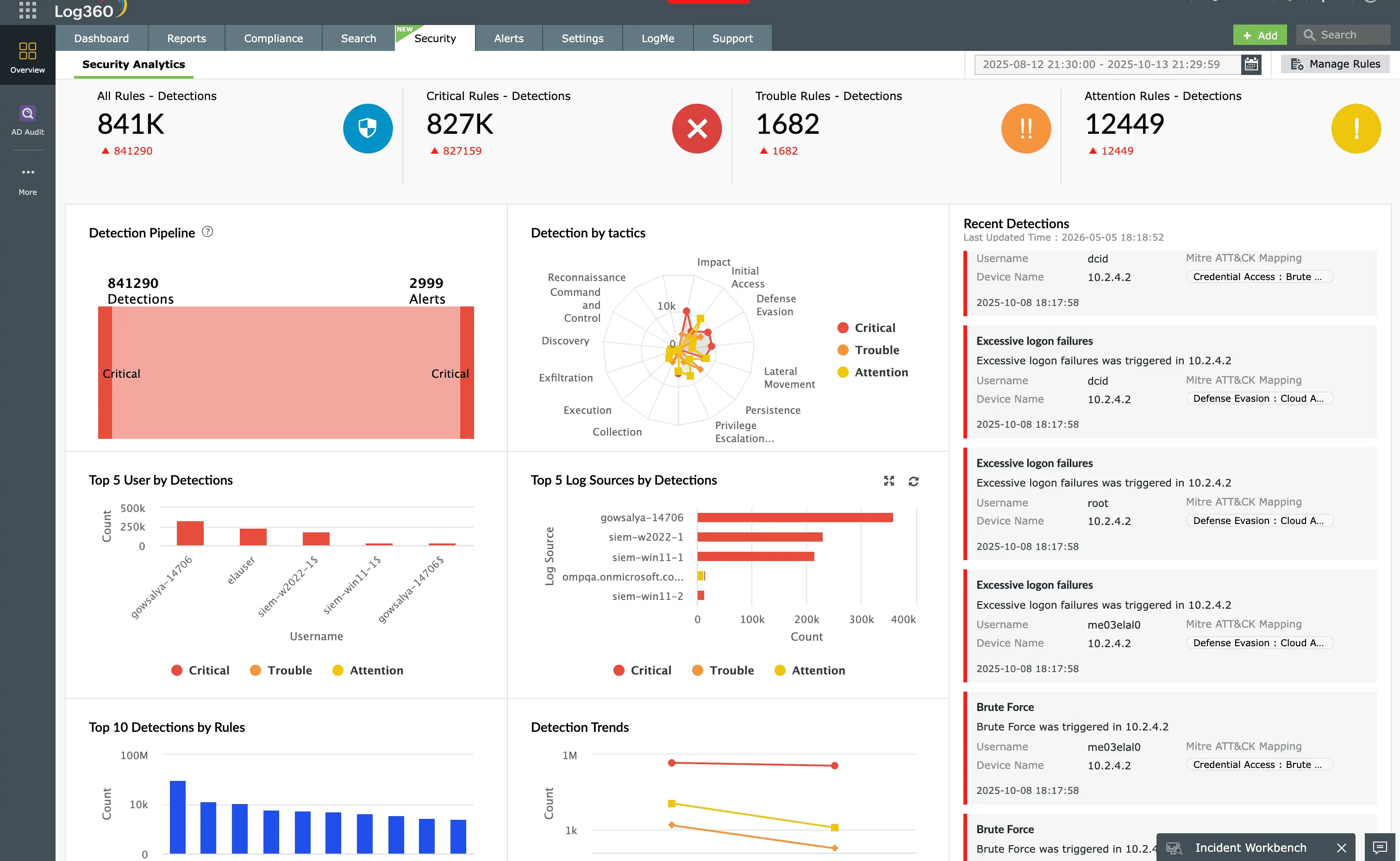
  • Centralized automation tracking: Monitor every automated workflow from a single dashboard that shows execution history, success rates, action-level outcomes, and the alerts each automation has handled across your environment.
Security automation dashboard for faster incident resolution

Real-time automated threat response

When Log360's detection layer fires an alert whether from correlation rules, behavioral analytics, or threshold conditions, security automation takes over instantly. Automated workflows begin enrichment and response within seconds, cutting down on dwell time and giving analysts a head start on every alert.

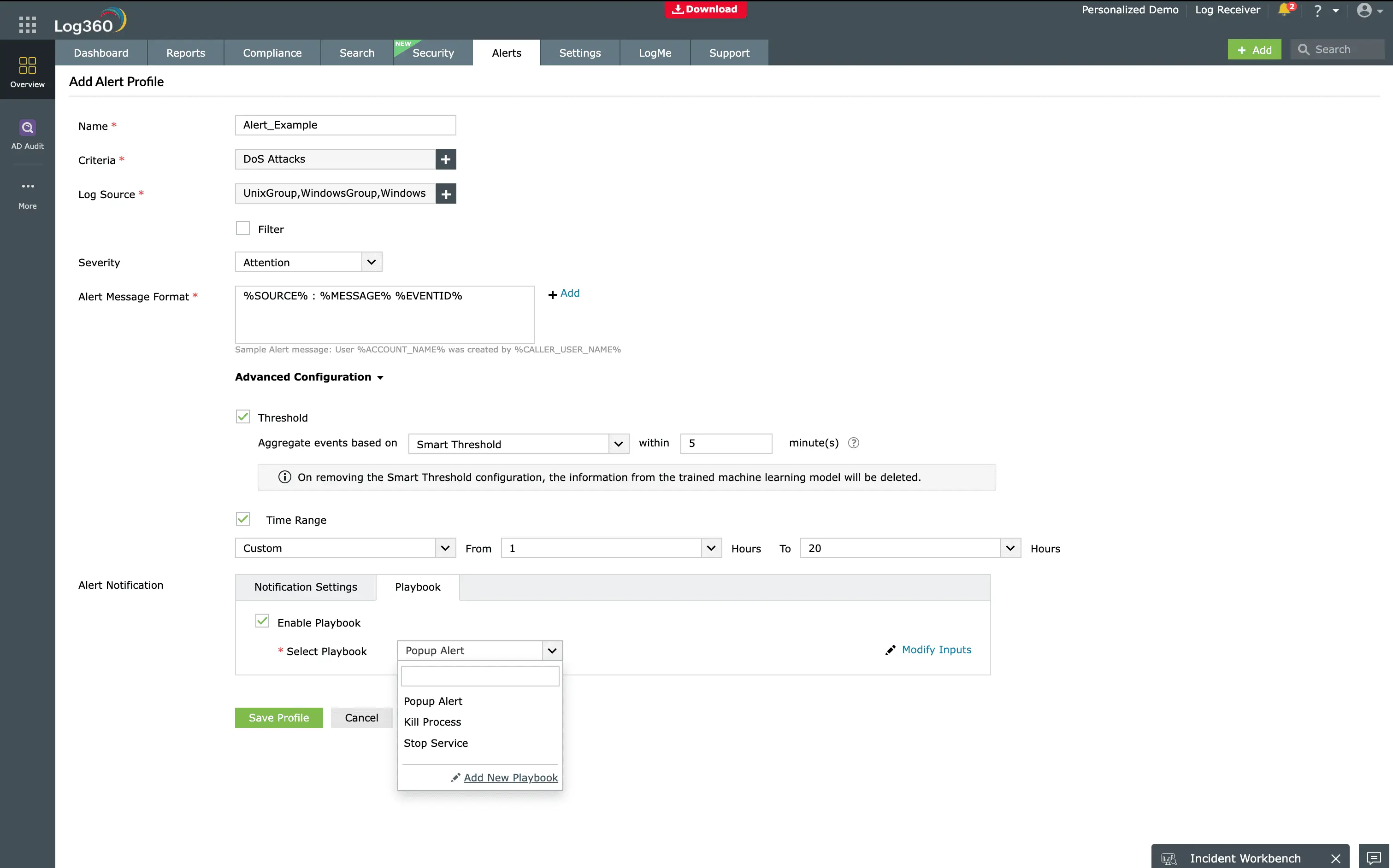
  • Instant playbook execution: Trigger playbooks automatically the moment an alert is generated, with full log context passed into the workflow payload. Associate up to 5 playbooks with any alert profile for simultaneous, parallel execution without dependencies between them.
  • Coverage across every alert type: Run automation on profile-based alerts, correlation alerts, threshold alerts, and behavioral detections from a single platform. Threshold and correlation alerts pass up to 10 associated log events into the playbook payload, giving every workflow full evidence from the first step.
  • Smart playbook recommendations: Log360 suggests the most relevant playbooks for each alert profile, helping your SOC pick the right automation without searching through the library.
  • Manual execution on demand: Run playbooks on the fly from any alert or incident when your team needs immediate containment.
Run playbooks from alert profile

Intelligent investigation and enrichment

Log360 automates the context-gathering steps that delay incident response. The moment an alert fires, playbooks pull threat intelligence, user data, and host context in parallel, so containment decisions run on enriched evidence without analyst intervention.

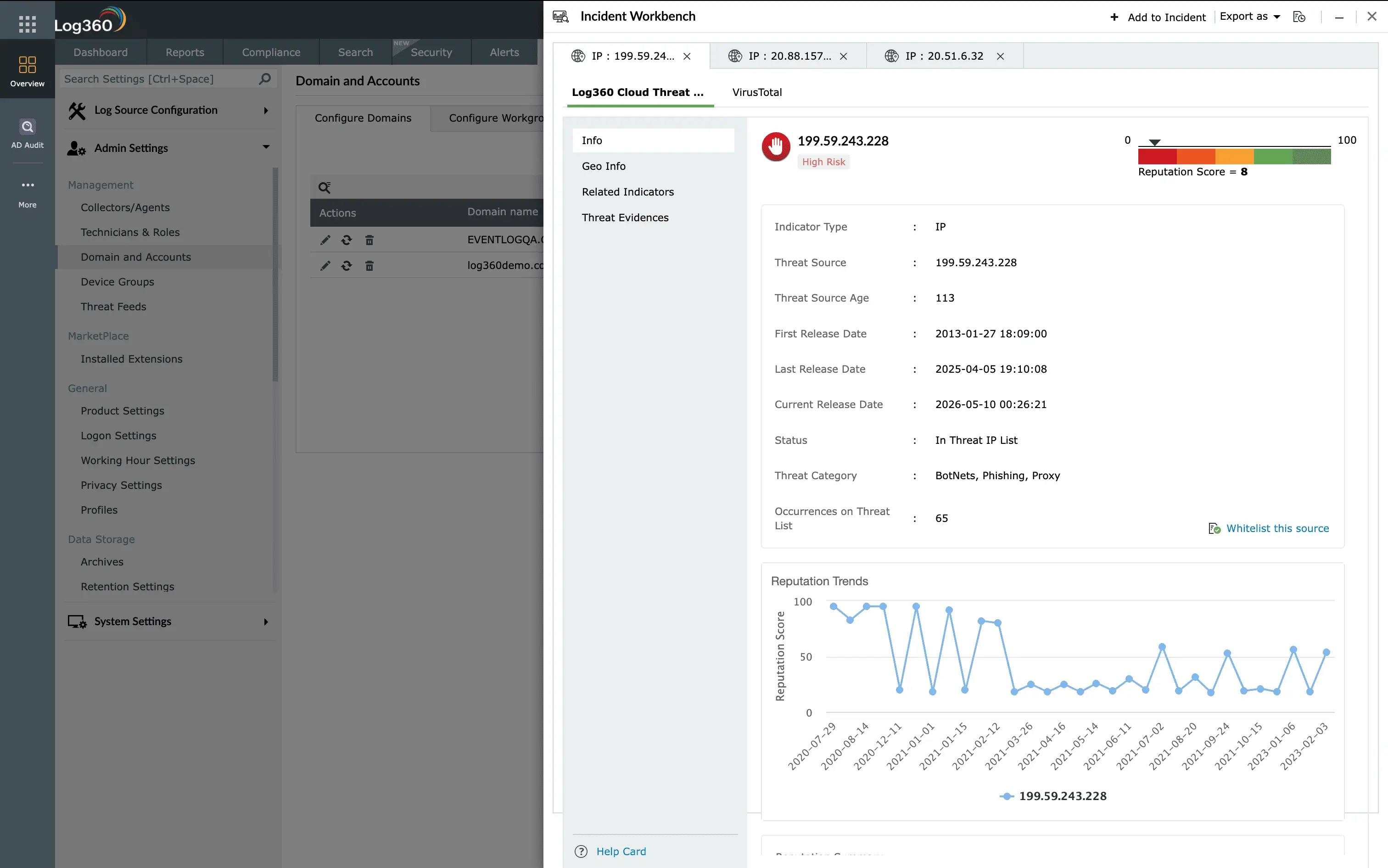
  • Automated threat intelligence lookups: Playbooks query VirusTotal, AlienVault OTX, Webroot, FireEye, Symantec, and Malwarebytes automatically to validate IPs, URLs, and file hashes, removing manual lookup steps from triage.
  • Auto-enriched user context: Playbooks fetch user roles, group memberships, privileged access, and MFA activity from Active Directory, Microsoft Entra, and Okta in real time, so account risk is assessed before any response action runs.
  • Built-in behavioral scoring: Playbooks pull UEBA risk scores for users and hosts directly into the workflow, allowing automation to branch based on whether activity deviates from baseline behavior.
  • Automated alert correlation: Playbooks surface prior alerts linked to the same user, IP, or host, helping automated workflows identify repeat offenders and escalate accordingly without waiting on analyst review.
Threat investigation using incident workbench

Orchestrated response and remediation

Log360 automates response across your entire security stack the moment a threat is confirmed. Instead of analysts running containment steps one tool at a time, automated playbooks execute network, identity, and endpoint actions together in a single workflow, helping your SOC shut down attacks before they spread.

  • Automated network containment: Playbooks block malicious IPs and domains and push firewall rule updates across integrated security tools without manual console access.
  • Automated identity containment: Workflows disable compromised accounts, reset passwords, force session logoff, and revoke unauthorized MFA factors automatically to stop attacker persistence.
  • Automated endpoint containment: Playbooks isolate infected devices, terminate malicious processes, quarantine files, and trigger antivirus scans to contain threats at the source without analyst intervention.
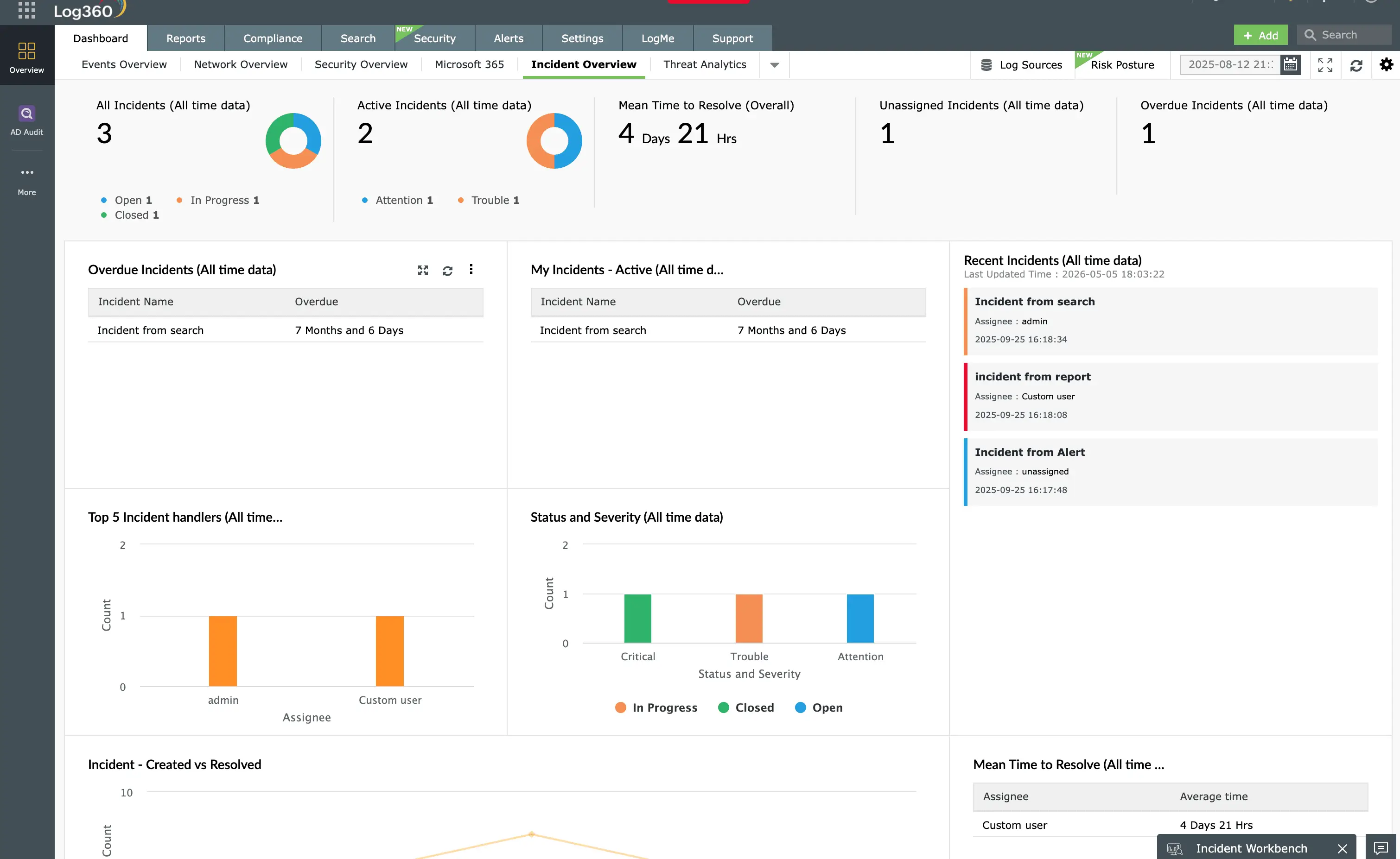
  • Automated ticketing and notifications: Trigger automated incident creation in service desk tools, send alerts through email, and log every action for audit and compliance reporting.

Extend any automated workflow with Deluge or Python custom functions and 400+ marketplace actions to tailor every response step to your environment.

Trigger automated incident tickets on service desk

Security automation in action: Key use cases

  • 2. Okta identity compromise response

    When an attacker compromises credentials and enrolls their own MFA factor, they gain persistent access to every SaaS application the user can reach. Detection is only half the battle. The response has to revoke that persistence before the attacker moves deeper.

  • 3. Suspicious account activity investigation

    Dormant accounts suddenly becoming active, unauthorized privilege escalation, or account changes that do not match a documented service ticket are classic signs of insider threat or credential misuse, but they require cross-tool correlation to confirm.

  • 4. Automated MFA factor remediation and account lockout

    When behavioral or correlation rules flag suspicious authentication activity, manual containment can take long enough for an attacker to move laterally. Automating the containment step closes that window.

  • 5. Agentic AI-driven alert triage and decisioning

    SOC teams receive thousands of alerts daily, most of them low priority or false positives. Agentic AI lets Log360 reason through context, not just pattern-match, before deciding what to do next.

How Log360 automates it:

  • Is triggered by the suspicious command line execution correlation rule when PowerShell or cmd.exe runs with arguments like -enc, http, or hidden. The playbook then decodes Base64 and other obfuscated command-line arguments to extract URLs, IPs, and file hashes as IOCs.
  • Queries VirusTotal to score extracted indicators and fetches the process tree to flag suspicious parent-child relationships, such as PowerShell spawned by something other than explorer.exe or winlogon.exe.
  • In parallel, pulls the host's critical alerts from the last 30 days, checks external IP reputation, validates user account posture (new accounts, password-never-expires, administrator flags), and retrieves UEBA risk scores.
  • If indicators confirm a true positive, the playbook terminates the process tree, adds malicious URLs and IPs to the Windows Defender firewall blocklist, quarantines malicious files, triggers a full endpoint scan, and emails the user and SOC team.

How Log360 automates it:

  • The playbook is triggered by the potential Okta account compromise behavioral rule when a new MFA factor is enrolled alongside a bad-reputation IP or a first-time device.
  • Enriches the user context: Group memberships, privileged role flag, registered applications, newly enrolled MFA factors in the last 24 hours, and historical critical alerts for the same user.
  • Enriches the IP context: IP alert history and reputation scoring (GOOD, SUSPICIOUS, BAD).
  • Analyzes login history for new device, new ASN, or new geographic location deviations.
  • If confirmed malicious, Log360 creates an incident with the gathered evidence, enforces a password reset, removes the newly enrolled MFA factor, blocks the malicious IP or ASN, and notifies the user by email.

How Log360 automates it:

  • Evaluates account risk signals: New user creation combined with non-expiring passwords flags as suspicious; administrator accounts with those same settings escalate to high risk; local users with no password requirement escalate to critical.
  • Queries ManageEngine ServiceDesk Plus for open tickets raised by or for the target user, and cross-references change request details with the alert log values to spot mismatches.
  • Fetches all critical alerts associated with the host from the last 30 days and retrieves UEBA user and host risk scores to confirm deviation from baseline
  • If confirmed, forces a logoff across all systems, reverts unauthorized account modifications (restoring password expiry, removing the user from. Administrators), initiates a Windows Defender scan on the host, creates a formal incident with attached evidence, and appends investigation notes.

How Log360 automates it:

  • Uses the Okta integration to identify and remove any MFA factors enrolled within a configurable time window before the alert.
  • Disables the user account in Active Directory, Entra, or Okta in parallel, and force-expires active sessions.
  • Enforces a password reset, and if the source IP reputation score crosses the malicious threshold, pushes a firewall block rule via the Cisco or Sophos integration.
  • Creates an incident, notifies the user and SOC team via email or Microsoft Teams, and logs every action to the execution history dashboard for audit.

How Log360 automates it:

  • Runs an AI-driven enrichment step that evaluates alert context, threat intel, user behavior, and historical incident data to classify alerts as benign, suspicious, or critical without analyst review.
  • Uses Branch flow states to route alerts based on the AI verdict, sending high-confidence false positives to auto-close while critical alerts move directly to containment playbooks.
  • Generates an incident summary with recommended next steps, mapped to MITRE ATT&CK tactics, and pushes it to the SOC analyst's queue for verification.
  • Continuously learns from analyst feedback on closed incidents to refine triage decisions over time.

See Log360 in action

Discover how Log360 automates threat detection, response, and investigation reducing manual effort and helping your SOC stay ahead of attacks.

Discover more with Log360


Threat intelligence

Enhance your automated workflows with actionable threat intelligence. Leverage global feeds from VirusTotal, AlienVault OTX, Webroot, FireEye, Symantec, and Malwarebytes to automatically strengthen SOAR playbooks with malicious IPs, domains, and file hashes.

Learn more  
 

Automated incident response

Streamline incident response with SOAR-powered playbooks that orchestrate evidence collection, stakeholder notification, and remediation workflows while ensuring consistent, repeatable processes.

Learn more  
 

Advanced threat detection

Combine behavioral analytics, MITRE ATT&CK mapping, and correlation rules to identify sophisticated attacks and automatically triggers SOAR playbook when threats are confirmed for immediate orchestrated response.

Learn more  
 

Integrated compliance management

Automate compliance workflows with playbooks that enforce policy controls, document remediation actions, and generate audit reports for PCI DSS, HIPAA, GDPR, SOC 2, and ISO 27001.

Learn more  

  •  

    We wanted to make sure that one, we can check the box for different security features that our clients are looking for us to have, and two, we improve our security so that we can harden our security footprint.

    Carter Ledyard

  •  

    The drill-down options and visual dashboards make threat investigation much faster and easier. It’s a truly user-friendly solution.

    Sundaram Business Services

  •  

    Log360 helped detect insider threats, unusual login patterns, privilege escalations, and potential data exfiltration attempts in real time.

    CIO, Northtown Automotive Companies

  •  

    Before Log360, we were missing a centralized view of our entire infrastructure. Now, we can quickly detect potential threats and respond before they escalate.Log360 has been invaluable for improving our incident response and ensuring compliance with audit standards. It’s a game-changer for our team.

    ECSO 911

Fill this form to schedule a
personalized web demo

  • By clicking " Submit", you agree to processing of personal data according to the Privacy Policy.

Your request for a demo has been submitted successfully. Our support technicians will get backto you at the earliest.

Frequently Asked Questions

Security automation is the process of using software and predefined workflows to automatically detect, investigate, and respond to cyberthreats without manual intervention. It replaces repetitive SOC tasks with automated actions such as alert triage, context enrichment, and incident remediation, helping teams respond faster and more consistently.

Security automation works by connecting your SIEM, EDR, IAM, firewall, cloud, and ITSM tools through orchestrated playbooks. When a suspicious event occurs, the system collects context, checks threat intelligence, analyzes user and device behavior, prioritizes the incident, and executes a predefined response workflow.

The benefits of security automation include faster incident response, reduced alert fatigue, improved SOC productivity, and more accurate threat investigation. It helps eliminate manual errors, shortens dwell time, ensures consistent remediation steps, and allows teams to focus on complex attacks instead of routine tasks.

Yes. Security automation is becoming essential as threats grow more sophisticated and SOC teams face higher alert volumes. Automated playbooks allow security teams to respond at machine speed, compensate for skill shortages, and maintain continuous protection. As AI-driven detection and SOAR adoption increase, security automation will form the backbone of modern cybersecurity operations.

Common cybersecurity tasks that can be automated include alert triage, threat intelligence lookups, user and device enrichment, malicious IP blocking, account lockouts, endpoint isolation, file quarantine, and incident ticketing. With Log360, these tasks run automatically through visual SOAR playbooks, allowing SOC teams to focus on high-value analysis instead of repetitive manual work.

Turn alert fatigue into automated security outcomes

Log360 empowers your SOC with unified detection, investigation, and response capabilities supported by intelligent automation.