

- Free Edition
- Quick Links
- Active Directory Auditing
- Active Directory auditor
- Active Directory monitoring
- Account lockout analyzer
- Login monitoring software
- Active Directory change notifier
- User logon audit reports
- AD logon logoff tracker
- User logon failure auditing
- Login history tracking tool
- AD change auditor
- Insider threat detection software
- Permissions change auditing
- Entra ID reporting
- Privileged user monitoring
- User behavior analytics tool
- Active Directory security monitoring
- Group Policy auditing tool
- GPO change auditor
- Entra ID auditing
- Audit user account management
- OU change auditor
- Audit group membership changes
- Active Directory auditing and reporting tool
- GPO reporting tool
- Remote desktop monitoring software
- PowerShell logging and auditing
- Azure password protection auditing
- Azure sign-in risk detection
- File Server Auditing
- Windows Server Auditing
- Employee Tracking
- Workstations Auditing
- Compliance Auditing
- Other features
- SIEM Integration
- Windows DNS - Schema Auditing
- Windows security event log monitoring
- SIEM audit solution
- Schedule Active Directory change reports
- Reports from Archived Data
- Aggregated summary reports
- AD new/old attribute changes
- Audit trail
- Audit Active Directory LAPS
- Scheduled Reports & Alerts
- Account lockout examiner
- Industry
- Documents
- Success Stories
- Related Products
- Log360 (On-Premise | Cloud) Comprehensive SIEM and UEBA
- ADManager Plus Active Directory Management & Reporting
- ADAudit Plus Real-time Active Directory Auditing and UBA
- ADSelfService Plus Identity security with MFA, SSO, and SSPR
- DataSecurity Plus File server auditing & data discovery
- Exchange Reporter Plus Exchange Server Auditing & Reporting
- M365 Manager Plus Microsoft 365 Management & Reporting Tool
- RecoveryManager Plus Enterprise backup and recovery tool
- SharePoint Manager Plus SharePoint Reporting and Auditing
- AD360 Integrated Identity & Access Management
- AD Free Tools Active Directory FREE Tools
AD change auditing with ADAudit Plus
Track every AD object change in real time
Every modification to users, groups, computers, OUs, GPOs, and permission sets is captured the moment it occurs. Each record shows the changed attribute, its old and new value, and the identity of whoever made the change.
Audit Group Policy settings end to end
Track GPO creation, deletion, modification, and settings changes across your domain. Password policy, account lockout policy, and security settings changes all include before-and-after values so you can pinpoint exactly what shifted and when.
Detect anomalies with user behavior analytics (UBA)
Leverage machine learning to establish a per-user baseline of normal AD activity. Deviations (an unusual spike in user management actions, a first-time privilege use, etc) trigger automatic alerts.
Meet compliance requirements with ease
Pre-configured compliance reports map AD change events to SOX, HIPAA, PCI-DSS, FISMA, GLBA, GDPR, and ISO 27001 requirements. Custom report profiles let you save specific user, action, and filter combinations as reusable views for auditors and compliance teams.
Extend auditing to Entra ID and hybrid environments
ADAudit Plus audits both on-premises AD and Microsoft Entra ID (previously known as Azure AD), from a single console. The hybrid correlation view links on-premises changes to cloud change activity, giving you a unified audit trail without switching tools.
Back up and restore your AD objects
Safeguard users, computers, groups, OUs, GPOs, schema objects, and more with automated backups. When an object needs to be restored or a change needs to be reverted, you can roll it back to any previous state without leaving the product console.
What is AD change auditing
Every AD object (user accounts, security groups, computer accounts, organizational units, Group Policy Objects, and permissions) can be created, modified, moved, or deleted by any administrator or delegated user in your environment. Change auditing is the practice of recording each of those events with enough context to answer four questions: what changed, who changed it, when the change occurred, and from which machine.
ADAudit Plus captures that context automatically across every monitored domain controller, without requiring custom scripts for each object type. Changes are correlated across DCs in real time, stored centrally, and surfaced as pre-configured reports that are ready to use.
Key changes ADAudit Plus captures across your AD environment
| AD area | What ADAudit Plus captures |
|---|---|
| User accounts | Creation, deletion, enable/disable events, password resets, name changes, and all attribute changes with old and new values |
| Security and distribution groups | Members added to and removed from groups, group creation and deletion, group attribute changes with old and new values |
| Computer accounts | Creation, deletion, enable/disable status, and all attribute changes |
| Organizational units | OU creation, deletion, movement, renaming, and modification events |
| Group Policy Objects | GPO creation, deletion, modification, and link changes, including all settings changes with old and new values |
| Permissions and ACLs | Permission changes at the domain, OU, container, GPO, user, group, and computer level, with old and new values |
| AdminSDHolder | Changes to AdminSDHolder permissions, which propagate automatically to all protected accounts across your domain |
| DNS records | DNS node additions, deletions, and modifications, plus zone and configuration changes |
| Schema and configuration | Schema modifications, site changes, and FSMO role transfers |
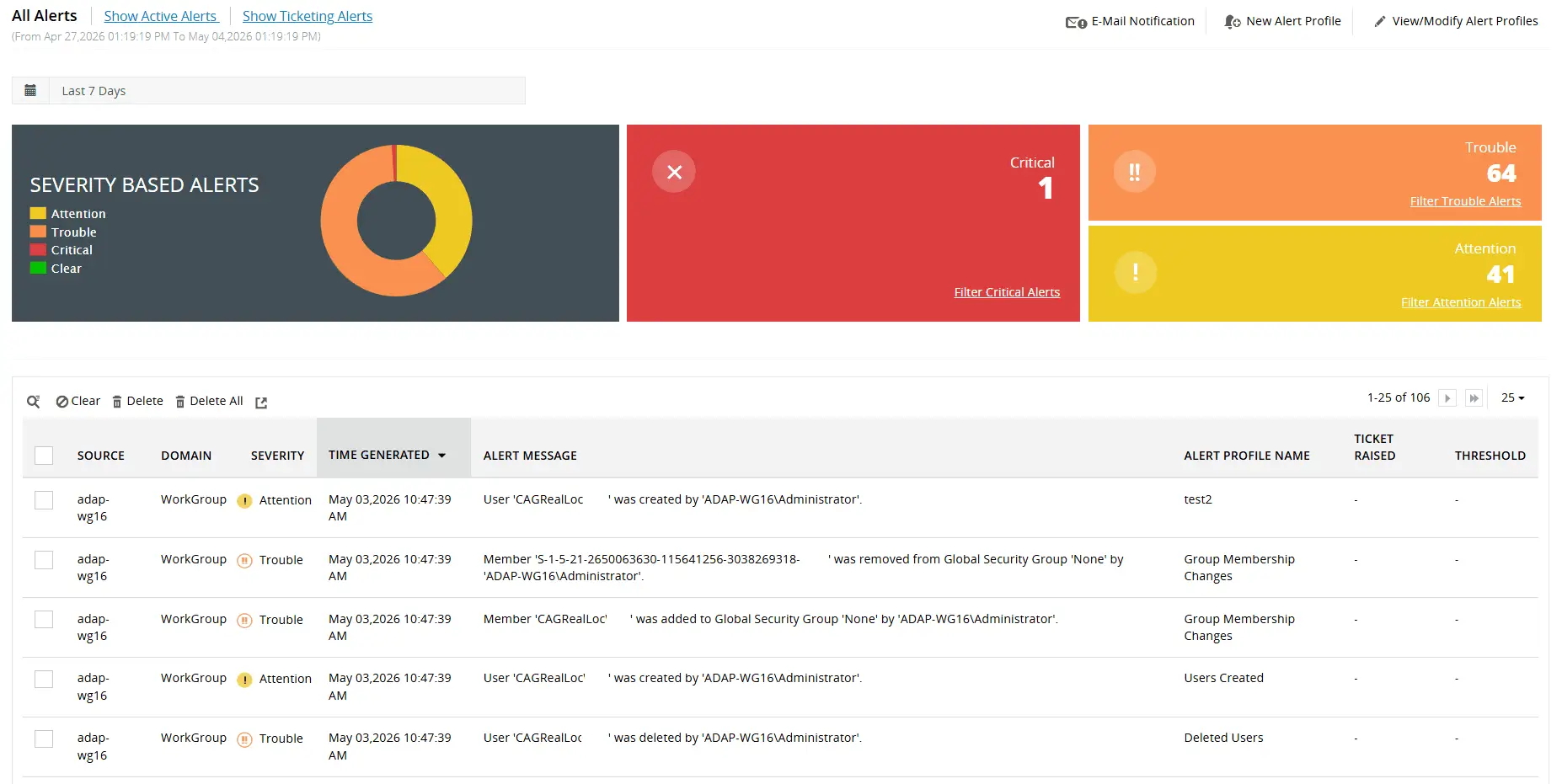
Use our library of over 50 predefined alert profiles to notify admins about critical changes to domain policies, admin groups, configuration permissions, and more
Monitor privileged user activity
ADAudit Plus gives you continuous visibility into the actions of privileged accounts.
- Audit every administrative action across AD schema, users, groups, OUs, GPOs, and configuration settings, maintaining a clear and detailed record of what each privileged user did, when, and from where
- Configure alerts on high-priority events and accelerate forensic investigations with reports that surface the who, what, when, and where of every privileged user action
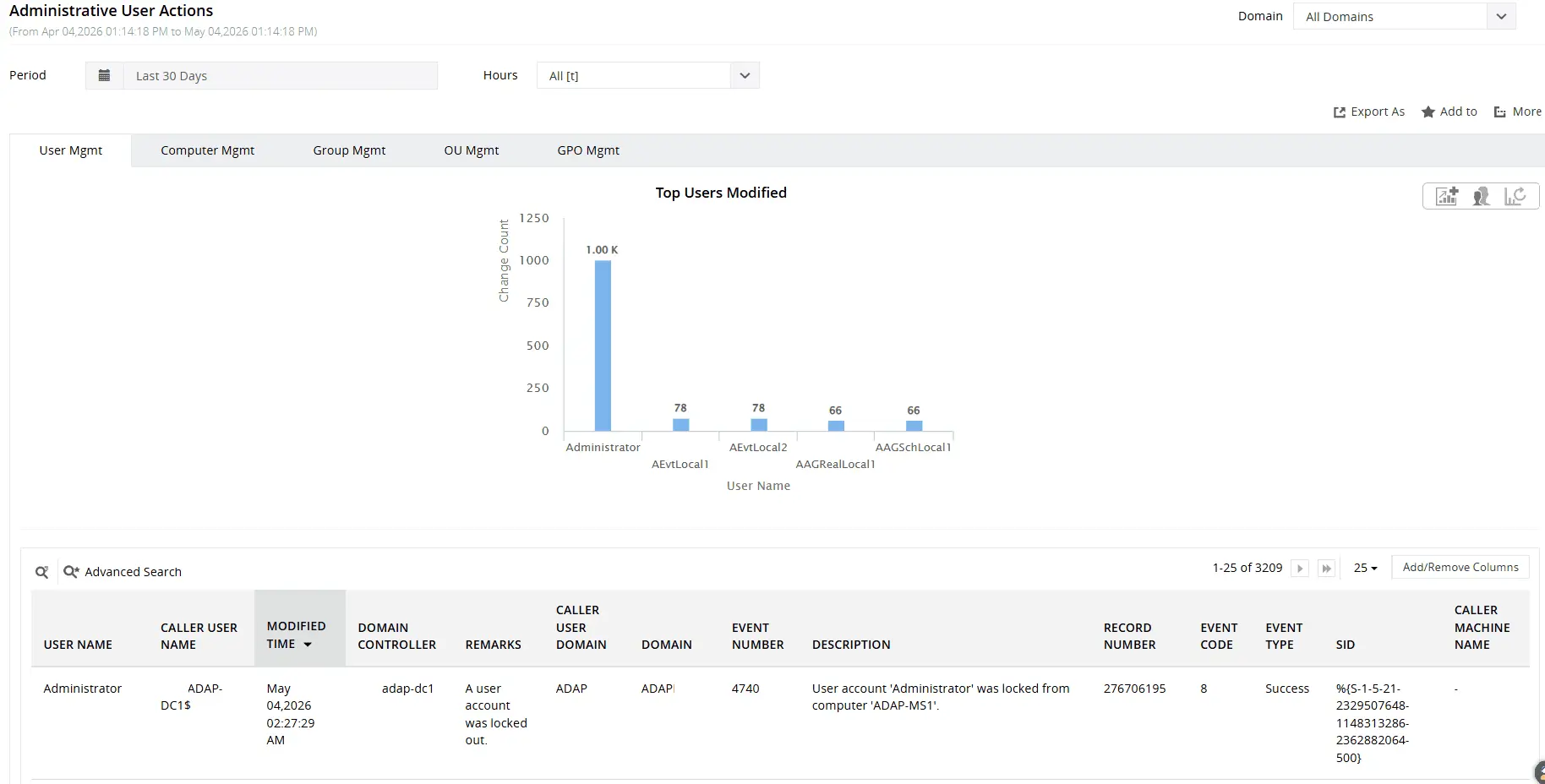
Gain visibility into changes to users, groups, computers, organizational units (OUs), and more by a privileged user
Identify anomalies with UBA
The UBA engine and risk assessment module analyze logon patterns, file activity, user management actions, and privilege usage to surface anomalies and flag accounts that warrant closer scrutiny.
- Detect unusual spikes in logon failures, lockouts, and file operations, first-time host access, new remote server connections, and new processes running on a host; all key indicators of abnormal or potentially malicious activity
- Flag activity outside expected hours across logons, user management actions, and file operations, where timing alone can indicate unauthorized access
- Track privilege usage at the individual level and alert when a user exercises a privilege for the first time, catching escalation attempts before they reach critical systems
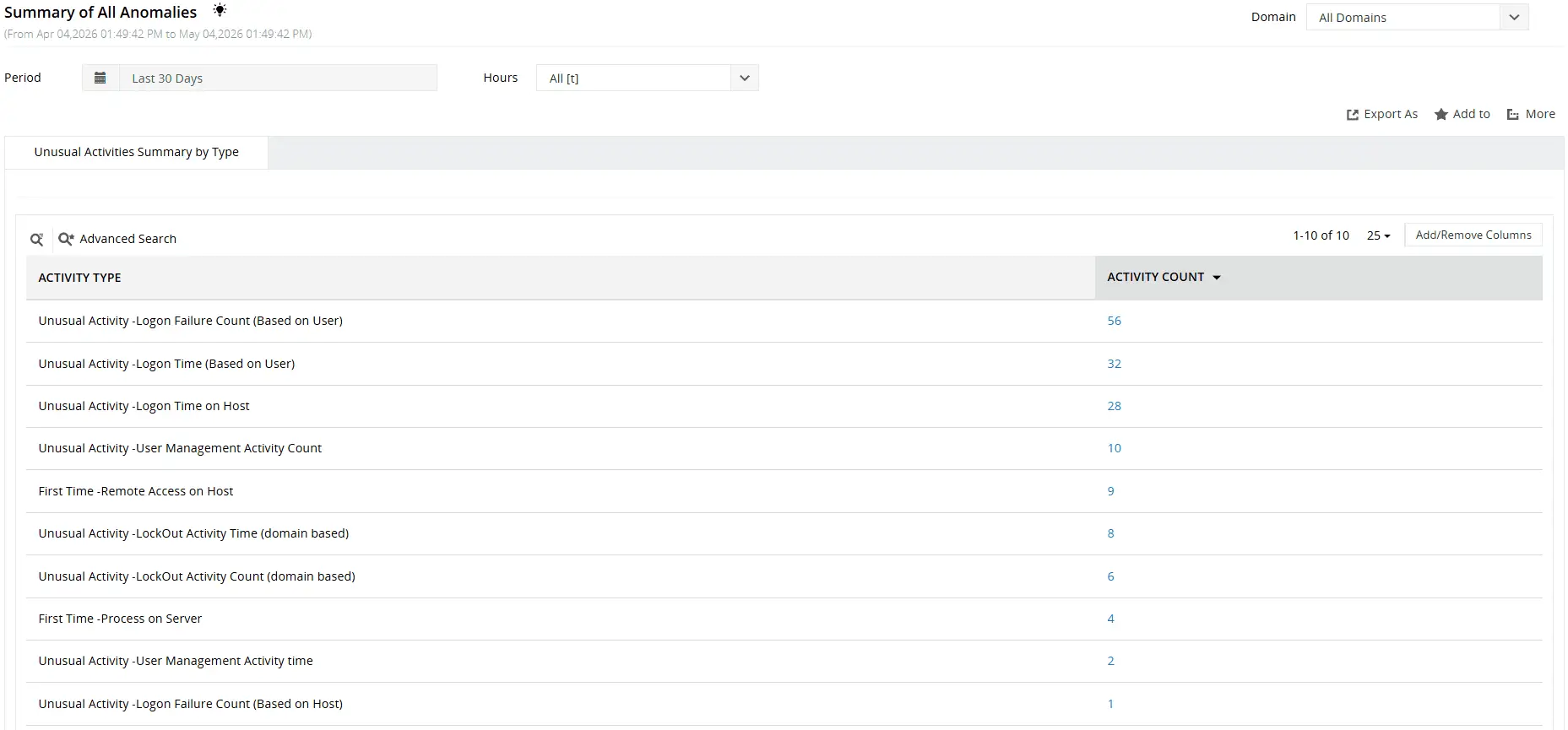
Leverage UBA to detect atypical user behavior such as an unusual volume of user management activities, unusual user activity time, and more
Extend auditing to Entra ID and hybrid environments
The Cloud auditing module extends your audit coverage beyond on-premises AD to Entra ID, giving you a unified view of user and administrator activity across both environments from a single console.
- Audit successful and failed logons across Entra ID, including account lockouts, disabled account logon attempts, and MFA-enabled logon failures, with correlated context such as a user's on-premises Distinguished Name, SID, and GUID linking cloud activity back to your AD environment
- Track user, device, and group management actions including password changes, dynamic group membership updates, and the assignment and removal of roles; with alerts on high-impact events such as a user being assigned the Global Administrator role
- Monitor application changes, API consent grants, and license assignments and expirations across your Entra ID environment to surface unauthorized access expansions and catch unintended entitlement changes
Back up and restore your AD objects
The AD Backup and Recovery add-on safeguards your environment against accidental deletions, unauthorized modifications, and other incidents by maintaining restorable snapshots of your AD objects.
- Back up and restore a comprehensive range of AD objects including users, computers, groups and group memberships, OUs, GPOs, schema objects, and more.
- Revert changes to user, computer, and OU objects directly from audit reports, covering events such as deletions, creations, moves, renames, and attribute-level changes without leaving the ADAudit Plus console.
Meet compliance requirements
ADAudit Plus simplifies compliance reporting with pre-built templates and flexible customization, giving auditors exactly the data they need without relying on IT to build queries from scratch.
- Access pre-configured compliance reports for SOX, HIPAA, PCI DSS, FISMA, GLBA, GDPR, and ISO 27001, each mapped to the standard's specific change monitoring requirements and ready to export on demand
- Build custom report profiles by combining specific users, audit actions, object types, and time ranges into a saved view that runs on demand, so recurring audit requests are answered instantly without manual intervention
- Automate report generation and delivery to designated recipients on a defined schedule, ensuring compliance evidence is consistently captured and distributed without depending on manual exports before every audit cycle
Why native tools fall short
ADAudit Plus eliminates the complexity of native Windows auditing by automating the heavy lifting that would otherwise require scripting expertise, manual log correlation, and careful security configuration.
- Aggregate audit data from domain controllers, Windows servers, workstations, file servers, Entra ID, and NAS devices into a single repository, without the deployment complexity of Windows Event Forwarding
- Replace manual event correlation and PowerShell scripting with built-in reports that surface before and after values of AD changes, GPO display names, etc
- Define threshold-based alerts for critical activities such as logons from disabled accounts, and execute automated response scripts to contain incidents before they escalate
- Retain audit data long term to meet regulatory requirements, with alerts that notify you when a configured computer stops sending logs or when event logs are cleared, closing the gaps that native log size limits and WEC server downtime leave open
4 compelling reasons to choose ADAudit Plus
Widely recognized
ADAudit Plus has been recognized as a Gartner Peer Insights Customers' Choice for Security Incident & Event Management (SIEM) for four consecutive years.
Easy deployment
Go from downloading ADAudit Plus to receiving predefined reports and alerts in under 30 minutes, without any professional help.
Competitive pricing
ADAudit Plus is licensed per-server, unlike other IT auditors which are licensed per-user. With per-server licensing, even with a growing number of users each year, you can continue to ingest log data without additional costs.
Unified visibility
ADAudit Plus consolidates auditing, security, and compliance across AD, Entra ID, Windows servers, workstations, and file servers into a single pane of glass, eliminating the need to juggle multiple tools.
Frequently asked questions
Without AD auditing, organizations risk security breaches, compliance violations, and blind spots across their IT environment. A systematic auditing process brings visibility and accountability to every change and access event in your AD environment.
Event IDs like 4720 (user account created), 4728/4732/4756 (group membership changes), 5136 (directory service object modified), 4719 (system audit policy changed), and 4662 (object access) are some key Windows event IDs associated with AD change auditing.
You should audit user account lifecycle events, security group membership changes, Group Policy modifications with before-and-after setting values, privileged account activity by Domain Admins and Enterprise Admins, permission changes, and account lockout events, to name a few.
Every organization's audit requirements are shaped by its own security posture and compliance obligations, so there is no universal approach to AD auditing. That said, the following principles can help you build a strategy that is both effective and sustainable:
- Reduce event noise: Configure advanced audit policy settings to log only what matters, giving you granular, actionable insights without burying critical events in irrelevant data
- Prioritize high-risk activity: Direct your auditing efforts toward events that carry the highest security impact like logons, group membership changes, privilege use, and account lockouts, where gaps in visibility are most likely to be exploited
- Size your event logs appropriately: Allocate sufficient storage when configuring log size and retention settings to prevent new events from overwriting old ones and creating gaps in your audit trail
- Archive audit data for the long term: Retain audit logs for the duration required by applicable regulations to support both compliance reporting and forensic analysis when incidents occur
The Attack Surface Analyzer module helps identify indicators of compromise for 25+ named AD attacks, including Kerberoasting, DCSync, Golden Ticket, and DCShadow. When an indicator is detected, ADAudit Plus fires a real-time alert with the event timeline, affected accounts, and attacker action sequence. No custom rule configuration is required.