

- Free Edition
- Quick Links
- Active Directory Auditing
- Active Directory auditor
- Active Directory monitoring
- Account lockout analyzer
- Login monitoring software
- Active Directory change notifier
- User logon audit reports
- AD logon logoff tracker
- User logon failure auditing
- Login history tracking tool
- AD change auditor
- Insider threat detection software
- Permissions change auditing
- Entra ID reporting
- Privileged user monitoring
- User behavior analytics tool
- Active Directory security monitoring
- Group Policy auditing tool
- GPO change auditor
- Entra ID auditing
- Audit user account management
- OU change auditor
- Audit group membership changes
- Active Directory auditing and reporting tool
- GPO reporting tool
- Remote desktop monitoring software
- PowerShell logging and auditing
- Azure password protection auditing
- Azure sign-in risk detection
- File Server Auditing
- Windows Server Auditing
- Employee Tracking
- Workstations Auditing
- Compliance Auditing
- Other features
- SIEM Integration
- Windows DNS - Schema Auditing
- Windows security event log monitoring
- SIEM audit solution
- Schedule Active Directory change reports
- Reports from Archived Data
- Aggregated summary reports
- AD new/old attribute changes
- Audit trail
- Audit Active Directory LAPS
- Scheduled Reports & Alerts
- Account lockout examiner
- Industry
- Documents
- Success Stories
- Related Products
- Log360 (On-Premise | Cloud) Comprehensive SIEM and UEBA
- ADManager Plus Active Directory Management & Reporting
- ADAudit Plus Real-time Active Directory Auditing and UBA
- ADSelfService Plus Identity security with MFA, SSO, and SSPR
- DataSecurity Plus File server auditing & data discovery
- Exchange Reporter Plus Exchange Server Auditing & Reporting
- M365 Manager Plus Microsoft 365 Management & Reporting Tool
- RecoveryManager Plus Enterprise backup and recovery tool
- SharePoint Manager Plus SharePoint Reporting and Auditing
- AD360 Integrated Identity & Access Management
- AD Free Tools Active Directory FREE Tools
AD user login history auditing with ADAudit Plus
Complete logon audit trail per user
Pull the full logon history for any user: every DC, server, and workstation they accessed, with timestamps and source IP addresses, without querying individual event logs.
Audit logon activity across hybrid environments
On-premises AD and Microsoft Entra ID (previously known as Azure AD) sign-in history appear side by side in a single console.
Real-time alerts on critical logon events
Get notified the moment a disabled account attempts to log in, an account lockout occurs, or logon failures spike past a defined threshold, before the event escalates.
Meet compliance with pre-configured reports
Pre-configured logon audit reports map directly to SOX, HIPAA, PCI-DSS, FISMA, GLBA, GDPR, and ISO 27001 requirements, so you walk into an audit with the evidence already prepared.
What is AD user login history auditing?
AD records logon events across DCs, member servers, and workstations, but those records are stored locally on each machine. Retrieving a complete logon history for a single user means collecting and correlating logs from every system they touched, which is neither fast nor reliable when done manually.
ADAudit Plus aggregates logon data from every monitored system and presents it as a report. You can see every system a user accessed, the time and source IP address of each logon, the number of failed attempts, and whether any session is currently active, all without logging into individual DCs or running scripts.
- Consolidated logon history across all DCs, member servers, and workstations.
- Source IP address, client hostname, and DC recorded for every logon event.
- Successful logons, failed attempts, logon duration, and logoff times in one view.
- Currently active sessions visible in real time across the domain.
Audit logon events across your domain
A complete logon audit goes beyond tracking when someone logged in. You need to know which systems they logged into, whether they were active on multiple machines simultaneously, and whether sessions terminated cleanly. ADAudit Plus provides named reports for every logon scenario across the domain.
- The User's Last Logon report shows the most recent logon time per user across all monitored systems, useful for identifying stale accounts that remain enabled.
- Users logged into multiple computers surfaces accounts with concurrent or recent sessions on more than one machine, flagging potential credential sharing or unauthorized access.
- Remote Desktop Services Activity captures every RDP session (connection, disconnection, and termination) with client IP and session duration.
- RADIUS Logon History (NPS) aggregates all NPS authentication events, covering wireless logons that would otherwise require a separate log source.
- User Work Hours shows the active hours each user spent logged on to workstations.
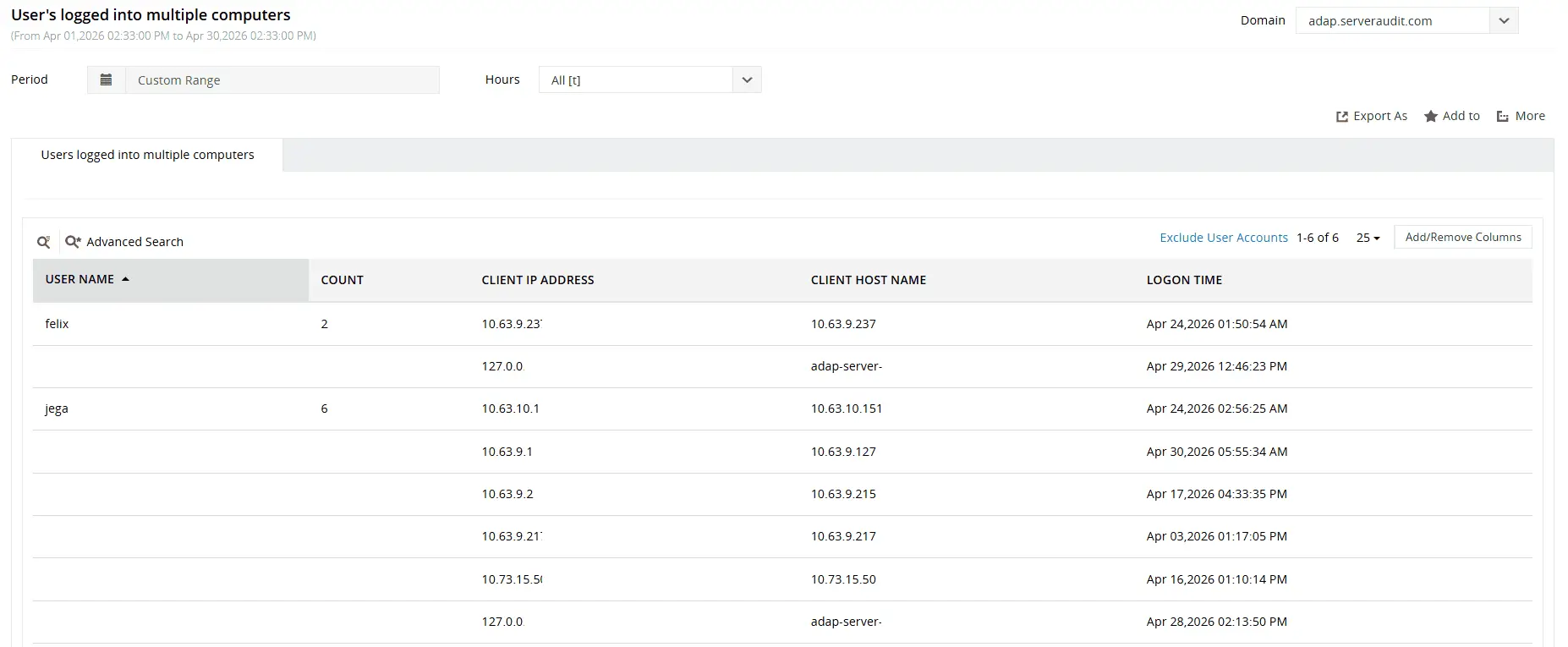
Use machine learning to identify unusual logon failure volumes, abnormal logon times, first-time host access, and other suspicious activity.
Extend auditing to hybrid and cloud environments
Your on-premises logon events live in Windows Security logs, while Microsoft Entra ID sign-in events live in the cloud. Correlating them for a single user means accessing two separate administrative interfaces and reconciling different event formats manually, and native tools provide no mechanism to bridge that gap.
ADAudit Plus bridges this gap. The Hybrid Logon Activity report surfaces sign-in events for hybrid users from both on-premises AD and Microsoft Entra ID in a single view. You see the full authentication picture for any user, including which application they authenticated to, whether MFA was enforced, what Conditional Access policy applied, and the geo-location of each cloud sign-in.
- Entra ID Logon Activity includes geo-location, device information, MFA result, and Conditional Access outcome alongside the standard who-when-where detail.
- Logon Activity by Legacy Authentication identifies sign-ins using older protocols that bypass MFA enforcement, a persistent security gap in hybrid environments.
- Risk detection reports (impossible travel, anonymized IP, password spray attack, leaked credentials) surface Entra ID Identity Protection signals in the same console as on-premises logon data.

Gain complete visibility into logon activity across your AD and Entra ID environments.
Detect anomalous logon behavior with user behavior analytics (UBA)
Not every threat announces itself with a lockout or a failed logon flood. An attacker using valid stolen credentials may log in once, at a slightly unusual time, from a machine the user has accessed before: nothing that crosses a static threshold. ADAudit Plus builds a machine learning baseline of each user's normal logon behavior and alerts when that baseline is broken.
- Unusual Logon Activity Time flags a logon that falls outside the hours that user normally authenticates, calibrated per individual, not a domain-wide schedule.
- Unusual Volume of Logon Failure identifies a spike in failed attempts for a specific user, distinguishing a genuine brute-force attempt from routine mistyped passwords.
- First Time Host Accessed by User surfaces the first-ever logon by a user to a host they have never accessed before, a lateral movement indicator when seen alongside other anomaly signals.
- Unusual Volume of Lockout detects when lockout frequency across the domain exceeds its learned baseline, covering coordinated lockout activity that might otherwise look like isolated incidents.
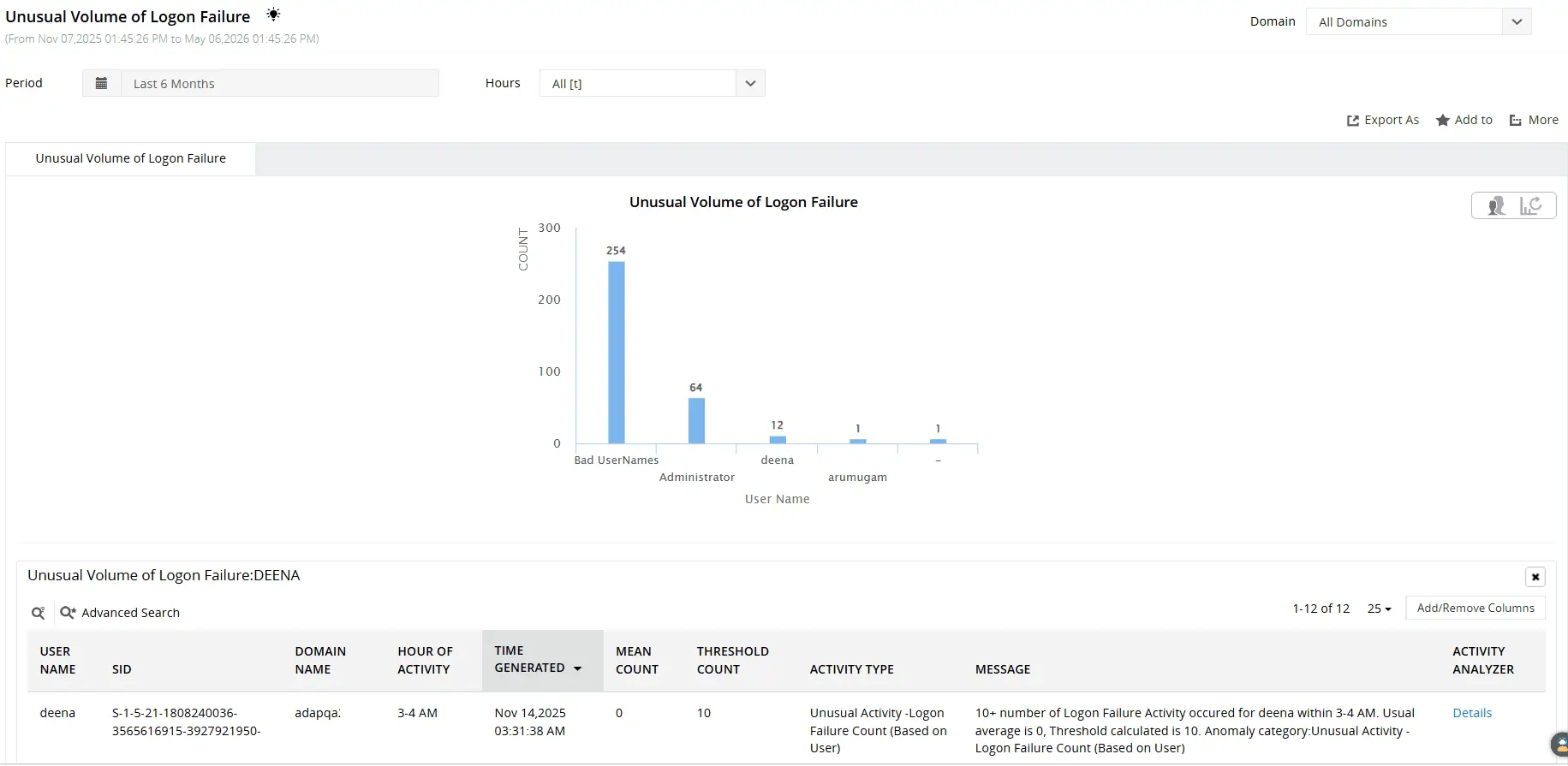
Use machine learning to uncover suspicious logon behavior, including unusual logon failure volumes, abnormal logon times, first-time host access, and more.
Get real-time alerts on critical logon events
Logon history is useful for investigation. Alerting is what stops an incident from becoming a breach. ADAudit Plus ships with pre-configured alert profiles for critical logon events, and every alert is built around what you can actually do with it.
- When an account lockout occurs, your team receives an immediate notification so the lockout is investigated.
- A disabled account logon attempt triggers an alert the moment it happens, catching credential replay attacks or unauthorized re-enabling of accounts before access is gained.
- Replay attack detection surfaces Kerberos ticket replay events in real time, giving you the affected account name, DC, and event timestamp needed to contain the threat.
When an alert fires, ADAudit Plus can automatically create a ticket in ServiceNow, Jira, or your preferred ITSM platform, so the responsible team is notified without manual intervention.
Meet compliance requirements with ease
Logon audit trails are a requirement across every major compliance framework. Auditors want to know who accessed what system, when, and whether access was authorized. ADAudit Plus maps its logon reports directly to SOX, HIPAA, PCI-DSS, FISMA, GLBA, GDPR, and ISO 27001 requirements, so the evidence is ready when the audit begins.
Custom report profiles let you save a specific combination of user, audit action, and filter as a recurring view, so the same compliance report that previously took hours to assemble manually can be scheduled for automatic delivery to auditors or compliance officers on a weekly or monthly basis. Every logon report is exportable in CSV, PDF, HTML, or XLSX format and can be scheduled for email delivery without requiring the recipient to have product access.
Why native tools fall short for logon history
Windows records logon events through Security event logs, but those logs are stored locally on each DC, member server, and workstation. Retrieving the complete logon history for a single user means collecting and correlating logs from every system they accessed, a process that does not scale beyond a handful of machines and produces no consolidated output.
Native tools can tell you that Event ID 4624 recorded a successful logon on a specific DC. They cannot tell you whether that user is currently logged into three other machines, what caused their account to lock out, or whether their logon time yesterday was outside their normal pattern.
- Security event logs are per-machine and stored locally, so there is no built-in mechanism to query logon history for a single user across all DCs simultaneously.
- Event Viewer has no baseline awareness, so it cannot distinguish a logon at an unusual hour from the same user's routine logon time.
- PowerShell scripts can aggregate logs across DCs, but require scheduled execution, produce no real-time alerting, and leave compliance reporting as a manual task.
ADAudit Plus bridges these gaps by centrally collecting logon data from every machine, retaining it beyond the native log window, and making it searchable and reportable from a single console. It also includes built-in lockout root cause analysis, hybrid logon correlation, and UBA-driven anomaly detection.
4 compelling reasons to choose ADAudit Plus
Widely recognized
ADAudit Plus has been recognized as a Gartner Peer Insights Customers' Choice for Security Incident & Event Management (SIEM) for four consecutive years.
Easy deployment
Go from downloading ADAudit Plus to receiving predefined reports and alerts in under 30 minutes, without any professional services engagement.
Competitive pricing
ADAudit Plus is licensed per-server, not per-user. As your user count grows, you continue to ingest log data without additional licensing costs.
Unified visibility
ADAudit Plus consolidates auditing, security, and compliance across AD, Microsoft Entra ID, Windows servers, workstations, and file servers into a single console, eliminating the need to manage multiple tools.
Frequently asked questions
Event ID 4624 records a successful logon on a Windows system. It captures the account name, logon type, source IP address, and the DC that processed the authentication. ADAudit Plus surfaces 4624 events across all monitored systems.
lastLogon updates on the authenticating DC only and is never replicated. lastLogonTimestamp replicates across DCs but refreshes only every nine to 14 days, making it an approximation. ADAudit Plus collects real-time logon events across all DCs, giving you accurate last logon data without relying on either attribute.
In many jurisdictions, monitoring logon activity on employer-owned systems is permitted when employees are informed through an acceptable-use policy. ADAudit Plus tracks authentication events within your own AD infrastructure. Before deployment, review applicable employment and data protection regulations in your region and ensure your monitoring policies are properly documented.