

- Free Edition
- Quick Links
- Active Directory Auditing
- Active Directory auditor
- Active Directory monitoring
- Account lockout analyzer
- Login monitoring software
- Active Directory change notifier
- User logon audit reports
- AD logon logoff tracker
- User logon failure auditing
- Login history tracking tool
- AD change auditor
- Insider threat detection software
- Permissions change auditing
- Entra ID reporting
- Privileged user monitoring
- User behavior analytics tool
- Active Directory security monitoring
- Group Policy auditing tool
- GPO change auditor
- Entra ID auditing
- Audit user account management
- OU change auditor
- Audit group membership changes
- Active Directory auditing and reporting tool
- GPO reporting tool
- Remote desktop monitoring software
- PowerShell logging and auditing
- Azure password protection auditing
- Azure sign-in risk detection
- File Server Auditing
- Windows Server Auditing
- Employee Tracking
- Workstations Auditing
- Compliance Auditing
- Other features
- SIEM Integration
- Windows DNS - Schema Auditing
- Windows security event log monitoring
- SIEM audit solution
- Schedule Active Directory change reports
- Reports from Archived Data
- Aggregated summary reports
- AD new/old attribute changes
- Audit trail
- Audit Active Directory LAPS
- Scheduled Reports & Alerts
- Account lockout examiner
- Industry
- Documents
- Success Stories
- Related Products
- Log360 (On-Premise | Cloud) Comprehensive SIEM and UEBA
- ADManager Plus Active Directory Management & Reporting
- ADAudit Plus Real-time Active Directory Auditing and UBA
- ADSelfService Plus Identity security with MFA, SSO, and SSPR
- DataSecurity Plus File server auditing & data discovery
- Exchange Reporter Plus Exchange Server Auditing & Reporting
- M365 Manager Plus Microsoft 365 Management & Reporting Tool
- RecoveryManager Plus Enterprise backup and recovery tool
- SharePoint Manager Plus SharePoint Reporting and Auditing
- AD360 Integrated Identity & Access Management
- AD Free Tools Active Directory FREE Tools
Archiving Active Directory audit data with ADAudit Plus
Active Directory environments generate an enormous volume of audit data every single day—user logons, group changes, GPO modifications, permission updates, and more. While this data is invaluable for security, compliance, and forensics, it also introduces a major operational challenge: how do you retain it long-term without impacting performance or blowing up storage costs?
ADAudit Plus solves this problem by allowing users to retain every AD event, satisfy multi-year compliance mandates, and generate reports from historical data on demand, without burdening your live environment.
Archive AD events automatically
ADAudit Plus continuously captures Windows Security Event Log data from every domain controller and writes it to a compressed, searchable archive with no risk of being overwritten, and no manual intervention.
Tiered audit data archiving system
ADAudit Plus uses a tiered model with hot data for fresh and frequently accessed logs, cold for older data stored in compressed form, and frozen for long-term storage with maximum compression. This approach balances performance and cost efficiency.
Meet multi-year retention mandates
Configure retention periods to match regulatory requirements. Archived data is categorized and remains available for querying for the full retention window.
Archive on-premises and cloud identity data together
On-premises domain controller events and Microsoft Entra ID sign-in and change events are archived from a single console, giving you a unified historical record across hybrid environments.
Compression and storage optimization
Archived data is significantly compressed, reducing storage requirements by a large margin. This allows organizations to retain years of audit data without needing massive storage investments.
Easy restoration of archived data
Archived data is not locked away without access. ADAudit Plus allows administrators to restore archived logs back into the system for analysis, ensuring no loss of usability.
Replace overwritten security logs
Windows Security Event Logs on domain controllers overwrite when full. ADAudit Plus reads and archives events before they are lost, giving compliance and forensic teams access to data the native log no longer holds.
Generate compliance-ready exports
Archived data can be exported as PDF, CSV, HTML, or XLSX reports and scheduled for automatic delivery, so auditors receive formatted evidence packages without manual intervention from your team.
Why an archiving tool for AD audit data is essential
Active Directory is the backbone of most enterprise environments, and every significant event it records, such as logon attempts, account changes, permission modifications, and group membership updates, is a potential audit artifact. Regulators treat these records as evidence. When a financial auditor, a breach investigator, or a healthcare compliance officer needs to know who accessed what system on a specific date 18 months ago, the answer has to be retrievable.
ADAudit Plus is that retrieval system. It reads Windows Security Event Log data from every monitored domain controller, compresses and archives it to a central repository, and keeps it available for reporting across the full retention period your compliance framework requires.
The archive is not a static backup. It's a live data source you can run reports against, build custom queries on, and export formatted evidence from at any point during the retention window.
That distinction matters because auditors rarely accept raw log files as evidence. They want structured reports with consistent formatting, verifiable timestamps, and clear attribution. ADAudit Plus produces those reports from archived data using the same pre-configured and custom report templates you use on live data.
Long-term retention for compliance
Regulatory frameworks specify minimum retention periods, but none of those requirements is satisfied by the Windows Security Event Log, which overwrites data when it reaches its size limit. ADAudit Plus lets you configure retention periods per data category to match the standard your organization is subject to, with archived data available for queries for the full term.
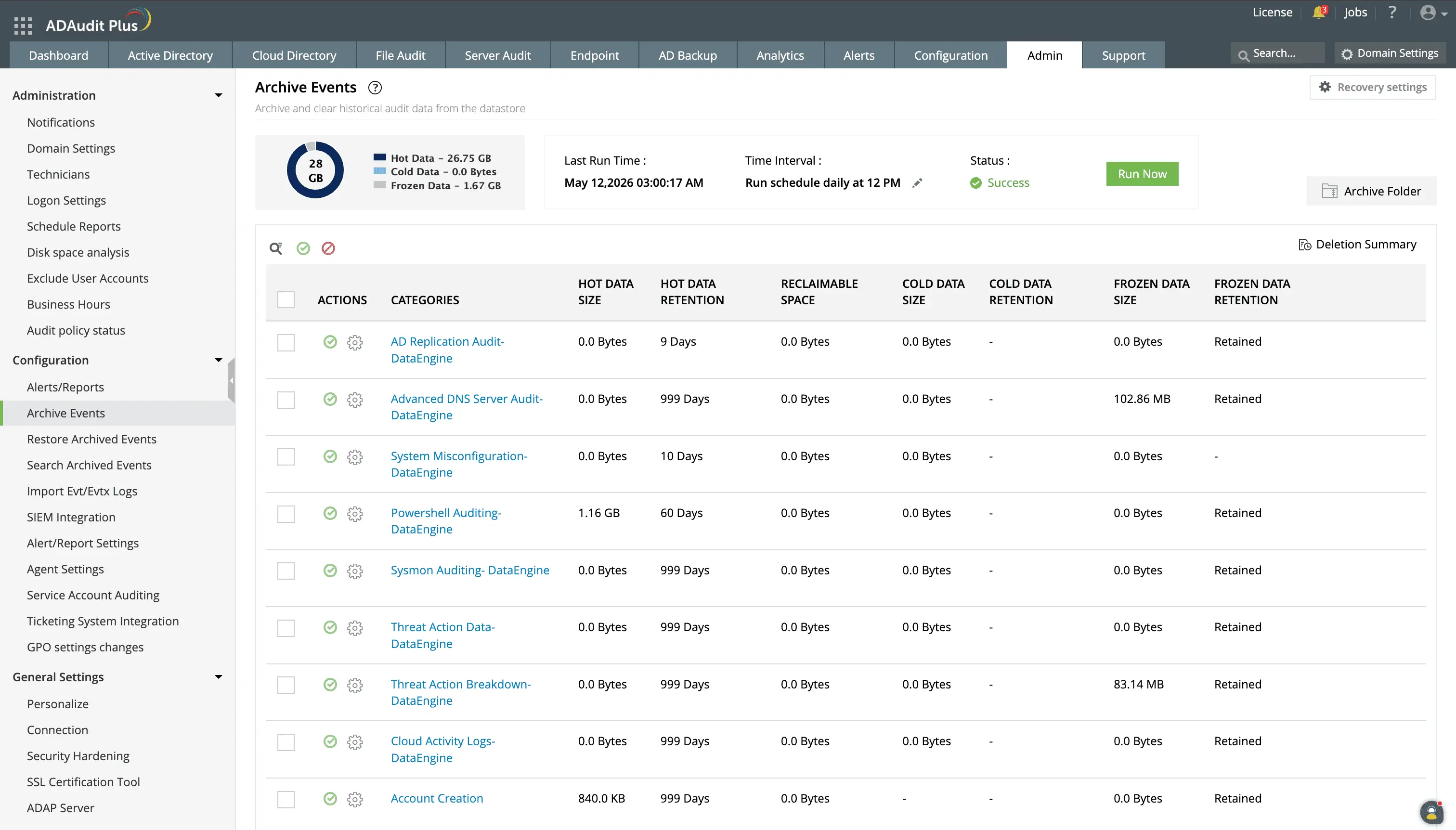
ADAudit Plus archives data by category and the tiered system allows even archived data to be pulled up for reports.
You can choose where to store your archived log files for maximum security and performance.
Generate audit reports from archived data
ADAudit Plus treats the archive as a reporting source, so you can load an archive onto the console and run the same pre-configured reports that you run against current events. You can pull a per-user consolidated audit trail for any user in the archive across whatever historical period the archive covers.
- Reconstruct the full timeline of changes a specific account made before and after a suspected compromise.
- Identify which domain controller processed each authentication event and from which source IP.
- Trace permission changes that modified access rights before a data breach was detected.
- Correlate on-premises AD changes with Microsoft Entra ID events from the same user during the same period using hybrid logon data retained in the archive.
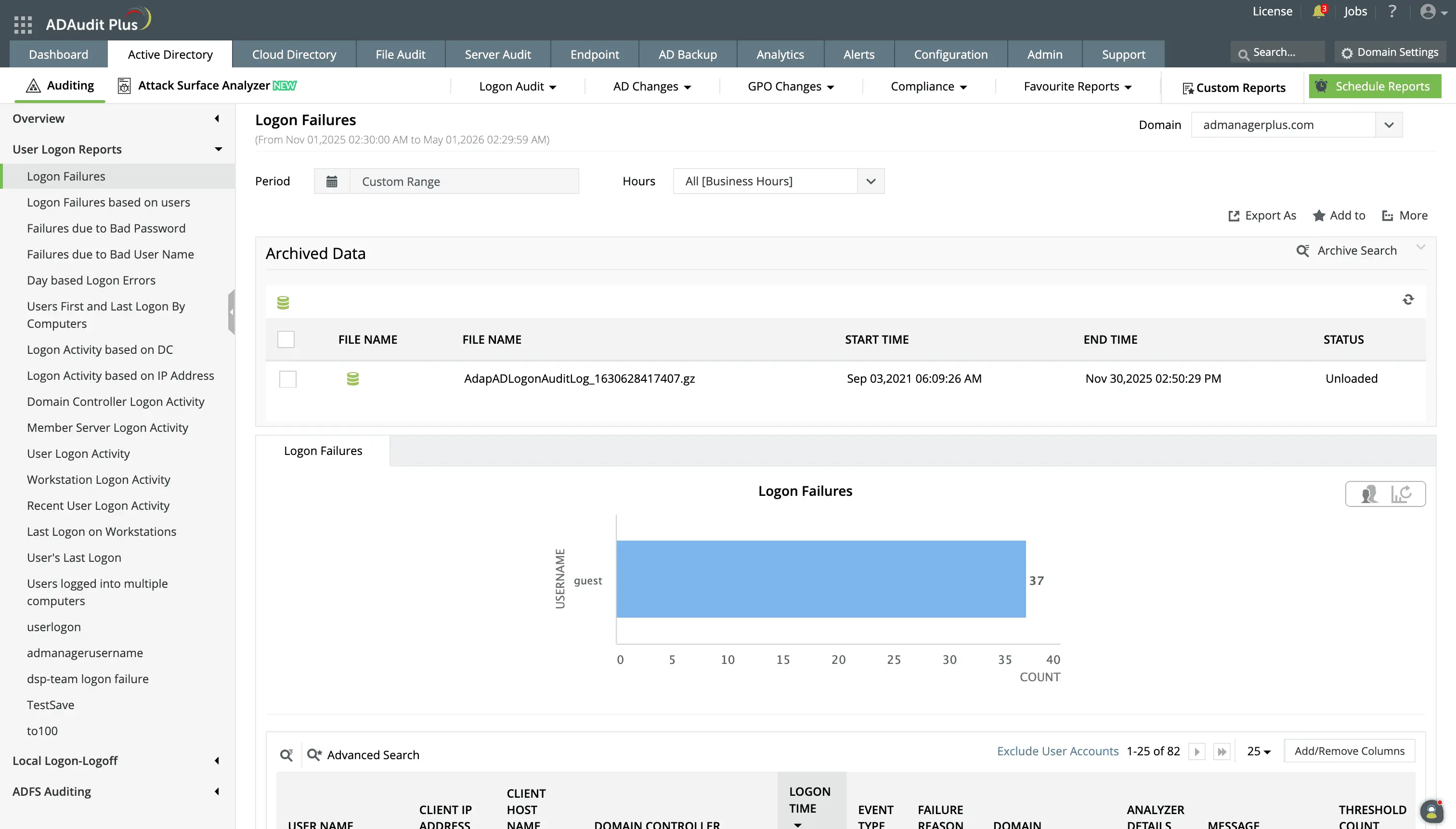
ADAudit Plus lists the archived audit data available for the selected time interval. You can load this data to the console for reporting alongside live data.
Extend archiving to hybrid and cloud environments
ADAudit Plus archives event data from both on-premises AD and Microsoft Entra ID, previously known as Azure Active Directory (Azure AD), from a single console. Sign-in activity, user and group changes, role assignments, Conditional Access policy modifications, and MFA events from Entra ID are retained alongside on-premises AD events under the same retention configuration.
- When a user authenticates against both on-premises AD and Entra ID during the same session, those events are captured.
- Investigators and auditors can query a single unified audit trail for hybrid identity users rather than joining records from two separate systems.
- Correlated hybrid records eliminate the most common source of delay in compliance evidence requests for organizations with synchronized identities.
Optimize performance with archiving
Active audit tables grow rapidly. Offloading inactive data to archival storage frees up primary database resources, resulting in faster search queries and better system responsiveness. It also means that:
- Production databases run faster because searches, lookups, and index updates do not have to sift through massive amounts of historical logs.
- Moving inactive data off primary databases frees up CPU, memory, and I/O operations for critical, day-to-day business transactions.
- Backing up a smaller, active dataset is much faster than backing up a database bloated with years of historical audit records.
- Investigations are sped up since quick access to historical data enables faster root cause analysis and incident response.
Why native tools fall short for AD audit archiving
Windows Security Event Logs are the source of AD audit data, but they were designed for operational troubleshooting, not long-term compliance retention. Four limitations make them unsuitable as an archiving solution:
Overwrite by default: Security Event Logs on domain controllers overwrite older events when the log reaches its configured size. In busy environments, that can mean hours or even days of history. There is no native mechanism to prevent this without affecting operational performance.
No centralised storage: Each domain controller maintains its own local log. Retrieving audit data for a specific event means querying each DC individually, with no cross-DC correlation and no single search interface.
No structured compliance reporting: Raw event log data requires manual processing to produce the formatted, attributed reports that auditors and regulators accept as evidence. Event Viewer provides no report templates, no scheduling, and no export formatting.
No configurable retention period: Windows offers no native mechanism to retain Security Event Log data for months or years with a defined retention policy tied to a compliance standard.
ADAudit Plus reads from the Windows Security Event Log before overwrite occurs, centralises the data across all monitored domain controllers, and retains it in a compressed, queryable archive for the full retention period your compliance framework requires.
4 compelling reasons to choose ADAudit Plus
Widely recognized
ADAudit Plus has been recognized as a Gartner Peer Insights Customers' Choice for Security Incident & Event Management (SIEM) for four consecutive years.
Easy deployment
Go from downloading ADAudit Plus to receiving predefined reports and alerts in under 30 minutes, without any professional help.
Competitive pricing
ADAudit Plus is licensed per-server, unlike other IT auditors which are licensed per-user. With per-server licensing, even with a growing number of users each year, you can continue to ingest log data without additional costs.
Unified visibility
ADAudit Plus consolidates auditing, security, and compliance across Active Directory, Entra ID, Windows servers, workstations, and file servers into a single pane of glass, eliminating the need to juggle multiple tools.
Frequently asked questions
Active Directory records security events in the Windows Security Event Log on each domain controller, capturing logon attempts, account changes, permission modifications, and group membership updates. These logs are stored locally on each DC, overwrite when full, and require a dedicated tool to centralise, retain, and report from them. However, ADAudit Plus overcomes these limitations by not only tracking events, but also having an automated system of archiving older audit data while keeping it available for reporting.
In the context of IT auditing, archiving means moving audit log data into a long-term storage repository where it remains accessible and queryable. ADAudit Plus archives Active Directory audit events before the Windows Security Event Log overwrites them, for as long as your compliance framework requires.
Archived data remains reportable. You can run pre-configured or custom reports against the archive using a date range selector, export results in PDF, CSV, HTML, or XLSX format, and schedule recurring reports against historical data.
ADAudit Plus collects AD audit logs automatically from all monitored domain controllers by reading Windows Security Event Log data in real time. Once collected, events are centralised, indexed, and made available through pre-configured reports and custom report profiles. No manual log extraction or PowerShell scripting is required.