

- Free Edition
- Quick Links
- Active Directory Auditing
- Active Directory auditor
- Active Directory monitoring
- Account lockout analyzer
- Login monitoring software
- Active Directory change notifier
- User logon audit reports
- AD logon logoff tracker
- User logon failure auditing
- Login history tracking tool
- AD change auditor
- Insider threat detection software
- Permissions change auditing
- Entra ID reporting
- Privileged user monitoring
- User behavior analytics tool
- Active Directory security monitoring
- Group Policy auditing tool
- GPO change auditor
- Entra ID auditing
- Audit user account management
- OU change auditor
- Audit group membership changes
- Active Directory auditing and reporting tool
- GPO reporting tool
- Remote desktop monitoring software
- PowerShell logging and auditing
- Azure password protection auditing
- Azure sign-in risk detection
- File Server Auditing
- Windows Server Auditing
- Employee Tracking
- Workstations Auditing
- Compliance Auditing
- Other features
- SIEM Integration
- Windows DNS - Schema Auditing
- Windows security event log monitoring
- SIEM audit solution
- Schedule Active Directory change reports
- Reports from Archived Data
- Aggregated summary reports
- AD new/old attribute changes
- Audit trail
- Audit Active Directory LAPS
- Scheduled Reports & Alerts
- Account lockout examiner
- Industry
- Documents
- Success Stories
- Related Products
- Log360 (On-Premise | Cloud) Comprehensive SIEM and UEBA
- ADManager Plus Active Directory Management & Reporting
- ADAudit Plus Real-time Active Directory Auditing and UBA
- ADSelfService Plus Identity security with MFA, SSO, and SSPR
- DataSecurity Plus File server auditing & data discovery
- Exchange Reporter Plus Exchange Server Auditing & Reporting
- M365 Manager Plus Microsoft 365 Management & Reporting Tool
- RecoveryManager Plus Enterprise backup and recovery tool
- SharePoint Manager Plus SharePoint Reporting and Auditing
- AD360 Integrated Identity & Access Management
- AD Free Tools Active Directory FREE Tools
Account lockout analysis with ADAudit Plus
Identify the lockout source
The Account Lockout Analyzer traces every lockout to its origin. It identifies the device, service, or mapped drive using incorrect credentials.
Alert your team in real time
The default Account Lockout alert profile triggers as soon as a lockout occurs. It provides the account name, source machine, and IP address. It can also auto-create a ticket in your ITSM platform.
Audit lockout policy changes
Every change to your account lockout threshold, duration, or reset interval is captured with before and after values and the identity of who made the change.
Detect lockout attack patterns
Machine learning baselines normal lockout frequency for your domain and flags volume spikes and off-hours activity consistent with brute-force or password spray attempts.
Respond before the damage spreads
Configurable alert thresholds separate a single misfired password from an active credential-stuffing attempt. This allows your team to prioritize and address the most urgent issues.
Cover on-premises and Entra ID
A single console surfaces lockout events across on-premises Active Directory and Microsoft Entra ID, with hybrid correlation for environments running both.
What is an account lockout tool?
An account lockout tool identifies why a user account in Active Directory was locked out and where the locking authentication originated. When a domain account exceeds the bad-password threshold in your account lockout policy, Windows locks it. The lockout event itself is straightforward to detect, but tracing it back to the source requires correlating Event ID 4740 across multiple domain controllers and reconstructing a timeline from fragmented data. ADAudit Plus replaces that manual process entirely.
Find the lockout source instantly
The Account Lockout Analyzer goes beyond recording which domain controller recorded the lockout. It identifies what caused it and pins the source to the specific device, service, or credential store. You get the locking source, the client machine, the IP address, and the preceding logon history in a single report row.
The most common sources the Analyzer surfaces:
- Stale credentials stored on a device after a password change
- Mapped drives authenticating with an old password
- Scheduled tasks or services running under the account with an outdated password
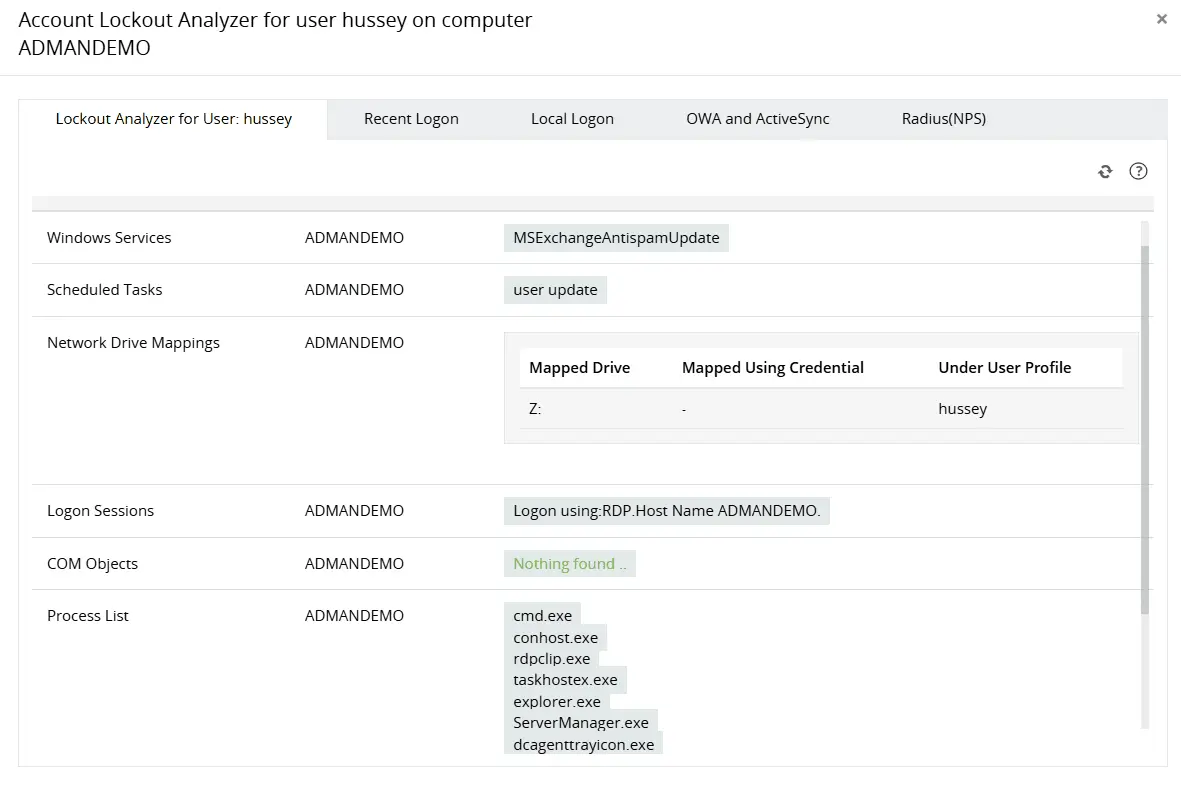
Identify the primary source of continuous AD account lockouts by analyzing multiple components, including network drive mappings, process lists, applications, and more.
Obtain more perspective into locked out user accounts by analyzing recent logon details.
Track every lockout event across the domain
A single lockout is usually a support ticket. A pattern of lockouts across multiple accounts or workstations is a security signal. ADAudit Plus gives you the full domain-wide picture through pre-built reports:
- Recently Locked Out Users: gives you every lockout event across all domain controllers in a single view, so you can spot recurring patterns, repeat accounts, and distributed spikes.
- Recently Unlocked Users: captures every unlock action with the identity of who performed it and when, giving you a complete audit trail alongside the lockout record.
- Logon Attempts by Locked Out Users: shows authentication attempts made by accounts that are already locked out. Continued attempts after lockout are a reliable sign of an automated attack, not a confused user.
All three pull from every domain controller centrally. You never need to log into individual DCs or piece together a picture from multiple security event logs.
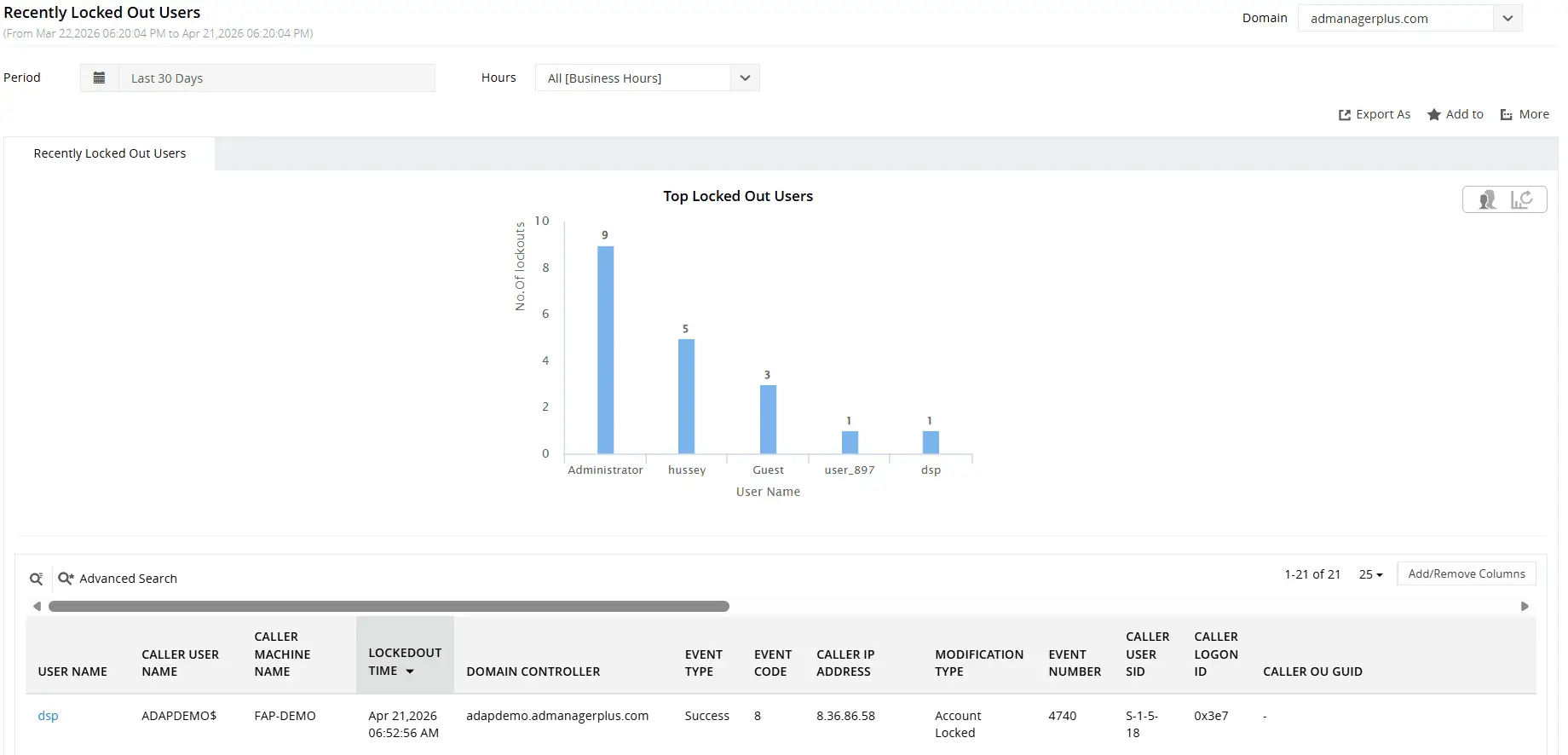
Find recently locked out AD user accounts and their relevant details including when, from where, and by whom.
Monitor and audit lockout policy changes
Raising the lockout threshold or shortening the lockout duration makes your environment measurably more vulnerable to password-guessing attacks. ADAudit Plus tracks every change to these settings through the Account Lockout Policy Changes report, capturing who made the change, what the before and after values were for the lockout threshold, duration, and reset interval, and the exact timestamp of each modification.
For tighter control, you can configure a dedicated alert for Account Lockout Policy Changes alone, so the right team is notified the moment anyone touches those settings.
Detect lockout anomalies with user behavior analytics
Isolated account lockouts are routine. A sudden spike in lockouts across multiple accounts, or a cluster of lockouts at 3 a.m., is not. ADAudit Plus applies machine learning to build a baseline of normal lockout activity for your domain, then flags deviations the moment they occur. Two dedicated UBA reports in the Analytics tab handle this:
- Unusual Volume of Lockout: fires when lockout frequency exceeds the learned domain baseline. A spike consistent with a brute-force or password spray attempt will surface here before the volume starts affecting normal users.
- Unusual Lockout Activity Time: flags lockout events occurring outside the normal time window for your domain. Lockouts against privileged accounts at 2 a.m. or 3 a. m. are not a misconfiguration. They are an attack in progress.
Get real-time alerts on account lockouts
Your team needs to know the moment a lockout fires, not when they open the next morning's report. ADAudit Plus ships with a default account lockout alert profile that works out of the box. When it triggers, the alert puts your team in a position to act immediately:
- You know which account was locked, so you can contact the right user without a lookup.
- You know the machine and IP address that caused it, so you can determine whether the source is a known corporate device or something unexpected.
- You know the domain controller that recorded the event, so investigation starts at the right point.
When the alert fires, ADAudit Plus can also auto-create a ticket in your ITSM platform. Supported integrations include ServiceNow, Jira, Zendesk, ManageEngine Service Desk Plus, Freshservice, and Kayako. The ticket arrives pre-populated with event details, so your help desk has what they need without waiting on the security team.
For environments where lockouts are expected to be rare, you can set a custom threshold so notifications fire only after a defined number of events within a rolling window, separating a user who mistyped their password twice from an active credential-stuffing attempt against your domain.
Extend lockout visibility to Microsoft Entra ID
Account lockouts are not limited to on-premises Active Directory. Microsoft Entra ID, previously known as Azure Active Directory (Azure AD), enforces its own lockout policy for cloud-authenticated accounts. A hybrid environment can produce lockouts in both directories simultaneously. ADAudit Plus gives you a single console for both. The Cloud Directory tab covers:
- Account Locked Out Users: lets you act on Entra ID lockout events immediately, with the triggering application, source IP address, geo-location, and MFA details already surfaced in the same record.
- Hybrid Logon Activity: correlates sign-in events across on-premises AD and Microsoft Entra ID, so you can determine whether a lockout in one directory is connected to authentication activity in the other.
- Login by PasswordSpray Account: lets you respond to a password spray attack in Entra ID before it translates into an on-premises lockout spike, a cloud-side signal that often precedes on-premises credential attacks.
When a lockout spike hits both directories at the same time, that correlated view is what lets you escalate to an incident response workflow immediately rather than spending the first hour ruling out a coincidence.
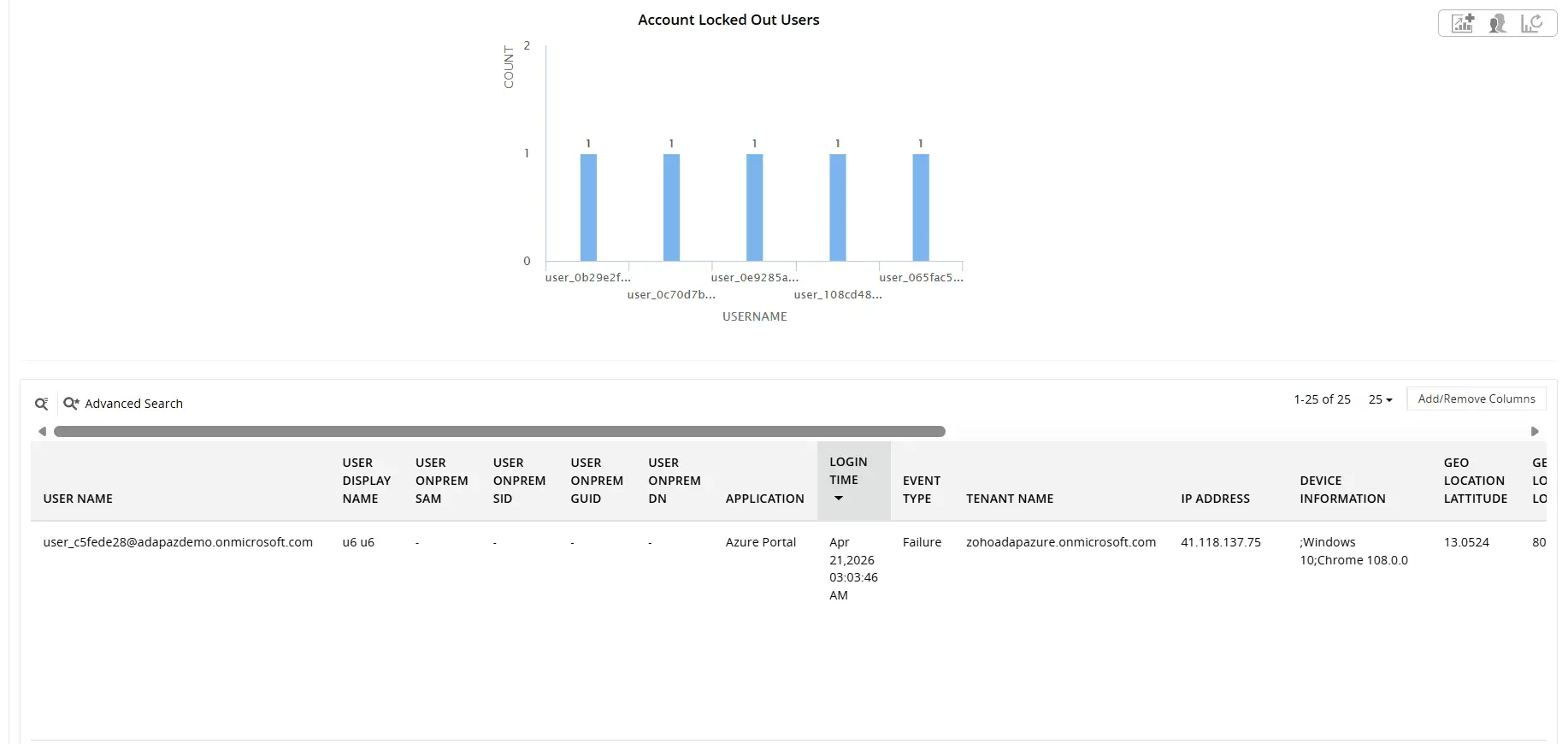
Find locked out Entra ID user accounts and their relevant details including User Principal Name, On-prem SID, caller IP, and more
Why native tools fall short
Microsoft provides two free utilities (LockoutStatus.exe and ALTools.exe) for investigating account lockouts, and both have real limits. Neither tool handles:
- Real-time alerting when a lockout occurs
- Historical trend analysis or lockout frequency baselines
- UBA-driven anomaly detection for lockout spikes
- Automated ITSM ticket creation
- A centralized audit trail across all domain controllers without manual CSV correlation
- Coverage of Microsoft Entra ID lockout events
In any environment where lockouts affect business continuity, trigger support tickets, or need to be correlated with security events, these gaps cost real time. ADAudit Plus covers all of it: root cause identification, real-time alerts, ITSM ticket creation, and Entra ID coverage, without manual log correlation or per-machine investigation.
4 compelling reasons to choose ADAudit Plus
Widely recognized
ADAudit Plus has been recognized as a Gartner Peer Insights Customers' Choice for Security Incident & Event Management (SIEM) for four consecutive years.
Easy deployment
Go from downloading ADAudit Plus to receiving predefined reports and alerts in under 30 minutes, without any professional help.
Competitive pricing
ADAudit Plus is licensed per-server, unlike other IT auditors which are licensed per-user. With per-server licensing, even with a growing number of users each year, you can continue to ingest log data without additional costs.
Unified visibility
ADAudit Plus consolidates auditing, security, and compliance across Active Directory, Entra ID, Windows servers, workstations, and file servers into a single pane of glass, eliminating the need to juggle multiple tools.
Frequently asked questions
The most common causes are stale credentials on a device after a password change, mapped network drives authenticating with an old password, and scheduled tasks or services running with an outdated password. The Account Lockout Analyzer identifies exactly which one triggered the event.
The Account Lockout Analyzer consolidates Event ID 4740 data from across your domain controllers and parses the associated authentication events to determine the originating machine, IP address, and the process or device that submitted the bad credentials. The result lands in a single report row, with the full logon history right beside it.
Yes. The Account Locked Out Users report covers Entra ID lockouts with source IP, geo-location, application, and MFA details. For hybrid environments, the Hybrid Logon Activity report correlates on-premises AD and Microsoft Entra ID authentication events in a single view.
Both the Account Lockout Analyzer and the Recently Locked Out Users report surface the originating machine and IP address in the same row as the lockout event. If an alert is configured, your team has that required information the moment it fires.
Yes. A default Account Lockout alert profile is included out of the box and works without configuration. ADAudit Plus sends email or SMS notifications and can auto-create a ticket in ServiceNow, Jira, Zendesk, ManageEngine Service Desk Plus, Freshservice, or Kayako. You can also tune the threshold to avoid noise from routine mistyped passwords.