

- Free Edition
- Quick Links
- Active Directory Auditing
- Active Directory auditor
- Active Directory monitoring
- Account lockout analyzer
- Login monitoring software
- Active Directory change notifier
- User logon audit reports
- AD logon logoff tracker
- User logon failure auditing
- Login history tracking tool
- AD change auditor
- Insider threat detection software
- Permissions change auditing
- Entra ID reporting
- Privileged user monitoring
- User behavior analytics tool
- Active Directory security monitoring
- Group Policy auditing tool
- GPO change auditor
- Entra ID auditing
- Audit user account management
- OU change auditor
- Audit group membership changes
- Active Directory auditing and reporting tool
- GPO reporting tool
- Remote desktop monitoring software
- PowerShell logging and auditing
- Azure password protection auditing
- Azure sign-in risk detection
- File Server Auditing
- Windows Server Auditing
- Employee Tracking
- Workstations Auditing
- Compliance Auditing
- Other features
- SIEM Integration
- Windows DNS - Schema Auditing
- Windows security event log monitoring
- SIEM audit solution
- Schedule Active Directory change reports
- Reports from Archived Data
- Aggregated summary reports
- AD new/old attribute changes
- Audit trail
- Audit Active Directory LAPS
- Scheduled Reports & Alerts
- Account lockout examiner
- Industry
- Documents
- Success Stories
- Related Products
- Log360 (On-Premise | Cloud) Comprehensive SIEM and UEBA
- ADManager Plus Active Directory Management & Reporting
- ADAudit Plus Real-time Active Directory Auditing and UBA
- ADSelfService Plus Identity security with MFA, SSO, and SSPR
- DataSecurity Plus File server auditing & data discovery
- Exchange Reporter Plus Exchange Server Auditing & Reporting
- M365 Manager Plus Microsoft 365 Management & Reporting Tool
- RecoveryManager Plus Enterprise backup and recovery tool
- SharePoint Manager Plus SharePoint Reporting and Auditing
- AD360 Integrated Identity & Access Management
- AD Free Tools Active Directory FREE Tools
File server change audit reports from ADAudit Plus
ADAudit Plus alerts about file changes by monitoring Windows file server events in real-time, tracking who (user), what (action), when (time), and where (location) files were modified, moved, or deleted.
Real-time file change detection
Capture every file and folder event (create, modify, delete, move, rename, and copy) the moment it happens. Reports break down activity by user, server, and share so you can trace any change without digging through raw event logs.
Permission change auditing
Track every NTFS permission change in your file servers with full before-and-after ACL values, along with folder owner changes, and SACL modifications.
Early threat detection
Attackers often alter configuration files, binaries, or system logs to establish persistence, escalate privileges, or hide their tracks. Instant alerts via email and SMS allow security teams to stop attacks before they escalate.
Ransomware and anomaly detection
Machine learning baselines normal file activity per user and flags spikes in file modifications or deletions that match ransomware encryption patterns, not just static volume thresholds.
Automated audit report delivery
Schedule file server reports to run hourly, daily, weekly, or monthly and deliver them automatically to auditors, IT managers, or compliance teams. No manual intervention required.
Custom report profiles
Combine specific users, file shares, and action types into saved report views. Revisit them on demand or include them in scheduled delivery without rebuilding filters each time.
Coverage beyond Windows file servers
ADAudit Plus covers over 13 supported file store types: Windows File Server, NetApp, EMC, Synology, QNAP, Amazon FSx, Azure File Share, Nutanix Files, and more, all from a single console.
Compliance-ready file audit trails
Pre-configured compliance reports map file access and permission change events to SOX, HIPAA, PCI-DSS, GLBA, GDPR, and ISO 27001 requirements, ready for auditors without custom scripting.
Why monitor file server changes
Every time a file is created, modified, deleted, renamed, or moved on your network, that event writes to a Windows security log on the host server. Without a central auditing solution, those events stay isolated on each server, visible only to someone who already knows where to look and what to search for.
File server auditing collects those events from every monitored server, correlates them into structured reports, and makes the complete activity record searchable and reportable from a single console. ADAudit Plus extends this further by adding real-time alerts, user behavior analytics, and automated responses, so the audit trail is not just a record of what happened but an active part of your security posture.
What ADAudit Plus audits on your Windows file servers
| Area | What ADAudit Plus captures |
|---|---|
| File create, modify, delete | Every write, deletion, and creation event with the user, source machine, IP address, and exact timestamp |
| File move, rename, and copy | Source and destination paths for moved and renamed files; source and destination for copy-paste operations |
| File read access | Successful read events per file, per user, per machine, including read attempts from unusual sources |
| Failed access attempts | Denied read, write, and delete attempts with the user and machine that triggered the denial |
| Folder permission changes | NTFS DACL changes with old and new permission values; folder owner changes; SACL changes |
| Share-level changes | Network share creation, deletion, and modification events |
Track every file and folder change in real time
When an incident occurs on a file server, the first question is always who did it and from where. ADAudit Plus answers both without requiring you to log into individual servers or parse raw Windows security event logs. Every file operation is captured with user identity, source machine, IP address, file path, and timestamp, and denied operations are listed in dedicated reports for easy investigation.
- Trace every file create, modify, delete, move, rename, and copy event back to the originating user and machine.
- Know whether a file operation was initiated by a process, and how active that process is in that file server.
- Audit every denied read, write, and delete attempt with the user and machine behind it.
- Correlate failed access events with successful logon activity to build a fuller picture of suspicious behavior.
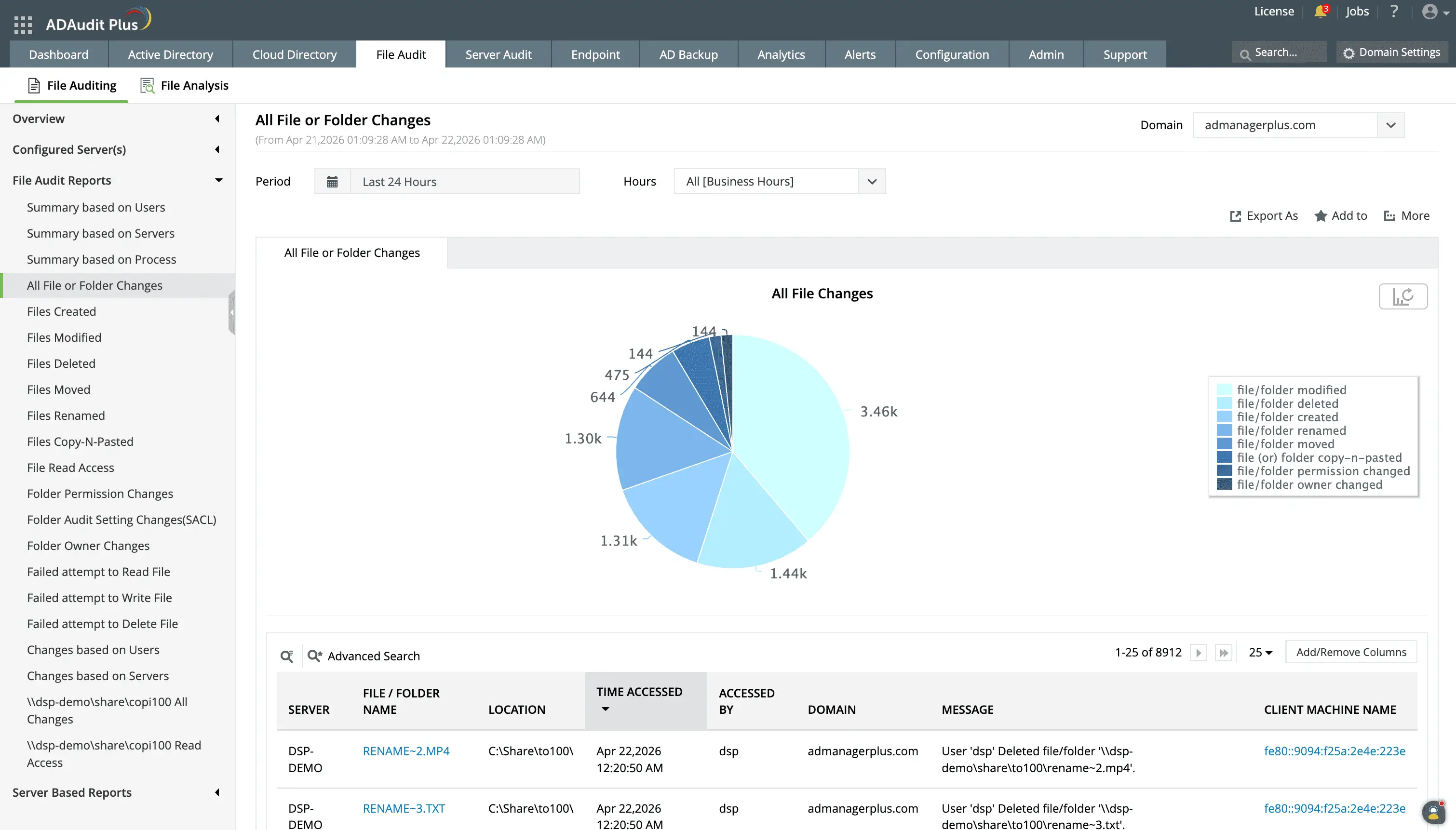
Audit all successful and failed attempts to change files stored in Windows file servers.
You can report on actions performed by a specific user, in a particular server, or within a specified duration.
Audit file permission changes
Permission change auditing provides a detailed log of who modified access rights, which is critical for identifying insider threats and detecting privilege escalation. ADAudit Plus captures the complete old and new permission values on every DACL change, alongside share creation, deletion, and modification events.
- Track DACL changes on any monitored folder with before-and-after ACL values to know exactly what has been changed.
- Detect folder ownership change events since a change in ownership can signify an unauthorized attempt to access critical data.
- Be in the know of attempts to modify permissions in bulk, since this is a critical indicator of malware and insider threats.
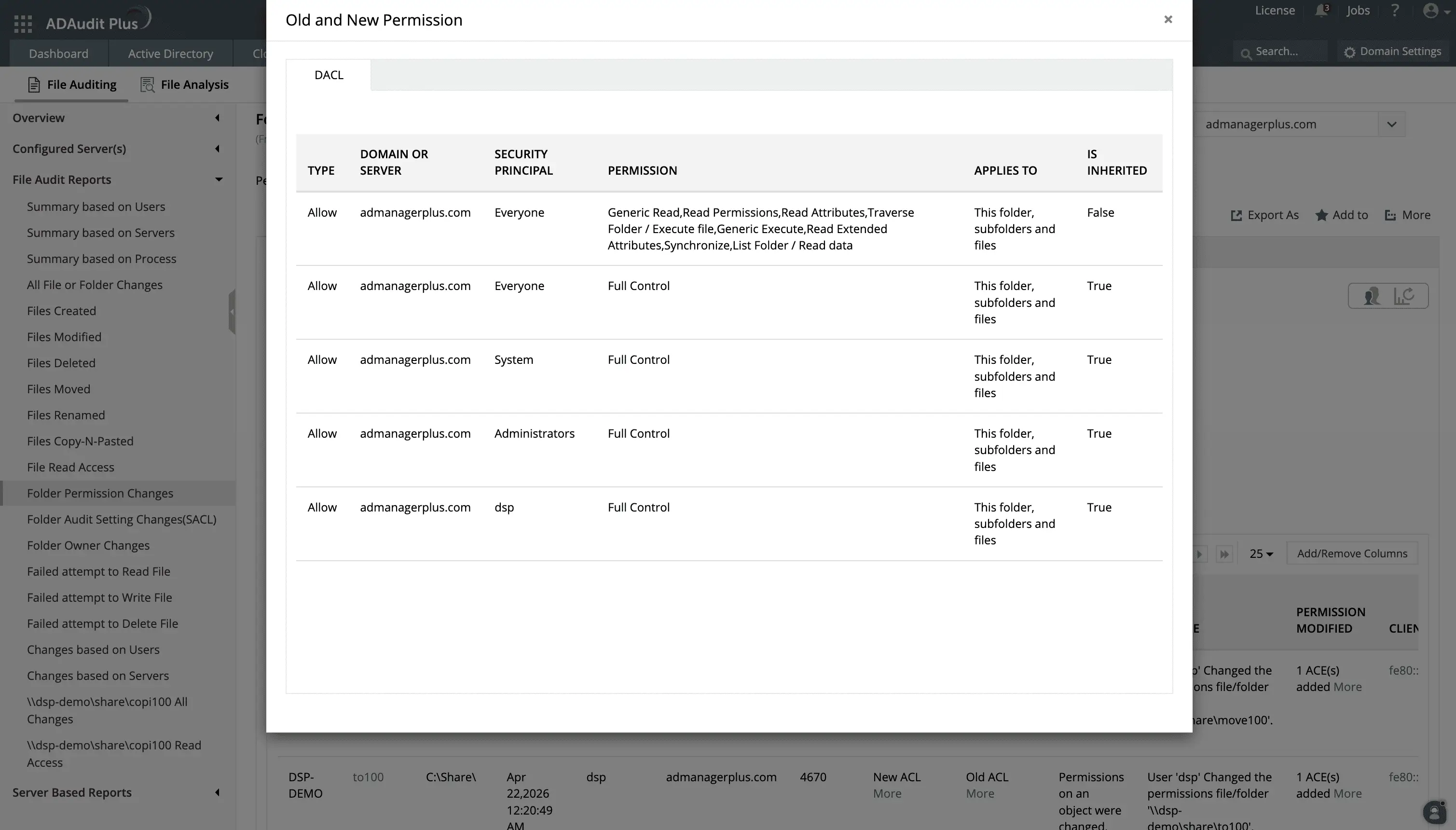
Beyond knowing that a permission change has occurred, you can also drill down and see what ACLs have been modified in the change.
Knowing if a permission is inherited or explicit is crucial for managing security, troubleshooting access issues, and auditing data access. When a permission is modified you can see if it will be inherited.
Get real-time alerts on critical file server events
File change alerts are essential for maintaining security since they ensure IT teams detect unauthorized modifications or ransomware threats quickly and enabling prompt action. ADAudit Plus ships with pre-configured profiles for the file server events most likely to signal a security incident or policy violation, so your team knows about them within seconds. These profiles come im handy when:
- Files or folders are deleted in bulk, your team receives an immediate notification so you can assess whether the deletion is authorised before the window to recover closes.
- Folder permissions change on a critical share, an alert fires regardless of what time the change was made, so after-hours modifications do not go unnoticed until morning.
- ADAudit Plus observes file modification patterns consistent with encryption activity, giving you the earliest possible signal to isolate the affected machine.
You can control alert thresholds, so high-volume environments only escalate events that genuinely require action rather than generating noise on routine operations. Alert delivery covers both email and SMS, and ADAudit Plus can auto-create a ticket in ManageEngine ServiceDesk Plus, ServiceNow, Jira, Freshservice, or your other connected ITSM tool.
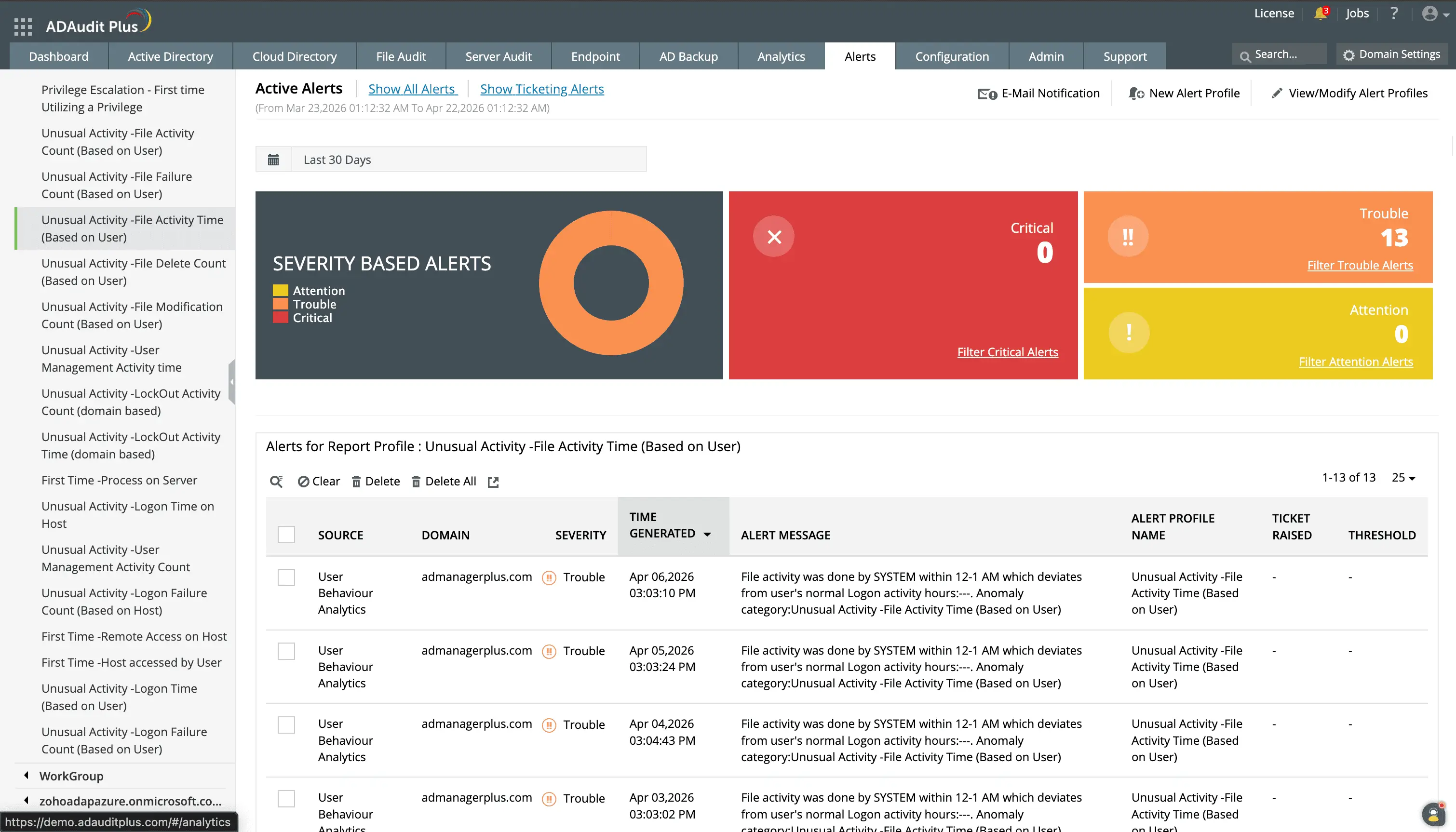
While ADAudit Plus comes with numerous alert profiles for popular criteria, you can also custom-create your own.
You can configure the profile to not just raise an alert but also automatically connect to your ticketing tool instance and raise a corresponding ticket for the AD incident.
Detect ransomware and anomalous file activity
Static thresholds catch spikes you anticipated. Machine learning catches the ones you did not. ADAudit Plus applies user behavior analytics to file server activity, building a baseline of normal file operation volume and timing per individual user and flagging deviations from that baseline rather than from a domain-wide average.
A backup operator who modifies hundreds of files nightly looks nothing like a sales user doing the same thing at 2am. ADAudit Plus distinguishes the two because it baselines each user independently. With this capability, you can:
- Flag users whose file modification rate exceeds their personal baseline, the earliest reliable indicator of ransomware encryption activity.
- Spot deletion spikes that match data destruction, separately from normal file cleanup operations.
- Detect suspicious behavior like mass file operations at unusual hours and exfiltration attempts.
- Identify accounts probing files they cannot reach, separating reconnaissance from routine permission errors
Automate file server audit report delivery
ADAudit Plus helps both the security team that reviews reports reactively and the compliance team that needs them delivered on a schedule. Every file server report can be scheduled for automatic delivery on an hourly, daily, weekly, or monthly cadence.
- Schedule any default or custom file server report to run automatically and deliver results by email without requiring admin intervention at each cycle.
- Save any combination of users, shares, audit actions, and date ranges as a named profile for scheduled use.
- Include custom profiles in scheduled delivery runs alongside default reports for incident investigations without disrupting the scheduled run.
Extend coverage to NAS devices and cloud file stores
Windows File Server is one of 13+ file store types that ADAudit Plus monitors from a single console. The same file activity reports, alert profiles, and compliance coverage you apply to Windows servers extend directly to NetApp, EMC Isilon, Synology NAS, QNAP, Amazon FSx, Azure File Share, Nutanix Files, CTERA Edge Filers, and Qumulo NAS, without deploying separate tools or retraining your team on a different interface.
Meet file server compliance requirements
File server audit trails are a documented requirement under every major compliance framework your organisation is likely to operate under. ADAudit Plus provides pre-configured compliance report sets for SOX, HIPAA, PCI-DSS, GLBA, GDPR, ISO 27001, and FISMA, mapped to the specific file access and permission change controls each standard requires.
Custom report profiles extend this further: you can build a compliance-specific profile that targets the exact shares and user groups an auditor will ask about, and deliver it on the schedule your audit cycle requires.
Why native Windows file server change auditing falls short
Windows does log file server events, but only on the server where they occurred. Security event logs are stored locally on each file server, which means investigating an incident across five servers requires logging into five machines, running separate queries, and manually correlating results. At any meaningful scale, that process is not practical as a real-time response capability.
Enabling object access auditing through Group Policy also requires per-folder configuration. Every folder you want to audit needs its SACL set correctly before events will appear in the log, a configuration step that is easy to miss on new shares and difficult to audit at scale.
ADAudit Plus centralises collection from every monitored server, enforces coverage without per-folder manual configuration, retains events beyond the native log size limit, and triggers alerts the moment a critical event occurs.
Download a free 30-day trial of ADAudit Plus and start getting real-time alerts on every critical file server change across your environment.
Frequently asked questions
A file server change auditing solution is software that monitors, records, and reports on all activities related to files, folders, and permissions on a network. It provides real-time visibility into who accessed, modified, moved, or deleted sensitive data, as well as who changed access permissions. ADAudit Plus does this not just for Windows file servers, but also for multiple NAS platforms along with pre-configured alert profiles, user behavior analytics, and automated ticket creation.
Native Windows security event logs are stored locally on each server, requiring separate logins and queries per machine. ADAudit Plus centralises collection from all monitored servers into one console, where you can search, filter, and report on file activity across your entire environment without accessing individual servers.
ADAudit Plus captures every file change event with the user identity, source machine, IP address, and timestamp. Its reports show both successful reads and denied attempts. Both are available per server, per user, and in aggregate across all monitored file stores.