Understanding DNS Resolution: How websites become visible
Have you ever typed a web address like www.example.com into your browser and wondered how, in a blink, the page appears? The magic behind this seamless experience is DNS resolution, a fundamental process that translates human-friendly domain names into the numerical Internet Protocol (IP) addresses that computers use to communicate. Without DNS, navigating the internet would involve memorizing complex strings of numbers.
This comprehensive guide on DNS resolution delves into the basics of the Domain Name System (DNS) and the intricate steps of DNS resolution. We'll explore the crucial role of DNS resolvers, the collaborative effort of various DNS servers, and the detailed DNS lookup process. By the end, you'll have a clear understanding of how DNS ensures the smooth and reliable functioning of the internet.
What is a DNS resolver?
A DNS resolver, also known as a recursive DNS server, is the initial point of contact in the DNS server hierarchy when your device attempts to access a website. Its primary function is to translate domain names (like www.example.com) into IP addresses through the process of DNS resolution. Unlike other DNS servers, a resolver doesn't typically hold all the DNS records itself. Instead, it intelligently queries other specialized DNS servers – root name servers, Top-Level Domain (TLD) name servers, and authoritative name servers – to find the correct IP address. Acting as a crucial bridge between your browser and the vast expanse of the internet, the DNS resolver is essential for ensuring fast and reliable web access.
How DNS resolution works: A step-by-step journey
Let's say you wanted to read about oputils. When you type oputils.com into your browser, a behind-the-scenes journey unfolds in milliseconds:
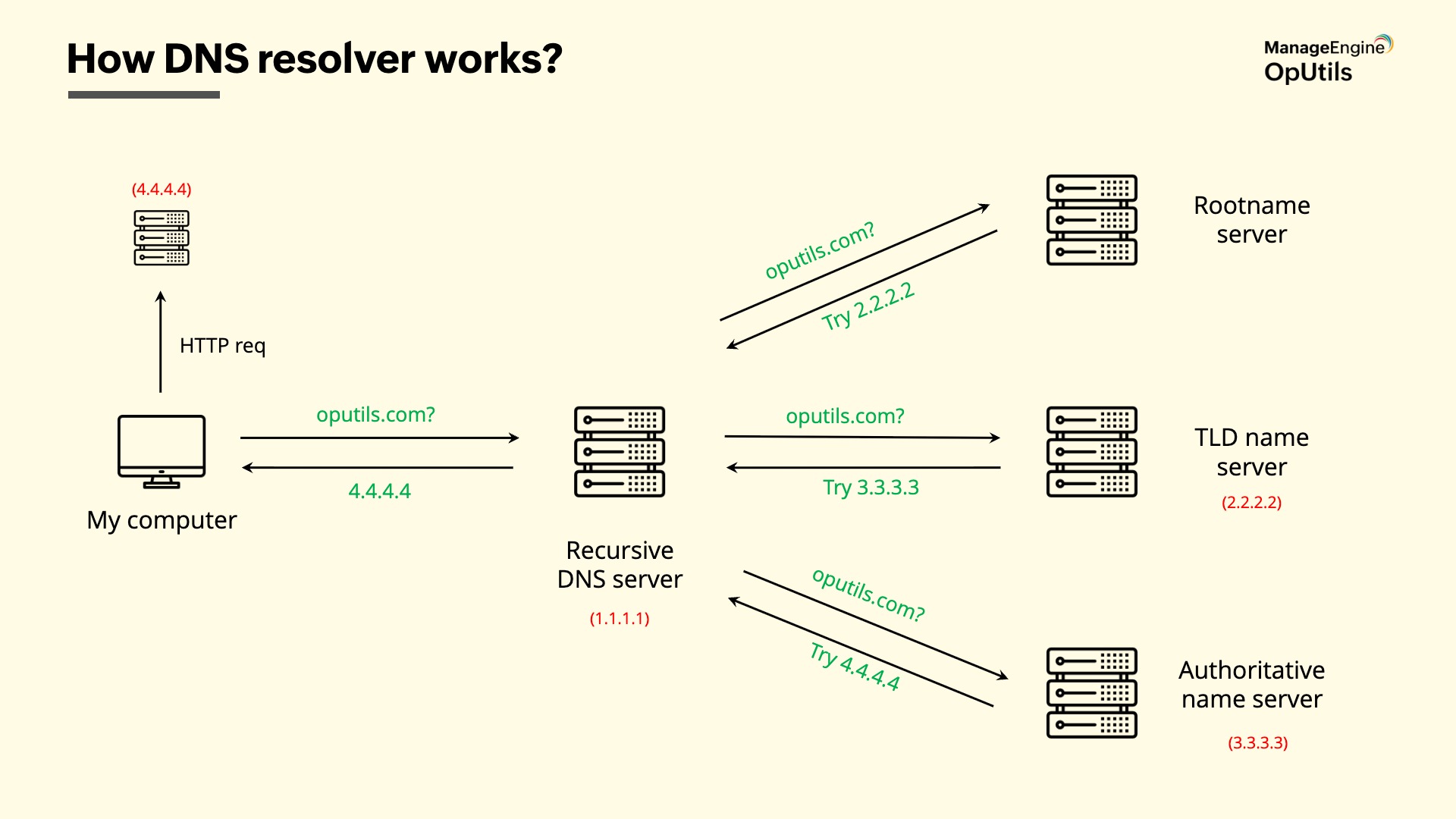
- DNS query initiation: Your computer sends a DNS query to a configured recursive DNS server (often provided by your Internet Service Provider - ISP, or a public DNS resolver like 1.1.1.1).
- Local cache check: The resolver first checks its local cache. If it has recently resolved oputils.com, it can provide the IP address directly, speeding up the process.
- Querying the root name servers: If the IP address isn't in the cache, the resolver initiates the resolution process by querying a root name server. These servers don't know the specific IP address for oputils.com, but they direct the resolver to the appropriate TLD name server. The root server's response might be, "To find .com addresses, query the TLD name server at 2.2.2.2."
- Querying the TLD name servers: Next, the resolver contacts the TLD name server responsible for the .com top-level domain. This server manages information for all websites ending in .com. It doesn't know the exact IP for oputils.com but holds information about the authoritative name server for that specific domain. The TLD server might reply, "The authoritative name server for oputils.com is at 3.3.3.3." TLD name servers manage various top-level domains like .org, .net, .in, etc.
- Querying the authoritative name servers: Finally, the resolver reaches out to the authoritative name server for oputils.com. This server holds the definitive DNS records for the oputils.com domain, including the A record (which maps the domain name to an IPv4 address) or AAAA record (mapping to an IPv6 address). The authoritative server responds with the correct IP address for example.com, for instance, 4.4.4.4.
- Returning the IP address: The recursive DNS resolver receives the IP address from the authoritative server and returns it to your computer.
- Establishing a connection: Your computer uses this IP address (4.4.4.4) to send an HTTP/HTTPS request directly to the web server hosting the oputils.com website, allowing the page to load in your browser.
This entire behind-the-scenes communication typically happens within milliseconds, ensuring a seamless browsing experience. You might have various questions, such as who owns the recursive DNS server, what distinguishes a web server from a DNS server, and more. Here’s a comprehensive explanation to address these queries.
Difference between recursive vs non-recursive DNS queries
What is a recursive DNS resolver?
A recursive DNS resolver is responsible for fully resolving a domain name into an IP address by querying multiple DNS servers if necessary. When a user queries a recursive resolver, it retrieves the required information, contacts other DNS servers along the way, until it returns the final answer to the client.
How it differs from iterative resolution?
- Recursive resolution: The DNS resolver takes on the full responsibility of resolving the query. It queries other DNS servers as needed, returning the final result to the client once it has obtained the IP address.
- Non-recursive/iterative resolution: In this method, the client (or DNS resolver) queries DNS servers one at a time. If the queried server doesn’t have the answer, it provides the next authoritative server to query, and the process continues iteratively until the information is found.
Examples and use cases
- Recursive resolution: This is typically used in situations where a user queries their local ISP’s DNS server, and the server is responsible for fully resolving the domain name to an IP address.
- Non-recursive resolution: This is often used by authoritative DNS servers. In contrast, the authoritative DNS server doesn’t query other servers; it simply provides the answer to the query based on its own records.
Web server vs. DNS server
A web server is a system that stores, processes, and delivers the content of websites to users upon request. This content includes HTML files, images, videos, and other associated files. Once your browser knows the correct IP address of a website, it sends a request to the web server at that IP address to retrieve the website's content.
Key difference: Unlike a DNS resolver, which translates domain names into IP addresses, a web server hosts the actual website content and serves it to the client. Think of DNS as the phonebook that gives you the address, and the web server as the house at that address.
DNS forwarder vs. DNS resolver
A DNS forwarder is a server that receives DNS queries from clients but does not resolve them itself. Instead, it forwards these queries to another DNS server (often a resolver or another forwarder) to resolve. A forwarder relies on external servers for the actual resolution process and may have limited or no caching.
Core differences: Who resolves the query and caching behavior?
- DNS resolver: The resolver is responsible for fully resolving the query. It performs the entire lookup process, contacting multiple DNS servers if necessary, and often caches the results to speed up future queries.
- DNS forwarder: The forwarder does not resolve the query itself. It simply forwards the request to another DNS server that performs the resolution. Forwarders typically do not cache responses themselves but may rely on the resolver they forward to for caching.
When to use a resolver vs a forwarder
- DNS resolver: Use a DNS resolver when you need to fully resolve DNS queries independently. It’s ideal for situations where you want direct control over the DNS resolution process and caching. Example: A local DNS server resolves the domain "example.com" by querying root, TLD, and authoritative servers to return the IP address.
- DNS forwarder: Use a DNS forwarder when you want to offload the resolution process to another server or need a centralized server to handle DNS queries for multiple clients. It's often used in environments where multiple DNS servers are involved, or in networks where a DNS server forwards queries to an external resolver to improve efficiency or security. Example: A corporate DNS server forwards all external queries to Google’s DNS server (8.8.8.8) for resolution.
DHCP server vs. DNS resolver
A DHCP (Dynamic Host Configuration Protocol) server is a network server that automatically assigns IP addresses to devices on a network. It ensures that each device receives a valid IP address to communicate effectively within the network.
IP address assignment (DHCP) vs name resolution (DNS)
- DHCP: Provides IP addresses to devices on the network, ensuring they can communicate with other devices or servers.
- DNS: Resolves human-readable domain names to machine-readable IP addresses, enabling devices to access websites or services by name instead of numeric addresses.
Why both are needed on a network
- DHCP ensures connectivity: Devices need valid IP addresses to communicate with other devices and servers on the network.
- DNS enables easy access: Users interact with the internet using domain names, and DNS is essential for translating these names into the IP addresses of the servers hosting the desired resources.
DNS resolver vs. DNS forwarder vs. DHCP server: A feature comparison
| Feature | DNS Resolver | DNS Forwarder | DHCP (Dynamic Host Configuration Protocol) |
|---|---|---|---|
| Primary function | Resolves domain names to IP addresses | Forwards DNS queries to another DNS server | Assigns IP addresses and network config to devices |
| Query handling | The resolver itself handles and completes the lookup | Forwards query to another resolver or upstream server | Not applicable – assigns IPs, doesn’t resolve names |
| Caching | Yes – caches resolved DNS responses | May or may not cache responses | No caching – provides temporary IP leases |
| Use case | When you want full control over DNS resolution | To centralize or offload DNS queries | When you want to automate IP address assignment |
| Query source | Clients (like browsers or OS) | Local DNS servers or clients | Devices joining the network (e.g., laptops, phones) |
| Response type | Final IP address of the domain | Same as the resolver it forwards to | IP address, subnet mask, gateway, and DNS info |
| Example | Google DNS (8.8.8.8), Cloudflare DNS (1.1.1.1) | Internal DNS server forwarding to Google DNS | Home router assigning IPs to connected devices |
What is a public DNS resolver?
A public DNS resolver is a DNS server available for anyone to use, usually offered by third-party providers. Instead of using your ISP’s DNS resolver, you can configure your device or network to send DNS queries to a public resolver for name resolution. Here are some of the popular public DNS resolver examples.
- Google Public DNS - 8.8.8.8 and 8.8.4.4
- Cloudflare DNS - 1.1.1.1 and 1.0.0.1
- OpenDNS (by Cisco) - 208.67.222.222 and 208.67.220.220
What is caching in a DNS resolver? Speeding up lookups
DNS resolver caching is the process of temporarily storing previously resolved domain name queries. When a user requests a domain, the resolver checks its cache first before performing a full DNS lookup.
By serving responses from the cache, the resolver avoids repeated lookups for the same domain. This speeds up DNS responses for users and reduces the load on upstream DNS servers, improving overall network efficiency.
Each DNS record comes with a TTL value that tells the resolver how long it can keep the record in cache. Once the TTL expires, the resolver must query the authoritative server again to get an updated response.
How is DNS resolver configured?
Setting up your own DNS resolver can improve privacy, performance, and control over DNS traffic. Tools like BIND and Unbound are popular open-source DNS resolver options that can be installed on servers or local machines. For basic system-level changes, users can configure DNS settings directly in their operating systems - whether on Windows, Linux, or macOS - by specifying preferred DNS servers.
Network-wide configuration is also possible by setting DNS resolvers on routers or firewalls, directing all connected devices through a chosen resolver. While basic setups handle general name resolution, advanced configurations can include DNSSEC validation, access control, and caching optimizations.
DNS resolver security best practices
DNS resolvers are attractive targets for various cyber threats, including:
- DNS spoofing: Attackers inject false DNS records into a resolver's cache, redirecting users to malicious websites even when they type in legitimate addresses.
- Cache poisoning: Similar to spoofing, this involves corrupting the DNS cache with fake information.
- DoS (Denial of Service) and DDoS (Distributed Denial of Service) attacks: Overwhelming the resolver with a flood of queries, making it unavailable to legitimate users.
- Amplification attacks: Exploiting DNS servers to amplify the volume of malicious traffic sent to a target.
DNS resolver security best practices
To safeguard your DNS resolver and ensure the integrity and availability of your DNS infrastructure, it's crucial to implement the following best practices:
- Enable DNSSEC (Domain Name System Security Extensions): DNSSEC adds digital signatures to DNS responses, allowing resolvers to verify the authenticity and integrity of the data and prevent tampering. This establishes a chain of trust back to the root zone.
- Implement rate limiting: Control the volume of DNS queries a resolver will process within a specific time frame. This helps mitigate abuse from malicious traffic and prevents DoS attacks.
- Protect against amplification attacks: Configure your resolver to avoid being used as a tool in DDoS attacks. This includes disabling recursive queries from untrusted sources and implementing response rate limiting.
- Regular monitoring and logging: Invest in a DNS monitoring tool and regularly review resolution logs to detect unusual query patterns, suspicious activity, or potential intrusions early.
Implementing these security measures is vital for maintaining the trustworthiness, availability, and integrity of your network's DNS resolution process.
Why OpUtils is the right DNS resolver tool for your network
OpUtils’ DNS Resolver tool enables you to retrieve DNS details for IPv4/IPv6 addresses and hostnames by querying your network’s DNS records. Whether you're managing hardware DNS, software-based servers, or network devices acting as DNS servers, OpUtils helps ensure accurate IP-to-host mapping, essential for maintaining network reliability and performance.
OpUtils' DNS resolver is a powerful tool that enhances network reliability and visibility by ensuring availability by proactively detecting DNS resolution issues, tracking responsiveness to monitor DNS latency and optimize performance, reducing security risks by identifying anomalies such as spoofed entries or unusual delays, supporting efficient routing and switching by aiding in DNS-aware network configurations, and offering deep insights when used with tools like Ping and Traceroute for complete DNS diagnostics.
As part of its unified DDI management approach, OpUtils brings DNS resolution monitoring together with DNS zone and record visibility in a single console.
Download our free, 30-day trial or schedule a live demo with a product expert today!
Frequently asked questions on DNS resolution
Can I use multiple DNS resolvers?
+Is it safe to use public DNS servers?
+Which is the fastest DNS resolver?
+How can I test my DNS resolver?
+Is 1.1.1.1 a DNS resolver?
+Is 8.8.8.8 a DNS resolver?
+What is the best DNS resolver?
+Ensure simplified IP address management with OpUtils
Try OpUtils for free today