Multi-factor authentication
Note: Multi-factor authentication (MFA) for endpoints, VPNs, and SSO require the Professional edition of ADSelfService Plus with Endpoint MFA. Refer to the pricing page for more details.
ADSelfService Plus' MFA augments traditional username- and password-based authentication with an additional layer of authentication (for example, biometrics, TOTP codes, or FIDO Passkeys) to verify a user's identity. MFA provides a high level of identity assurance for access requests.
You can enable MFA in ADSelfService Plus to secure access via:
- Endpoint MFA for Windows, macOS, and Linux, including offline MFA for Windows and macOS machines
- SSO for enterprise applications
- MFA for VPNs and all endpoints supporting RADIUS authentication, like Citrix Gateway, VMWare Horizon, and Microsoft Remote Desktop Gateway
- MFA for Outlook on the web and the Exchange admin center (EAC)
- Self-service password resets and account unlocks, and logins to the ADSelfService Plus portal
To enable MFA for these events, follow these steps:
- Configure the authentication methods you want to use for MFA.
- Enable the MFA methods you've configured for the required resources.
Please refer to the authenticators page for the list of supported authentication methods and how to configure them.
Combined with Conditional Access, MFA for Endpoints can be enabled only for high-risk users, ensuring high-risk actions stay secure while minimizing the impact on the user experience overall. To learn more about Conditional Access, click here.
Enabling MFA for a specific sets of users
ADSelfService Plus enables you to configure MFA for two sets of users:
Domain users
Domain users are part of an AD domain and are typically imported into ADSelfService Plus via the AD Synchronizer set up during domain configuration.
To configure MFA for domain users, first assign them to a policy. You can then apply MFA settings to that policy, and all the users under that policy will have MFA configured for them.
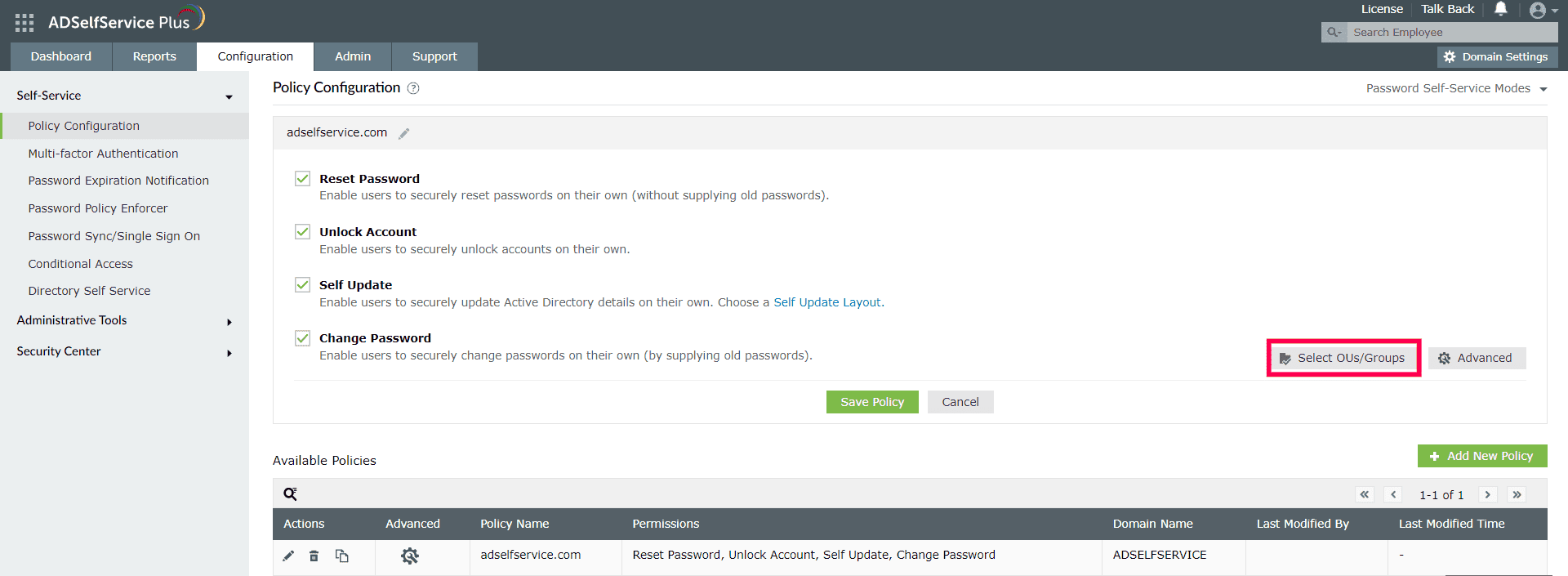
- Go to Configuration > Self-Service > Policy Configuration, choose a policy of your choice, and click the Edit icon. You can also create a new policy by clicking the Add New Policy button.
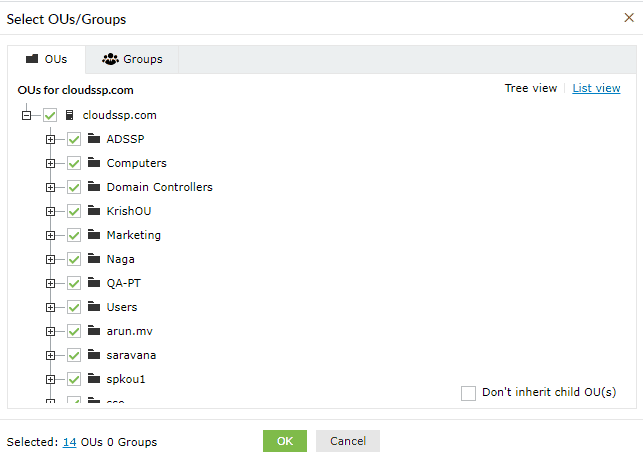
- Click the Select OUs/Groups button and select the specific set of users for whom you wish to enable MFA. Click OK.
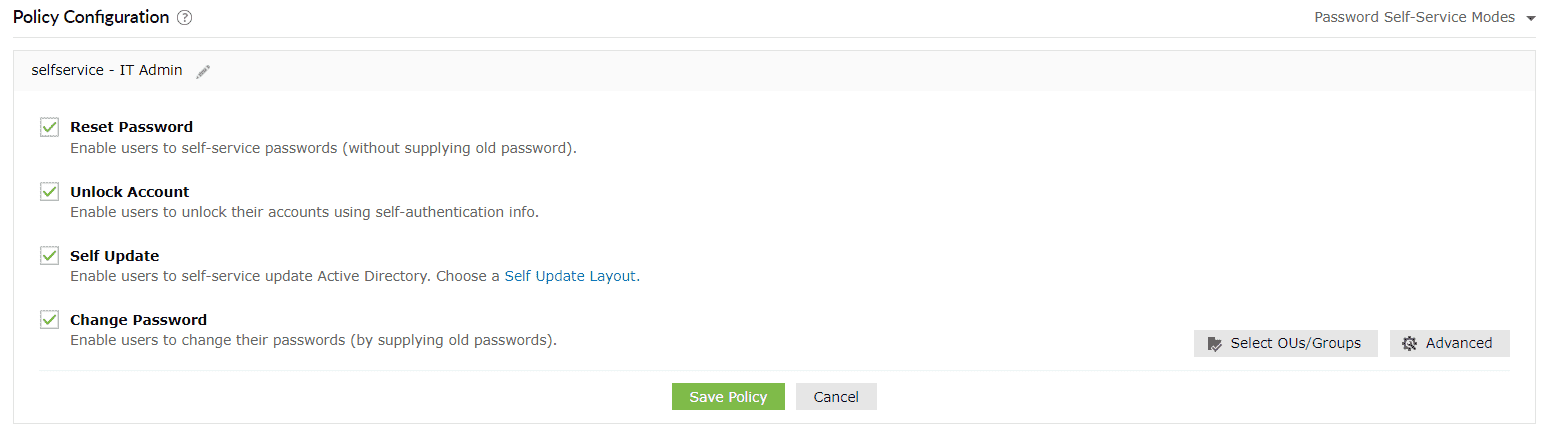
- Select the password self-service features (Reset Password, Unlock Account, Self Update, or Change Password) that you wish to enable for the selected users. Click Save Policy.
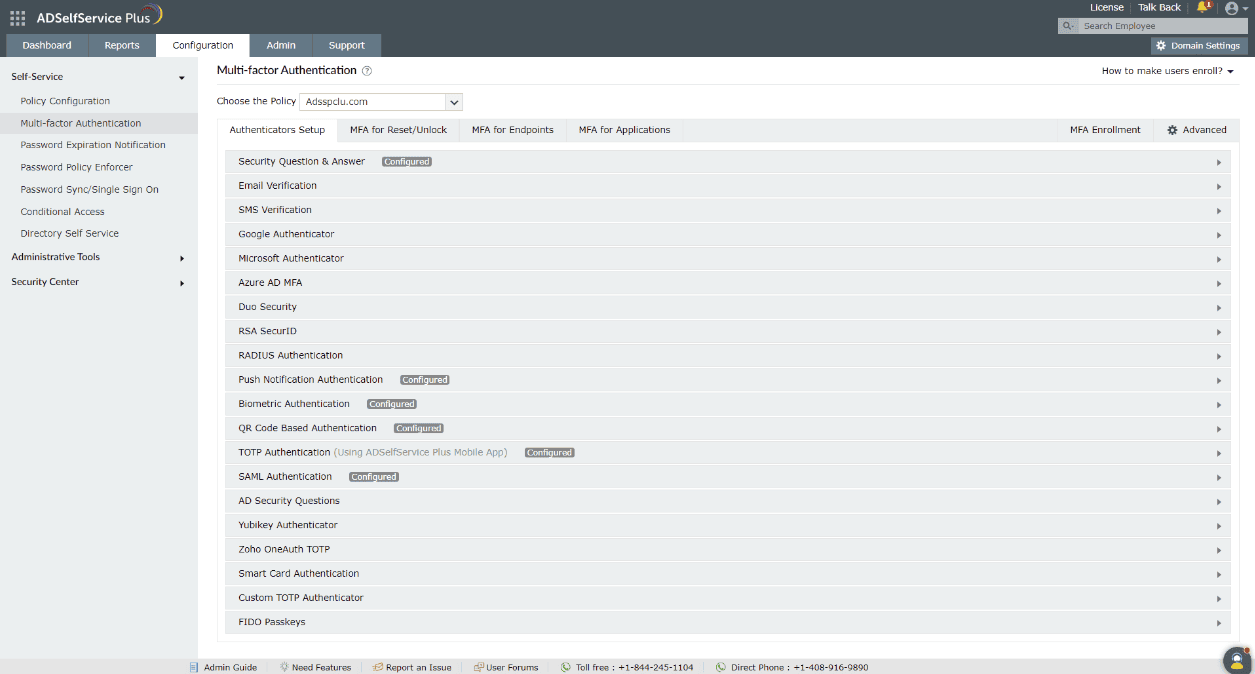
- Go to Configuration > Self-Service > Multi-factor Authentication > Authenticator Setup and select a policy from the Choose the Policy drop-down.
- Configure the authentication methods that you want to enable for the selected policy.
- Click Save.
How to force enrollment for specific authentication methods
Domain users must enroll themselves by providing the necessary information, as per the enabled authentication methods, to be able to prove their identity. For example, if you have enabled biometric authentication, users must scan their fingerprint or face using the ADSelfService Plus mobile app, only after which they will be able to use their biometrics during password reset or endpoint logins.
To force enrollment for specific authentication methods:
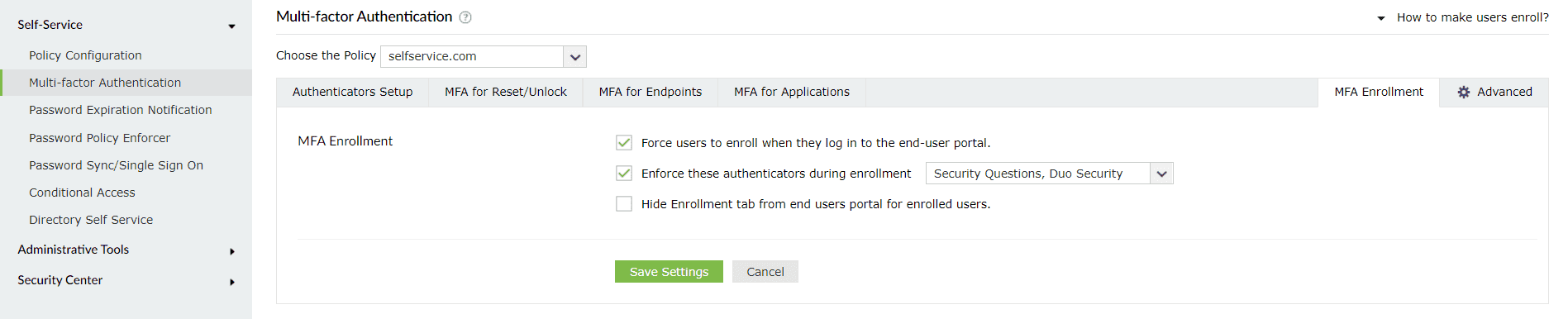
- Go to Configuration > Self-Service > Multi-factor Authentication > MFA Enrollment.
- Select Force users to enroll when they log in to the end-user portal option. This will prevent users from accessing other features in the self-service portal before entering their enrollment information.
- Select Enforce these authenticators during enrollment and choose the authenticators to be set as mandatory.
- You can also choose to hide the Enrollment tab in the end-user portal for enrolled users.
- Click Save Settings.
Local users
Note: Local User MFA is supported only on Windows machines and requires the Professional edition of ADSelfService Plus with Endpoint MFA.
Local users are accounts created directly on a specific computer and exist only on that machine. They are not managed through a network domain and authenticate using credentials stored locally. Local users can be present on both standalone and domain-joined machines, and are typically used for administrator access or for logging into Workgroup or offline systems that don’t rely on a central directory like AD. Click here to learn more.
Authenticators and functions supported by the various MFA types
This table provides detailed information on each MFA type, including the supported authenticators and the settings and options available to improve the functionality and security of the authentication process.
| MFA type | Authentication methods supported | Passwordless login | Backup recovery codes | CAPTCHA |
|---|---|---|---|---|
| MFA for self-service actions via the web portal | All the authenticators supported by ADSelfService Plus | Not applicable | Supported | Supported |
| Self-service actions from the GUI machine login screen for Windows, macOS, and Linux machines | All the authenticators supported by ADSelfService Plus. Smart Card Authentication is not supported for macOS or Linux machines | Not applicable | Supported | Supported |
| MFA for domain user logins to Windows, macOS, and Linux machines | All the authenticators supported by ADSelfService Plus. Smart Card Authentication is not supported for macOS or Linux machines | Not supported | Supported | Supported |
| MFA for local user logins to Windows machines* |
|
Not supported | Supported | Supported |
| Offline MFA for Windows and macOS logins |
|
Not applicable | Not supported | Not supported |
| MFA for OWA and the EAC | All the authenticators supported by ADSelfService Plus | Not applicable | Supported | Supported |
| MFA for RADIUS-based VPNs, RDP, and other endpoints via the VPN Client Verification option |
|
Not applicable | Supported* (Backup codes can be used only for challenge-based authenticators) |
Not applicable |
| MFA for RADIUS-based VPNs, RDP, and other endpoints via the Verify via Secure Link through Browser option | All the authenticators supported by ADSelfService Plus | Not applicable | Supported | Supported |
| MFA for cloud applications | All the authenticators supported by ADSelfService Plus | Supported | Supported | Supported |
| MFA for ADSelfService Plus logins | All the authenticators supported by ADSelfService Plus | Supported | Supported | Supported |
*Local user MFA secures logins and peripheral access on standalone and domain-joined Windows machines, but cannot be used for self-service actions, cloud apps, or other domain-specific endpoints.
The following table outlines the capabilities and restrictions associated with each supported MFA type in ADSelfService Plus. It highlights whether idle timeouts and trusted device options are available, and explains how the product handles user access when MFA enrollment is incomplete. Use this as a reference to configure MFA policies based on your organization's security and usability requirements.
| MFA type | Can an idle time limit be set? | Can the browser or machine be trusted not to require MFA for a certain period? | Restrict user logins and self-service actions for unenrolled users: |
|---|---|---|---|
| MFA for self-service actions | Yes | No | Deny access to self-service actions when users are unenrolled. Partially-enrolled users can be forced to enroll for the remaining authenticators and proceed with self-service actions. |
| MFA for domain user logins to Windows, macOS, and Linux machines | Yes | Yes | Deny or allow machine logins for unenrolled users, or enforce enrollment during login attempt. |
| MFA for local logins to Windows machines* | Yes. Supports Windows logins only. | Yes. Supports Windows logins only. | Deny or allow machine logins for unenrolled users. |
| MFA for Outlook on the web and EAC | Yes | Yes | Access to OWA and Exchange logins is denied for unenrolled users by default. |
| MFA for RADIUS-based VPNs, RDP, and other endpoints via the VPN Client Verification option | Yes* (A session time limit is set to enforce users to complete authentication within the specified time.) |
No | Deny or allow logins for unenrolled users. |
| MFA for RADIUS-based VPNs, RDP, and other endpoints via the Secure Link Email Verification option | Yes* (An idle time limit is set to enforce users to complete authentication within the specified time, and it cannot be greater than the secure link's validity period.) |
No | Deny or allow logins for unenrolled users. |
| MFA for cloud applications | Yes | Yes | Deny or allow cloud application logins for unenrolled users. |
| MFA for ADSelfService Plus logins | Yes | Yes | Deny or allow ADSelfService Plus logins for unenrolled users. |
* Users do not have to enroll for these methods because they are automatically enrolled upon logging in the first time.
+ These authenticators are native to the mobile app and cannot be used in the mobile browser portal.
*Local user MFA can be configured to secure logins to and peripheral connections from standalone (Workgroup) and domain-joined Windows machines. It cannot be configured for self-service actions, cloud applications, and other endpoints that can be secured for domain users.
Authenticators supported by the ADSelfService Plus mobile app and mobile browser portal
ADSelfService Plus offers 21 types of authenticators. Of these, eight basic authenticators are available with every edition of ADSelfService Plus. The other 13 are advanced authenticators, available only with the Professional edition of ADSelfService Plus.
This table provides detailed information on the basic and advanced authenticators supported for MFA in the ADSelfService Plus mobile app and mobile browser portal along with provisions for authenticator enrollment in the two consoles.
Note: This information pertains to domain users only. Local users will not be able to log in to the ADSelfService Plus mobile portal or app.
| Authenticator | Authenticator type | Mobile browser portal | Mobile app | ||||
|---|---|---|---|---|---|---|---|
| Can users enroll in the authenticator in the mobile browser portal? | Is the authenticator supported for MFA for ADSelfService Plus logins? | Is the authenticator supported for MFA for self-service actions? | Can users enroll in the authenticator in the mobile app? | Is the authenticator supported for MFA for logins to the ADSelfService Plus Mobile App ? | Is the authenticator supported for MFA for self-service actions? | ||
| Security Questions and Answers | Basic | Yes | Yes | Yes | Yes | Yes | Yes |
| Email Verification | Basic | Yes | Yes | Yes | Yes | Yes | Yes |
| SMS Verification | Basic | Yes | Yes | Yes | Yes | Yes | Yes |
| Google Authenticator | Basic | Yes | Yes | Yes | Yes | Yes | Yes |
| Microsoft Authenticator | Basic | Yes | Yes | Yes | Yes | Yes | Yes |
| Duo Security | Advanced authenticator | Yes | Yes | Yes | Yes | Yes | Yes |
| Radius Authentication | Advanced authenticator | No* | Yes | Yes | No* | Yes | Yes |
| Push Notification | Advanced authenticator | No+ | No+ | No+ | Yes | No | No |
| QR Code Based Authentication | Advanced authenticator | No+ | No+ | No+ | Yes | No | No |
| Biometric Authentication | Advanced authenticator | No+ | No+ | No+ | Yes | Yes | Yes |
| TOTP Authentication (Using ADSelfService Plus Mobile app) | Advanced authenticator | No+ | No+ | No+ | Yes | No | No |
| AD Security Questions | Basic | No* | Yes | Yes | No* | Yes | Yes |
| Zoho OneAuth TOTP | Basic | Yes | Yes | Yes | Yes | Yes | Yes |
| Custom TOTP authenticator (Hardware Token) | Basic | Yes | Yes | Yes | Yes | Yes | Yes |
| Custom TOTP authenticator (Software Token) | Advanced authenticator | Yes | Yes | Yes | Yes | Yes | Yes |
| Smart Card Authentication | Advanced authenticator | No* | No | No | No* | No | No |
| SAML Authentication | Advanced authenticator | No* | Yes | Yes | No* | Yes | Yes |
| YubiKey Authenticator | Advanced authenticator | Yes | Yes | Yes | Yes | Yes | Yes |
| Microsoft Entra ID MFA | Advanced authenticator | No* | Yes | Yes | No* | Yes | Yes |
| RSA SecurID | Advanced authenticator | No* | Yes | Yes | No* | Yes | Yes |
| FIDO Passkeys | Advanced authenticator | Yes | Yes | Yes | Yes | No | No |
* Users do not have to enroll for these methods because they are automatically enrolled upon logging in the first time.
+ These authenticators are native to the mobile app and cannot be used in the mobile browser portal.