

Trusted bytop brands

Saint Gobain
NASA
Time Warner Cable
Loreal Paris
Siemens
DHL

Anthropic integration for enterprise AIOps

OpManager integrates with Anthropic to bring Claude models directly into your network monitoring workflow. Claude analyzes device statuses, active alarms, and performance metrics, then returns consolidated summaries and recommended actions. This makes it well-suited for tasks like root cause identification across correlated alarms, device group health analysis, and plain-language script generation, all without leaving OpManager.

Get instant AI-generated health overviews for any device

  • Generate on-demand health summaries for any monitored device at the click of a button, powered by Anthropic's Claude models.
  • Summarize health and performance at the individual device level or across an entire device group to surface recurring patterns and wider infrastructure trends.
  • Get a clear view of device details and critical alarms, along with recommended actions to resolve issues faster.
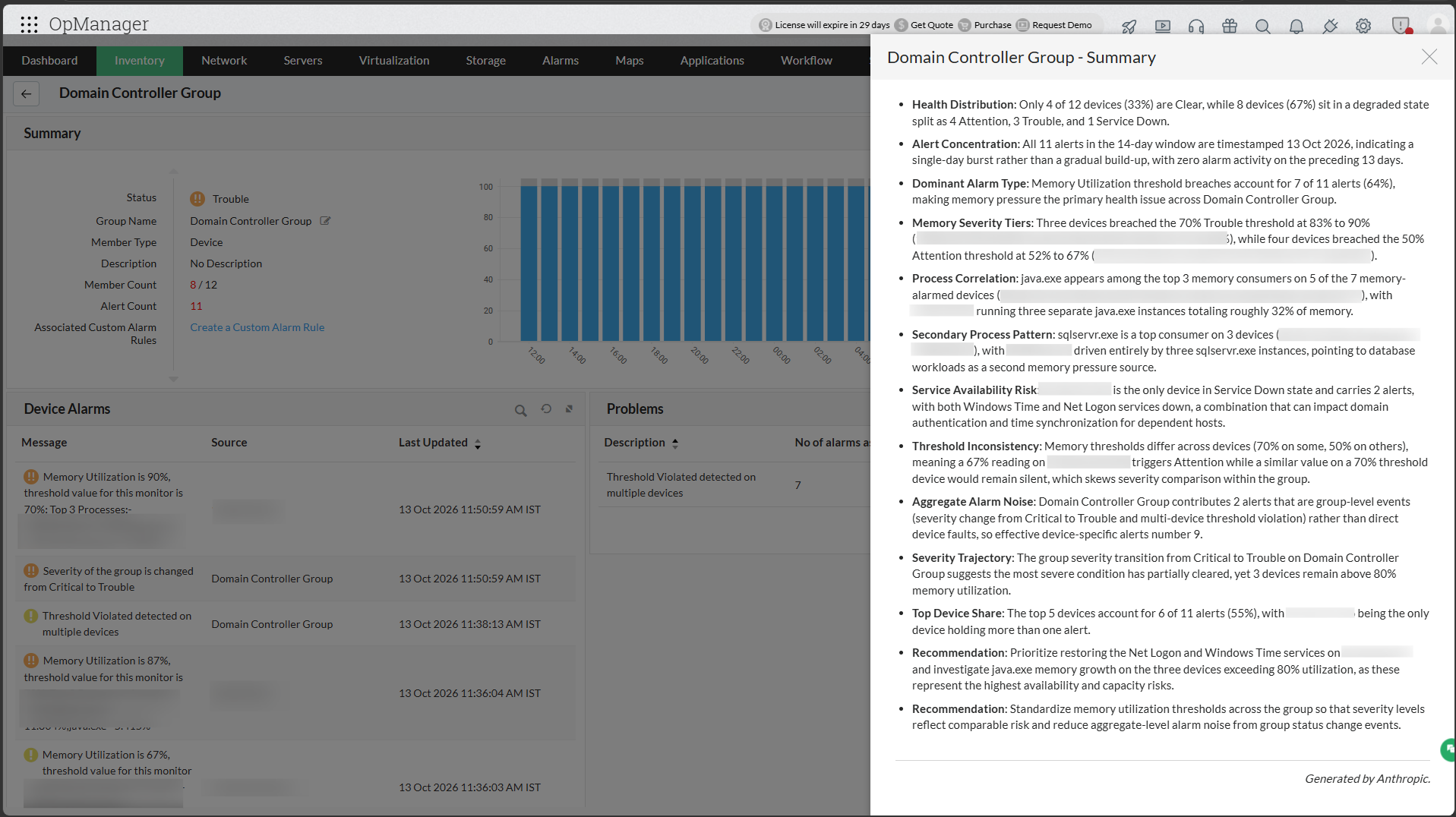
Device group summary generated by the Anthropic integration
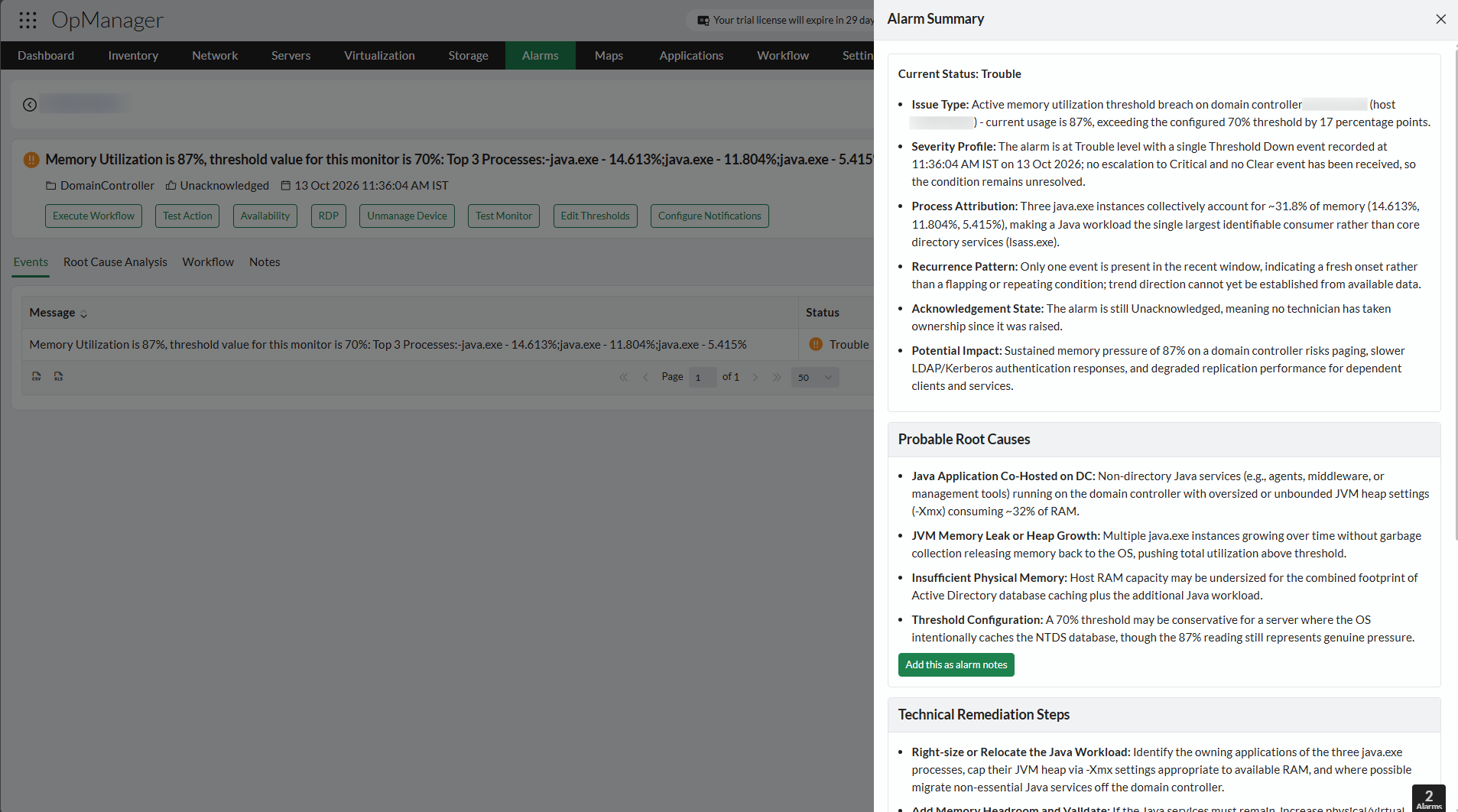
Individual alarm summary generated by the Anthropic integration

Identify the root cause of IT issues with alarm summaries

  • Analyze IT incidents at a deeper level with AI-generated alarm summaries backed by Anthropic.
  • Summarize all active alarms at once to identify broader infrastructure trends, or drill into individual alarms for device-specific context.
  • Extract the alarm type, probable causes, and structured troubleshooting steps without exiting OpManager.

Turn a plain-language prompt into a deployable monitoring script

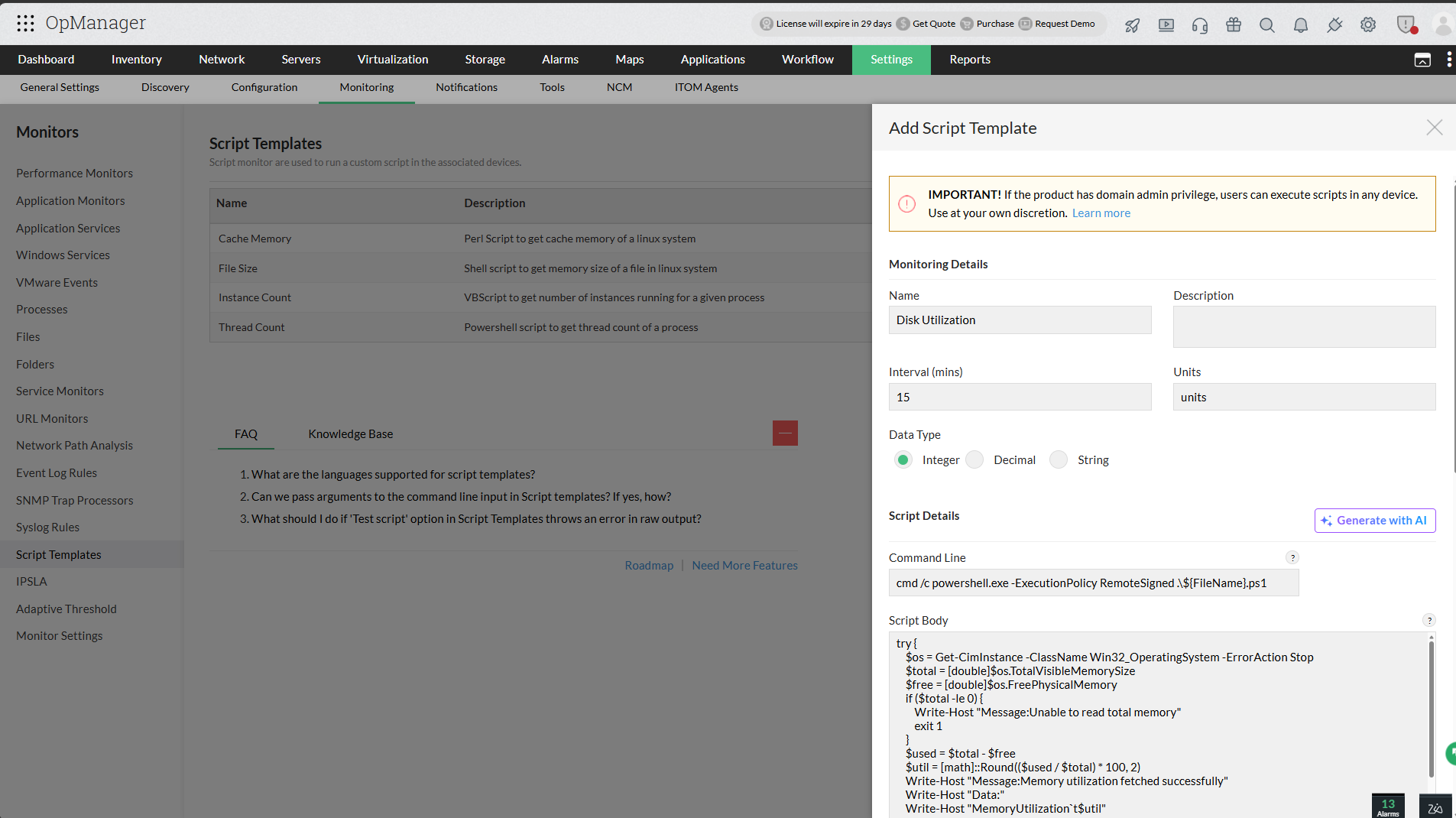
  • Describe your monitoring requirements in plain English and Anthropic produces a complete, ready-to-deploy script template automatically.
  • Supports PowerShell, Linux shell, VBScript, Perl, and Python directly inside OpManager's native script monitoring engine.
  • Extend monitoring coverage to custom and non-standard metrics without manual scripting effort or the risk of human error.
Monitoring script generated from a plain-language prompt by the Anthropic integration
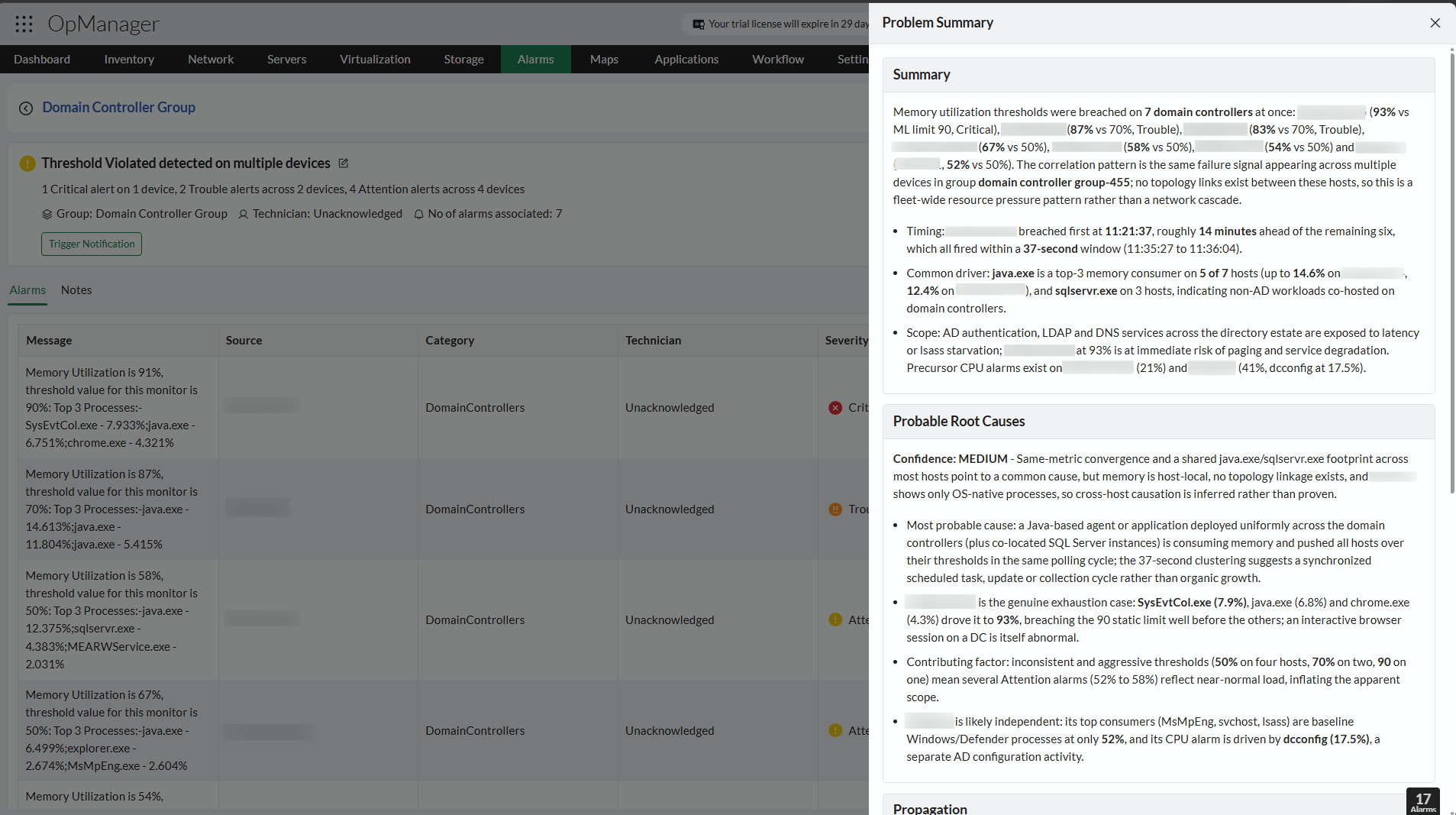
Problem summary with probable root cause generated by the Anthropic integration

Resolve complex incidents faster with Claude-powered root cause analysis

  • When related alarms are correlated into a single Problem through OpManager's Event Correlation engine, Anthropic analyzes the full set of associated alarms to identify the probable root cause.
  • Each root cause comes with a high or medium confidence level and suggested next steps, so engineers know where to act first.

Use cases

Faster incident triage for enterprise IT teams

A large enterprise network operations center is flooded with alerts following a scheduled firmware push across 200 routers. Instead of manually correlating each alarm, the on-call engineer opens the All Alarms Summary in OpManager. Anthropic processes the active alarms and returns a prioritized synopsis with probable causes and recommended next steps, cutting the time it takes to understand and resolve the incident.

Proactive health checks for healthcare IT

A health-tech operations team responsible for uptime across electronic health record systems uses Device Group Summary to run a pre-shift infrastructure sweep every morning. Anthropic analyzes the group's key metrics and flags devices that need attention, allowing the team to resolve issues before clinical staff are impacted, without manually reviewing each device snapshot.

Rapid script deployment for managed service providers

An MSP managing infrastructure for dozens of clients needs to extend monitoring coverage to a new set of non-standard IoT sensors. Rather than writing custom scripts for each device type manually, the engineer uses OpManager's Script Generation feature with Anthropic to produce deployment-ready templates from plain-language descriptions in seconds, dramatically reducing onboarding time for new client environments.

AI-assisted operations for security-conscious enterprises

A financial services NOC wants AI-assisted incident triage but is cautious about sharing infrastructure details with an external service. OpManager masks IP addresses, hostnames, and serial numbers before anything is sent to Anthropic, then restores them in the response. Engineers get readable, accurate alarm summaries and device analysis without raw infrastructure identifiers leaving OpManager.

What sets OpManager's Anthropic integration apart?

Claude-grade intelligence

Advanced reasoning

Bring Anthropic's Claude models to your network monitoring workflows. Claude's language understanding and reasoning help turn raw alarms and metrics into clear summaries, probable causes, and recommended next steps that go beyond surface-level pattern matching.

PII protection as a standard layer

Absolute privacy

OpManager masks sensitive identifiers, including IP addresses, device hostnames, and serial numbers, before any data is transmitted to Anthropic. Masked data is restored automatically in the response, keeping summaries accurate and actionable without exposing raw infrastructure details.

Your API key, your models

Cost control

Bring your own Anthropic API key and OpManager fetches the models available for it at integration time, with no manual model configuration required. Choose how many tokens are sent per request, from 250 to 8000. There are no additional licensing fees from ManageEngine; you pay only for what you consume through your own Anthropic account.

Full control

Choose where Claude works

Enable each AI feature independently and assign it its own vendor and model from the AI Settings page, or use Anthropic for everything with the Apply to all features checkbox. Every generated summary and script carries a "Generated by Anthropic" tag, so you always know which vendor produced the content.

FAQs on Anthropic Integration

Can I use Anthropic for some AI features and a different vendor for others?


Yes. Once the integration is configured, the AI Settings page lets you enable each feature independently and choose its vendor and model. For example, alarm summaries can run on Anthropic while script generation uses another integrated vendor. To use Anthropic for everything, enable the Apply to all features checkbox. Generated summaries and scripts carry a "Generated by Anthropic" tag, so you can confirm which vendor produced the content.

Do I need a separate Anthropic account?


Is my network data safe when using Anthropic?


Which Claude models are available?


Leverage secure AIOps with OpManager's Anthropic integration!