

Trusted bytop brands

Saint Gobain
NASA
Time Warner Cable
Loreal Paris
Siemens
DHL

Run AIOps at scale, without the premium price tag

OpManager's SiliconFlow integration provides a cost-effective path to AIOps by connecting directly to SiliconFlow's hosted language model API. With competitive per-query pricing and broad model support, teams can run alarm summaries, device analysis, and script generation at scale, without watching the meter.

Device health summaries, on demand

  • Generate on-demand health summaries for any monitored device at the click of a button, no manual data correlation needed.
  • Zoom out to a device group for an infrastructure-wide view, or zoom in on a single device to isolate a specific problem.
  • Get visibility into CPU load, memory pressure, and active processes, along with probable root causes and recommended next steps.
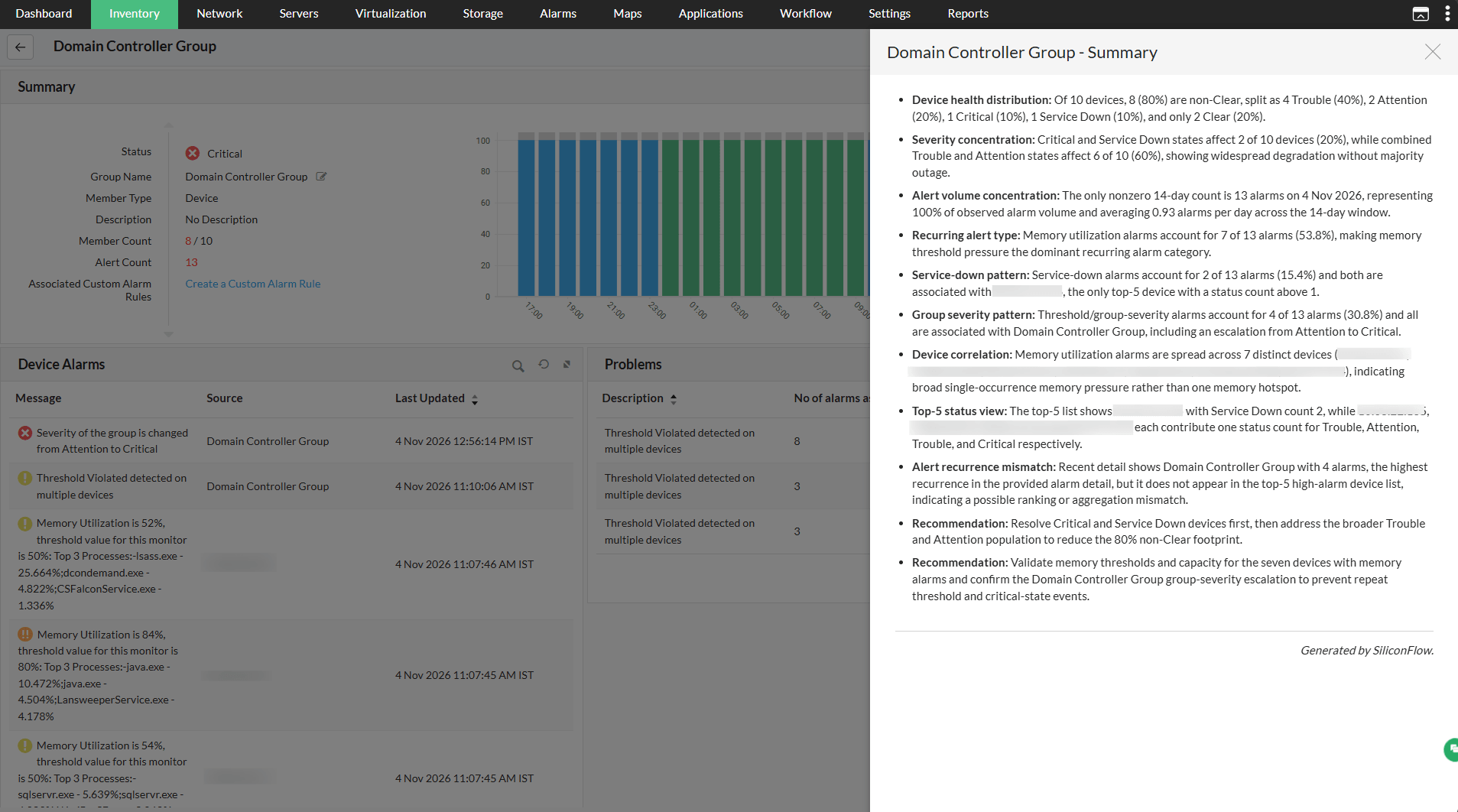
Device group summary generated by the SiliconFlow integration
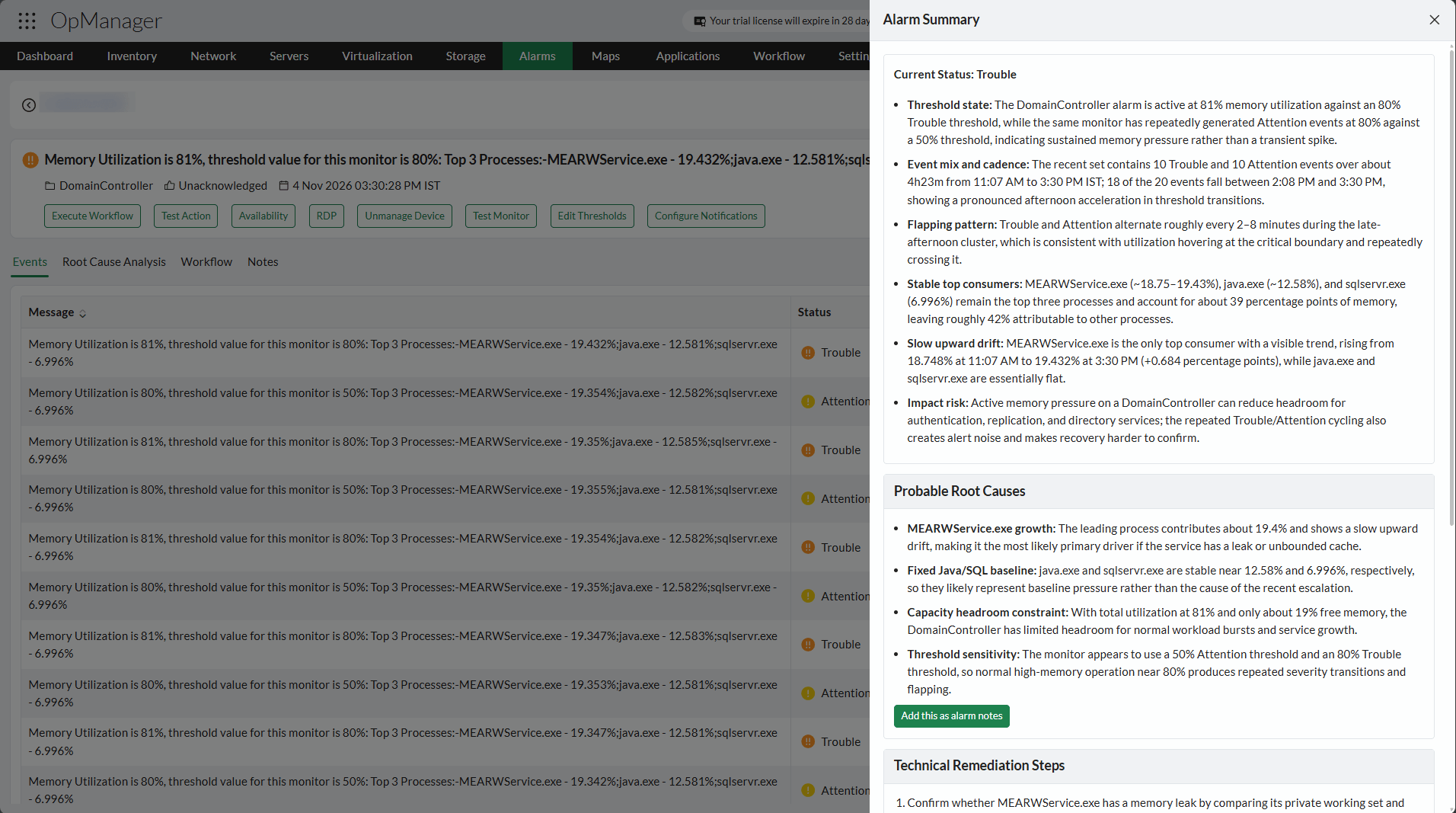
Individual alarm summary generated by the SiliconFlow integration

From a wall of alerts to a single, prioritized action list

  • Summarize your entire active alarm queue in a single click and let AI surface what actually needs attention.
  • Attach AI-generated summaries directly to alarm records as notes, so your team has full context from the moment they open a ticket.
  • Drill into readily available info on any alarm for device history, root cause analysis, and severity to hand to your technician.

Turn a sentence into a deployable monitoring script

  • From a plain language direction, SiliconFlow can produce a complete, ready-to-deploy script template automatically.
  • Supports PowerShell, Linux shell, VBScript, Perl, and Python, all generated and stored inside OpManager's native script monitoring engine.
  • Extend coverage to custom and non-standard metrics your existing templates don't reach, without writing a single line of code or risking a manual scripting error.
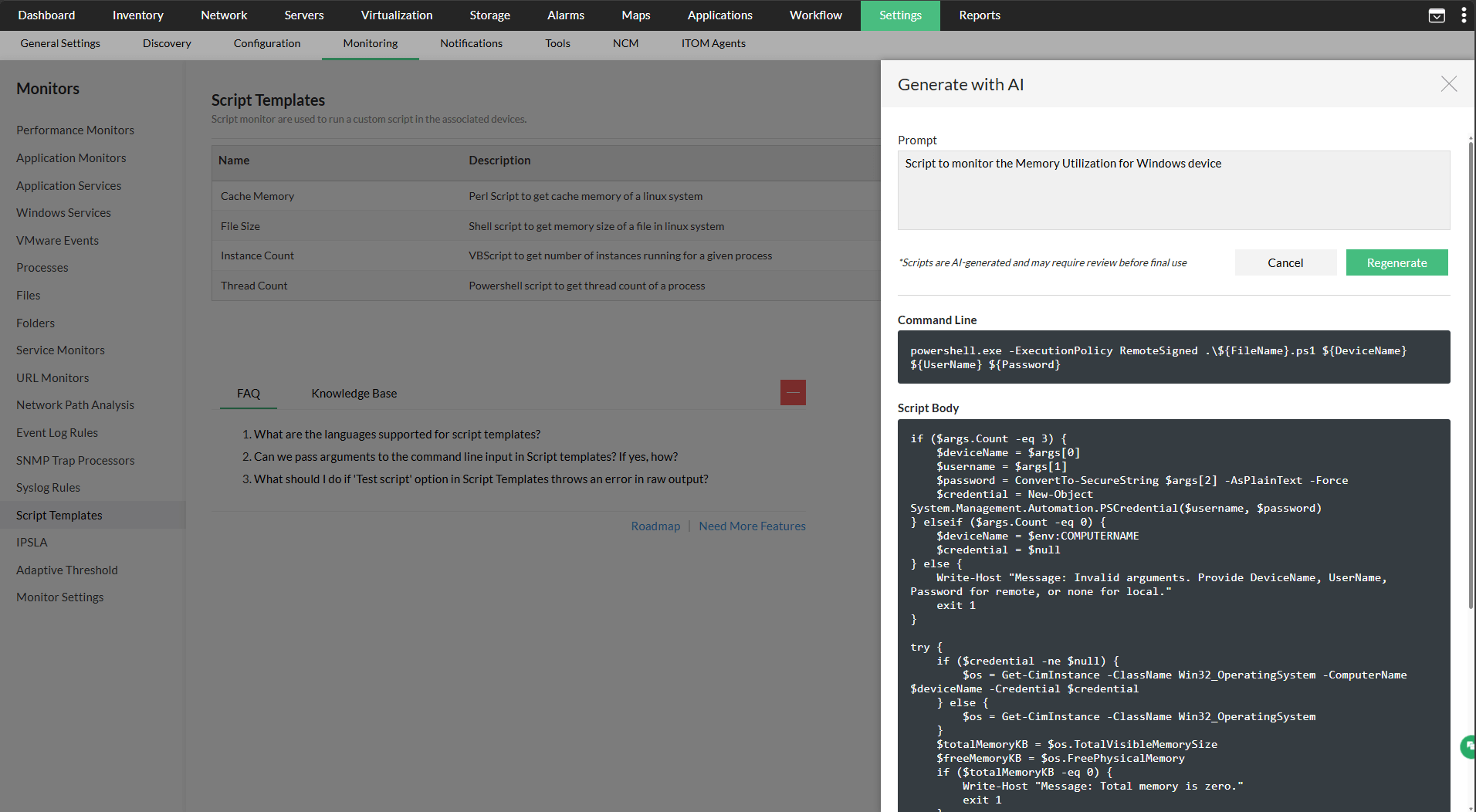
Monitoring script generated from a plain-language prompt by the SiliconFlow integration
SiliconFlow integration settings in OpManager

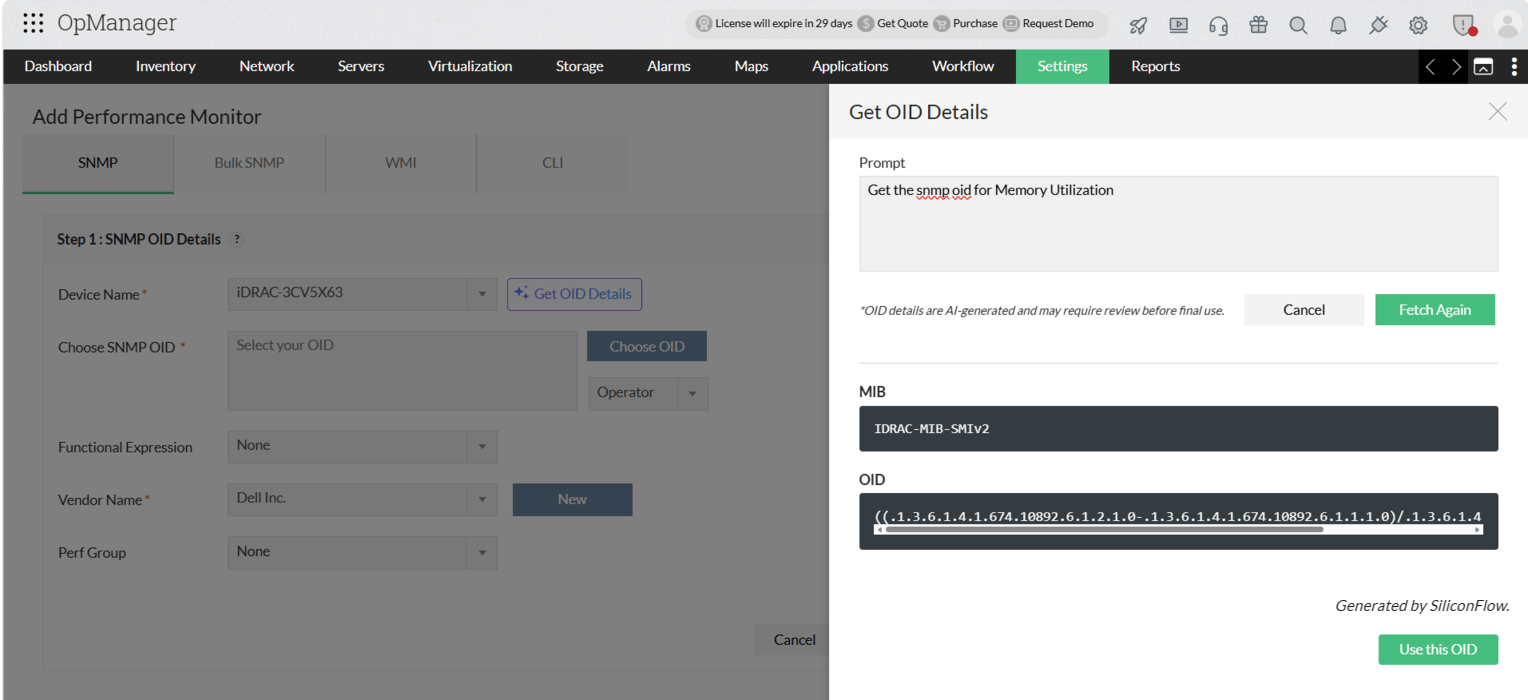
Get the right SNMP OIDs without the manual lookup*

  • Eliminates manual OID lookup for non-standard or poorly documented device types.
  • With just the description of the metric you want to monitor, SiliconFlow returns the relevant SNMP OIDs automatically.
  • *Available from OpManager version 12.9.120 onward.

Use cases

Scaling AI analysis without scaling the budget

An IT operations team at a regional logistics company wants AI-powered monitoring but can't justify premium cloud AI subscriptions across a 500-device environment. By connecting OpManager to SiliconFlow with their own API key, the team enables alarm summaries and script generation across the whole infrastructure. Competitive pricing keeps the cost per query low as device counts grow, with no added OpManager licensing fee.

Running the right AI vendor for every job

A global enterprise IT team runs multiple AI vendors in OpManager at once. High-frequency, cost-sensitive tasks like SNMP OID lookup and bulk alarm processing go to SiliconFlow, while precision-critical tasks use another vendor. Everything is assigned from the AI Settings page without touching integration configurations, giving the team a tuned, cost-aware AI stack.

Morning health sweeps across branch networks

A retail operations team responsible for hundreds of store networks uses Device Group Summary every morning to check the branch routers, switches, and access points in each region. SiliconFlow summarizes health and performance trends across each group and flags the devices that need attention, so engineers can resolve issues before stores open, without opening each device snapshot one by one.

Cutting MSP onboarding time for complex device fleets

A managed service provider onboarding a manufacturing client needs monitoring for proprietary industrial controllers with sparse SNMP documentation. Using Script Generation and SNMP OID features powered by SiliconFlow, the engineer creates custom templates and fetches the required OIDs from plain-language descriptions. Work that would take days of research and manual scripting finishes in an afternoon, and the templates are reusable for similar devices.

What sets OpManager's SiliconFlow integration apart?

Data privacy

Sensitive data never travels raw

Before a single byte of network telemetry reaches SiliconFlow, OpManager automatically masks device identifiers like IP addresses, hostnames, and serial numbers. The masked values are restored in the AI's response, so every summary and script is accurate and fully contextual. Your infrastructure's specifics stay inside your network.

Cost-effectiveness

High-volume AI at a low per-query cost

Most cloud AI vendors charge a premium that compounds fast across large device inventories. SiliconFlow's pricing is built for scale, making it a practical choice for teams running hundreds or thousands of AI queries per day across alarms, devices, and scripts, without exposing themselves to unpredictable monthly bills.

Usage control

Control how much each response uses

Set the Token Count to cap the tokens used to generate each response. Choose 1000, 2000, or 3000, or enter a custom value from 250 to 8000, so you can balance the level of detail in summaries and scripts against cost for every feature.

Bring your own key

Your API key, your models, no extra cost

Bring your own SiliconFlow API key and OpManager fetches all available models for it automatically at integration time — no manual model configuration, no fixed list to work around. There are no additional licensing fees from ManageEngine; you connect your existing SiliconFlow account and pay only for what you consume through it.

FAQs on SiliconFlow Integration

What is the OpManager SiliconFlow integration?


The SiliconFlow integration connects OpManager to SiliconFlow's hosted language model API, enabling AI-powered device summaries, alarm analysis, monitoring script generation, and SNMP OID lookup directly within OpManager. It works alongside any other configured AI vendor and can be assigned to individual features independently.

Which domain should I use — CN or COM?


Can SiliconFlow run alongside other AI vendors in the same OpManager instance?


Can I review the AI-generated monitoring scripts before they deploy?


Do I need a separate SiliconFlow account?


Leverage secure AIOps with OpManager's SiliconFlow integration!

Loved by customers all over the world


“Easy Implementation, Excellent support & Lower Cost Tool - Team Lead, IT Services Industry”

Reviewer Role: Infrastructure and Operations

Company size: 500M - 1B USD

We have been using OpManager since 2011 and our overall experience has been excellent. The tool plays a vital role in providing the value to our organization and to the customers we are supporting. The support is excellent and staff takes full responsibilities in resolving the issues. Innovation is never stopping and clearly visible with newer versions.

“OpManager - 10 steps ahead of the competition, one step away from being unequaled - Network Services Manager, Government Organization”

Reviewer Role: Infrastructure and Operations

Company size: 5,000 - 50,000 Employees

I have a long standing relationship with ManageEngine. OpManager has always missed one or two features that would make it truly the best tool on the market, but over it is the most comprehensive and easy to use the product on the market.

“Easy Implementation with a feature rich catalogue, support has some room for improvement - NOC Manager, IT Services Industry”

Reviewer Role: Program and Portfolio Management

Company size: 500M - 1B USD

The vendor has been supportive during the implementation & POC phases providing trial licenses. Feature requests and feedbacks is usually acted upon swiftly. There was sufficient vendor support during the implementation phase. After deployment, the support is more than adequate, where the vendor could make some improvements.

“Great Monitoring tool - CIO in Finance Industry”

Reviewer Role: CIO

Company size: 1B - 3B USD

ManageEngine provides a suite of tools that have made improvements to the availability of our internal applications. From monitoring, management and alerting, we have been able to peak performance within our data center.

“Simple Implementation, Easy To Use. Very Intuitive. - Principal Engineer in IT Services”

Reviewer Role: Enterprise Architecture and Technology Innovation

Company size: 250M - 500M USD


ManageEngine support was responsive to all our queries.

Capterra
Getapp
Software Advice
G2
Altaleb Alshenqiti

“OpManager helps me monitor all aspects of the data-center and equipment like servers, switches and routers. It is fast, intuitive and centralized and you do not need to be an expert to deal with OpManager.”

Altaleb Alshenqiti

NGHA

Donald Stewart

“Donald Stewart, IT Manager of Crest Industries is happy with ManageEngine OpManager for its end-to-end network monitoring software. It is easy-to-use and offers fault and performance management for router.”

Donald Stewart

IT Manager, Crest Industries

John Rosser

“John Rosser, MIS Manager of Yale Chase talks about the proactive nature of ManageEngine OpManager & how his organization gained value from it.”

John Rosser

MIS Manager