Pricing  Get Quote


Password synchronization with AD LDS server

Solution

AD LDS is a Lightweight Directory Access Protocol (LDAP) directory service, providing both data storage and retrieval support for directory-enabled applications. Aside from AD DS, AD LDS is the only other identity provider supported by Active Directory Federation Services (AD FS) for authentication purposes and to supply claims to federation-aware web applications. ADSelfService Plus' Password Synchronization feature allows users' domain passwords and any changes made to them to be synchronized with their AD LDS passwords.
How to configure AD LDS with ADSelfService Plus

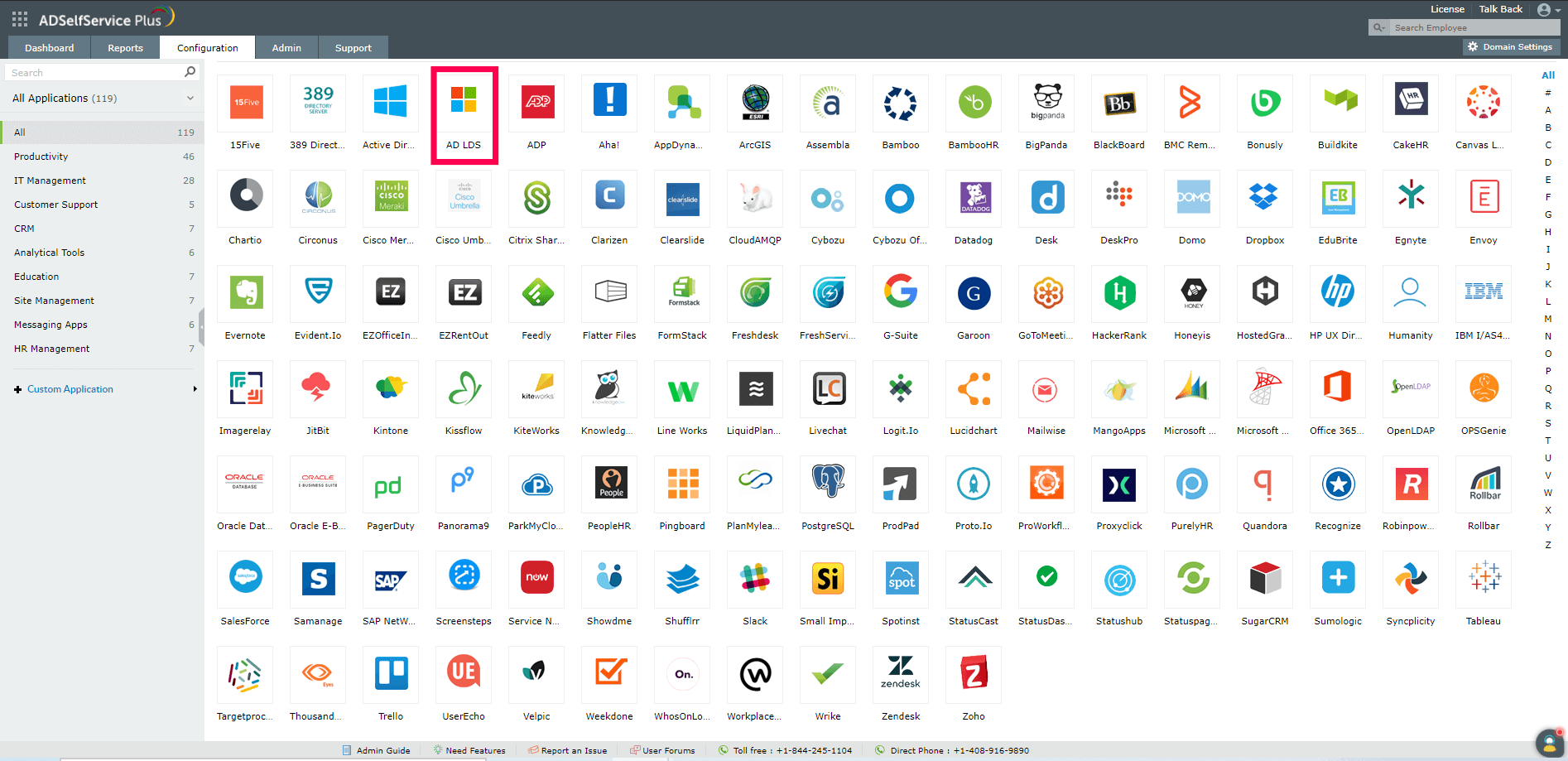
  1. Go to Configuration → Self-Service → Password Sync/Single Sign On → Add Application..
  2. Once you click on the AD LDS app, you will be taken to the AD LDS configuration page.

    configure-password-sync-between-adlds-adselfservice

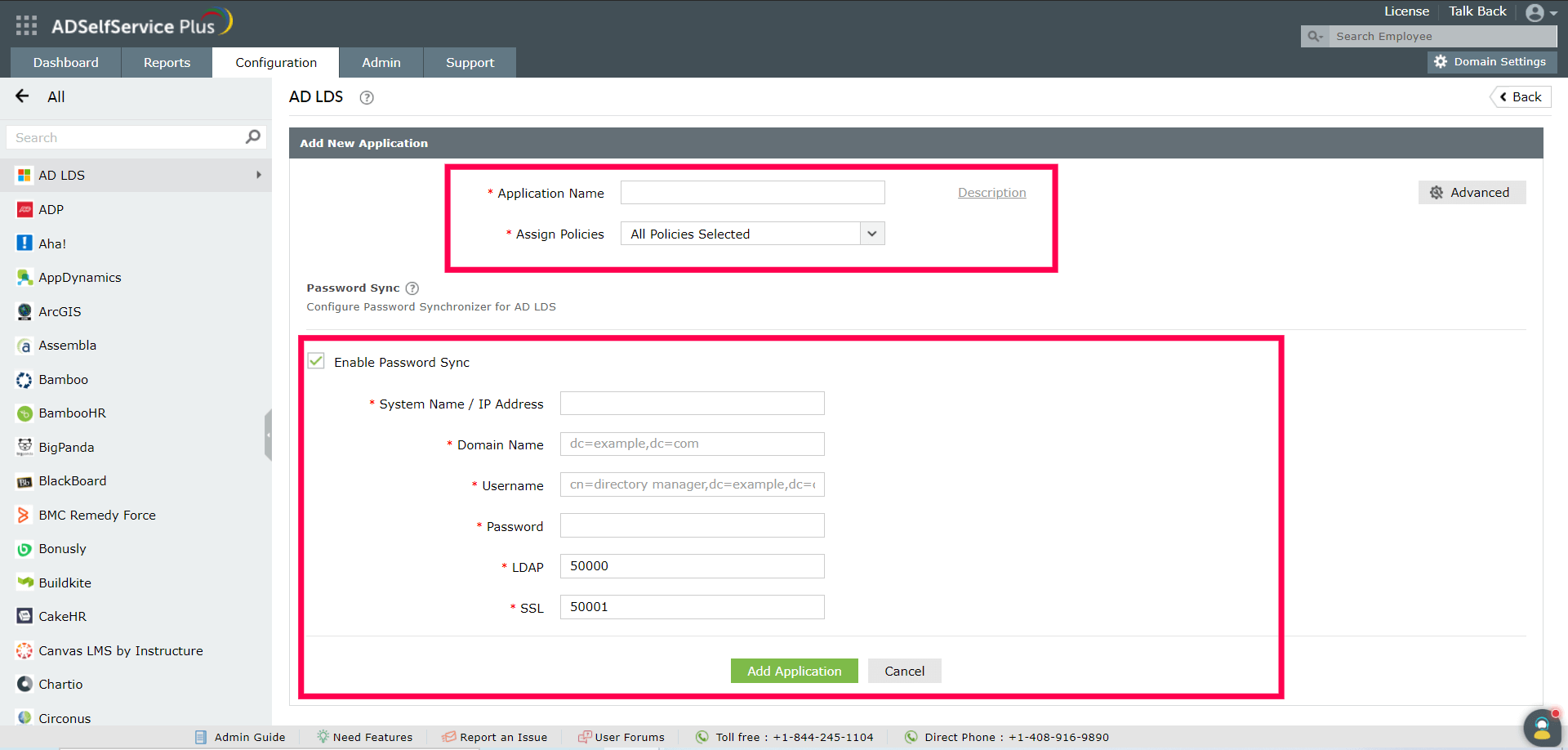
  3. Enter the Application name and choose the appropriate policies from the drop-down.
    Note: To create or edit a policy, navigate to the Configuration tab → Self-Service → Policy Configuration. You can either create a new self-service policy by clicking the +Add New Policy button, or you can edit the existing default policy by clicking on the edit icon. For detailed steps, click here.
  4. Check the Enable Password Sync checkbox.
  5. Enter the System Name or IP Address of the AD LDS server.
  6. Enter the Domain Name of the AD LDS server in distinguished name format. For example, dc=example or dc=com.
  7. Enter the Username of the AD LDS server in distinguished name format. For example: CN=Andrew Biege,CN=admin,DC=example,DC=com.
  8. Enter the Password of the AD LDS server.
  9. Enter the AD LDS server's LDAP (default port is 50000) and LDAP SSL (default port is 50001) port numbers.
  10. Click Add Application.

    configure-password-sync-between-adlds-adselfservice

You have now integrated AD LDS with Active Directory for password synchronization through ADSelfService Plus.

Request for Support

Need further assistance? Fill this form, and we'll contact you rightaway.

  • Name
  •  
  • Business Email *
  •  
  • Phone *
  •  
  • Problem Description *
  •  
  • Country
  •  
  • By clicking 'Submit' you agree to processing of personal data according to the Privacy Policy.
Highlights of ADSelfService Plus

Password self-service

Allow Active Directory users to self-service their password resets and account unlock tasks, freeing them from lengthy help desk calls.

One identity with single sign-on

Get seamless one-click access to 100+ cloud applications. With enterprise single sign-on, users can access all their cloud applications using their Active Directory credentials.

Password and account expiry notification

Intimate Active Directory users of their impending password and account expiry via email and SMS notifications.

Password synchronization

Synchronize Windows Active Directory user passwords and account changes across multiple systems automatically, including Microsoft 365, Google Workspace, IBM iSeries, and more.

Password policy enforcer

Strong passwords resist various hacking threats. Enforce Active Directory users to adhere to compliant passwords by displaying password complexity requirements.

Directory self-update and corporate directory search

Enable Active Directory users to update their latest information themselves. Quick search features help admins scout for information using search keys like contact numbers.


ADSelfService Plus trusted by

Embark on a journey towards identity security and Zero Trust